
Every game eventually needs to save something — a high score, player settings, progress through a level. The naive approach is to hard-code a file path like C:\MyGame\save.dat, which works on your machine and breaks on everyone else's. Different operating systems store user data in different places, and some platforms (iOS, Android, consoles) don't let applications write to arbitrary paths at all.
SDL3 solves this with SDL_GetPrefPath: one function call that hands you the correct writable directory for the current platform, automatically created if it doesn't exist yet. The same code compiles and runs correctly on Windows, macOS, Linux, Android, and iOS without a single #ifdef. That's the standout function in this project.
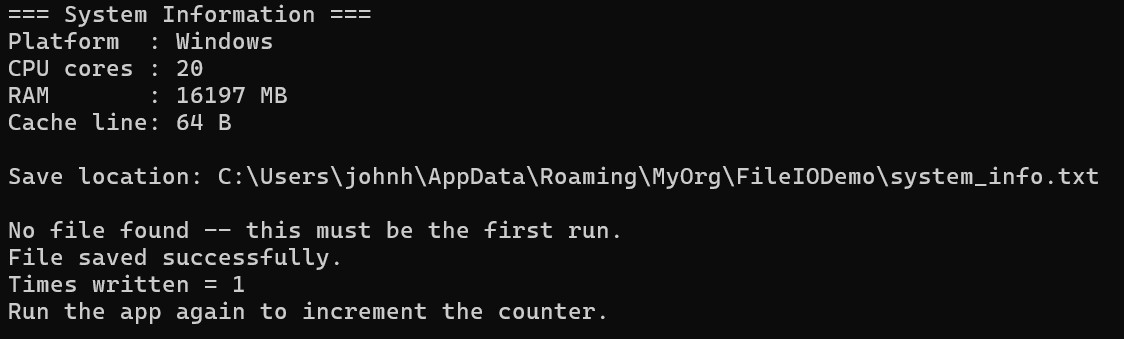
Alongside file I/O, SDL3 provides a set of system query functions — CPU count, total RAM, cache line size — that are useful for logging crash reports, choosing quality presets at startup, or just satisfying curiosity. This project demonstrates all of them in a single self-contained program: it collects system info, writes it to a file, and increments a run counter each time you launch it.
Project Setup
This project has no window and no renderer — it's a pure command-line program that uses SDL3 only for its utility functions. You don't need to call SDL_Init at all for the system query functions; they work standalone. For the file functions, SDL_GetPrefPath technically doesn't require SDL_Init either, though it's good practice to initialise SDL before using any of its APIs.
If you haven't set up SDL3 yet, Chapter 1 of Learning C++ by Building Games walks through installing SDL3 and configuring Visual Studio from scratch. The build setup here is identical — same include paths, same library links, same SDL3.dll alongside the executable.
Create a new project, drop in main.cpp, and build. No assets required — this one is entirely self-contained.
Part 1 — System Information
SDL_Log("=== System Information ===");
SDL_Log("Platform  : %s",    SDL_GetPlatform());
SDL_Log("CPU cores : %d",    SDL_GetNumLogicalCPUCores());
SDL_Log("RAM       : %d MB", SDL_GetSystemRAM());
SDL_Log("Cache line: %d B",  SDL_GetCPUCacheLineSize());
These four functions need no initialisation — you can call them at any point. They query the OS directly and return immediately:
SDL_GetPlatform()— returns a string like"Windows","macOS", or"Linux". Useful in crash logs so you know at a glance what system a bug report came from.SDL_GetNumLogicalCPUCores()— logical core count, which includes hyperthreaded cores. A 4-core CPU with hyperthreading reports 8 here.SDL_GetSystemRAM()— total installed RAM in megabytes. Good for choosing a texture quality preset at startup.SDL_GetCPUCacheLineSize()— the CPU's L1 cache line size in bytes. Mostly relevant for low-level performance work, but handy to log alongside the rest.
SDL_Log is SDL's cross-platform print function. On Windows it writes to the debugger output window and to stderr. On Android it goes to logcat. Using SDL_Log keeps your diagnostic output portable — the same code works everywhere SDL runs.
Part 2 — Getting the Save Directory
char* prefPath = SDL_GetPrefPath("MyOrg", "FileIODemo");
if (!prefPath)
{
    SDL_Log("ERROR: Could not get pref path: %s", SDL_GetError());
    return 1;
}

std::string filePath = std::string(prefPath) + "system_info.txt";
SDL_free(prefPath);
SDL_GetPrefPath(organisation, application) returns a platform-appropriate path for storing user data. On Windows this looks like C:\Users\<you>\AppData\Roaming\MyOrg\FileIODemo\. On macOS it's inside ~/Library/Application Support/. On Linux it lives under ~/.local/share/. The directory is created automatically if it doesn't exist.
The most important detail is the memory ownership rule: SDL allocated the string, so you must free it with SDL_free() — not delete, not the standard library's free(). We copy what we need into a std::string first, then call SDL_free immediately. This pattern — copy then free — is the correct way to handle every SDL-allocated string.
Part 3 — Reading the File
size_t fileSize = 0;
void*  fileData = SDL_LoadFile(filePath.c_str(), &fileSize);

if (fileData)
{
    std::string content(static_cast<char*>(fileData), fileSize);
    SDL_free(fileData);

    const std::string marker = "Times written = ";
    size_t pos = content.find(marker);
    if (pos != std::string::npos)
    {
        timesWritten = std::stoi(content.substr(pos + marker.length()));
    }
}
else
{
    SDL_Log("No file found -- this must be the first run.");
}
SDL_LoadFile reads an entire file into a single SDL-allocated buffer in one call. It appends a null terminator automatically, so the buffer is safe to treat as a C string. It returns nullptr if the file doesn't exist — which is the expected outcome on the first run — so the check doubles as first-run detection.
Same memory rule applies: cast to char*, copy into a std::string, then SDL_free the buffer. After that, std::string::find searches for the counter line we wrote last time. The fixed prefix "Times written = " makes it easy to locate reliably regardless of what else is in the file.
Part 4 — Building the Output
timesWritten++;

std::ostringstream oss;
oss << "=== SDL3 System Info ===\n"
    << "Platform  : " << SDL_GetPlatform()           << "\n"
    << "CPU cores : " << SDL_GetNumLogicalCPUCores()  << "\n"
    << "RAM       : " << SDL_GetSystemRAM()            << " MB\n"
    << "Cache line: " << SDL_GetCPUCacheLineSize()     << " bytes\n"
    << "\n"
    << "Times written = " << timesWritten << "\n";

std::string output = oss.str();
We re-query the system info on every run so the file always reflects the current machine. This matters if you're using the app to log specs from different devices. The counter line goes last with its fixed prefix — that's what the next run will scan for.
Part 5 — Writing the File
if (SDL_SaveFile(filePath.c_str(), output.c_str(), output.size()))
{
    SDL_Log("File saved successfully.");
    SDL_Log("Times written = %d", timesWritten);
}
else
{
    SDL_Log("ERROR: Save failed: %s", SDL_GetError());
    return 1;
}
SDL_SaveFile writes a buffer to disk in one call. It creates the file if it doesn't exist and overwrites it if it does. Note that we pass output.size(), not output.size() + 1 — we don't want to write the null terminator to disk. When we load the file next time, SDL_LoadFile adds its own null terminator, so it all works out.
The return value is true on success, false on failure. Always check it — a full disk or a permissions problem will otherwise fail silently and your players will wonder why their save data keeps disappearing.
Complete Listing
The full source is at EliteIntegrity/Learning-C-by-Building-Games — File IO and System, or read it in full below:
// =============================================================================
// SDL3 Tutorial: File I/O and System Information
// =============================================================================

#include <SDL3/SDL.h>
#include <string>
#include <sstream>

int main(int argc, char* argv[])
{
    // --- Part 1: System information ------------------------------------------
    SDL_Log("=== System Information ===");
    SDL_Log("Platform  : %s",    SDL_GetPlatform());
    SDL_Log("CPU cores : %d",    SDL_GetNumLogicalCPUCores());
    SDL_Log("RAM       : %d MB", SDL_GetSystemRAM());
    SDL_Log("Cache line: %d B",  SDL_GetCPUCacheLineSize());
    SDL_Log("");

    // --- Part 2: Get the platform-correct save directory --------------------
    char* prefPath = SDL_GetPrefPath("MyOrg", "FileIODemo");
    if (!prefPath)
    {
        SDL_Log("ERROR: Could not get pref path: %s", SDL_GetError());
        return 1;
    }

    std::string filePath = std::string(prefPath) + "system_info.txt";
    SDL_free(prefPath);   // SDL allocated it -- SDL frees it

    SDL_Log("Save location: %s", filePath.c_str());
    SDL_Log("");

    // --- Part 3: Read the existing file (first run: file won't exist) --------
    int timesWritten = 0;

    size_t fileSize = 0;
    void*  fileData = SDL_LoadFile(filePath.c_str(), &fileSize);

    if (fileData)
    {
        std::string content(static_cast<char*>(fileData), fileSize);
        SDL_free(fileData);

        const std::string marker = "Times written = ";
        size_t pos = content.find(marker);
        if (pos != std::string::npos)
        {
            timesWritten = std::stoi(content.substr(pos + marker.length()));
            SDL_Log("Existing file found -- counter was: %d", timesWritten);
        }
    }
    else
    {
        SDL_Log("No file found -- this must be the first run.");
    }

    timesWritten++;

    // --- Part 4: Build the new file contents ---------------------------------
    std::ostringstream oss;
    oss << "=== SDL3 System Info ===\n"
        << "Platform  : " << SDL_GetPlatform()           << "\n"
        << "CPU cores : " << SDL_GetNumLogicalCPUCores()  << "\n"
        << "RAM       : " << SDL_GetSystemRAM()            << " MB\n"
        << "Cache line: " << SDL_GetCPUCacheLineSize()     << " bytes\n"
        << "\n"
        << "Times written = " << timesWritten << "\n";

    std::string output = oss.str();

    // --- Part 5: Save the file -----------------------------------------------
    if (SDL_SaveFile(filePath.c_str(), output.c_str(), output.size()))
    {
        SDL_Log("File saved successfully.");
        SDL_Log("Times written = %d", timesWritten);
        SDL_Log("Run the app again to increment the counter.");
    }
    else
    {
        SDL_Log("ERROR: Save failed: %s", SDL_GetError());
        return 1;
    }

    return 0;
}
Common Issues
No output visible — the console window flashes and closes. In Visual Studio, run with Ctrl+F5 (Start Without Debugging) so the console stays open. Alternatively, add a breakpoint on return 0 and run with F5. The program outputs via SDL_Log, which also writes to the Output pane in the debugger.
SDL_GetPrefPath returns null. This is rare on desktop platforms but can happen if the environment is severely restricted (e.g. certain sandboxed CI runners). Check SDL_GetError() for details. On desktop it almost always succeeds.
Save fails with a permissions error. If you have manually edited the save directory and set a file to read-only, SDL_SaveFile will fail. Check the file attributes in Explorer, or delete the file and let the program recreate it.
Counter doesn't increment — reads as 0 every time. The find search is case-sensitive and whitespace-sensitive. Make sure the marker string "Times written = " in the write path exactly matches the one in the read path, including the trailing space before the number.
Where to Take It Next
- JSON or INI save format. The current format is a custom text file. For anything more structured — multiple settings, nested data — consider a simple INI parser or a header-only JSON library like nlohmann/json.
SDL_LoadFileandSDL_SaveFilework the same regardless of what the content looks like. - SDL_IOStream for streaming reads.
SDL_LoadFileloads everything into RAM at once. For large files — level data, asset packs —SDL_IOFromFilegives you a streaming handle you can read in chunks, similar tofopenbut portable. - Adaptive quality settings. Use the system query results at startup to choose a rendering quality tier — full resolution on high-RAM machines, reduced texture sizes on low-end hardware. SDL3 makes it easy to make this decision once in a portable way and never revisit it per-platform.