
At the end of the last chapter, a jackal came to meet you, and then just stood there. A monster that can't hurt you is part of the scenery. This chapter gives the monsters teeth and you a sword arm, and makes the dungeon a place where a run can end.
Everyone gets health: you and every monster. Walk into a monster and you hit it, and a monster beside you hits back. Your health shows in the side panel as a number and a colored bar, and it creeps back up while you explore. When it runs out, the run is over. A death screen says what killed you and on which turn, and R starts a new run.
The next image shows the end of the chapter. The jackal from Chapter 5 came to meet the player again, and this time, they fought. The log tells the story, in the lines outlined in blue: the player stepped aside, and the jackal bit, for 1. Then the player hit it for 3, it bit back, and the player's second blow killed it. The side panel, also outlined, shows what the bites cost.
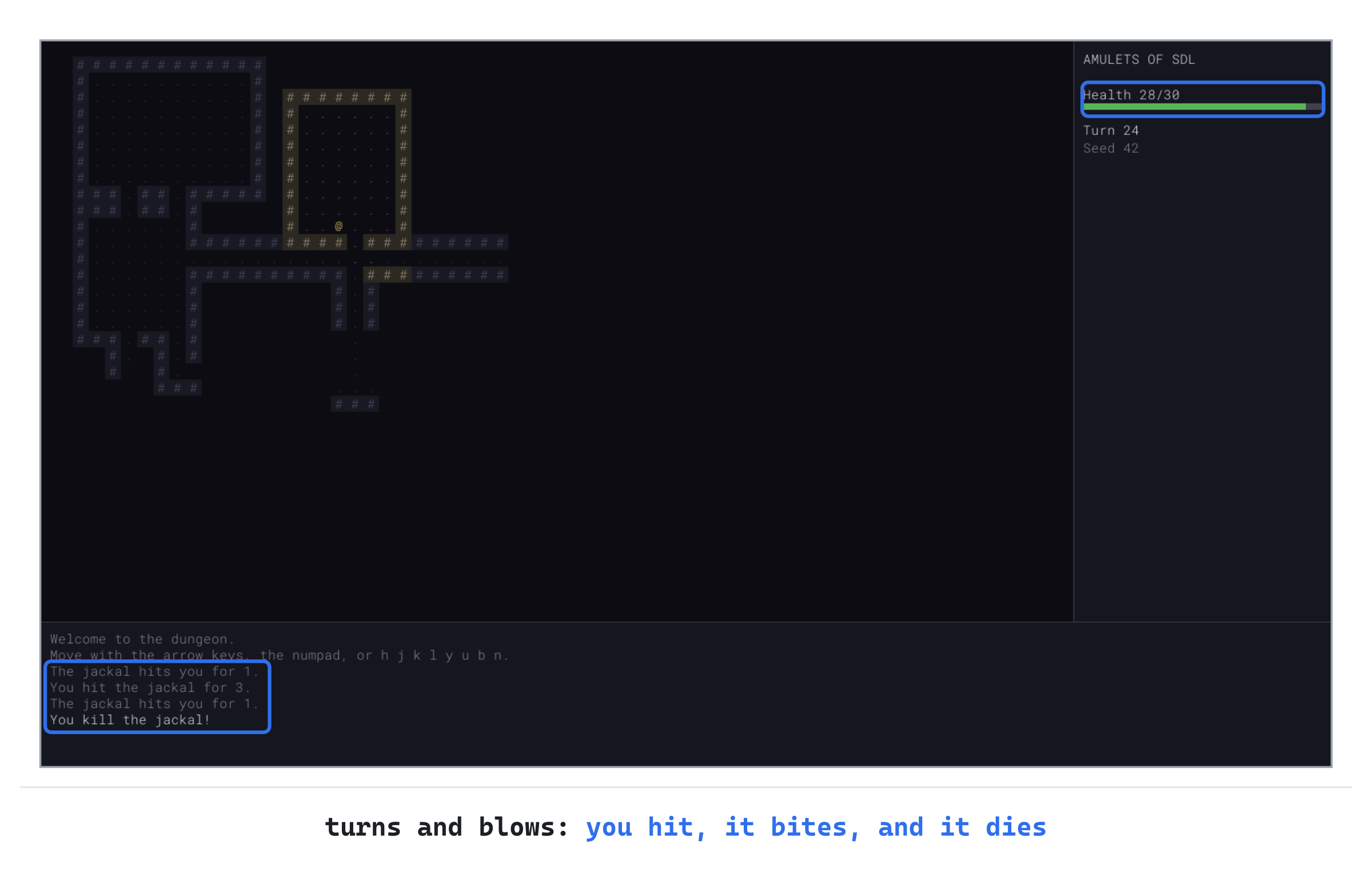
That's 28 health left, out of 30. One jackal is no great danger, but monsters rarely come one at a time, and health comes back slowly.
Chapter 06 in the book's repository holds this chapter's finished project. The chapter carries on in your own project from Chapter 5, or from the book's Chapter 05 folder.In this chapter, we will:
- Gather what the player and the monsters share into one struct,
Entity, that both inherit from - Give every kind of monster health, damage, and defense, in its row of the table
- Turn a bump into an attack, with a simple rule for damage
- Let the monsters fight back, in a turn with a fixed order, and let the player heal
- Show the player's health in the side panel, as a number and a bar
- End the run when the player dies, with a death screen, and start another with R
There are five checkpoints along the way. Let's sharpen some teeth.
Planning the Chapter
This chapter adds one file, and changes four:
| File | Status | What it's for |
|---|---|---|
src/Entity.h |
New | What the player and the monsters share: a place, health, and defense |
src/Player.h, src/Monster.h |
Changed | Both are built on Entity now, and the monster table gains health, damage, and defense |
src/Common.h |
Changed | Colors for health, for danger, and for fading the dungeon |
src/main.cpp |
Changed | The blows, the monsters' turn, healing, the health bar, and the death screen |
| The other files | Unchanged |
The next image shows how the files fit together at the end of the chapter. The new file, Entity.h, sits below the player and the monsters, since both of them use it.
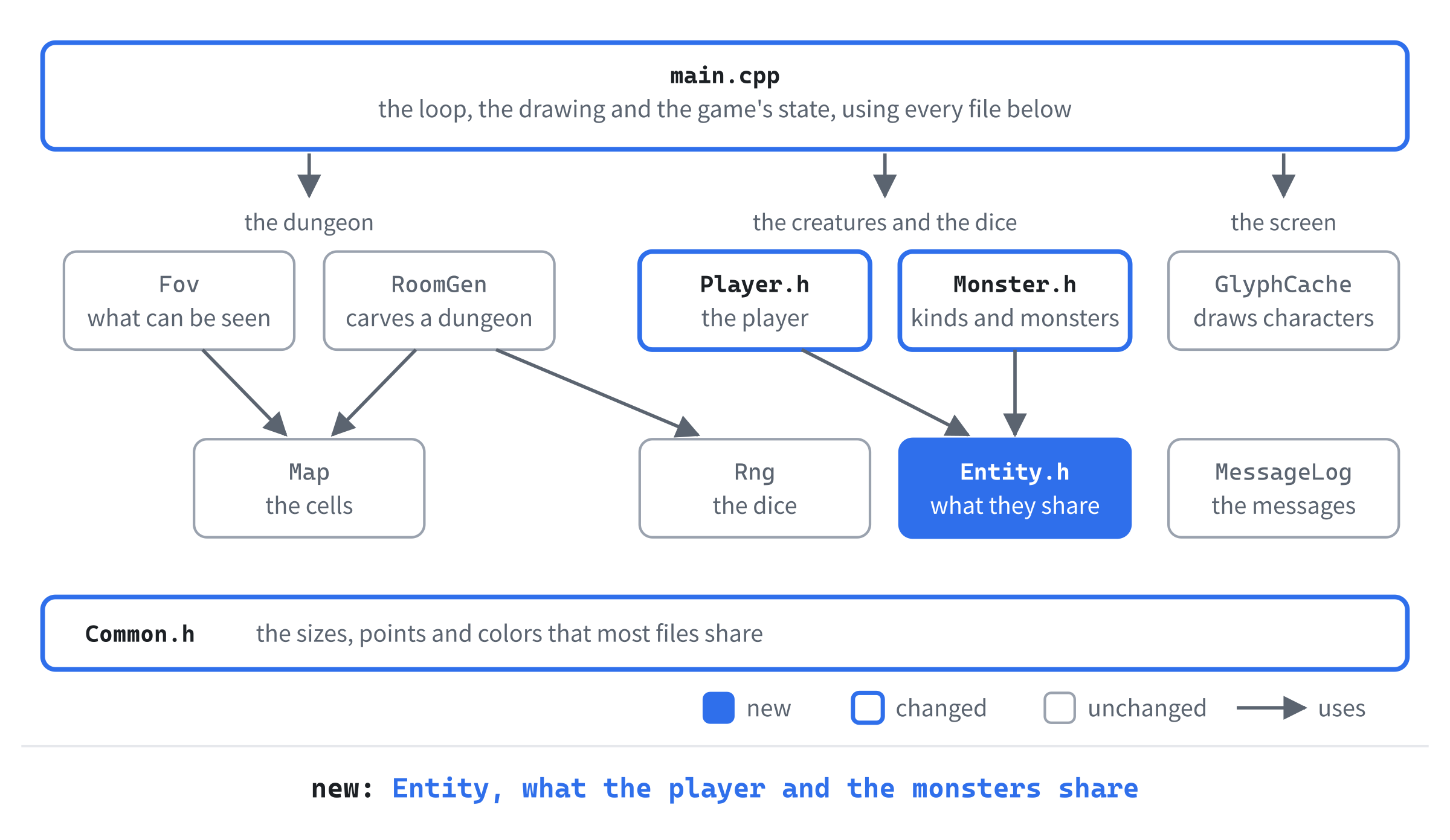
Three ideas carry the chapter. The first is the struct that the player and the monsters share. Both need health, a defense, and a way to ask whether they're still alive. Writing all that twice would mean keeping two copies in step forever. So it's written once, in Entity, and both are built on it.
The second is the order of a turn. After you act, one function plays out the rest of the turn in a fixed order. So there's one place to look when something seems to happen out of turn.
The third is how a run ends. Death stops the game. A new run is a fresh call to runGame, the function that plays a run, so nothing from the old run can leak into the new one.
We'll build the chapter in five steps: health, your blows, the monsters' blows, what death looks like, and another run.
Health for Everyone
Health comes first, before anything can take it away. By the end of this section, everyone has some, and the game plays exactly as it did.
The Entity Struct
In Solution Explorer, right-click src, choose Add > New Item, and add a Header File (.h) called Entity.h. Type the whole file, so that it reads like this:
#pragma once
#include "Common.h"

// What the player and the monsters have in common: a place on the map,
// health, and a defense that takes something off every blow they suffer
struct Entity
{
    Point pos;
    int hp = 1;
    int maxHp = 1;
    int defense = 0;

    bool isAlive() const
    {
        return hp > 0;
    }
};
An Entity is what the player and the monsters have in common. Game programmers call anything in the world that acts, or can be acted on, an entity. This one has a place, pos, which moves here from Player and Monster. It has its health, hp, and the most health it can have, maxHp. And it has a defense, which takes something off every blow it suffers.
The function isAlive says whether there's any health left. It's const, a promise that it changes nothing, so it can be asked of a const entity too, such as the const Player& that drawFrame takes. Health starts at 1, not 0, so a new entity is alive until it's given its real health. And a maxHp of 1 can't cause a division by zero, which will matter when the health bar divides by it.
Built on an Entity
Now the player is built on an Entity. Open Player.h, and change #include "Common.h" to #include "Entity.h". Then find the comment and the struct below it:
// The player. For now, just a place on the map
struct Player
{
    Point pos;
};
Replace them with these lines:
// The player. Until Chapter 13 gives them weapons to wield, each of their
// blows does minDamage to maxDamage, before the target's defense
struct Player : Entity
{
    int minDamage = 2;
    int maxDamage = 6;
};
The : Entity after the name means that Player inherits from Entity. A Player has every member that an Entity has, from pos to isAlive, and then its own members as well. Here, Entity is the base, and Player is derived from it. For a struct, inheritance is public unless you say otherwise, so everything public in an Entity is public in a Player too.
So player.pos still works, exactly as before, and so do player.hp and player.isAlive(). The player's own members are the damage their blows do: 2 to 6, until Chapter 13 puts a weapon in their hand. The next image shows the three structs, and how a Player is laid out.
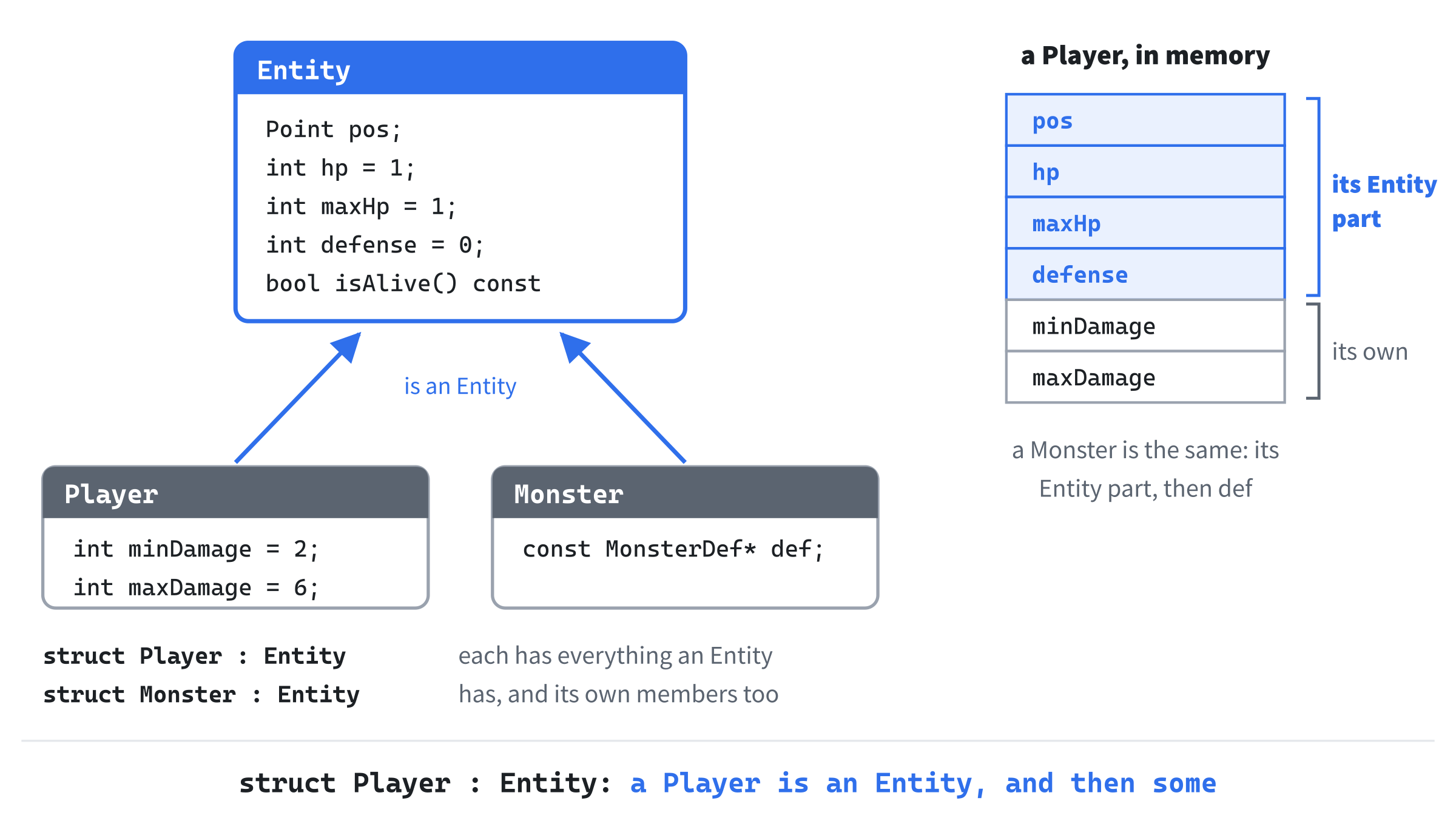
A Player holds an Entity, with its own members after it. And a Player can go anywhere an Entity is wanted: a function that takes a const Entity& can be handed a player, and it sees the player's Entity part. The health bar, later in the chapter, takes an Entity for just that reason, so that it can show a monster's health too.
Numbers for Every Kind
Monsters are built on Entity too. Open Monster.h, and change #include "Common.h" to #include "Entity.h" there as well. Each kind of monster needs four more numbers in its row. Find the line for sight, in MonsterDef:
int sight; // how far it can see, in cellsReplace it with these lines:
int sight;       // how far it can see, in cells
int hp;          // its health when it's made
int minDamage;   // each of its blows does minDamage to maxDamage,
int maxDamage;   // before the target's defense
int defense;
A kind's hp is the health each of its monsters starts with. Its blows do minDamage to maxDamage, before the target's defense, and its own defense takes something off every blow it suffers. The comments line up again, so the one for sight has moved along to match.
Every row needs the new numbers. Find the table's rows:
{ "giant white rat", 'r', { 215, 215, 205, 255 }, 6 },
{ "jackal", 'j', { 205, 150, 80, 255 }, 7 },
{ "kobold", 'k', { 110, 185, 95, 255 }, 6 },
{ "goblin", 'g', { 160, 205, 60, 255 }, 7 },
Replace them with these lines:
// name, glyph, color, sight, hp, damage from and to, defense
{ "giant white rat", 'r', { 215, 215, 205, 255 }, 6, 4, 1, 3, 0 },
{ "jackal", 'j', { 205, 150, 80, 255 }, 7, 5, 1, 3, 0 },
{ "kobold", 'k', { 110, 185, 95, 255 }, 6, 7, 2, 4, 1 },
{ "goblin", 'g', { 160, 205, 60, 255 }, 7, 9, 2, 5, 1 },
The comment above the rows names the columns, since a row of bare numbers is hard to read. The monsters grow tougher down the table. A giant white rat has 4 health, and bites for 1 to 3. The goblin has 9 health, hits for 2 to 5, and has a defense of 1, like the kobold. Tougher monsters wait deeper down, in later chapters.
Last, the monster itself. Find the comment and the struct at the bottom of the file:
// One monster in the dungeon: where it is, and what kind it is
struct Monster
{
    Point pos;
    const MonsterDef* def = nullptr;
};
Replace them with these lines:
// One monster in the dungeon: an Entity, and the kind of monster it is
struct Monster : Entity
{
    const MonsterDef* def = nullptr;
};
A Monster is an Entity too, with a pointer to its kind. Its health is its own, copied from its kind when it's made, since one jackal's wounds mustn't hurt every jackal. The defense is copied as well, so every blow can read the defender's defense from its Entity, whether the defender is the player or a monster. But the damage stays in the table, since every jackal bites the same.
Starting Health
Everyone needs their real health when they're made. Open main.cpp, and add the player's starting health below MONSTER_COUNT:
// The player's health at the start of a run
constexpr int PLAYER_HP = 30;
Thirty is enough to survive a few fights, and few enough that you'll feel each one. In placeMonsters, add these lines below monster.def = &MONSTER_DEFS[rng.roll(0, lastKind)];:
monster.hp = monster.def->hp;
monster.maxHp = monster.def->hp;
monster.defense = monster.def->defense;
Each new monster copies its health and its defense from its kind, and starts at full health, so its maxHp is its hp. None of this rolls the dice, so seed 42's monsters are where they were. In runGame, where the player is made, add these lines below player.pos = RoomGen::centerOf(rooms.front());:
player.hp = PLAYER_HP;
player.maxHp = PLAYER_HP;
The player starts at full health too. The Space key's new dungeon leaves the player's health as it is, but that key won't be around for long.
Checkpoint: Press F5. The game plays exactly as it did. Everyone has health now, but nothing can take it away yet.
Blows
Now a bump becomes a blow. Three small functions do the work: one rolls the damage, one lands the player's blow, and one clears away the dead.
The Damage Rule
The rule for damage is the same for everyone, so it gets a function of its own. Add it below placeMonsters:
// The damage one blow does: a roll from minDamage to maxDamage, less
// the defender's defense, but never less than 1, so every hit hurts
int rollDamage(Rng& rng, int minDamage, int maxDamage, int defense)
{
    int damage = rng.roll(minDamage, maxDamage) - defense;
    return SDL_max(1, damage);
}
A blow rolls its damage from the attacker's minDamage to maxDamage, and the defender's defense comes off it. Then SDL_max, which gives the larger of two numbers, keeps the damage at 1 or more. So every blow does some harm, however tough the defender.
The roll goes into damage before SDL_max sees it, and that matters. Like SDL_min in Chapter 1, SDL_max is a macro: the preprocessor pastes its arguments in wherever it uses them, and it uses the larger one twice, once to compare and once to give back. With the roll written inside it, there would be two rolls. The first would be checked, but the second would be the damage, unchecked, so a blow could do nothing, or even heal. A variable holds one roll, so the check and the damage agree.
There's no roll to see whether a blow lands: every blow hits, and the only question is how hard. A kobold, with its defense of 1, takes 1 to 5 from your 2 to 6.
The Player's Blow
The player's blow uses the rule. Add this function below rollDamage:
// The player strikes a monster. A blow in melee always hits
void playerAttacks(const Player& player, Monster& monster, Rng& rng,
                   MessageLog& log)
{
    int damage = rollDamage(rng, player.minDamage, player.maxDamage,
                            monster.defense);
    monster.hp -= damage;
    std::string name = monster.def->name;
    if (monster.isAlive())
    {
        log.add("You hit the " + name + " for " +
                std::to_string(damage) + ".");
    }
    else
    {
        log.add("You kill the " + name + "!");
    }
}
The damage comes off the monster's health. Then the log says "You hit the jackal for 3.", or "You kill the jackal!" if that was the last of its health. The monster is passed by reference, as Monster&, since the blow changes it. The player is a const reference, since the blow doesn't change them. The name is copied into a std::string first, as in Chapter 5, so that + joins text.
Clearing Away the Dead
A monster with no health left mustn't stay in the dungeon. Add this function below playerAttacks:
// Takes the dead monsters out of the dungeon
void removeDead(std::vector<Monster>& monsters)
{
    std::erase_if(monsters, [](const Monster& monster)
    {
        return !monster.isAlive();
    });
}
The function std::erase_if, new in C++20, removes every element of a vector for which a test says true, and closes up the gaps. The test is the part with the square brackets, a lambda: a small function, written right where it's used, with no name. The empty brackets, [], are where a lambda lists the variables it borrows from the code around it, and this one needs none. Then come its parameter, one monster, and its body, which says true for a monster that isn't alive.
The next image shows what removeDead does to a vector of four monsters, after a jackal has been killed.
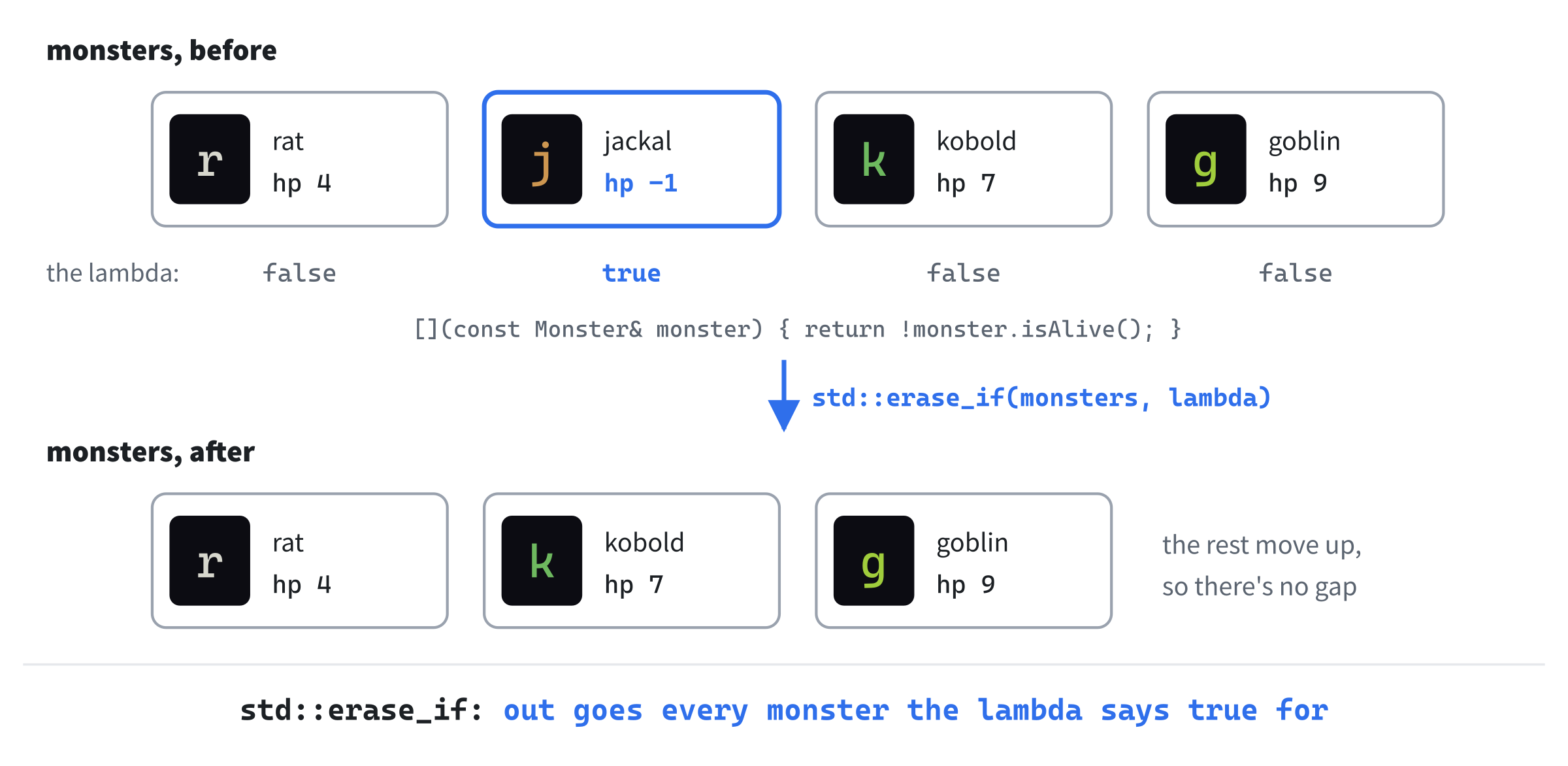
The monsters after the jackal move up, and the vector is one shorter. A lambda saves writing a named function for a one-line test that's used in only one place. You'll meet more of them, wherever a standard function wants a test.
Bump to Attack
Now the walking code can attack. In the walking code, replace the comment above Point step; with these lines:
// Stepping onto a monster attacks it. An attack or a step
// takes a turn, and then the rest of the turn plays out.
// Bumping into a wall takes no turn
An attack takes a turn, just as a step does, and either way, the rest of the turn plays out afterward. For now, that's just the monsters moving and the turn being counted. So the code needs to remember whether the player did something that took a turn. In the walking code, below log.markRead();, add this line:
bool tookTurn = false;Then find the two lines that say a monster is in the way:
std::string name = monster->def->name;
log.add("The " + name + " is in the way.");
Replace them with these lines:
playerAttacks(player, *monster, rng, log);
removeDead(monsters);
tookTurn = true;
The player attacks the monster, and the dead are taken away at once, before any monster gets a turn. The function monsterAt returns a pointer, and *monster is the monster it points to, which is what playerAttacks wants. In the else if for floor, find these lines:
// The player's step, then the monsters' turn
player.pos = to;
Fov::compute(map, player.pos, SIGHT_RADIUS);
moveMonsters(map, monsters, player, rng);
++turn;
Replace them with these lines:
player.pos = to;
Fov::compute(map, player.pos, SIGHT_RADIUS);
tookTurn = true;
A step no longer gives the monsters their turn. It just says that it took one. Last, add these lines below the else for the wall, with a blank line in between:
if (tookTurn)
{
    moveMonsters(map, monsters, player, rng);
    ++turn;
}
Now an attack and a step end the same way: the monsters move, and the turn is counted. A bump into a wall leaves tookTurn as false, so it takes no turn, as before.
Design note: bump to fight. Walking into a monster to attack it is as old as the genre. Rogue did it in 1980, and most roguelikes since have done the same: the keys that move you also fight for you, so there's no attack key to press, and no target to pick. But in Rogue, the dice decided whether each blow hit at all, and a miss cost you the turn. In this game, every blow lands, and defense takes damage off instead. So you can count the blows a fight will take, and every fight is a decision you can reason about, rather than a gamble.
Checkpoint: Press F5, with seed 42 in Command Arguments. Take Chapter 5's walk to the jackal: eight steps down, eleven to the right, and two up, through its doorway. It comes to meet you, as before. Now walk into it. The log says "You kill the jackal!", the turn count goes up, and the jackal is gone. It has only 5 health, and your blows do 2 to 6, so a good one kills it outright, as this one did.
The jackal couldn't have fought back anyway, since the monsters can't attack yet. That's next.
The Monsters Fight Back
The monsters' turn is about to do three things: wander, chase, and attack. Rather than grow moveMonsters into one long function, we'll take it apart into small ones, each with one job, and put them together in a new function that runs the turn.
Next to the Player
A monster can only attack when it's next to the player, so that's the first small function. It takes the place of moveMonsters, and the chase and the wandering come back below it, as functions of their own. Replace the whole of moveMonsters with this function:
// True if two cells touch, side by side or corner to corner
bool isNextTo(Point a, Point b)
{
    return distanceSquared(a, b) <= 2;
}
Two cells touch, side by side or corner to corner, when they're at most one apart, across and down. Their squared distance is then 1 for a side, or 2 for a corner, so distanceSquared can answer this too.
Chasing and Wandering
Chapter 5's chase becomes a function of its own. Add it below isNextTo:
// Where a monster that sees the player steps: to the free neighbor
// nearest the player, if that's nearer than where it stands
Point chaseStep(const Map& map, std::vector<Monster>& monsters,
                const Player& player, const Monster& monster)
{
    Point best = monster.pos;
    int bestDistance = distanceSquared(monster.pos, player.pos);
    for (Point step : DIRECTIONS)
    {
        Point to = { monster.pos.x + step.x, monster.pos.y + step.y };
        int distance = distanceSquared(to, player.pos);
        if (distance < bestDistance && isFree(map, monsters, player, to))
        {
            best = to;
            bestDistance = distance;
        }
    }
    return best;
}
The chase is the one from Chapter 5, with one difference: it doesn't move the monster. It returns the cell the monster should step to, which is its own cell if no neighbor is nearer. Whoever calls it decides what to do with the answer.
The wandering becomes a function too. Add it below chaseStep:
// Where a monster that can't see the player steps: in a random
// direction, if the cell there is free, or nowhere
Point wanderStep(const Map& map, std::vector<Monster>& monsters,
                 const Player& player, const Monster& monster, Rng& rng)
{
    Point step = DIRECTIONS[rng.roll(0, 7)];
    Point to = { monster.pos.x + step.x, monster.pos.y + step.y };
    if (isFree(map, monsters, player, to))
    {
        return to;
    }
    return monster.pos;
}
It rolls a direction, as before, and returns the cell that way if it's free, or the monster's own cell if it isn't. The roll happens even when the way is blocked, as it did in the old code, so a wandering monster uses the dice exactly as it did in Chapter 5.
The Monsters' Blows
A blow that kills the player should be remembered, for the death screen. Open Player.h, and add this include below #pragma once:
#include <string> // std::string, for what killed the playerThen add this member below maxDamage, to hold the killer's name:
// Whatever killed the player, such as "a jackal", for the death screen
std::string killedBy;
The member killedBy starts out empty, and the blow that kills the player fills it in. Back in main.cpp, a killer's name needs "a" or "an" before it. Add this function below wanderStep:
// The name with "a" or "an" before it: "a jackal", but "an ogre"
std::string withArticle(const std::string& name)
{
    const std::string vowels = "aeiou";
    if (!name.empty() && vowels.find(name[0]) != std::string::npos)
    {
        return "an " + name;
    }
    return "a " + name;
}
The call vowels.find(name[0]) looks for the name's first letter among the vowels. It gives the letter's place in vowels if it's there, or std::string::npos, a special value that means it isn't. So a name that starts with a vowel gets "an", and the rest get "a". The check for an empty name comes first, since an empty name has no first letter to look at. There's no ogre yet, but one is coming, in Chapter 15.
Now a monster's blow. Add this function below withArticle:
// A monster strikes the player. If the blow kills, the player
// remembers what dealt it, for the death screen
void monsterAttacks(const Monster& monster, Player& player, Rng& rng,
                    MessageLog& log)
{
    int damage = rollDamage(rng, monster.def->minDamage,
                            monster.def->maxDamage, player.defense);
    player.hp -= damage;
    std::string name = monster.def->name;
    log.add("The " + name + " hits you for " +
            std::to_string(damage) + ".");
    if (!player.isAlive())
    {
        player.killedBy = withArticle(name);
    }
}
It's the player's blow, the other way around. The damage comes from the monster's kind, through def, and the player's defense comes off it. The player has no armor yet, so that's 0, until Chapter 13. If the blow kills, the player remembers who dealt it, such as "a jackal".
The Monsters' Turn
The pieces come together in the monsters' turn. It's long, so it comes in two parts. Add the first below monsterAttacks:
// The monsters' turn. A monster that can see the player attacks if
// it's next to them, and otherwise comes closer. The rest wander. Once
// the player is dead, no monster acts
void monstersAct(const Map& map, std::vector<Monster>& monsters,
                 Player& player, Rng& rng, MessageLog& log)
{
    for (Monster& monster : monsters)
    {
        if (!player.isAlive())
        {
            return;
        }
Each monster acts in turn, as in Chapter 5. But before each one acts, the loop checks that the player is still alive. Once a blow kills the player, return ends the monsters' turn at once. No monster acts on a dead player, and nobody can kill them twice.
Add the rest below the check, inside the loop:
        if (!seesPlayer(map, monster, player))
        {
            monster.pos = wanderStep(map, monsters, player, monster, rng);
        }
        else if (isNextTo(monster.pos, player.pos))
        {
            monsterAttacks(monster, player, rng, log);
        }
        else
        {
            monster.pos = chaseStep(map, monsters, player, monster);
        }
    }
}
A monster that can't see the player wanders. One that can see the player attacks if it's next to them, and otherwise steps closer. So a monster that comes to meet you no longer waits: on its next turn, it bites.
The Rest of the Turn
The player heals slowly, by 1 health every few turns. Add how often, below PLAYER_HP:
// The player heals 1 health every HEAL_EVERY turns, while hurt
constexpr int HEAL_EVERY = 10;
Now one function holds the order of the rest of the turn. Add it below monstersAct:
// The rest of a turn, once the player has acted: the monsters act, the
// player heals a little now and then, and last of all comes the one
// check for the player's death
void finishTurn(const Map& map, std::vector<Monster>& monsters,
                Player& player, Rng& rng, MessageLog& log, int& turn)
{
    monstersAct(map, monsters, player, rng, log);
    ++turn;

    bool healing = player.isAlive() && player.hp < player.maxHp;
    if (healing && turn % HEAL_EVERY == 0)
    {
        ++player.hp;
    }

    if (!player.isAlive())
    {
        log.add("You die...");
    }
}
In the preceding code, the monsters act first, and then the turn is counted. Then, on every tenth turn, a player who's alive and hurt heals 1. The test turn % HEAL_EVERY == 0 is true on turns 10, 20, 30, and so on, since % gives the remainder of a division. Last of all comes the one check for the player's death, which adds "You die..." to the log.
The turn count is passed by reference, as int& turn. The function changes it, and the change must reach runGame's own count. The next image shows the order of a whole turn.
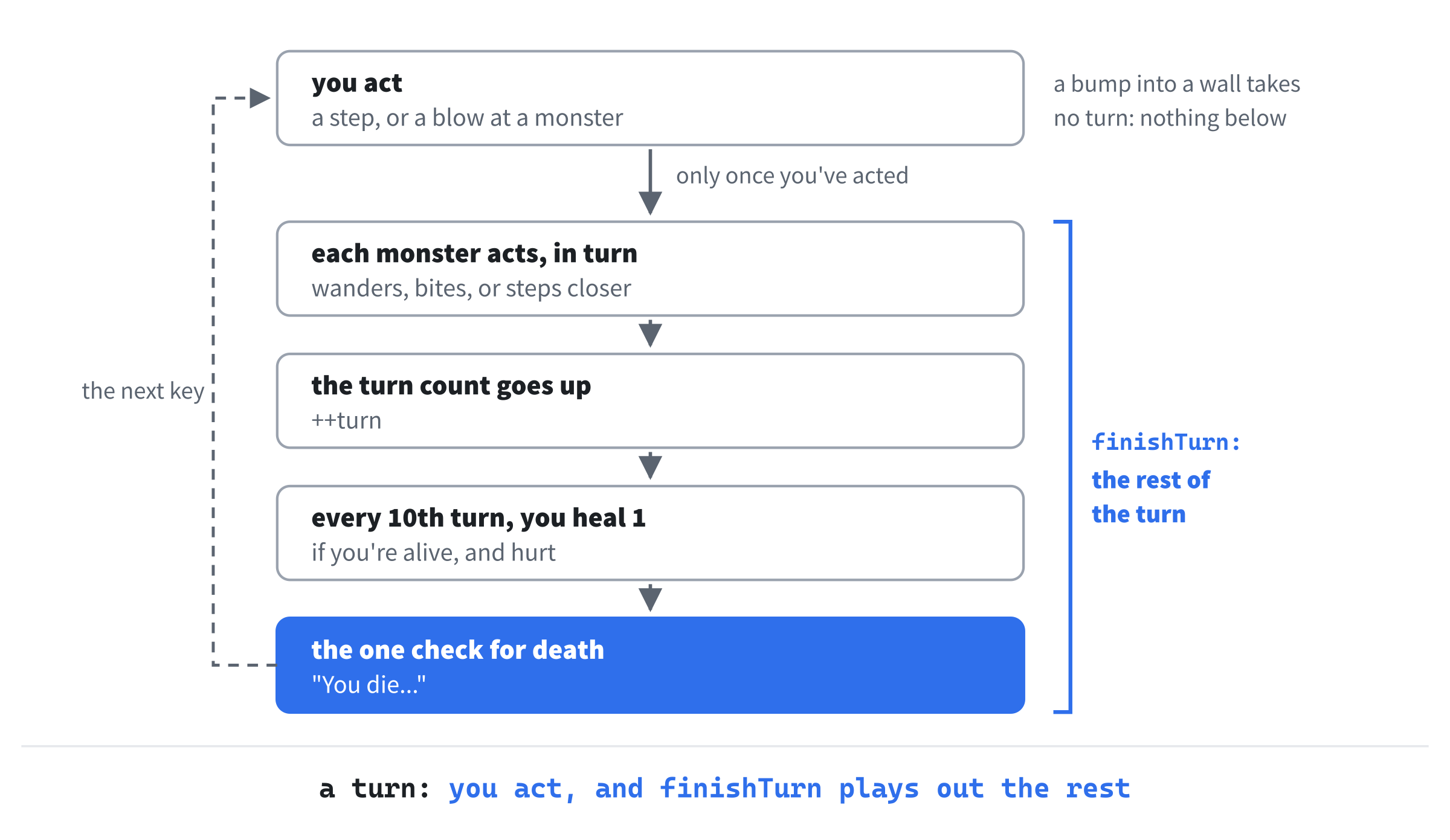
Death is checked once, at the end, after everything in the turn has happened. That way, it's reported once, however many blows landed. Later chapters add more to a turn, such as poison in Chapter 14, and the check stays in the same place, after all of it.
The walking code hands the rest of the turn to finishTurn. Find the two lines in the if for tookTurn:
moveMonsters(map, monsters, player, rng);
++turn;
Replace them with this line:
finishTurn(map, monsters, player, rng, log, turn);Now everything that takes a turn ends in finishTurn, and the order of a turn lives in one place.
Checkpoint: Press F5, with seed 42, and take the walk to the jackal. Your blow would kill it before it could bite, as before, so give it a turn first: step to the left, with h. It bites: "The jackal hits you for 1." It's up and to the right of you now, so fight it with u. The log says "You hit the jackal for 3.", then "The jackal hits you for 1." again, and your second blow kills it, as in Figure 6.1. Your health isn't on the screen yet, though. And if you die, nothing stops you: you can walk on, and every step adds "You die..." to the log again. The next section puts both right.
Life and Death
The game knows when you're hurt, and when you're dead, but it doesn't show either. Now it will. The colors come first. Open Common.h, and add these to Palette, below DEBUG:
// Health: plenty, getting low, and in danger
constexpr SDL_Color HEALTH_GOOD = { 90, 180, 90, 255 };
constexpr SDL_Color HEALTH_LOW = { 225, 170, 60, 255 };
constexpr SDL_Color DANGER = { 220, 70, 60, 255 };

// See-through black, to fade whatever is drawn behind it
constexpr SDL_Color SHADE = { 0, 0, 0, 170 };
Three of them show health: green while there's plenty, orange as it runs low, and red when it's in danger. The fourth, SHADE, is black with an alpha of 170, out of 255. Alpha is how solid a color is, so SHADE is about two-thirds solid, and whatever is beneath it shows through, darkened.
The rest goes into main.cpp, in eight places. The next image maps them out.
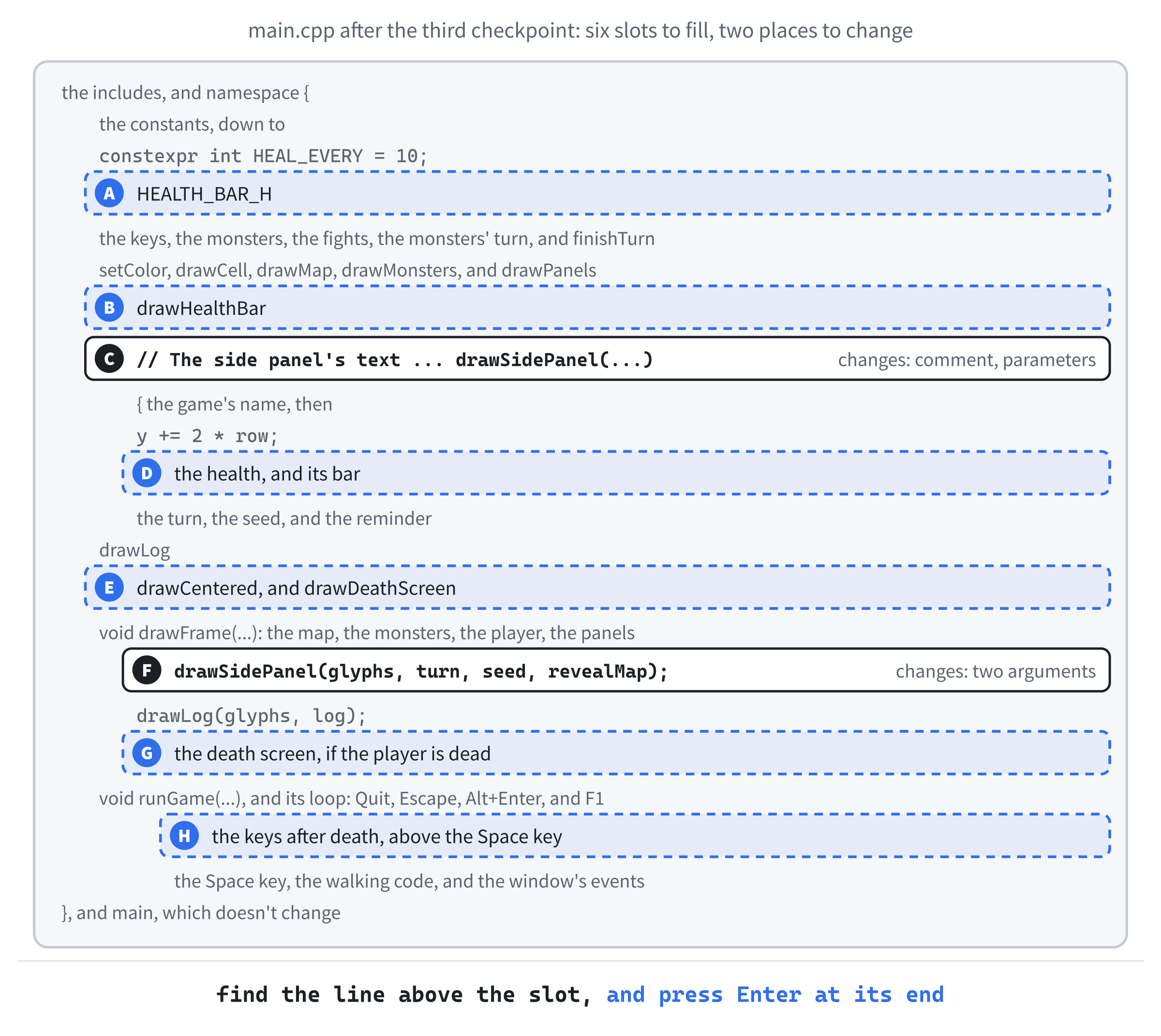
As before, if a slot's place isn't clear, the Chapter 06 folder in the repository holds main.cpp as it is at the end of the chapter, and it's the final word.
The Health Bar
At slot A, add the bar's height below HEAL_EVERY:
// How tall the health bar in the side panel is, in pixels
constexpr float HEALTH_BAR_H = 8.0f;
At slot B, add the bar itself, below drawPanels:
// A bar that shows how much health is left: green while there's
// plenty, orange below half, and red below a quarter
void drawHealthBar(SDL_Renderer* renderer, float x, float y, float width,
                   const Entity& entity)
{
    float share = static_cast<float>(entity.hp) / entity.maxHp;
    share = SDL_clamp(share, 0.0f, 1.0f);
    SDL_Color color = Palette::HEALTH_GOOD;
    if (share < 0.25f)
    {
        color = Palette::DANGER;
    }
    else if (share < 0.5f)
    {
        color = Palette::HEALTH_LOW;
    }

    SDL_FRect whole = { x, y, width, HEALTH_BAR_H };
    setColor(renderer, Palette::FRAME);
    SDL_RenderFillRect(renderer, &whole);
    SDL_FRect left = { x, y, width * share, HEALTH_BAR_H };
    setColor(renderer, color);
    SDL_RenderFillRect(renderer, &left);
}
In the preceding code, share is how much of its health the entity has left, from 0 to 1. A whole number divided by a whole number gives a whole number in C++, so 14 out of 30 would come out as 0. Casting hp to a float first gives 0.47. Then SDL_clamp keeps the share between 0 and 1, since a big blow can leave the health below 0, and a bar can't be shorter than nothing.
The bar is drawn in two parts. First comes the whole width, in the frame's gray. Then the share that's left goes over it, in the health's color. The next image shows the three colors.
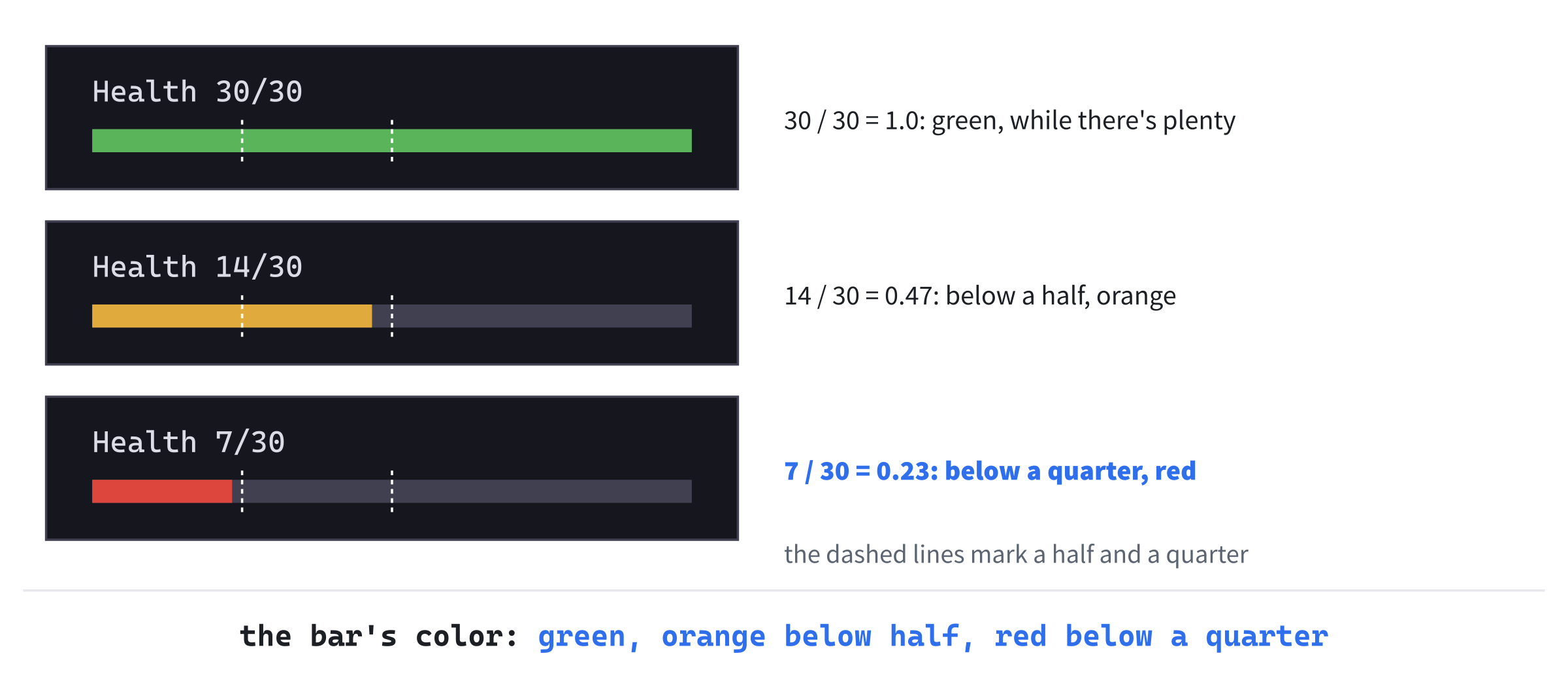
The bar takes any Entity, not just the player. Chapter 9's look panel uses it to show the health of whatever monster is under the mouse.
Health in the Panel
At slot C, the side panel needs the renderer to draw the bar, and the player to know their health. Find the comment above drawSidePanel, and the function's first lines:
// The side panel's text: the game's name, then the run so far, one row
// under another, and a reminder when a debugging aid is on
void drawSidePanel(const GlyphCache& glyphs, int turn, unsigned int seed,
                   bool revealMap)
Replace them with these lines:
// The side panel: the game's name, the player's health, then the run
// so far, one row under another, and a reminder when a debugging aid
// is on
void drawSidePanel(SDL_Renderer* renderer, const GlyphCache& glyphs,
                   const Player& player, int turn, unsigned int seed,
                   bool revealMap)
At slot D, the health goes below the game's name. Add these lines below the first y += 2 * row;:
glyphs.drawText("Health " + std::to_string(player.hp) + "/" +
                std::to_string(player.maxHp), x, y, Palette::TEXT);
y += row;
drawHealthBar(renderer, x, y, PANEL_W - 2 * MARGIN, player);
y += row;
The panel says something like "Health 29/30", and draws the bar on the next row, as wide as the panel's text can go.
The Death Screen
At slot E, the death screen needs a line of text centered on a point. Add this function below drawLog:
// A line of text, centered on centerX
void drawCentered(const GlyphCache& glyphs, const std::string& text,
                  float centerX, float y, SDL_Color color)
{
    float width = text.size() * glyphs.charWidth();
    glyphs.drawText(text, centerX - width / 2.0f, y, color);
}
Every character in the game's font is the same width, so a line's width is its length times the width of one character. Starting half that width to the left of centerX puts the middle of the line on it.
Now the death screen itself. It's long, so it comes in two parts. Add the first below drawCentered:
// The death screen. The dungeon fades, and a box in the middle of it
// says what killed the player, and when
void drawDeathScreen(SDL_Renderer* renderer, const GlyphCache& glyphs,
                     const Player& player, int turn)
{
    // The shade is see-through, so it's blended with what's under it
    SDL_SetRenderDrawBlendMode(renderer, SDL_BLENDMODE_BLEND);
    setColor(renderer, Palette::SHADE);
    SDL_FRect mapView = { 0.0f, 0.0f, static_cast<float>(MAP_VIEW_W),
                          static_cast<float>(MAP_VIEW_H) };
    SDL_RenderFillRect(renderer, &mapView);
    SDL_SetRenderDrawBlendMode(renderer, SDL_BLENDMODE_NONE);
The death screen first covers the map view with SHADE, the see-through black, to fade the dungeon. SDL's drawing normally replaces whatever is beneath it, so a see-through color would come out solid black. The blend mode SDL_BLENDMODE_BLEND tells SDL to mix the color with what's already there, by its alpha. Once the shade is drawn, the blend mode goes back to SDL_BLENDMODE_NONE, so everything drawn afterward is solid again.
Add the rest below the shade, with a blank line in between:
    float centerX = MAP_VIEW_W / 2.0f;
    float row = glyphs.lineHeight();
    SDL_FRect box = { centerX - 300.0f, MAP_VIEW_H / 2.0f - 3 * row,
                      600.0f, 6 * row };
    setColor(renderer, Palette::PANEL);
    SDL_RenderFillRect(renderer, &box);
    setColor(renderer, Palette::FRAME);
    SDL_RenderRect(renderer, &box);

    float y = box.y + row;
    drawCentered(glyphs, "YOU HAVE DIED", centerX, y, Palette::DANGER);
    y += 2 * row;
    drawCentered(glyphs, "Killed by " + player.killedBy + ", on turn " +
                 std::to_string(turn) + ".", centerX, y, Palette::TEXT);
    y += row;
    drawCentered(glyphs, "Press Esc to quit.",
                 centerX, y, Palette::DIM_TEXT);
}
A box in the middle of the map view, 600 pixels wide and six rows tall, is filled with the panel's color and outlined with the frame's. Three lines are centered in it: "YOU HAVE DIED", in red; what killed the player, and on which turn; and how to quit.
Drawing It All
At slot F, in drawFrame, change drawSidePanel(glyphs, turn, seed, revealMap); to drawSidePanel(renderer, glyphs, player, turn, seed, revealMap);, so that the panel gets what it now needs.
At slot G, add these lines below drawLog(glyphs, log);:
if (!player.isAlive())
{
    drawDeathScreen(renderer, glyphs, player, turn);
}
The death screen is drawn last, over everything else, and only once the player is dead.
Keys After Death
While the death screen is up, most keys should do nothing. At slot H, add this branch above the Space key's:
else if (event.type == SDL_EVENT_KEY_DOWN && !player.isAlive())
{
    // The death screen is up, and the keys above are the only
    // ones that do anything
}
A key pressed while the player is dead is caught by this branch, which does nothing with it. The keys above it still work: Escape, Alt+Enter, and F1. Their branches come first, and a chain of else ifs stops at the first branch that matches. The keys below it, Space and the moving keys, never get the chance.
The branch tests the event's type as well, so it only catches keys. Other events, such as the window changing size, still reach their own branches below it, so the death screen is drawn again when the window changes.
Checkpoint: Press F5. The side panel shows your health, with a green bar below it. Get into a fight, and watch both drop. To see the death screen without a long fight, set PLAYER_HP to 1. Then run seed 42, take the walk to the jackal, and step to the left, as before: it bites, and you die.
The next image shows what you'll see. Only Escape, Alt+Enter, and F1 do anything now.
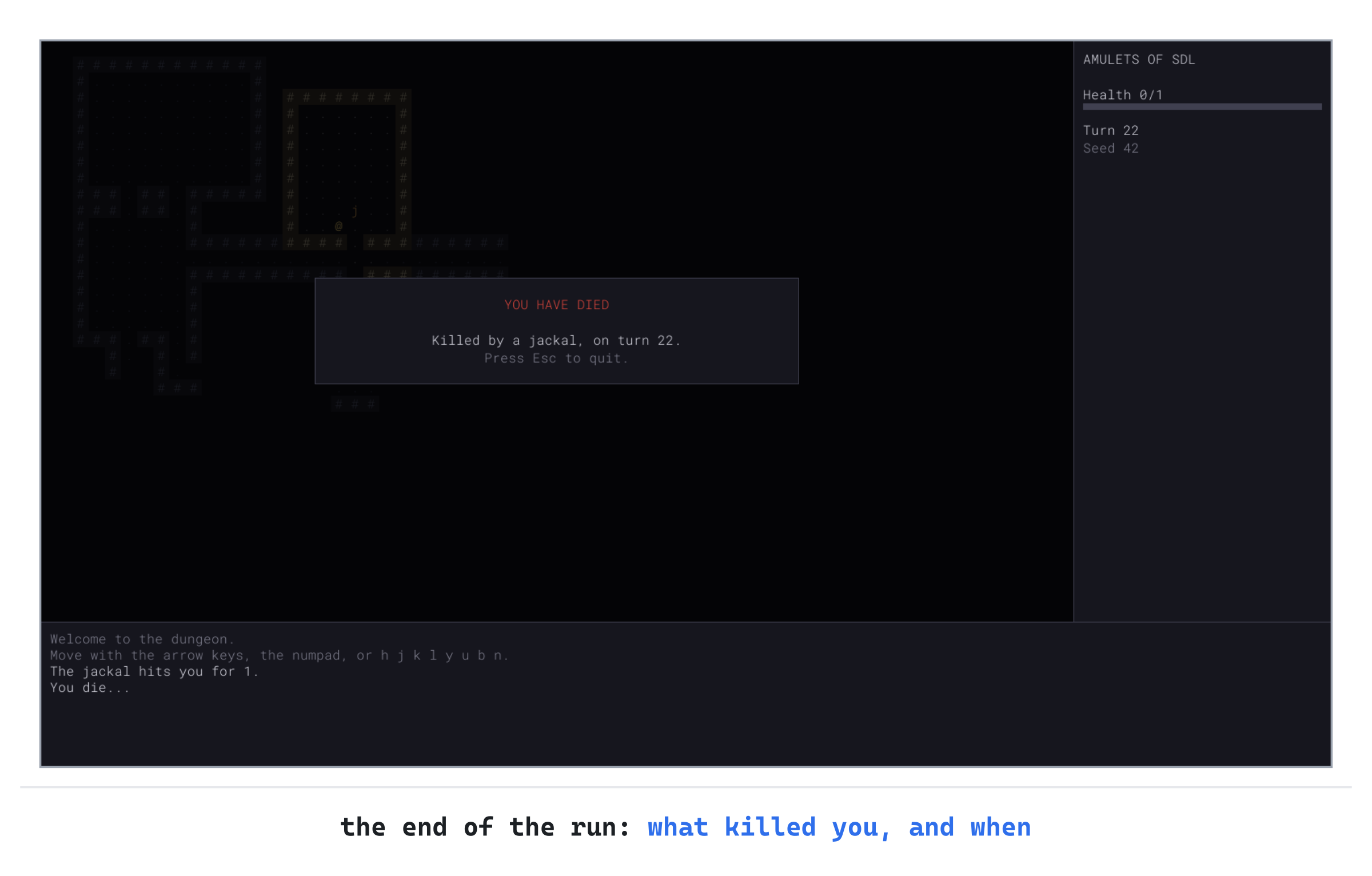
Leave PLAYER_HP at 1 for now, since the next checkpoint needs a quick death too. You'll put it back after that.
Another Run
Pressing Escape and starting the game again is a poor way to begin a new run. Now R does it, from the death screen.
Play Again
First, the death screen says so. In drawDeathScreen, change "Press Esc to quit." to "Press R to play again, or Esc to quit.".
The function runGame plays a run. Now it also says, when it returns, whether the player wants another. Find the first line of runGame:
void runGame(SDL_Renderer* renderer, GlyphCache& glyphs,Replace it with these lines:
// Plays one run, from a new dungeon to the player's death. Returns true
// if the player asked to play again
bool runGame(SDL_Renderer* renderer, GlyphCache& glyphs,
Below bool running = true;, add this line:
bool playAgain = false;Now R, on the death screen. In the branch for the keys after death, find the comment:
// The death screen is up, and the keys above are the only
// ones that do anything
Replace it with these lines:
// The death screen is up. R ends this run, and asks for
// another. The other keys do nothing
if (event.key.key == SDLK_R)
{
    playAgain = true;
    running = false;
}
Pressing R sets playAgain and ends the loop, which ends the run. The test matches the R key with or without Shift, since Shift doesn't change a key's keycode. Whether Shift was held is in the event's mod, as Chapter 3 showed for Alt, and this test doesn't need it.
Chapter 2's Space key, for a new dungeon, has had its day. A run now ends in death, and R starts the next one. Find the Space key's branch, below the one you just changed, and delete it:
else if (event.type == SDL_EVENT_KEY_DOWN &&
         event.key.key == SDLK_SPACE)
{
    // A new dungeon, from a new seed
    seed = entropy();
    rng = Rng(seed);
    rooms = RoomGen::generate(map, rng);
    monsters = placeMonsters(rooms, rng);
    player.pos = RoomGen::centerOf(rooms.front());
    Fov::compute(map, player.pos, SIGHT_RADIUS);
    turn = 0;
    log.markRead();
    log.add("You enter a new dungeon.");
    redraw = true;
}
At the end of runGame, below the loop's closing brace, add this line:
return playAgain;Last, main plays runs until the player stops asking for them. Find the call to runGame:
runGame(renderer, glyphs, seed);Replace it with these lines:
// Each run is a new game, with everything in it made afresh.
// Only the first uses the seed from the command line
while (runGame(renderer, glyphs, seed))
{
    seed = 0;
}
The loop calls runGame for as long as it returns true. Each call makes a new dungeon, new monsters, a new player, and a new log. They're all local variables of runGame, made when it starts and destroyed when it returns. So there's nothing to reset between runs, and nothing that could be forgotten. Setting seed to 0 means that only the first run uses the seed from Command Arguments, and every run after it gets a random one.
Checkpoint: Press F5, with PLAYER_HP still at 1, and die to seed 42's jackal as before. On the death screen, press R. A new dungeon appears, with a new seed in the side panel, your health full, and the turn count back at 0. Escape still quits, from the death screen or at any time.
Now set PLAYER_HP back to 30. A player with 1 health is a short game.
Design note: one life. When you die, the run is over, and no saved game brings you back. That's permadeath, and it's the rule most players name first when asked what makes a roguelike. The Berlin Interpretation, a definition of the genre drawn up at the International Roguelike Development Conference in Berlin in 2008, lists it among the factors that matter most. It's what gives every decision its weight: a risk you take is a risk to the whole run. Chapter 17 adds saving, but only so that you can stop and come back later. Death deletes the save.
So the game is a game now. You can explore, fight, and die, and the next run is one key away.
Playing the Game
There's a real game here now, if a short one. Play a few runs with random seeds, and watch your health in the side panel as you go. Rats and jackals are an annoyance, but a kobold or a goblin takes a few blows to kill, and bites harder while you work at it.
You can work out what a fight costs from the table you typed into Monster.h. Take the goblin. Your blows do 2 to 6, and its defense of 1 takes 1 off each, so they do 1 to 5, or 3 on average. Its 9 health, at 3 a blow, suggests three blows. But the blow that kills it usually does more than it needed to, so on average it takes 3.4, most often three or four.
If you strike first, the goblin bites back after every blow but the last, so about 2.4 times. Its bites do 2 to 5, or 3.5 on average, so that's about 8.5 of your health. At 1 health every 10 turns, it takes 85 turns to heal.
The next image shows the same sums for every kind of monster, with the goblin's row in blue.
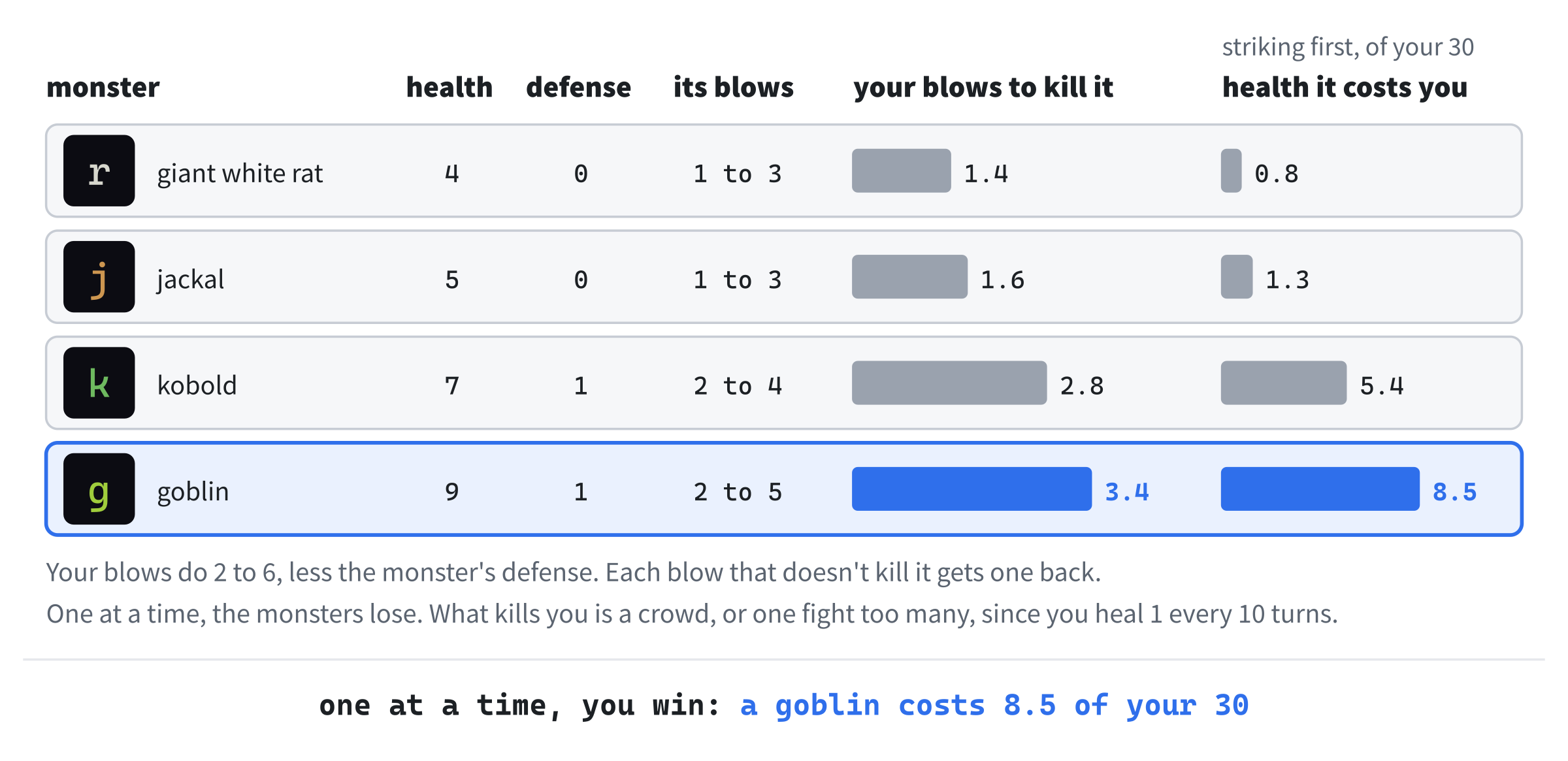
One at a time, the monsters lose, and not by a little: even a goblin costs less than a third of your 30 health. The danger is in the adding up. Two monsters at once cost more than the same two fights one after the other, since the second bites while you deal with the first. And each fight starts with whatever health the last one left you.
Who strikes first matters too. Step next to a monster, and it bites before you can swing, which gives a goblin one more bite: about 12 of your health, not 8.5. Let it step next to you, and the first blow is yours. For now, the only way to let a monster come is to walk somewhere else, but Chapter 11 adds a key for waiting where you stand.
So the way to survive is the way roguelike players always have: fight one at a time, and don't start fights you don't need. Try fighting in a corridor, where only one monster can reach you, and in the open, where two can. After a hard fight, walk away and explore for a while, and let your health come back. And when a goblin is chasing you and you're low, remember that it only chases while it can see you. A corner can save your life.
Understanding the Code
The player and the monsters are both built on Entity, which holds what they share: a place, health, a defense, and isAlive. A monster copies its health and its defense from its kind's row when it's made, and reads its damage from the row when it bites.
A bump into a monster is a blow. The function rollDamage rolls between the attacker's least and most damage, takes off the defender's defense, and never gives less than 1. The dead are taken away at once by removeDead, with std::erase_if and a lambda. Everything that takes a turn ends in finishTurn, which lets the monsters act, counts the turn, heals the player every tenth turn, and checks once for the player's death.
The side panel shows the player's health, with a bar from drawHealthBar that turns orange below half and red below a quarter. When the player is dead, drawFrame fades the dungeon and draws the death screen over it, and only a few keys work. Pressing R makes runGame return true, and main calls it again, for a new run with everything made afresh.
Experimenting
The numbers of a fight are all yours to change. Try each of these, and put each back afterward:
- A hero. Set
PLAYER_HPto300. Nothing on this floor can touch you, and the game gets dull fast. - Quick healing. Set
HEAL_EVERYto1. Now you heal every turn, and fights hardly matter, which shows how much slow healing does for the tension. - Armor. In
runGame, addplayer.defense = 2;belowplayer.maxHp = PLAYER_HP;. A rat's bites, of 1 to 3, now do 1 every time, since the rule never gives less than 1. - A tough goblin. Give the goblin a defense of
5. Your blows, of 2 to 6, now do 1 each, and it takes nine of them to kill one. - Glass jaw. Set
PLAYER_HPto5, and see how long a run lasts.
Every one of these is a change to a number, and that's the point of keeping them as named constants and table rows: the game's balance is in a few places you can find.
Common Errors and Fixes
If the game didn't build, or doesn't behave as described, the problem is probably one of these.
C2504: 'Entity': base class undefined, in Monster.h, followed by C2039: 'pos': is not a member of 'Monster', many times. The file still includes Common.h. Change it to #include "Entity.h".
C2039: 'pos': is not a member of 'Monster', many times, with more about hp, maxHp, and defense, but no C2504. The struct Monster doesn't inherit from Entity. Its first line should read struct Monster : Entity.
C3867: 'Entity::isAlive': non-standard syntax; use '&' to create a pointer to member. A call to isAlive is missing its parentheses, as in if (monster.isAlive). It should be monster.isAlive().
C2664: 'void `anonymous-namespace'::playerAttacks(const Player &,Monster &,Rng &,MessageLog &)': cannot convert argument 2 from 'Monster *' to 'Monster &'. The walking code passes the pointer itself. Pass the monster it points to, as *monster.
C2660: '`anonymous-namespace'::drawSidePanel': function does not take 4 arguments. The call in drawFrame still passes the old four. It should read drawSidePanel(renderer, glyphs, player, turn, seed, revealMap);.
C2562: '`anonymous-namespace'::runGame': 'void' function returning a value, and C2451: a conditional expression of type 'void' is not valid, in main. The first line of runGame still says void. It should say bool.
C4716: '`anonymous namespace'::runGame': must return a value. The line return playAgain; is missing from the end of runGame, below the loop.
The monsters you kill don't go away. A dead jackal stays where it fell, and each bump kills it again: "You kill the jackal! x3". Check that the walking code calls removeDead(monsters); after playerAttacks.
The turn count stays at 0, and you never heal. Check the last parameter of finishTurn. It must be int& turn, a reference. Without the &, the function counts a copy, and runGame's own count never moves.
The death screen is black, with no dungeon behind it. The shade is drawn without blending. Check the two calls to SDL_SetRenderDrawBlendMode in drawDeathScreen, before and after the shade.
You can still walk after you die. The branch for the keys after death must come above the walking code's branch, which catches every other key. If it's below, it never runs.
FAQ
Q) Why do the player and the monsters share a struct, rather than each having their own health?
A) Sharing means writing it once, and it lets code work on either. The damage rule reads any defender's defense the same way, and the health bar takes any Entity, so Chapter 9 can draw it for a monster with no new code. When Chapter 14 adds statuses, such as poison, they go into Entity too, and both the player and the monsters can suffer them.
Q) Why doesn't Entity have any virtual functions?
A) It doesn't need them. Nothing in the game calls one function and expects a player and a monster to do it differently: the player acts by keys, and the monsters in monstersAct. So Entity stays plain data, to the end of the book. Virtual functions arrive in Chapter 8, where two views, one of glyphs and one of tiles, draw the same game in different ways.
Q) Why does a monster copy its health from the table, but read its damage from the table each time?
A) Health changes, one monster at a time. A jackal you've wounded is wounded, and the next jackal isn't, so each needs its own. Damage never changes, and it's the same for every jackal, so the table's copy serves them all.
Q) Why does R start a new run by calling runGame again, rather than resetting everything?
A) A reset has to remember everything there is to reset, and every new thing the game gains would need adding to it. Forget one, and the old run leaks into the new one: a monster from the last dungeon, or a message in the log. A fresh call to runGame makes everything new, by the same code that made the first run, so it can't forget anything.
AI Exercise (Optional)
Many roguelikes have critical hits: now and then, a blow lands well and does double damage. If you'd like to add them with an AI's help, open your AI chatbot of choice, and try a prompt like this:
"I'm writing a roguelike in C++ with SDL 3. Damage is worked out by rollDamage(Rng& rng, int minDamage, int maxDamage, int defense), which keeps rng.roll(minDamage, maxDamage) - defense in a variable, damage, and returns SDL_max(1, damage), where rng.roll(low, high) gives a whole number from low to high. The player's blow is playerAttacks(const Player& player, Monster& monster, Rng& rng, MessageLog& log), which calls rollDamage, takes the damage off monster.hp, and adds a message such as 'You hit the jackal for 3.' with log.add. I'd like one blow in ten from the player to be a critical hit that does double damage, with its own message, such as 'You hit the jackal hard, for 6.'. Use rng for the chance, so that a seed still replays a run exactly. Show me the changes, with each curly brace on its own line, and explain them."
Notice what the preceding prompt does. It shows the AI the damage rule and the attack, with their parameters, so it can change them rather than invent new ones. The prompt also asks for the dice to come from rng, which keeps a run repeatable from its seed.
When the answer comes back, check it against your code. Does the critical hit double the damage before the defense comes off, or after, and which do you prefer? Is the "You kill" message still right when a critical hit kills? And with seed 42, does the fight with the jackal still go the same way? Probably not, since the extra roll for the chance moves every roll after it along, as in Figure 5.3.
Summary
The dungeon fights back now: the player and the monsters are built on one Entity, a bump is a blow, a turn plays out in a fixed order that ends with one check for death, and death ends the run, with the next one a key away. In Chapter 7, main.cpp gets the rethink it's been waiting for. It's nearly 800 lines long now, and one of its functions takes nine parameters. The whole game moves into a class, Game, and the long parameter lists go away.