
The dungeon has monsters in it now, with minds of their own, and nothing else. That's half a roguelike. The other half is the things you find: a potion that might save your life, a scroll that might show you the way out. Picking them up, carrying them, and deciding when to use them is where much of the game's thinking happens.
This chapter adds potions and scrolls. They lie on the floor, you pick them up with g and look through your pack with i, and you drink or read them.
There's a catch, and it's one of the oldest tricks in roguelikes. Each run, every kind of potion gets a color at random, and every kind of scroll a title of nonsense. You can't tell a potion of healing from a potion of strength until you've drunk one. The next image shows the end of the chapter, with a scroll that has just turned out to be a scroll of identify.

You read "a scroll titled VANQUA QUAGOR", not knowing what it was. It named itself as you read it, and now it asks which of your things to identify. The only other thing in the pack is "an amber potion", and a moment from now you'll know what amber means in this run.
Chapter 12 in the book's repository holds this chapter's finished project. The chapter carries on in your own project from Chapter 11, or from the book's Chapter 11 folder.In this chapter, we will:
- Describe kinds of item with a table, as the monsters' kinds are, and scatter items on the floor
- Draw them in both views, and name them in the log and the look panel
- Carry them in a pack of twenty lettered slots, shown in a dialog
- Drink potions and read scrolls: healing, strength, teleportation and magic mapping
- Hide every kind behind a random color or title, until it's used or identified
- Drop things, and choose what a scroll of identify reveals
There are five checkpoints along the way. Let's start with the plan.
Planning the Chapter
This chapter adds five files, and changes eleven, along with the tile atlas:
| File | Status | What it's for |
|---|---|---|
src/Item.h |
New | Kinds of item, a stack of items, and an item lying on the floor |
src/Inventory.h, src/Inventory.cpp |
New | The player's pack: twenty slots, lettered a to t |
src/Identification.h, src/Identification.cpp |
New | Each run's colors and titles, and which kinds the player knows |
src/View.h, src/GlyphView.h, src/GlyphView.cpp, src/TileView.h, src/TileView.cpp |
Changed | Drawing an item, in each view |
src/Common.h |
Changed | The colors of potions and scrolls |
src/Map.h, src/Map.cpp |
Changed | A cell the player knows of without seeing it, for magic mapping |
src/Player.h |
Changed | The pack, and strength |
src/Game.h, src/Game.cpp |
Changed | Placing items, picking them up, the pack's dialog, and using, dropping and identifying |
assets/tiles.png, assets/tiles.txt |
Changed | Pictures of a potion and a scroll |
| The other files | Unchanged |
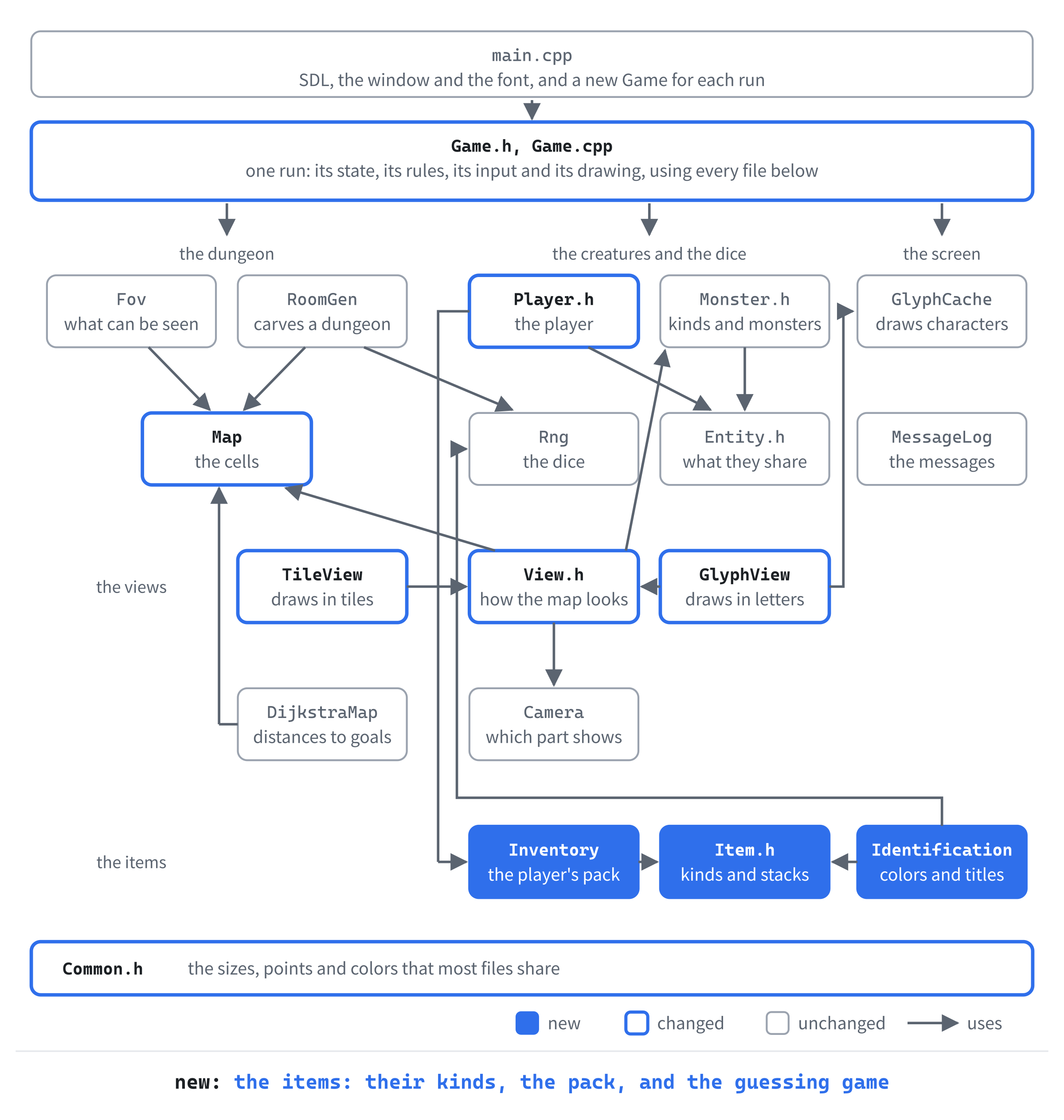
The next image shows how the files fit together at the end of the chapter. The three new modules get a row of their own: the player carries the pack, and the game asks the identification which name to give each item.
Items follow the monsters' pattern. A kind of item, such as a potion of healing, is a row in a table, ITEM_DEFS, as each kind of monster is a row in MONSTER_DEFS.
An item in the game points to its kind, and adds a count. Potions of the same kind stack: "3 potions of healing" take one slot of the pack. One lying on the floor adds its cell. The next image shows the three, and how they fit together.
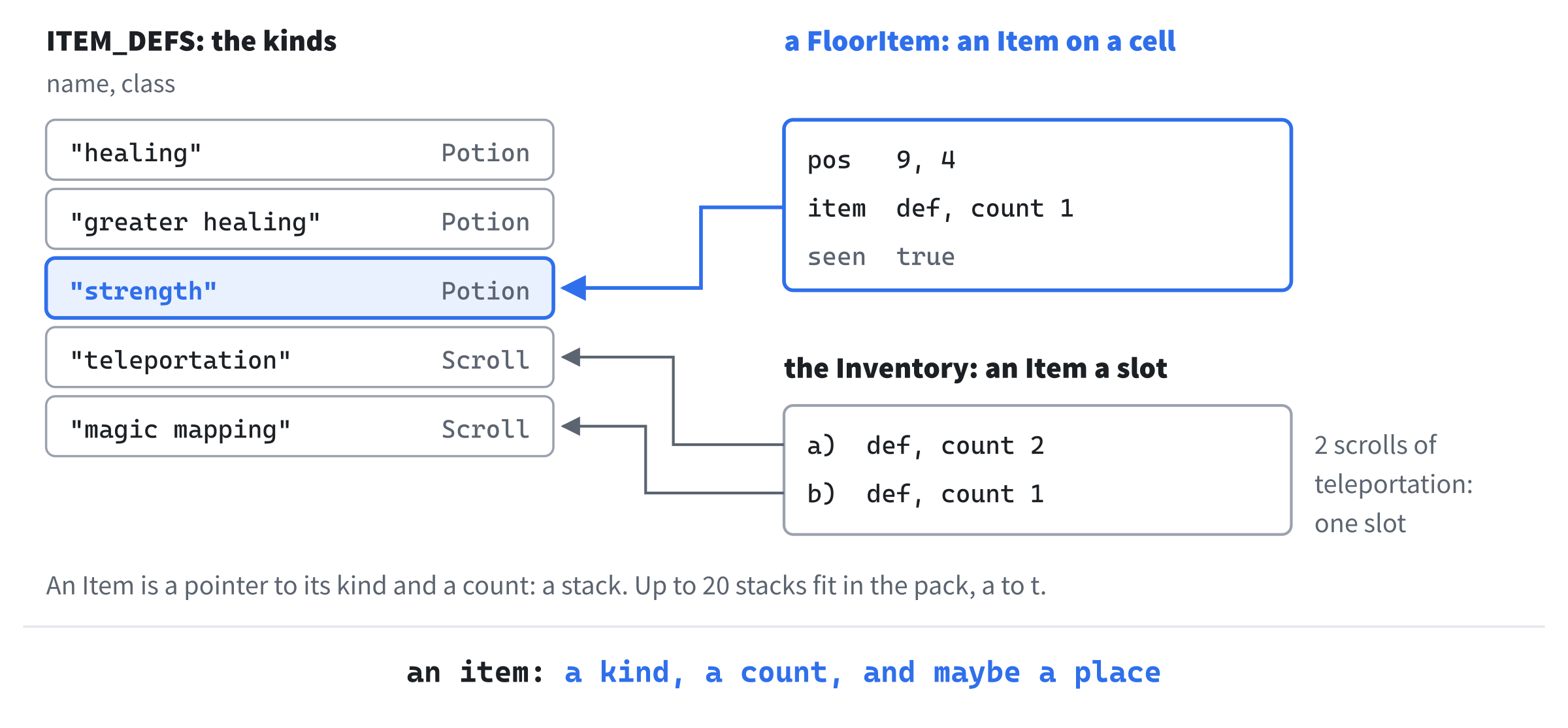
The pack is a list of stacks, and the floor a list of cells with stacks on them, so picking up and dropping move a stack from one list to the other.
The identification game sits on top of that, and changes only what the player is told. The game always knows that the amber potion is a potion of strength. The player doesn't, until they drink one, or read a scroll of identify. So the name of an item, everywhere the player sees it, comes from one function that asks what the player knows.
This chapter uses seed 2, the shrieker's seed from Chapter 11, since its first room has a potion and a scroll lying in it. We'll build it in five steps: items on the floor, picking them up, using them, the identification game, and dropping and identifying.
Things on the Floor
The first step puts items in the dungeon, and draws them. You can't do anything with them yet, but you can see them, and walk over them.
Kinds of Item
In Solution Explorer, right-click src, choose Add > New Item, and add a Header File (.h) called Item.h. Type its first part:
#pragma once
#include "Common.h"

// The kinds of thing an item can be. Chapter 13 adds weapons and armor
enum class ItemClass
{
    Potion,
    Scroll,
};

// What every item of one kind has in common. Chapter 16 moves these into
// a text file
struct ItemDef
{
    const char* name;   // the kind's own name, as in "healing"
    ItemClass itemClass;
};
The enum ItemClass says what sort of thing an item is. There are only potions and scrolls so far, and Chapter 13 adds weapons and armor. The struct ItemDef is what every item of one kind has in common, like MonsterDef: for now, its name and its class. Add the table of kinds below it:
// Every kind of item there is, so far. Chapter 14 adds the potions whose
// effects last (poison, regeneration and confusion) and the scroll of
// fear, and Chapter 21 the scrolls of lightning and fireball
inline constexpr ItemDef ITEM_DEFS[] = {
    { "healing", ItemClass::Potion },
    { "greater healing", ItemClass::Potion },
    { "strength", ItemClass::Potion },
    { "teleportation", ItemClass::Scroll },
    { "magic mapping", ItemClass::Scroll },
};
The table is inline constexpr, as MONSTER_DEFS is, so that every file that includes Item.h shares one table. Three potions and two scrolls is a modest start. Chapter 14 brings the potions whose effects last a while, and Chapter 21 the scrolls that need a target. Now add the item itself, below the table:
// Some items of one kind, as one stack: potions and scrolls of the same
// kind are carried together
struct Item
{
    const ItemDef* def = nullptr;
    int count = 1;
};

// An item lying in the dungeon, where it is, and whether the player has
// seen it there. A cell holds one at most
struct FloorItem
{
    Point pos;
    Item item;
    bool seen = false;
};
An Item is a stack: a pointer to its kind, and how many there are. A single potion is a stack of one. Lying somewhere, a stack is a FloorItem. A cell holds one at most, which keeps both the drawing and the picking up simple. And seen remembers whether the player has seen it there, for the drawing.
Scattering Them
The game places items as it places monsters. Open Game.h, and add the new header below #include "GlyphView.h":
#include "Item.h"Add a declaration below placeMonsters's:
void placeItems(const std::vector<SDL_Rect>& rooms);Then a group of functions for items, below monsterAt's declaration, with a blank line in between:
// Items
const FloorItem* floorItemAt(Point pos) const;
ItemLook itemLook(const Item& item) const;
Last, the items themselves, below monsters_:
std::vector<FloorItem> floorItems_;Open Game.cpp, and add the number of items to the unnamed namespace, below MONSTER_COUNT:
// How many items a new dungeon starts with
constexpr int ITEM_COUNT = 6;
Items mustn't be placed under the player, so the player must be placed first. In the constructor, find these lines:
placeMonsters(rooms);
player_.pos = RoomGen::centerOf(rooms.front());
Replace them with these lines:
player_.pos = RoomGen::centerOf(rooms.front());
placeMonsters(rooms);
placeItems(rooms);
Moving the player's line up changes nothing else. Finding the middle of the first room rolls no dice, so the monsters are placed exactly where they were. The items come last, and their rolls come after everything that was there before. Add placeItems below placeMonsters:
// Puts ITEM_COUNT items of random kinds on the floor of the rooms, any of
// them, one to a cell, but never on the player
void Game::placeItems(const std::vector<SDL_Rect>& rooms)
{
    int lastRoom = static_cast<int>(rooms.size()) - 1;
    int lastKind = static_cast<int>(std::size(ITEM_DEFS)) - 1;
    for (int i = 0; i < ITEM_COUNT; ++i)
    {
        for (int tries = 0; tries < 20; ++tries)
        {
            const SDL_Rect& room = rooms[rng_.roll(0, lastRoom)];
            Point pos = { room.x + rng_.roll(0, room.w - 1),
                          room.y + rng_.roll(0, room.h - 1) };
            if (pos != player_.pos && floorItemAt(pos) == nullptr)
            {
                FloorItem floorItem;
                floorItem.pos = pos;
                floorItem.item.def = &ITEM_DEFS[rng_.roll(0, lastKind)];
                floorItems_.push_back(floorItem);
                break;
            }
        }
    }
}
Each item gets twenty tries at a free cell, as each monster does. Unlike the monsters, items may lie in any room, the player's own included, so there may be something to find right where you start. Two helpers come next. Add them below placeItems:
// The item lying on a cell, or nullptr if there's none
const FloorItem* Game::floorItemAt(Point pos) const
{
    for (const FloorItem& floorItem : floorItems_)
    {
        if (floorItem.pos == pos)
        {
            return &floorItem;
        }
    }
    return nullptr;
}

// How an item looks: a potion is a !, and a scroll a ?
ItemLook Game::itemLook(const Item& item) const
{
    if (item.def->itemClass == ItemClass::Potion)
    {
        return { '!', Palette::POTION, "potion" };
    }
    return { '?', Palette::SCROLL, "scroll" };
}
In the preceding code, floorItemAt finds the item on a cell, or gives nullptr if there's none, as monsterAt does for monsters. It returns a pointer to const, since nothing that only looks should be able to change an item. And itemLook decides how an item is drawn: a potion is a !, and a scroll a ?, the characters Rogue used. It returns an ItemLook, which the views need, so that comes with the drawing.
Seeing Them
An item you've seen stays on your map, as the walls you've seen do. So each item keeps a flag, seen, and something must set it whenever an item comes into sight. Seeing is about to do more than work out the field of view, so it gets a function of its own, updateSight, called wherever Fov::compute was called for the player.
In Game.cpp, open Find and Replace with Ctrl+H. Type Fov::compute(map_, player_.pos, SIGHT_RADIUS); in the top box, and updateSight(); in the box below it, and click Replace All. It replaces two lines, in the constructor and in playerStep.
Do that before adding updateSight itself, since it calls Fov::compute too, and Replace All would turn that call into a call to itself. Now add it below playerAttacks:
// Works out what the player can see from where they stand, and notes
// every item that comes into sight: from then on, they know it's there
void Game::updateSight()
{
    Fov::compute(map_, player_.pos, SIGHT_RADIUS);
    for (FloorItem& floorItem : floorItems_)
    {
        if (map_.isVisible(floorItem.pos.x, floorItem.pos.y))
        {
            floorItem.seen = true;
        }
    }
}
Every item in sight is marked seen, and stays seen. Add the declaration to Game.h, below playerStep's:
void updateSight();Why a flag, rather than drawing whatever lies on a cell the player has explored? For now, the two come to the same thing, since an item on a cell you've explored was in sight when you explored it. They part in Chapter 21, where an arrow or a dart can land just out of sight, on a cell you explored long ago. You didn't see it fall, so it shouldn't be drawn there until you do.
Drawing Them
Each view draws an item in its own way, so drawing one is a job for View. Open View.h, and add the look below the includes:
// How an item looks: a character and its color in the glyph view, and a
// tile in the tile view, tinted with the same color
struct ItemLook
{
    char glyph;
    SDL_Color color;
    const char* tile;
};
The glyph view needs a character and its color, and the tile view a tile's name and a color to tint it with. One ItemLook serves both. Add the new pure virtual function below drawMonster's declaration:
// An item on the floor: lit if the player can see it, and otherwise as
// the player remembers it
virtual void drawItem(Point cell, const ItemLook& look,
                      bool lit) const = 0;
Every view must now draw items. Open GlyphView.h, and add a declaration below drawMonster's:
void drawItem(Point cell, const ItemLook& look, bool lit) const override;Open GlyphView.cpp, and add the function below drawMonster:
// A remembered item keeps its character, in the memory's cool color
void GlyphView::drawItem(Point cell, const ItemLook& look, bool lit) const
{
    drawCell(cell, look.glyph, lit ? look.color : Palette::MEMORY_WALL);
}
An item the player can't see at the moment is drawn as they remember it, in the cool color of remembered walls, as Chapter 4's memory draws the map. Now the tile view. Open TileView.h, and add the same declaration below drawMonster's:
void drawItem(Point cell, const ItemLook& look, bool lit) const override;Open TileView.cpp, and add the function below drawMonster:
// An item's tile is tinted with its color. A remembered one is tinted by
// the memory's tint too: the two are multiplied, as color mods multiply
void TileView::drawItem(Point cell, const ItemLook& look, bool lit) const
{
    SDL_Color tint = look.color;
    if (!lit)
    {
        tint.r = static_cast<Uint8>(tint.r * Palette::MEMORY_TINT.r / 255);
        tint.g = static_cast<Uint8>(tint.g * Palette::MEMORY_TINT.g / 255);
        tint.b = static_cast<Uint8>(tint.b * Palette::MEMORY_TINT.b / 255);
    }
    drawTile(cell, look.tile, tint);
}
The tile is drawn tinted with the item's color, so one picture of a flask serves every color of potion. A remembered item is darker as well. Chapter 8's color mod multiplies a tile's colors by the tint. So tinting by two colors at once means multiplying them together. Each part of the item's color is multiplied by the same part of the memory's tint, and divided by 255 to keep it in range.
The colors themselves go in the palette. Open Common.h, and add them at the end of Palette, below HIGHLIGHT:
// The colors of potions and scrolls
constexpr SDL_Color POTION = { 130, 190, 255, 255 };
constexpr SDL_Color SCROLL = { 235, 220, 175, 255 };
Every potion is this blue for now. In the fourth step, each kind of potion gets a color of its own. Back in Game.cpp, the game draws every item it knows of. Add drawItems below drawHighlight:
// The items on the floor that the player knows of: those in sight, lit,
// and those they've seen before, as they remember them. Items don't move,
// so a remembered one is still there. With revealMap_, all of them
void Game::drawItems() const
{
    for (const FloorItem& floorItem : floorItems_)
    {
        Point cell = floorItem.pos;
        bool visible = map_.isVisible(cell.x, cell.y);
        if (visible || floorItem.seen || revealMap_)
        {
            view_->drawItem(cell, itemLook(floorItem.item), visible);
        }
    }
}
An item in sight is drawn lit, and one the player has seen before is drawn as they remember it. Items don't move by themselves, so a remembered item is still there. A monster, though, is drawn only while you can see it. F1, the debugging aid, shows all of them. Add the declaration to Game.h, below drawMonsters's:
void drawItems() const;Items lie on the floor, under anything standing on them, so they're drawn before the monsters and the player. In Game.cpp, in draw, add this line above drawMonsters();:
drawItems();The tile view needs pictures of a potion and a scroll. From the book's repository, copy tiles.png and tiles.txt from the Chapter 12 folder's assets folder into your project's assets folder, in place of the old ones.
Checkpoint: Change the seed in Command Arguments to 2, press F5, and look around your room. A potion, !, lies two steps up and to the right of you, and a scroll, ?, three steps down and to the right. Walk onto the potion: nothing happens, since nothing knows how to pick it up. Press F1 to see the other four items on the floor, dimmed, since you haven't seen them yet. Then press F2, and the potion is a flask, tinted blue, as the next image shows.

Press F2 again to go back to the glyphs. The colors are the same in both views, since both come from itemLook.
Carrying Things
The second step names items, and lets you pick them up and look through your pack.
Names
The log and the look panel need an item's name. Add itemName to Game.cpp, below floorItemAt:
// An item's name, as the log and the inventory give it: "a potion of
// healing", or "3 scrolls of magic mapping"
std::string Game::itemName(const Item& item) const
{
    const ItemDef& def = *item.def;
    bool potion = def.itemClass == ItemClass::Potion;
    std::string noun = potion ? "potion" : "scroll";
    if (item.count > 1)
    {
        noun += "s";
    }

    std::string name = noun + " of " + def.name;

    if (item.count > 1)
    {
        return std::to_string(item.count) + " " + name;
    }
    return withArticle(name);
}
The name is built in three parts. The noun is "potion" or "scroll", made plural for a stack. The name is the noun and the kind's name: "potion of healing". Then a stack gets its count, and a single item an article, from Chapter 6's withArticle.
The middle part is one line for now. It's the part the identification game will change, using a member of Game, so itemName is a member too, rather than a helper in the unnamed namespace. Add its declaration to Game.h, below floorItemAt's:
std::string itemName(const Item& item) const;Walking onto an item should say what it is. In Game.cpp, in playerStep, add these lines directly below updateSight();:
// Arriving on an item, the player sees what it is
bool moved = step.x != 0 || step.y != 0;
const FloorItem* here = floorItemAt(player_.pos);
if (moved && here != nullptr)
{
    log_.add("You see " + itemName(here->item) + " here.");
}
The test of moved keeps the message from repeating. Chapter 11's wait key is a step of (0, 0) onto your own cell, and waiting on an item shouldn't announce it again every turn.
The look panel should name an item too. In drawLookPanel, add these lines below the creature's lines, with a blank line in between:
// An item on the cell, if the player has seen it there
const FloorItem* item = floorItemAt(*cell);
bool itemKnown = item != nullptr && (item->seen || revealMap_);
if (itemKnown)
{
    y = drawWrapped(capitalized(itemName(item->item)) + ".", y,
                    Palette::TEXT);
}
The item is named only if the player has seen it, by the same rule as drawItems. A cell can now hold a creature, an item and its ground. And an item's name can take two lines of the panel, so the panel needs more room. In the unnamed namespace, change constexpr int LOOK_PANEL_LINES = 5; to constexpr int LOOK_PANEL_LINES = 7;. Seven lines hold the most a cell can need: the line that says you're looking, two for a creature, its health bar, two for an item, and one for the ground.
The Pack
The player's pack is a class of its own, since it has rules: stacks of the same kind join, and there are only so many slots. Add a Header File (.h) called Inventory.h, and type it in:
#pragma once
#include <vector>   // std::vector, for the items
#include "Item.h"

// What the player carries: up to SLOTS stacks of items, each shown with a
// letter, from a to t
class Inventory
{
public:
    static constexpr int SLOTS = 20;

    // Adds the items, onto a stack of the same kind if there is one.
    // Returns false, and adds nothing, if they need a slot and there's
    // none free
    bool add(const Item& item);

    const std::vector<Item>& items() const;

    // The letter that goes with a slot: a for slot 0, b for 1, and so on
    static char letterFor(int slot);

private:
    std::vector<Item> items_;
};
In the preceding code, SLOTS is static, so it belongs to the class rather than to each pack. Other code can name it as Inventory::SLOTS. Twenty slots take the letters a to t, and letterFor gives a slot its letter. It's static too, since the letter depends only on the slot. Now add a C++ File (.cpp) called Inventory.cpp, and type its first part:
#include "Inventory.h"

bool Inventory::add(const Item& item)
{
    for (Item& carried : items_)
    {
        if (carried.def == item.def)
        {
            carried.count += item.count;
            return true;
        }
    }
    if (static_cast<int>(items_.size()) >= SLOTS)
    {
        return false;
    }
    items_.push_back(item);
    return true;
}
An item of a kind already in the pack joins its stack, by reference, so the count in the pack changes, not a copy's. Only an item of a new kind needs a slot. If there's none free, nothing is added and add says so. Add the rest below it:
const std::vector<Item>& Inventory::items() const
{
    return items_;
}

char Inventory::letterFor(int slot)
{
    return static_cast<char>('a' + slot);
}
A slot's letter is a character worked out from 'a', as Chapter 10 worked out digits from '0'. The letters are in order, so 'a' + 2 is 'c'. The player carries the pack. Open Player.h, and add its header below #include "Entity.h":
#include "Inventory.h"Then add the pack below killedBy, with a blank line in between:
// What they carry
Inventory inventory;
A new pack's vector is empty, so every run starts with nothing in it.
Picking Up
The g key picks up what you're standing on. Open Game.cpp, and add pickUp below playerAttacks:
// g picks up the item the player stands on, if the pack has room for it.
// That takes a turn; finding nothing there, or no room, doesn't
void Game::pickUp()
{
    log_.markRead();
    const FloorItem* here = floorItemAt(player_.pos);
    if (here == nullptr)
    {
        log_.add("There's nothing here to pick up.");
        return;
    }
    if (!player_.inventory.add(here->item))
    {
        log_.add("Your pack is full.");
        return;
    }

    log_.add("You pick up " + itemName(here->item) + ".");
    std::erase_if(floorItems_, [this](const FloorItem& floorItem)
    {
        return floorItem.pos == player_.pos;
    });
    finishTurn();
}
In the preceding code, finding nothing, or no room, is a message and nothing more, and takes no turn. A successful pick-up takes one, as a step does.
The item leaves the floor by std::erase_if, as dead monsters leave in Chapter 6, but this lambda's brackets aren't empty. It compares each item's cell with the player's, and player_ belongs to the game. So the lambda captures this, the pointer to the game, and can use the game's members through it. Add the declaration to Game.h, below playerStep's:
void pickUp();Nothing calls it yet. The g key comes next, with the key that opens the pack.
Looking Through the Pack
The pack is shown in a dialog over the map. While it's open, the keys mean something else, so it's a state of its own. In Game.h, add it to GameState, below Look:
Inventory,Add a declaration below handleLookKey's:
void handleInventoryKey(const SDL_KeyboardEvent& key);The new state's keys go to a function of their own. In Game.cpp, in handleKey, add a case to the switch, below Look's:
case GameState::Inventory:
    handleInventoryKey(key);
    break;
Now the keys that pick up and open the pack. Replace the comment above handlePlayingKey with this:
// Esc quits, g picks up, i shows the inventory, x starts looking around,
// and the moving keys move the player
In handlePlayingKey, add these lines below the check for Esc:
if (key.key == SDLK_G)
{
    pickUp();
    redraw_ = true;
    return;
}
if (key.key == SDLK_I)
{
    state_ = GameState::Inventory;
    redraw_ = true;
    return;
}
Add handleInventoryKey below handleLookKey:
// The inventory is showing. Esc puts it away
void Game::handleInventoryKey(const SDL_KeyboardEvent& key)
{
    if (key.key == SDLK_ESCAPE)
    {
        state_ = GameState::Playing;
        redraw_ = true;
    }
}
Only Esc puts the pack away, and not i again. In the next step, each item's letter will choose that item, and i is the ninth letter.
The death screen already draws a box over a faded map. The pack's dialog needs the same, in a different size, so that part of drawDeathScreen becomes a function of its own. In Game.h, find the death screen's declaration:
void drawDeathScreen() const;Replace it with these lines:
SDL_FRect drawDialog(float width, float height) const;
void drawDeathScreen() const;
void drawInventory() const;
In Game.cpp, replace the whole of drawDeathScreen with this:
// The death screen: a dialog that says what killed the player, and when
void Game::drawDeathScreen() const
{
    float centerX = MAP_VIEW_W / 2.0f;
    float row = glyphs_.lineHeight();
    SDL_FRect box = drawDialog(600.0f, 6 * row);

    float y = box.y + row;
    drawCentered("YOU HAVE DIED", centerX, y, Palette::DANGER);
    y += 2 * row;
    drawCentered("Killed by " + player_.killedBy + ", on turn " +
                 std::to_string(turn_) + ".", centerX, y, Palette::TEXT);
    y += row;
    drawCentered("Press R to play again, or Esc to quit.", centerX, y,
                 Palette::DIM_TEXT);
}
Its shade and its box move to drawDialog. That function returns the box, so the death screen knows where its text goes. Add drawDialog above drawDeathScreen:
// A dialog over the map: the dungeon fades, and a box of the given size
// sits in the middle of it. Returns the box, for the text to go in
SDL_FRect Game::drawDialog(float width, float height) const
{
    // The shade is see-through, so it's blended with what's under it
    SDL_SetRenderDrawBlendMode(renderer_, SDL_BLENDMODE_BLEND);
    setColor(Palette::SHADE);
    SDL_FRect mapView = { 0.0f, 0.0f, static_cast<float>(MAP_VIEW_W),
                          static_cast<float>(MAP_VIEW_H) };
    SDL_RenderFillRect(renderer_, &mapView);
    SDL_SetRenderDrawBlendMode(renderer_, SDL_BLENDMODE_NONE);

    SDL_FRect box = { (MAP_VIEW_W - width) / 2.0f,
                      (MAP_VIEW_H - height) / 2.0f, width, height };
    setColor(Palette::PANEL);
    SDL_RenderFillRect(renderer_, &box);
    setColor(Palette::FRAME);
    SDL_RenderRect(renderer_, &box);
    return box;
}
The first part is the death screen's shade, as it was. The box can now be any width and height, centered on the map view, and the death screen looks exactly as it did. Now the pack's dialog. Add drawInventory below drawDeathScreen, in two parts. Here's the first:
// The inventory: a dialog with a line for each stack the player carries,
// lettered from a, room for all 20 slots
void Game::drawInventory() const
{
    float row = glyphs_.lineHeight();
    SDL_FRect box = drawDialog(560.0f, (Inventory::SLOTS + 4) * row);
    float x = box.x + 2 * MARGIN;
    float y = box.y + row;
    glyphs_.drawText("INVENTORY", x, y, Palette::TEXT);
    float hintX = box.x + box.w - 2 * MARGIN - 12 * glyphs_.charWidth();
    glyphs_.drawText("Esc to close", hintX, y, Palette::DIM_TEXT);
The box is tall enough for every slot, so it never needs to grow. The title is on the left, and the hint on the right, 12 characters from the edge. That's the hint's own length. Add the rest below the first part:
    y += 2 * row;

    const std::vector<Item>& items = player_.inventory.items();
    if (items.empty())
    {
        glyphs_.drawText("Your pack is empty.", x, y, Palette::DIM_TEXT);
        return;
    }
    for (int slot = 0; slot < static_cast<int>(items.size()); ++slot)
    {
        std::string line = std::string(1, Inventory::letterFor(slot)) + ") " +
                           itemName(items[slot]);
        glyphs_.drawText(line, x, y, Palette::TEXT);
        y += row;
    }
}
Each line is the slot's letter, a parenthesis and the item's name: "a) a potion of strength". Last, the dialog goes on top of everything, as the death screen does. In draw, add these lines below the check that draws the death screen:
else if (state_ == GameState::Inventory)
{
    drawInventory();
}
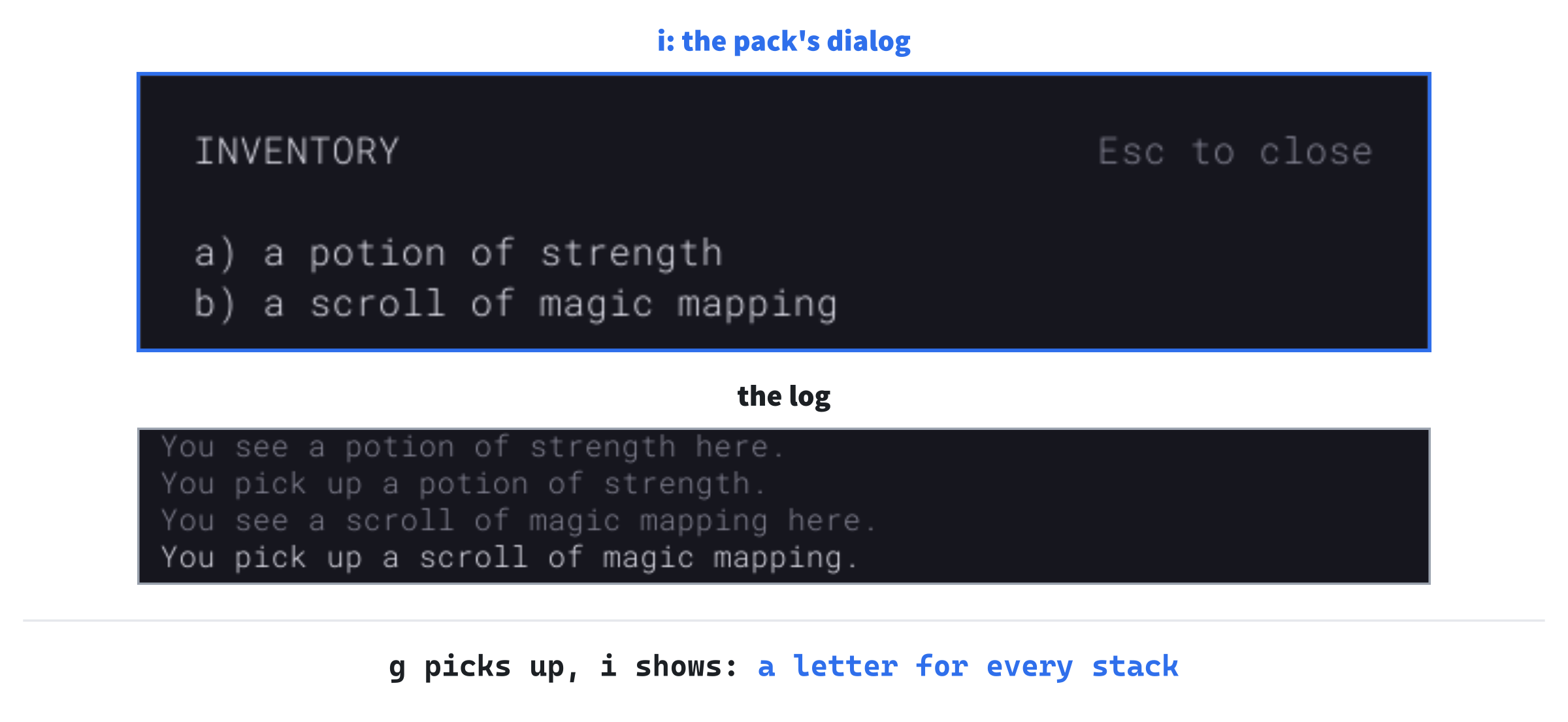
Checkpoint: Press F5, with seed 2, and step twice up and to the right, with u: "You see a potion of strength here." Press g: "You pick up a potion of strength." Step four down, with j, and once down and to the right, with n, onto the scroll. Pick it up too. Press i, and the pack lists them, as the next image shows.
Press Esc to close it.
Using Things
The third step makes items do something. In the pack, an item's letter uses it: you drink a potion, or read a scroll.
What Items Do
Each kind has an effect, and the game needs to know which. Open Item.h, and add the effects below ItemClass:
// What using an item does
enum class ItemEffect
{
    Heal,         // gives back some health
    HealFully,    // gives back all of it
    Strengthen,   // adds 1 to the player's strength, for good
    Teleport,     // moves the player somewhere at random
    MapFloor,     // shows the player the whole floor
};
Add the effect to ItemDef, below itemClass:
ItemEffect effect;Every row of the table now needs one. Find the rows of ITEM_DEFS:
{ "healing", ItemClass::Potion },
{ "greater healing", ItemClass::Potion },
{ "strength", ItemClass::Potion },
{ "teleportation", ItemClass::Scroll },
{ "magic mapping", ItemClass::Scroll },
Replace them with these rows:
{ "healing", ItemClass::Potion, ItemEffect::Heal },
{ "greater healing", ItemClass::Potion, ItemEffect::HealFully },
{ "strength", ItemClass::Potion, ItemEffect::Strengthen },
{ "teleportation", ItemClass::Scroll, ItemEffect::Teleport },
{ "magic mapping", ItemClass::Scroll, ItemEffect::MapFloor },
The kind's name and its effect are separate on purpose: the name is what the player is told, and the effect is what the code does. In Chapter 16, when the kinds move into a text file, a line such as effect = heal picks a kind's effect by name.
Choosing by Letter
A letter now uses an item. In Game.cpp, replace the whole of handleInventoryKey with this:
// The inventory is showing. An item's letter uses that item, and Esc puts
// the inventory away. (i can't close it: it's the letter of the ninth
// item.) SDL's keycodes for the letters run in order, from SDLK_A
void Game::handleInventoryKey(const SDL_KeyboardEvent& key)
{
    if (key.key == SDLK_ESCAPE)
    {
        state_ = GameState::Playing;
        redraw_ = true;
        return;
    }

    int slot = static_cast<int>(key.key) - static_cast<int>(SDLK_A);
    int count = static_cast<int>(player_.inventory.items().size());
    if (slot >= 0 && slot < count)
    {
        useItem(slot);
        redraw_ = true;
    }
}
In the preceding code, the key's keycode becomes a slot. SDL's keycodes for the letters are the letters themselves, in order. Taking away SDLK_A gives 0 for a, 1 for b, and so on. Any key that isn't a letter, or is the letter of an empty slot, gives a slot that's out of range, and does nothing.
The dialog should say so, in a row of its own. In drawInventory, add these lines below the hint's line, glyphs_.drawText("Esc to close", hintX, y, Palette::DIM_TEXT);:
y += row;
glyphs_.drawText("Press an item's letter to use it.", x, y,
                 Palette::DIM_TEXT);
The new row needs room, so the box needs one more. In drawInventory, change (Inventory::SLOTS + 4) to (Inventory::SLOTS + 5).
Using an item takes one from its stack. Open Inventory.h, and add a declaration below items's, with a blank line in between:
// Takes one item from a slot's stack, and the slot itself once the
// stack is gone, so the slots after it move up a letter
void removeOne(int slot);
Open Inventory.cpp, and add the function below items:
void Inventory::removeOne(int slot)
{
    --items_[slot].count;
    if (items_[slot].count == 0)
    {
        items_.erase(items_.begin() + slot);
    }
}
When the last of a stack goes, so does its slot, and erase moves every slot after it up a letter. The dialog always shows the letters as they are now.
Drinking and Reading
Open Game.h, and add three declarations below pickUp's:
void useItem(int slot);
void applyEffect(const ItemDef& def);
void teleportPlayer();
In Game.cpp, add useItem below pickUp:
// Drinks a potion, or reads a scroll, from the pack, which takes a turn
void Game::useItem(int slot)
{
    state_ = GameState::Playing;
    log_.markRead();

    // One of the stack, copied before it leaves the pack
    Item used = player_.inventory.items()[slot];
    used.count = 1;
    player_.inventory.removeOne(slot);

    bool potion = used.def->itemClass == ItemClass::Potion;
    log_.add((potion ? "You drink " : "You read ") + itemName(used) + ".");
    applyEffect(*used.def);
    finishTurn();
}
The item is copied out of the pack before one is taken away. Taking the last of a stack removes its slot, and a reference into the pack would then refer to whatever moved up into it. The copy's count is set to 1, so the log names one potion, not the rest of the stack. Then the effect plays, and the turn passes.
Now the effects, in two parts. Add the first below useItem:
// What an item does when it's used
void Game::applyEffect(const ItemDef& def)
{
    switch (def.effect)
    {
    case ItemEffect::Heal:
        player_.hp = SDL_min(player_.maxHp, player_.hp + HEAL_AMOUNT);
        log_.add("You feel better.");
        break;
    case ItemEffect::HealFully:
        player_.hp = player_.maxHp;
        log_.add("You feel much better.");
        break;
    case ItemEffect::Strengthen:
        ++player_.strength;
        log_.add("You feel stronger!");
        break;
    case ItemEffect::Teleport:
        teleportPlayer();
        log_.add("You are whisked away!");
        break;
A potion of healing gives back some health, and SDL_min stops it at the maximum. Greater healing gives back all of it. Add the amount of healing to the unnamed namespace, below HEAL_EVERY:
// How much health a potion of healing gives back (*tune*)
constexpr int HEAL_AMOUNT = 15;
Strength and teleportation get sections of their own, below. Add the rest of applyEffect below the first part:
    case ItemEffect::MapFloor:
        // Every cell of floor, and every wall beside floor, is known, and
        // every item lying on the floor is seen
        for (int y = 0; y < MAP_H; ++y)
        {
            for (int x = 0; x < MAP_W; ++x)
            {
                if (map_.at(x, y) == Terrain::Floor || map_.bordersFloor(x, y))
                {
                    map_.setExplored(x, y);
                }
            }
        }
        for (FloorItem& onFloor : floorItems_)
        {
            onFloor.seen = true;
        }
        log_.add("A map of the floor forms in your mind.");
        break;
    }
}
Magic mapping marks every cell of floor as explored, and every wall that borders floor. That's exactly what the player would know if they'd walked everywhere. It marks every item on the floor seen too, which is a choice, and the end of this part says why.
Stronger Blows
A potion of strength makes every blow you strike harder, for the rest of the run. Open Player.h, and add the strength below maxDamage, with a blank line in between:
// Added to the damage of every blow. Potions of strength raise it
int strength = 0;
The damage of a blow is worked out by rollDamage, which now takes a bonus. In Game.cpp, replace the whole of rollDamage with this:
// The damage one blow does: a roll from minDamage to maxDamage, plus
// the attacker's bonus, less the defender's defense, but never less
// than 1, so every hit hurts
int rollDamage(Rng& rng, int minDamage, int maxDamage, int bonus,
               int defense)
{
    int damage = rng.roll(minDamage, maxDamage) + bonus - defense;
    return SDL_max(1, damage);
}
The player's blows add their strength. In playerAttacks, change monster.defense); to player_.strength, monster.defense);. A monster's blows have no bonus, so in monsterAttacks, change maxDamage, player_.defense); to maxDamage, 0, player_.defense);.
The side panel shows the strength, in a row of its own below the health bar. In drawSidePanel, add these lines below the health bar:
glyphs_.drawText("Strength +" + std::to_string(player_.strength), x, y,
                 Palette::TEXT);
y += row;
Strength starts at zero, so until you drink a potion of strength, every blow does what it always did.
Somewhere Else
A scroll of teleportation moves you to a floor cell chosen at random, and you see from wherever you land. In Game.cpp, add teleportPlayer below updateSight:
// Moves the player to a free floor cell chosen at random
void Game::teleportPlayer()
{
    for (int tries = 0; tries < 100; ++tries)
    {
        std::optional<Point> cell = randomFloorCell();
        if (cell && *cell != player_.pos && monsterAt(*cell) == nullptr)
        {
            player_.pos = *cell;
            updateSight();
            return;
        }
    }
}
Chapter 11's randomFloorCell chooses the cell. Any cell with a monster on it, or the player's own, is tried again. A hundred tries that all fail would leave the player where they are, which on any real map won't happen. Landing, the player sees from the new cell at once, with updateSight.
The Whole Floor
Magic mapping needs a way to mark a cell explored without seeing it. Open Map.h, and add a declaration below setVisible's:
void setExplored(int x, int y);Open Map.cpp, and add the function below setVisible:
// A cell the player knows of without having seen it, as magic mapping
// shows them
void Map::setExplored(int x, int y)
{
    if (inBounds(x, y))
    {
        cells_[y * MAP_W + x].explored = true;
    }
}
With that, a mapped floor's cells are known, though the player has seen none of them. The floor's items are another matter. By the rule of seen, an item nobody saw stays hidden, so a map could show the items or leave them to be found. Ours shows them, since applyEffect marks them seen, and the next note says why.
Design note: What a map should show. For a while, our magic mapping showed only the floor, and kept its items hidden until the player saw them. Then a test bot of the kind Chapter 27 builds, which plays thousands of games, showed what that costs. Chapter 23's auto-explore stops once a floor is explored, and a mapped floor is explored at once. In 600 runs, the bot left 37 Amulets behind on mapped floors, without ever seeing them, and lost every one of those runs. A map that hid items made a whole floor's rooms worth walking anyway. So the scroll shows the items too.
Checkpoint: Press F5, with seed 2. Pick up the potion and the scroll, as before. Open the pack with i, and drink the potion with a: "You drink a potion of strength." and "You feel stronger!" The side panel shows "Strength +1". The scroll has moved up to slot a, so i and a again read it: "A map of the floor forms in your mind." The next image shows the floor, mapped.

The whole floor appears, in the colors of memory, with three more potions and a scroll lying in rooms you haven't seen. It's a long walk to any of them, and the map doesn't show the monsters on the way.
The Identification Game
So far, every item says what it is. The fourth step hides that, as Rogue did, and makes using an unknown item a gamble.
Colors and Titles
The looks of a run, and what the player knows, go in a class of their own. Add a Header File (.h) called Identification.h, and type its first part:
#pragma once
#include <SDL3/SDL.h>
#include <string>          // std::string, for the appearances' names
#include <unordered_map>   // std::unordered_map, for each kind's look
#include <unordered_set>   // std::unordered_set, for the kinds known
#include "Item.h"
#include "Rng.h"

// How the items of one kind look in a run, until the player knows what
// they are: a potion's color, or a scroll's title
struct Appearance
{
    std::string name;   // "crimson", or "ZELMOR THIKA"
    SDL_Color color;
};
An Appearance is how the items of one kind look in a run: a name, which is a potion's color or a scroll's title, and a color to draw them in. Add the class below it:
// The identification game. Each run, every kind of potion gets a color at
// random, and every kind of scroll a title of nonsense, so the player
// can't know a potion of healing by its look. Using one names its kind,
// for the rest of the run
class Identification
{
public:
    // Gives every kind a new look, and forgets every kind known
    void randomize(Rng& rng);

    const Appearance& appearanceOf(const ItemDef& def) const;
    bool isKnown(const ItemDef& def) const;
    void learn(const ItemDef& def);

private:
    std::unordered_map<const ItemDef*, Appearance> appearances_;
    std::unordered_set<const ItemDef*> known_;
};
The class keeps two things, each looked up by a kind's address, a const ItemDef*. Every kind is one row of ITEM_DEFS, so its address names it uniquely and never changes. A std::unordered_map holds each kind's appearance, found by its key as std::map finds things. But it finds them by hashing rather than sorting, which is quicker and keeps no order. The std::unordered_set beside it holds just keys, and answers whether one is there: here, whether the player knows a kind.
Now add a C++ File (.cpp) called Identification.cpp, and type its includes, with the unnamed namespace empty for now:
#include "Identification.h"
#include <iterator>   // std::begin, std::end and std::size, for the tables
#include <utility>    // std::swap, to shuffle the colors
#include <vector>     // std::vector, for the shuffled colors

namespace
{
}
The potions' colors go in the namespace. Add them inside it:
// The colors a potion can be. There must be at least as many as there
// are kinds of potion
struct PotionColor
{
    const char* name;
    SDL_Color color;
};

constexpr PotionColor POTION_COLORS[] = {
    { "crimson", { 220, 60, 60, 255 } },
    { "azure", { 80, 140, 255, 255 } },
    { "emerald", { 60, 200, 100, 255 } },
    { "golden", { 235, 195, 60, 255 } },
    { "violet", { 170, 100, 230, 255 } },
    { "murky", { 130, 115, 80, 255 } },
    { "silver", { 200, 200, 215, 255 } },
    { "amber", { 230, 140, 40, 255 } },
    { "pink", { 240, 130, 180, 255 } },
    { "teal", { 50, 180, 180, 255 } },
};
There are ten colors, each with its name, for three kinds of potion. Most colors go unused in any one run. Chapter 14's three new potions make six kinds, and there must always be at least as many colors as kinds. Add the scrolls' syllables, and a function that makes a word of them, below the colors:
// The scrolls' titles are made of these, run together into words
constexpr const char* SYLLABLES[] = {
    "ka", "zel", "mor", "thi", "van", "qua", "lor", "bex",
    "nim", "pho", "rax", "sul", "gor", "dra", "ush", "tel",
};

// A word of two or three syllables, in capitals
std::string makeWord(Rng& rng)
{
    int last = static_cast<int>(std::size(SYLLABLES)) - 1;
    int length = rng.roll(2, 3);
    std::string word;
    for (int i = 0; i < length; ++i)
    {
        word += SYLLABLES[rng.roll(0, last)];
    }
    for (char& c : word)
    {
        c = static_cast<char>(SDL_toupper(c));
    }
    return word;
}
A word is two or three syllables, each chosen at random from sixteen, so "ZEL" and "MOR" make "ZELMOR". The loop over the word takes each character by reference, char&, so it can change it in place. The function SDL_toupper gives a character's capital, as an int, which goes back into the char with a cast.
Now randomize, in three parts. Add the first below the namespace:
void Identification::randomize(Rng& rng)
{
    appearances_.clear();
    known_.clear();

    // The colors in a random order, shuffled the way a pack of cards is:
    // each place from the last to the second swaps with one at random at
    // or before it. Then each kind of potion takes the next color
    std::vector<PotionColor> colors(std::begin(POTION_COLORS),
                                    std::end(POTION_COLORS));
    for (int i = static_cast<int>(colors.size()) - 1; i > 0; --i)
    {
        std::swap(colors[i], colors[rng.roll(0, i)]);
    }
The colors are copied into a std::vector, from std::begin to std::end of the table, and shuffled. The shuffle is the one a careful card player does, known as the Fisher-Yates shuffle. It works from the last place down to the second, and swaps each with a place chosen at random at or before it, itself included. Every order of the colors is then exactly as likely as every other. The next image shows it on five colors.
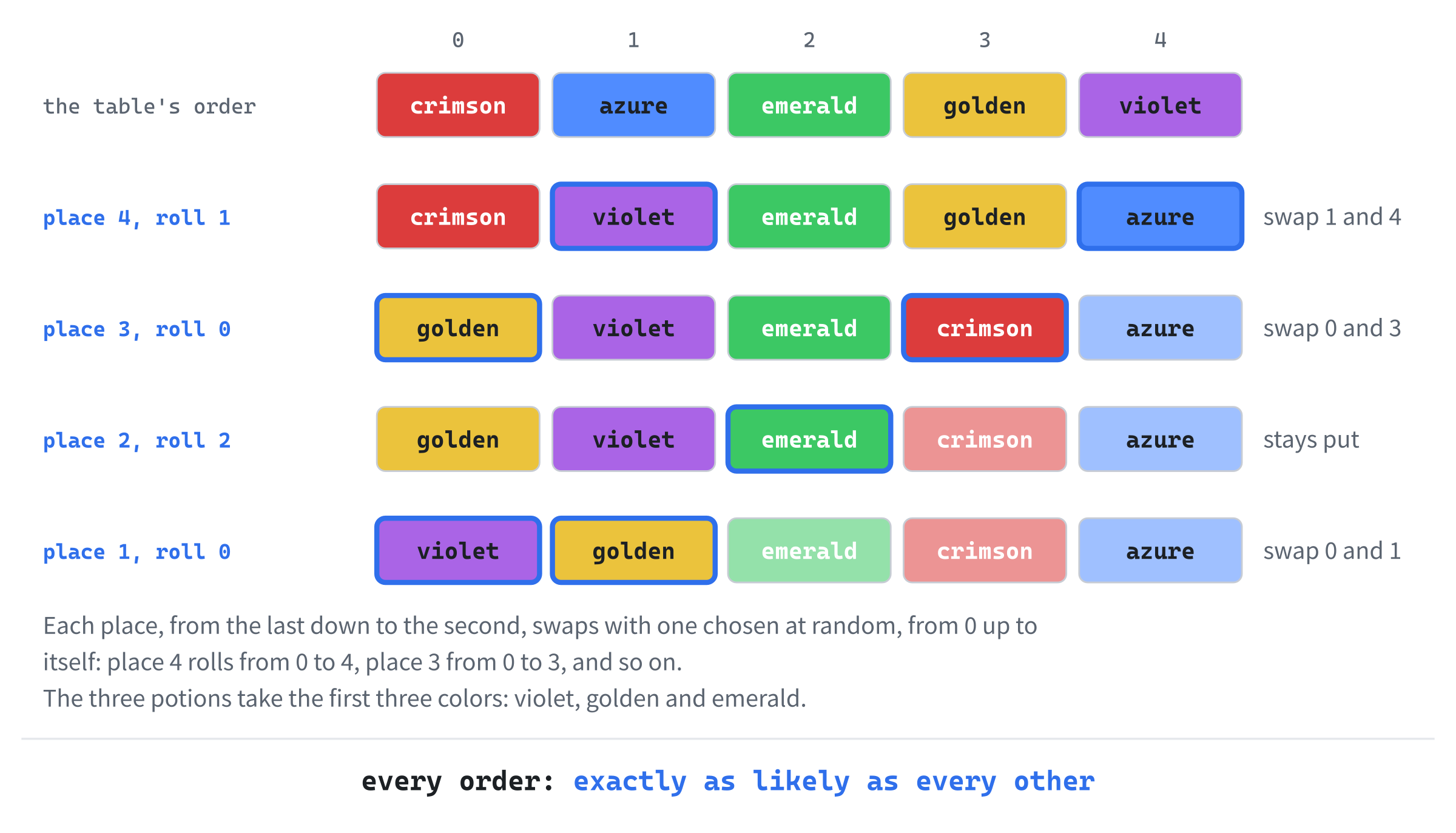
Each kind of potion will take the next color of the shuffled list, so no two share one.
The scrolls have a problem the potions don't: two kinds could, by chance, get the same title. Then the player could never tell them apart. Add a test for that below the first part, with a blank line in between:
// True if some kind already has this title
auto taken = [this](const std::string& title)
{
    for (const auto& entry : appearances_)
    {
        if (entry.second.name == title)
        {
            return true;
        }
    }
    return false;
};
The test, taken, is a lambda that captures this, since it reads the class's appearances_. Each entry of a std::unordered_map is a pair, of the key, first, and the value, second. Here, entry.second.name is a kind's look so far. Add the rest of randomize below it, with a blank line in between:
    int nextColor = 0;
    for (const ItemDef& def : ITEM_DEFS)
    {
        if (def.itemClass == ItemClass::Potion)
        {
            const PotionColor& color = colors[nextColor];
            appearances_[&def] = { color.name, color.color };
            ++nextColor;
        }
        else
        {
            // Every scroll is the same color: only its title tells it
            // apart, so no two kinds may share one
            std::string title = makeWord(rng) + " " + makeWord(rng);
            while (taken(title))
            {
                title = makeWord(rng) + " " + makeWord(rng);
            }
            appearances_[&def] = { title, Palette::SCROLL };
        }
    }
}
In the preceding code, every kind gets its look, in the table's order. Each kind of potion gets the next shuffled color, and each kind of scroll a title of two words, tried again for as long as another kind has it. A map's square brackets add a key if it isn't there, so appearances_[&def] makes the entry and fills it in. Last, the three questions the game asks. Add them below randomize:
const Appearance& Identification::appearanceOf(const ItemDef& def) const
{
    return appearances_.at(&def);
}

bool Identification::isKnown(const ItemDef& def) const
{
    return known_.contains(&def);
}

void Identification::learn(const ItemDef& def)
{
    known_.insert(&def);
}
The function at finds a key's value, like the square brackets, but never adds one. Asked for a key that isn't there, it throws an exception, and the game stops with a message. That's better than a made-up look. Every kind gets a look in randomize, so that never happens. And contains, new in C++20, says whether a set holds a key.
Unknown Names
The game keeps one identification for the run. Open Game.h, and add the header below #include "GlyphView.h":
#include "Identification.h"Add the identification below floorItems_:
Identification identification_;The looks are dealt out once the dungeon is made. In Game.cpp, in the constructor, add this line below placeItems(rooms);:
identification_.randomize(rng_);Its rolls come after every roll that places things, so the monsters and the items are where they were. Now the name. In Game.cpp, in itemName, find the line that makes the name:
std::string name = noun + " of " + def.name;Replace it with these lines:
std::string name;
std::string look = identification_.appearanceOf(def).name;
if (identification_.isKnown(def))
{
    name = noun + " of " + def.name;
}
else if (potion)
{
    name = look + " " + noun;
}
else
{
    name = noun + " titled " + look;
}
The string look holds the kind's appearance in this run. A known kind goes by its name, an unknown potion by its color, and an unknown scroll by its title: "potion of healing", "amber potion", "scroll titled VANQUA QUAGOR". The count or the article still comes last, and that matters now: a color can start with a vowel, and "an amber potion" is right, where "a amber potion" isn't. Replace the comment above itemName with this:
// An item's name, as the log and the inventory give it. A kind the player
// knows goes by its name: "a potion of healing", "3 scrolls of magic
// mapping". One they don't goes by its look: "a crimson potion", "a
// scroll titled ZELMOR THIKA"
The next image shows how a name is chosen, with seed 2's looks.

The game always knows what an item is. The identification only decides which of the two names you see.
Each potion is drawn in its own color now. Replace the whole of itemLook with this:
// How an item looks: a potion is a ! in its color, and a scroll a ?
ItemLook Game::itemLook(const Item& item) const
{
    SDL_Color color = identification_.appearanceOf(*item.def).color;
    if (item.def->itemClass == ItemClass::Potion)
    {
        return { '!', color, "potion" };
    }
    return { '?', color, "scroll" };
}
That leaves the palette's potion color unused. Open Common.h, and find these lines:
// The colors of potions and scrolls
constexpr SDL_Color POTION = { 130, 190, 255, 255 };
Replace them with this line:
// Scrolls, which are all this color. Potions have colors of their ownLast, using an item teaches you its kind. In Game.cpp, replace the comment above useItem with this:
// Drinks a potion, or reads a scroll, from the pack, which takes a turn.
// Its kind is known from then on, so the player learns what it was, and
// then sees what it does
Then add these lines below the line that logs what you drink or read:
if (!identification_.isKnown(*used.def))
{
    identification_.learn(*used.def);
    log_.add("It was " + itemName(used) + ".");
}
The name is logged twice, before and after learning: "You drink an amber potion." then "It was a potion of strength." The kind is learned before its effect plays, so the log tells you what it was before it tells you what it did.
Checkpoint: Press F5, with seed 2, and step onto the potion: "You see an amber potion here." Pick it up, and the scroll: "You pick up a scroll titled KALORSUL DRAUSH." The pack lists "an amber potion" and "a scroll titled KALORSUL DRAUSH". Drink the potion: "You drink an amber potion.", "It was a potion of strength." and "You feel stronger!" Press F1, and look at the other potions on this floor with x, or with the mouse: the amber ones say "A potion of strength." Run again with a different seed, and the colors and titles are all different.
Design note: The guessing game. Rogue invented it. Each game, it gave every kind of potion a different color, chosen at random from 27, from amber to yellow. Every kind of scroll got a title strung together from random syllables. Rings got gemstones, and wands and staffs got metals and woods. The same color could heal you in one game and hurt you in the next, so every unknown potion was a decision: drink it now, while you're safe, or keep it for when you're desperate, and hope. Rogue let you give an unknown kind a name of your own, to remember what you suspected. Ours is smaller: ten colors, and titles of two words.
That's a real choice now, every time you find something new. The last step gives you another way to learn: a scroll that tells you what something is.
Dropping and Identifying
The fifth step adds two more uses for the pack: choosing something to drop, and choosing something for a scroll of identify to name. The dialog and the choosing by letter are the same, so the game remembers why the pack was opened.
Opened for a Reason
Open Game.h, and add the reasons below GameState:
// What choosing an item in the inventory does with it
enum class InventoryAction
{
    Use,
    Drop,
    Identify,
};
Add the reason the pack is open below state_:
InventoryAction inventoryAction_ = InventoryAction::Use;Then find the declaration of useItem:
void useItem(int slot);Replace it with these lines, which add three more around it:
void openInventory(InventoryAction action);
void useItem(int slot);
void dropItem(int slot);
void identifyItem(int slot);
In Game.cpp, add openInventory below pickUp:
// Opens the inventory, for using an item, dropping one or identifying one.
// There's no point in choosing something to drop from an empty pack
void Game::openInventory(InventoryAction action)
{
    if (action == InventoryAction::Drop &&
        player_.inventory.items().empty())
    {
        log_.markRead();
        log_.add("You have nothing to drop.");
        redraw_ = true;
        return;
    }
    state_ = GameState::Inventory;
    inventoryAction_ = action;
    redraw_ = true;
}
Replace the comment above handlePlayingKey with this:
// Esc quits, g picks up, i shows the inventory, d drops, x starts looking
// around, and the moving keys move the player
In handlePlayingKey, find the check for i:
if (key.key == SDLK_I)
{
    state_ = GameState::Inventory;
    redraw_ = true;
    return;
}
Replace it with these lines:
if (key.key == SDLK_I)
{
    openInventory(InventoryAction::Use);
    return;
}
if (key.key == SDLK_D)
{
    openInventory(InventoryAction::Drop);
    return;
}
A letter in the pack now does whatever the pack was opened for. Replace the comment above handleInventoryKey with this:
// The inventory is showing. An item's letter chooses that item, for
// whatever the inventory was opened for, and Esc puts it away. (i can't
// close it: it's the letter of the ninth item.) SDL's keycodes for the
// letters run in order, from SDLK_A
In handleInventoryKey, find the test of the slot:
if (slot >= 0 && slot < count)
{
    useItem(slot);
    redraw_ = true;
}
Replace it with these lines:
if (slot < 0 || slot >= count)
{
    return;
}
switch (inventoryAction_)
{
case InventoryAction::Use:
    useItem(slot);
    break;
case InventoryAction::Drop:
    dropItem(slot);
    break;
case InventoryAction::Identify:
    identifyItem(slot);
    break;
}
redraw_ = true;
The dialog says what a letter will do, in its title and its hint. In drawInventory, find the title:
glyphs_.drawText("INVENTORY", x, y, Palette::TEXT);Replace it with these lines:
// The title and the hint say what choosing an item will do
std::string title = "INVENTORY";
std::string hint = "Press an item's letter to use it.";
if (inventoryAction_ == InventoryAction::Drop)
{
    title = "DROP WHICH?";
    hint = "Press an item's letter to drop it.";
}
else if (inventoryAction_ == InventoryAction::Identify)
{
    title = "IDENTIFY WHICH?";
    hint = "Press the letter of something you don't know.";
}
glyphs_.drawText(title, x, y, Palette::TEXT);
Then find the hint's line:
glyphs_.drawText("Press an item's letter to use it.", x, y,
                 Palette::DIM_TEXT);
Replace it with this line:
glyphs_.drawText(hint, x, y, Palette::DIM_TEXT);Opened with i, the pack uses an item, as before, and says so.
Dropping
A cell holds one stack, so a dropped stack can join one of its own kind there, but not lie beside another kind. Taking a whole stack is a job for the pack. Open Inventory.h, and add a declaration below removeOne's, with a blank line in between:
// Takes a slot's whole stack out of the pack, and returns it
Item removeStack(int slot);
Open Inventory.cpp, and add it below items:
Item Inventory::removeStack(int slot)
{
    Item stack = items_[slot];
    items_.erase(items_.begin() + slot);
    return stack;
}
In Game.cpp, add dropItem below useItem, in two parts. Here's the first:
// Drops a whole stack from the pack where the player stands, which takes a
// turn. A cell holds one stack, so it can only join one of its own kind
void Game::dropItem(int slot)
{
    state_ = GameState::Playing;
    log_.markRead();
    const FloorItem* here = floorItemAt(player_.pos);
    const ItemDef* kind = player_.inventory.items()[slot].def;
    if (here != nullptr && here->item.def != kind)
    {
        log_.add("There's already something here.");
        return;
    }
A cell that holds another kind refuses, and that takes no turn. Add the rest below the first part, with a blank line in between:
    Item stack = player_.inventory.removeStack(slot);
    log_.add("You drop " + itemName(stack) + ".");
    if (here != nullptr)
    {
        for (FloorItem& floorItem : floorItems_)
        {
            if (floorItem.pos == player_.pos)
            {
                floorItem.item.count += stack.count;
            }
        }
    }
    else
    {
        FloorItem dropped;
        dropped.pos = player_.pos;
        dropped.item = stack;
        dropped.seen = true;
        floorItems_.push_back(dropped);
    }
    finishTurn();
}
In the preceding code, the stack leaves the pack, and either joins the stack on the floor or lies there as a new FloorItem. The new one is already seen, since you put it there. To join it, the loop finds the floor's stack again, by reference. The pointer here won't do, since it points to a const item, which can't be changed.
The Scroll of Identify
The last kind of item is the scroll of identify. Open Item.h, and add its effect at the end of ItemEffect:
Identify, // names the kind of an item the player choosesAdd the scroll at the end of ITEM_DEFS:
{ "identify", ItemClass::Scroll, ItemEffect::Identify },Reading it opens the pack for choosing, if there's anything left to learn. In Game.cpp, in applyEffect, add a case at the end of the switch, below MapFloor's:
case ItemEffect::Identify:
    // The player chooses what to identify, if there's anything left
    // to learn in the pack
    for (const Item& item : player_.inventory.items())
    {
        if (!identification_.isKnown(*item.def))
        {
            openInventory(InventoryAction::Identify);
            log_.add("Choose an item to identify.");
            return;
        }
    }
    log_.add("You already know everything you carry.");
    break;
The pack opens for identifying only if it holds something unknown, and return leaves right away, with the message given. If there's nothing to learn, the scroll is spent, which is the gamble's risk. Then add identifyItem below dropItem:
// The scroll of identify's choice: learns the kind of the item chosen.
// The scroll took the turn, so this takes none
void Game::identifyItem(int slot)
{
    const Item& chosen = player_.inventory.items()[slot];
    if (identification_.isKnown(*chosen.def))
    {
        log_.add("You already know what that is.");
        return;
    }
    identification_.learn(*chosen.def);
    log_.add("You identify " + itemName(chosen) + ".");
    state_ = GameState::Playing;
}
Reading the scroll took the turn, so choosing takes none. Choosing something already known only says so, and leaves the pack open. Putting the pack away with Esc, without choosing, wastes the scroll, and the player should be told so. In handleInventoryKey, add these lines inside the check for Esc, above state_ = GameState::Playing;:
// Putting the pack away unchosen wastes a scroll of identify
if (inventoryAction_ == InventoryAction::Identify)
{
    log_.add("The scroll's magic is wasted.");
}
Last, the dialog dims what you already know, while you're choosing. In drawInventory, add these lines below itemName(items[slot]);:
// Choosing what to identify, the things already known are dim
bool known = identification_.isKnown(*items[slot].def);
bool dim = inventoryAction_ == InventoryAction::Identify && known;
Then, in drawInventory, change (line, x, y, Palette::TEXT) to (line, x, y, dim ? Palette::DIM_TEXT : Palette::TEXT).
Checkpoint: Press F5, with seed 2, and pick up the potion and the scroll, as before. The new kind changed the dice, and the scroll is "a scroll titled VANQUA QUAGOR" now. Open the pack with i, and read the scroll with b: "It was a scroll of identify." and "Choose an item to identify." The dialog's title is "IDENTIFY WHICH?". Choose the potion, with a: "You identify a potion of strength."
Now press d, and the dialog asks "DROP WHICH?". Choose the potion again: "You drop a potion of strength." Step off it and back on, and "You see a potion of strength here."
Playing the Game
Every unknown potion is a question now. Drinking one while you're healthy and safe is the cheapest way to learn what it is. Once you know a color, every potion of that color is known too, for the rest of the run. Saving potions for an emergency is tempting, but a potion you've never tried might not be the one you need.
Scrolls are riskier, since a scroll of teleportation read at the wrong moment can drop you among sleeping monsters. A scroll of identify is best kept until you hold something worth knowing about. And strength is worth having early: a potion of strength adds to every blow for the rest of the run.
Understanding the Code
Kinds of item are rows of ITEM_DEFS, in Item.h: a name, a class and an effect. An Item is a stack of one kind. A FloorItem is an item lying on a cell, with a flag that says whether the player has seen it. Whenever an item comes into sight, updateSight sets its flag. The function placeItems scatters six over a new floor, and drawItems draws those the player knows of, through each view's drawItem.
The player's Inventory holds up to twenty stacks, lettered a to t: add joins a stack of the same kind, removeOne takes one, and removeStack a whole stack. The pack is shown in a dialog, GameState::Inventory. While it's open, inventoryAction_ says whether a letter uses an item, drops it, or identifies it. Using an item copies one out of the pack, learns its kind, and plays its effect, in applyEffect's switch.
The Identification class gives every kind a look for the run. Each kind of potion gets a color, shuffled by Fisher-Yates, and each kind of scroll a title of two words, made from syllables and never shared. It keeps the looks in a std::unordered_map and the kinds known in a std::unordered_set, both keyed by the kind's address. The game's itemName asks it what the player knows, and names a kind by its name or by its look.
Experimenting
Try each of these, and put each back afterward:
- Plenty. Set
ITEM_COUNTto40. Every room is full of things, and you'll learn every kind in a few minutes. - Generous healing. Set
HEAL_AMOUNTto100. A potion of healing is now as good as one of greater healing, and the difference between them is lost. - A short pack. Set
SLOTSto3. Picking up a fourth kind says "Your pack is full.", and you have to choose what to leave behind. - Everything known. In the constructor, below
identification_.randomize(rng_);, add a loop:for (const ItemDef& def : ITEM_DEFS) { identification_.learn(def); }. Every item says what it is, and the game is much less interesting.
The last one shows what the identification game adds. Without it, finding a potion is good news and nothing more; with it, it's a decision.
Common Errors and Fixes
If the game didn't build, or doesn't behave as described, the problem is probably one of these.
C2259: 'TileView': cannot instantiate abstract class. A view is missing its drawItem. The one in View is pure virtual, so a view that doesn't override it can't be made. If it's GlyphView's that's missing, the message names GlyphView.
C3668: 'GlyphView::drawItem': method with override specifier 'override' did not override any base class methods, followed by C2259. The override doesn't match View's exactly, so it overrides nothing. Here its const is missing.
C3493: 'this' cannot be implicitly captured because no default capture mode has been specified, followed by more about player_. The lambda in pickUp has empty brackets. It uses player_, a member, so it must capture this, as [this].
C2724: 'Inventory::letterFor': 'static' should not be used on member functions defined at file scope. The static belongs on the declaration, in Inventory.h, and not on the definition in Inventory.cpp.
C2440: 'initializing': cannot convert from 'const _Ty' to 'Item &', in useItem. The item must be a copy, Item used. The pack's items gives a const vector, so a plain reference can't refer into it. Even a const reference would go wrong, since taking the last of a stack removes the slot it refers to.
C2039: 'unordered_set': is not a member of 'std', in Identification.h, followed by many more. The include for <unordered_set> is missing.
C4717: 'Game::updateSight': recursive on all control paths, function will cause runtime stack overflow, a warning, and the game crashes as it starts. Replace All was run after updateSight was added, and turned its call to Fov::compute into a call to itself. Put Fov::compute(map_, player_.pos, SIGHT_RADIUS); back as its first line.
The game stops with an exception, std::out_of_range, "invalid unordered_map<K, T> key", as soon as an item comes into sight. The function appearanceOf asked for a kind that has no look. The call to identification_.randomize(rng_); is missing from the constructor.
A potion or a scroll is a pink square in the tile view. The old tiles.txt has no pictures called potion and scroll. Copy tiles.png and tiles.txt from the Chapter 12 folder.
FAQ
Q) Why does a stack drop all at once?
A) To keep the pack simple. Dropping one of a stack would need a way to choose how many, and dropping things is rare enough that a whole stack will do.
Q) Why can't the pack hold more than twenty stacks?
A) A limit makes choices: with room for everything, you'd never decide what to leave behind. Twenty is roomy, since potions or scrolls of one kind share a slot, and the dialog is tall enough to list all twenty. Rogue's pack held 23 items.
Q) Why are the looks keyed by the kind's address, rather than its name?
A) The address is the kind itself: no two kinds share one, and comparing two addresses is quicker than comparing two names. Every kind is a row of a table that stays put while the game runs, so its address never changes.
AI Exercise (Optional)
Rogue let you name an unknown kind yourself, to remember what you suspected. If you'd like to add that with an AI's help, open your AI chatbot of choice, and try a prompt like this:
"I'm writing a roguelike in C++ with SDL 3. A class, Identification, has an std::unordered_map<const ItemDef*, Appearance> appearances_ and an std::unordered_set<const ItemDef*> known_, with isKnown(const ItemDef& def) and learn(const ItemDef& def). Another class, Game, has std::string itemName(const Item& item) const, which names an unknown potion by its color, as in 'an amber potion'. I'd like the player to be able to give an unknown kind a name of their own, such as 'maybe healing', shown after its look: 'an amber potion (maybe healing)'. Add a std::unordered_map<const ItemDef*, std::string> for the names to Identification, with functions to set and get one. Show me the code, with each curly brace on its own line, and explain it."
Notice what the preceding prompt does. It describes the classes and their members exactly. And it leaves out how the player types the name, which would need text input, a new state, and much more. One step at a time is easier to check.
When the answer comes back, check that a kind the player knows ignores its name, and that the names are cleared at the start of each run, in randomize. Then, for a first test, give the potion of strength a name in the constructor, and look at it in the pack.
Summary
Potions and scrolls now lie on the floor, in both views. You can pick them up, look through your pack, drink, read, drop and identify. Each kind is a row of a table, and each run hides it behind a shuffled color or a made-up title. So using something unknown is a gamble, and a scroll of identify is a way to win it. In Chapter 13, the pack gets weapons and armor: things you wield and wear, and that change how you fight.