
This is the big one. Everything the book has taught—variables, flow control, loops, functions, collections, classes, inheritance, interfaces, threads, delta time, sprites, animation, sound—comes together here, in one complete, polished game.
We are building an endless runner. Our animated hero sprints across a scrolling grassy world. Walls rush in from the right. Tap the screen and the hero leaps; time it well and you sail over the wall, time it badly and you crash in a heap. The longer you survive, the faster it gets, and your score climbs with the distance. It is a genuine, playable arcade game—the kind of thing you might actually find on a phone—and you are about to build every line of it.
Best of all, look how little is truly new. We have the threaded game-loop engine from Chapter 21. We have the Atlas and sprite animation from Chapter 22. We have object-oriented design from Act 3 and frame-rate-independent movement from delta time. This chapter is mostly assembly: bolting together parts you already understand into something far greater than any one of them. That is exactly how real games are made.
Code for this chapter: all five files are in the
Chapter 23folder of the accompanying repository at github.com/EliteIntegrity/Learning-Kotlin-by-Building-Android-Games.
In this chapter, we will:
- Set up the Endless Runner project across five files.
- Give our
Playerjump physics on top of its run animation. - Build a
Wallobstacle that scrolls in from the right. - Scroll the ground to create a sense of speed.
- Spawn walls, detect collisions, and handle game over and restart.
- Track a score and ramp up the difficulty over time.
- Run it, play it, and try an optional AI challenge.
Let's finish Act 3 in style.
Setting Up the Project
The usual steps, and like Chapters 19, 21, and 22, this is a multi-file project.
- Create a New Project, choosing Empty Views Activity.
- Name the application Runner.
- Make sure the Language is Kotlin, and click Finish.
- Delete the generated code in
MainActivity.kt.
We will use five files in com.example.runner: Atlas.kt, Player.kt, Obstacle.kt, GameView.kt, and MainActivity.kt. And we need our assets—the texture, the atlas, and two sounds—added exactly as we learned in Chapter 22.
Adding the Assets
Following Chapter 22's steps: create the assets folder (right-click app > New > Folder > Assets Folder) and add lkbbag_texture.png and lkbbag_atlas.txt. Then create the res/raw folder (right-click res > New > Android Resource Directory > type raw) and add two sound files, sfx_jump.wav and sfx_crash.wav. This game uses the grass, wall, and player_0–player_5 sprites from the atlas.
Coding the Game
We will reuse the Atlas class unchanged, extend the Player with jumping, write a small Wall obstacle, and then bring it all together in the GameView.
The Atlas (Unchanged)
Create Atlas.kt and paste in the exact same Atlas class from Chapter 22—it loads the texture and atlas and draws named sprites, and it needs no changes at all. That a whole class carries over untouched is the first sign of how much groundwork we have already laid.
The Player: Running and Jumping
Our Chapter 22 player could run on the spot. For a runner it also needs to jump, which means giving it some simple physics: an upward launch, gravity pulling it back down, and a ground to land on. Create Player.kt:
package com.example.runner

import android.graphics.Canvas
import android.graphics.Paint
import android.graphics.RectF

class Player(var x: Float, private val size: Float) {

    var y = 0f
    private var velY = 0f
    private val gravity = 3000f       // downward acceleration, pixels per second per second
    private val jumpSpeed = -1400f    // upward launch speed (negative = up)
    private var onGround = false

    // Run animation (player_0 .. player_5 in the atlas)
    private val frameCount = 6
    private var currentFrame = 0
    private var frameTimer = 0f
    private val frameDuration = 0.08f

    // Try to jump. Returns true only if the jump actually started (we were on the ground).
    fun jump(): Boolean {
        if (onGround) {
            velY = jumpSpeed
            onGround = false
            return true
        }
        return false
    }

    fun update(deltaSeconds: Float, groundY: Float) {
        // Gravity and movement (delta time, so it's frame-rate independent)
        velY += gravity * deltaSeconds
        y += velY * deltaSeconds

        // Land on the ground
        if (y + size >= groundY) {
            y = groundY - size
            velY = 0f
            onGround = true
        }

        // Advance the run animation
        frameTimer += deltaSeconds
        if (frameTimer >= frameDuration) {
            frameTimer = 0f
            currentFrame = (currentFrame + 1) % frameCount
        }
    }

    fun draw(canvas: Canvas, paint: Paint, atlas: Atlas) {
        atlas.draw(canvas, paint, "player_$currentFrame", x, y, size, size)
    }

    // A slightly inset hit box feels fairer than the full sprite square
    fun hitBox(): RectF {
        val inset = size * 0.15f
        return RectF(x + inset, y + inset, x + size - inset, y + size - inset)
    }

    fun reset(groundY: Float) {
        y = groundY - size
        velY = 0f
        onGround = true
        currentFrame = 0
        frameTimer = 0f
    }
}
The animation half is straight from Chapter 22. The new half is the jump physics, and it is the bouncing-ball idea from Chapter 3 with one extra ingredient: gravity. Each frame, update adds gravity * deltaSeconds to the vertical velocity velY—a constant downward pull—then moves the player by that velocity. Left alone, this makes the player fall. The if (y + size >= groundY) check catches the player at ground level, parks it exactly on the ground, zeroes its velocity, and records that it is onGround.
To jump, we just give velY a big upward (negative) kick. The jump method does that—but only if (onGround), so you cannot jump in mid-air. Gravity then takes over, slowing the rise, stopping it, and pulling the player back down into a satisfying arc. Notice jump returns a Boolean (Chapter 8): true if the jump actually happened, false if the player was already airborne. We will use that to play the jump sound only on a real jump.
The hitBox method returns a RectF for collision testing, inset slightly so a near-miss does not count as a hit—a small kindness that makes the game feel fair.
The Wall: An Obstacle to Jump
Each wall is simple: it sits at some position and slides left. Create Obstacle.kt:
package com.example.runner

import android.graphics.Canvas
import android.graphics.Paint
import android.graphics.RectF

class Obstacle(var x: Float, private val y: Float, private val size: Float) {

    // Move left at the current game speed
    fun update(deltaSeconds: Float, speed: Float) {
        x -= speed * deltaSeconds
    }

    fun isOffScreen(): Boolean {
        return x + size < 0f
    }

    fun draw(canvas: Canvas, paint: Paint, atlas: Atlas) {
        atlas.draw(canvas, paint, "wall", x, y, size, size)
    }

    fun hitBox(): RectF {
        return RectF(x, y, x + size, y + size)
    }
}
There is barely anything to it, which is the point. A wall's update moves it left by speed * deltaSeconds—the same delta-time movement as everything else, with the speed passed in so all walls move at the current game speed. isOffScreen reports when a wall has slid completely past the left edge. draw paints the wall sprite, and hitBox returns its rectangle for collision testing. Small, focused, single-purpose—the OOP lesson from Act 3, now second nature.
The GameView: Putting It All Together
Now the engine and the game logic. This is the largest file, but every piece of it is something you have seen before. Create GameView.kt. First, the setup:
package com.example.runner

import android.content.Context
import android.graphics.Canvas
import android.graphics.Color
import android.graphics.Paint
import android.graphics.RectF
import android.media.SoundPool
import android.view.MotionEvent
import android.view.SurfaceView

class GameView(context: Context) : SurfaceView(context), Runnable {

    private var gameThread: Thread? = null
    @Volatile private var playing = false
    private var deltaTime = 0f
    private val targetFrameMs = 16L

    private val paint = Paint()
    private val atlas = Atlas(context)

    private val tileSize = 150f
    private val playerSize = 200f
    private val obstacleSize = 150f

    private val player = Player(250f, playerSize)
    private val obstacles = mutableListOf<Obstacle>()

    private val soundPool = SoundPool.Builder().setMaxStreams(4).build()
    private val jumpSound = soundPool.load(context, R.raw.sfx_jump, 1)
    private val crashSound = soundPool.load(context, R.raw.sfx_crash, 1)

    private var gameSpeed = 700f
    private var groundScroll = 0f
    private var spawnTimer = 0f
    private var nextSpawn = 1.5f

    private var distance = 0f
    private var score = 0
    private var isGameOver = false
    private var started = false

    init {
        paint.isFilterBitmap = false
        paint.isAntiAlias = true
    }

    private fun groundY(): Float {
        return height - tileSize
    }
The top of the engine is the now-familiar Chapter 21/22 setup—thread, playing flag, delta time, frame budget, paint, atlas—plus the game's own state. We have a player, a MutableList<Obstacle> of walls (a list, because there can be any number, exactly as Act 2 taught), and a SoundPool with two sounds loaded. The game variables track the current gameSpeed, the groundScroll offset, a spawn timer, the distance and score, and the isGameOver and started flags. The little groundY() function returns the top of the grass row—the height the player runs along—and we call it wherever we need that line.
Now the loop:
    override fun run() {
        while (playing) {
            val frameStart = System.currentTimeMillis()
            if (holder.surface.isValid) {
                if (!isGameOver) {
                    update()
                }
                draw()
            }
            val frameMs = System.currentTimeMillis() - frameStart
            if (frameMs < targetFrameMs) {
                Thread.sleep(targetFrameMs - frameMs)
            }
            deltaTime = (System.currentTimeMillis() - frameStart) / 1000f
        }
    }
The only change from Chapter 21 is if (!isGameOver) update(): when the game is over we stop updating the world (everything freezes) but keep drawing, so the "Game Over" message stays on screen. The pacing and delta-time logic are untouched—our engine just works.
Here is the heart of the game, update:
    private fun update() {
        // The first valid frame, stand the player on the ground
        if (!started) {
            player.reset(groundY())
            started = true
        }

        // Player physics and animation
        player.update(deltaTime, groundY())

        // Scroll the ground, wrapping by one tile
        groundScroll += gameSpeed * deltaTime
        if (groundScroll >= tileSize) {
            groundScroll -= tileSize
        }

        // Distance, score, and a gradual speed-up
        distance += gameSpeed * deltaTime
        score = (distance / 50f).toInt()
        gameSpeed += 8f * deltaTime
        if (gameSpeed > 1500f) {
            gameSpeed = 1500f
        }

        // Spawn walls on a timer
        spawnTimer += deltaTime
        if (spawnTimer >= nextSpawn) {
            spawnTimer = 0f
            nextSpawn = (Math.random() * 0.9 + 0.9).toFloat()    // 0.9 to 1.8 seconds
            obstacles.add(Obstacle(width.toFloat(), groundY() - obstacleSize, obstacleSize))
        }

        // Move obstacles, check collisions, remove the ones that have left the screen
        val playerBox = player.hitBox()
        for (i in obstacles.indices.reversed()) {
            obstacles[i].update(deltaTime, gameSpeed)
            if (RectF.intersects(playerBox, obstacles[i].hitBox())) {
                soundPool.play(crashSound, 1f, 1f, 1, 0, 1f)
                isGameOver = true
            }
            if (obstacles[i].isOffScreen()) {
                obstacles.removeAt(i)
            }
        }
    }
Take it a piece at a time, because every piece is a concept you know. The if (!started) block runs once, on the first frame the surface is valid (when we finally know the screen height), to stand the player on the ground. Then player.update runs the jump physics and animation.
The ground scroll creates the illusion of running. We add to groundScroll each frame, and when it passes one tile's width we wrap it back by subtracting tileSize—the same modulo-style wrapping idea from the Pattern Drawer in Chapter 7. We will use this offset when drawing the grass.
The score and difficulty come next: distance grows with speed and time, the score is that distance scaled down to a friendlier number, and gameSpeed creeps up every second (capped at 1500) so the game gets harder the longer you last.
The spawning uses a timer. Each frame we add delta time to spawnTimer; when it crosses nextSpawn, we create a new Obstacle at the right edge (width), sitting on the ground, add it to the list, and pick a fresh random gap of 0.9 to 1.8 seconds before the next one. This is the Advanced Spawner pattern from Chapter 15, now spawning real obstacles.
Finally, the obstacle loop—the part that makes it a game. We walk the obstacles backwards (the safe-removal trick from Chapter 11), move each one left, and do two checks. First, collision: RectF.intersects(playerBox, obstacles[i].hitBox()) is an Android helper that returns true if two rectangles overlap—so if the player's box touches a wall's box, we play the crash sound and set isGameOver. Second, cleanup: if a wall has slid off the left, we remove it from the list. Collision detection, which sounded so advanced back in early chapters, is just two rectangles being asked whether they overlap.
Now draw:
    private fun draw() {
        val canvas = holder.lockCanvas()

        // Sky
        canvas.drawColor(Color.rgb(120, 190, 255))

        // Scrolling row of grass along the bottom
        val groundTop = groundY()
        var x = -groundScroll
        while (x < width) {
            atlas.draw(canvas, paint, "grass", x, groundTop, tileSize, tileSize)
            x += tileSize
        }

        // Obstacles
        for (obstacle in obstacles) {
            obstacle.draw(canvas, paint, atlas)
        }

        // Player
        player.draw(canvas, paint, atlas)

        // Score
        paint.color = Color.BLACK
        paint.textSize = 70f
        canvas.drawText("Score: $score", 40f, 100f, paint)

        // Game over message
        if (isGameOver) {
            paint.textSize = 130f
            canvas.drawText("Game Over", 40f, height / 2f - 80f, paint)
            paint.textSize = 60f
            canvas.drawText("Tap to play again", 40f, height / 2f + 30f, paint)
        }

        holder.unlockCanvasAndPost(canvas)
    }
We lock the canvas, paint the sky, then draw the scrolling grass. The grass is the clever bit: we start drawing not at 0 but at -groundScroll, so the whole row of tiles shifts left a little each frame, then snaps back when groundScroll wraps—giving smooth, endless motion from a handful of tiles. The while loop tiles across the screen exactly as in Chapter 7. Then we draw every obstacle and the player (each drawing itself), the score text, and—if the game is over—the message. Finally we post the frame.
The last pieces are input and lifecycle:
    override fun onTouchEvent(event: MotionEvent): Boolean {
        if (event.action == MotionEvent.ACTION_DOWN) {
            if (isGameOver) {
                restart()
            } else {
                // Only play the jump sound if the jump actually happened
                if (player.jump()) {
                    soundPool.play(jumpSound, 1f, 1f, 1, 0, 1f)
                }
            }
        }
        return true
    }

    private fun restart() {
        obstacles.clear()
        gameSpeed = 700f
        groundScroll = 0f
        spawnTimer = 0f
        nextSpawn = 1.5f
        distance = 0f
        score = 0
        isGameOver = false
        player.reset(groundY())
    }

    fun resume() {
        playing = true
        gameThread = Thread(this)
        gameThread?.start()
    }

    fun pause() {
        playing = false
        gameThread?.join()
    }
}
onTouchEvent is beautifully simple: tap during the game and the player jumps (and we play the jump sound only if the jump actually happened, thanks to that Boolean return); tap on the game over screen and we restart. restart resets every piece of state to its starting value and stands the player back on the ground. And resume/pause are the exact thread controls from Chapter 21. The MainActivity.kt is, once again, the same lifecycle wiring we have used since Chapter 21—it is in the code folder.
Playing the Game
Add the assets, type in the five files, and hit Play.
Your hero runs across a scrolling green world under a blue sky, legs pumping through all six frames. A wall slides in from the right—tap, and the hero leaps over it with a boing, landing in a clean arc on the other side. The score ticks up, the pace quickens, the walls keep coming. Mistime a jump and—crash—it is game over, until you tap to dive back in.
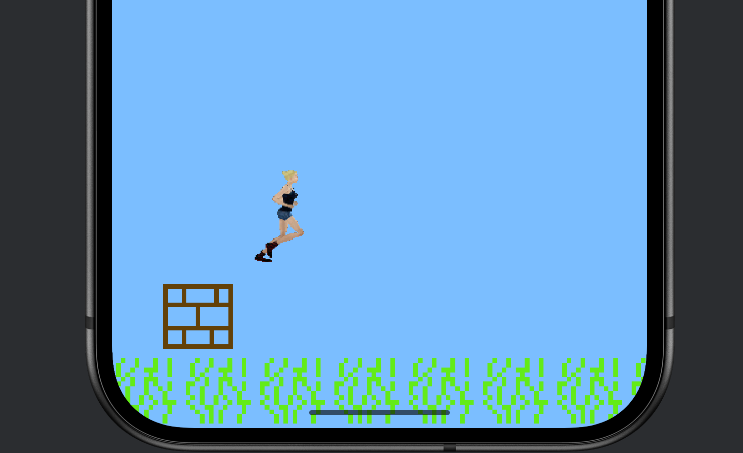
Sit with this for a moment. This is a real game—animation, physics, scrolling, obstacles, collisions, sound, scoring, difficulty, game over and restart—and you built every line of it, understanding all of them. That is a genuine achievement, and it is the payoff for everything since Chapter 1.
Understanding the Code
The most striking thing about this capstone is how little of it was new. Reread the files and tally it up. The engine—threaded SurfaceView, the loop, pacing, delta time—was Chapter 21. The Atlas and the player's animation were Chapter 22. The jump was Chapter 3's physics plus gravity. The scrolling ground was Chapter 7's tiling. The spawning was Chapter 15's timer. The obstacle list, with its backwards-removal loop, was Chapter 11. The classes, each minding its own state, were Act 3. The score, lives, and game-over-restart flow were Chapter 9. The only genuinely new line in the whole game is RectF.intersects(...)—rectangle collision—and even that is just "do these two boxes overlap?"
That is the real lesson of a capstone, and of game programming in general. You do not learn a hundred unrelated tricks. You learn a modest set of solid ideas—a loop, objects, collections, timing, drawing—and then you combine them. A big game is not made of big ideas; it is made of small, well-understood ones, assembled with care. You have the small ideas now. Everything from here is assembly.
The architecture is worth admiring too. Five files, each with one job: Atlas knows about textures, Player knows about running and jumping, Obstacle knows about being a wall, GameView orchestrates the game, MainActivity connects to the system. Want to change how jumping feels? Open Player.kt. Want to change how walls behave? Open Obstacle.kt. The clean separation we have practiced since Chapter 17 is what makes a game this size comfortable to build and easy to change.
Experimenting
This is your game—make it yours. Each change lives in an obvious place:
- Tune the jump. In
Player.kt, makejumpSpeedmore negative (e.g.-1700f) for a higher leap, or raisegravity(e.g.3800f) for a snappier, heavier feel. - Change the difficulty curve. In
GameView.kt, change the startinggameSpeed, the speed-up rate (8f), or the cap (1500f). Make the spawn gaps tighter or wider by editing the0.9values. - Add a second obstacle height. Spawn some walls two tiles tall (pass
obstacleSize * 2) so the player must jump earlier. A one-line change to the spawn. - Add a high score. Keep a
bestScorevariable, update it on game over, and draw it next to the score. (Saving it permanently is a great thing to revisit in Act 4.) - Make it prettier. Add a second, slower-scrolling row of background tiles behind the grass for a parallax depth effect. This is exactly the kind of "juice" we will lean on AI for in Act 4.
Summary
You built a complete, polished endless runner: an animated hero with jump physics, a scrolling world, walls that spawn and rush in, rectangle collision, sound effects, a rising score, increasing difficulty, and a clean game-over-and-restart flow. And you built it almost entirely by combining things you already knew—the engine, the atlas, animation, timing, collections, classes, and delta time—with barely a single new concept. That is what it feels like to actually know how to make games.
This closes Act 3, and with it the "learn it yourself" half of the book. You started unable to draw a square; you now command threads, sprite animation, audio, and a clean object-oriented architecture, and you have a real arcade game to prove it. Take a moment—this is a milestone.
Act 4 changes the game, literally. With these foundations rock-solid, we bring an AI assistant on board to turbo-charge development—building bigger, richer games much faster than we could alone, while you stay firmly in the driver's seat, understanding and directing every step. The next chapter is a tour of the corners of Kotlin we deliberately left out, so you know what is out there. Then the real fun begins: vibe coding.
AI Exercise (Optional)
You have built a complete game, so this is a proper vibe-coding warm-up for Act 4.
Open your AI chatbot and try a prompt like this:
"I have a complete Kotlin Android endless runner built on a custom SurfaceView game loop (no game engine), organized into files: Atlas (draws sprites from a texture atlas), Player (run animation + jump physics with gravity, has a hitBox(): RectF), Obstacle (a wall that moves left, has a hitBox()), and GameView (the loop: scrolls the ground, spawns obstacles on a timer, moves them, checks collisions with RectF.intersects, tracks score, handles game over and restart, plays sounds via SoundPool). Movement uses delta time. I understand classes, inheritance, interfaces, lists, lambdas, and the game loop. Without rewriting the whole thing, show me how to add a collectible coin that spawns occasionally between the walls, floats at a jumpable height, and adds 10 to the score when the player's hit box touches it. Suggest what new class to add and what minimal changes GameView needs, and explain how the coin's collision differs from the wall's (collecting vs crashing)."
This is a real feature request, scoped tightly, with the constraint "don't rewrite the whole thing." A well-built game should absorb a coin by adding one small class and a few lines—mirroring the Obstacle you already have. Asking the AI to explain how collecting differs from crashing (remove the coin and score, versus end the game) checks that it understands your collision logic, not just rectangle math.
When the answer comes back, judge it against your own architecture. Did it propose a Coin class shaped like Obstacle, with its own hit box? Are its GameView changes genuinely minimal, or did it needlessly rework your loop? You are the boss now—and in Act 4, that mindset is everything.