
Rogue SDL has everything a roguelike needs, apart from a fighting chance. You fight with your bare hands, from the first rat to the last orc, and the only magic you can carry shows you the way, but doesn't help you along it. This last part gives you both. There are weapons to find and wield, from a dagger to a warhammer, and a scroll of fireball, which burns everything in a patch of the dungeon that you choose.
Choosing is the interesting part. A fireball needs a target, so reading one can't happen at once, the way drinking a potion does. The inventory closes, and a new state opens in its place, where the arrows move a cursor over the map, a glow shows you exactly what would burn, and Enter lets it go. It's the third state in Chapter 35's family, and the first with anything to remember, and the stack takes it without a single change to Game::handleKey. The weapons bring something new too: the player might be holding one, or might not, and C++ has a type made for exactly that, std::optional.
By the end of the chapter, the game is finished, and it looks like Figure 30.1, the picture Chapter 30 started from. So is the book. Figure 36.1 shows a fireball about to land.
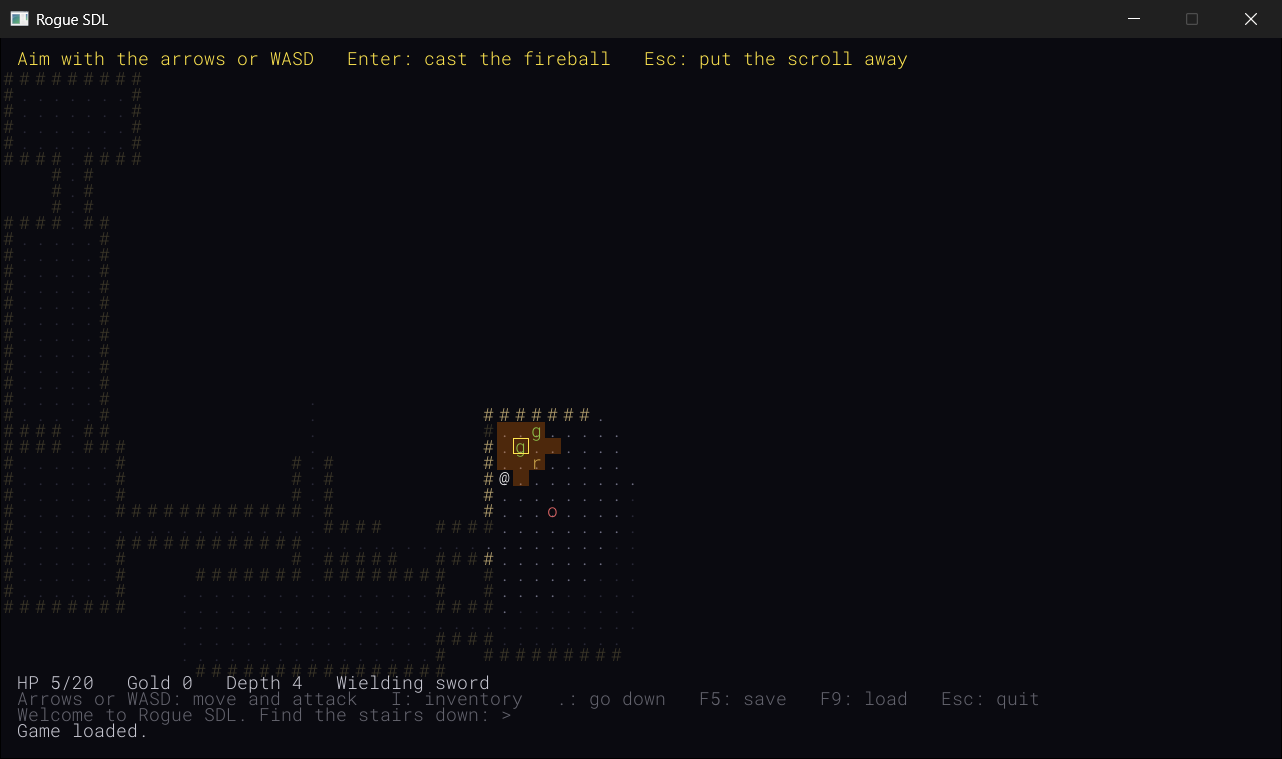
SDL3 Projects/Rogue SDL Part 7 — the complete source for this chapter lives here, with its thirty-eight files and the assets folder, which holds the same seven sounds as Part 6's. The chapter carries on in your own project from Chapter 35. If you'd rather start from the book's copy of Part 6, make a copy of the Rogue SDL Part 6 folder beside it in SDL3 Projects, where it still finds the SDL3 and SDL3_ttf folders, and open the copy's .slnx file.In this chapter, we will:
- Give the player weapons, and a hand that might be empty, with
std::optional - Balance the weapons against the monsters, one hit at a time
- Record the weapon in version 3 of the save file
- Add a scroll of fireball, and a third state for aiming it, with a cursor and a glow that shows what would burn
- Burn a diamond of cells, and every monster in it, but only what you can see
- Finish Rogue SDL, look back over the whole book, and look ahead
- Play, experiment, fix the most common mistakes, and try an optional AI exercise
Let's arm the @.
Planning Part 7
Part 6 finished with thirty-six files. Part 7 adds two, and changes twelve. Here's what each one is for:
| File | What's new |
|---|---|
TargetingState.h, TargetingState.cpp |
New: aiming a fireball |
Item.h, Item.cpp |
Three weapons and a scroll of fireball, and an attack bonus in every kind's stats |
Player.h, Player.cpp |
A weapon that may or may not be wielded, and the damage it adds |
Common.h |
The fireball's reach and damage, and four colors |
HUD.cpp |
What you're wielding |
MapGenerator.h, MapGenerator.cpp |
Weapons, more often deeper down, and scrolls of fireball |
SaveLoad.cpp |
Version 3 of the save file, which records the weapon |
InventoryState.cpp |
A scroll of fireball opens the aiming state, in the inventory's place |
Game.h, Game.cpp |
Wielding, casting, and burning |
There are no new sounds. Wielding a weapon uses the pickup sound, and a fireball uses the scroll's, and the kill sound for anything it kills.
We'll add Part 7 in two stages, and play the game at the end of each. First, the weapons, and the save file that remembers them. Then the fireball, with its aiming state. And at the end of the chapter, once the game is finished, there's a look back over the whole book, and a look ahead.
Weapons
Something to Hold
A weapon adds to the damage of every hit. You find one lying in the dungeon like any other treasure, a gray ), carry it in your pack, and wield it by using it from the inventory, which takes a turn, like drinking a potion. Whatever you were wielding before goes back into your pack, so nothing is ever lost, and you can swap back whenever you like.
There are three kinds. A dagger adds a little, a sword adds more, and a warhammer adds the most, and the deeper you go, the more often you find a weapon, and the better it's likely to be. Each weapon is a kind of item, like a potion, and so a row in the stats table, with one new number: how much it adds to a hit.
The Weapons
The three weapons are new kinds of item. In Item.h, find the end of the list of kinds, and the count below it:
    MagicMapping
};

constexpr int ITEM_KINDS = 3;   // how many kinds there are
And change them to this:
    MagicMapping,
    Dagger,
    Sword,
    Warhammer
};

constexpr int ITEM_KINDS = 6;   // how many kinds there are
In the preceding code, Dagger, Sword, and Warhammer go at the end of the enum, as every new kind does, so that the numbers of the older kinds never change, and ITEM_KINDS is 6. Then add this to ItemStats, below SDL_Color color;:
int attackBonus = 0; // for a weapon, the extra damage of each hitIn the preceding code, attackBonus is how much a weapon adds to each hit, and = 0 gives it a default member initializer, as Chapter 11's structs had. The rows already in the table, for the potion, the gold, and the scroll, give three values each, and a member that a row's braces leave out gets its default, so every one of them has a bonus of 0 without being changed. Only the weapons need to say anything.
The weapons need a color. In Common.h, add this below SCROLL:
constexpr SDL_Color WEAPON = { 200, 200, 220, 255 };In the preceding code, WEAPON is a pale steel gray. Then, in Item.cpp, find the scroll's row, at the end of the stats table:
{ "scroll of magic mapping", '?', Palette::SCROLL }And change it to this:
{ "scroll of magic mapping", '?', Palette::SCROLL },
{ "dagger", ')', Palette::WEAPON, 2 },
{ "sword", ')', Palette::WEAPON, 5 },
{ "warhammer", ')', Palette::WEAPON, 10 }
In the preceding code, the scroll's row gains a comma, and three rows follow it. All three weapons look the same on the map, a ) in steel gray, which is how Rogue drew its weapons too, so you only find out which one you've found when you pick it up, and the message names it. Their bonuses are 2, 5, and 10, and the static_assert below the table checks that there are six rows now, one for each kind.
Balancing the Blows
Why 2, 5, and 10? Because a bonus only matters when it saves a hit, and whether it does depends on the monsters. A rat has 4 health, a goblin 8, and an orc 14, and the player hits for PLAYER_ATTACK, 4, plus the weapon's bonus. Figure 36.2 counts how many hits each weapon needs for each monster.
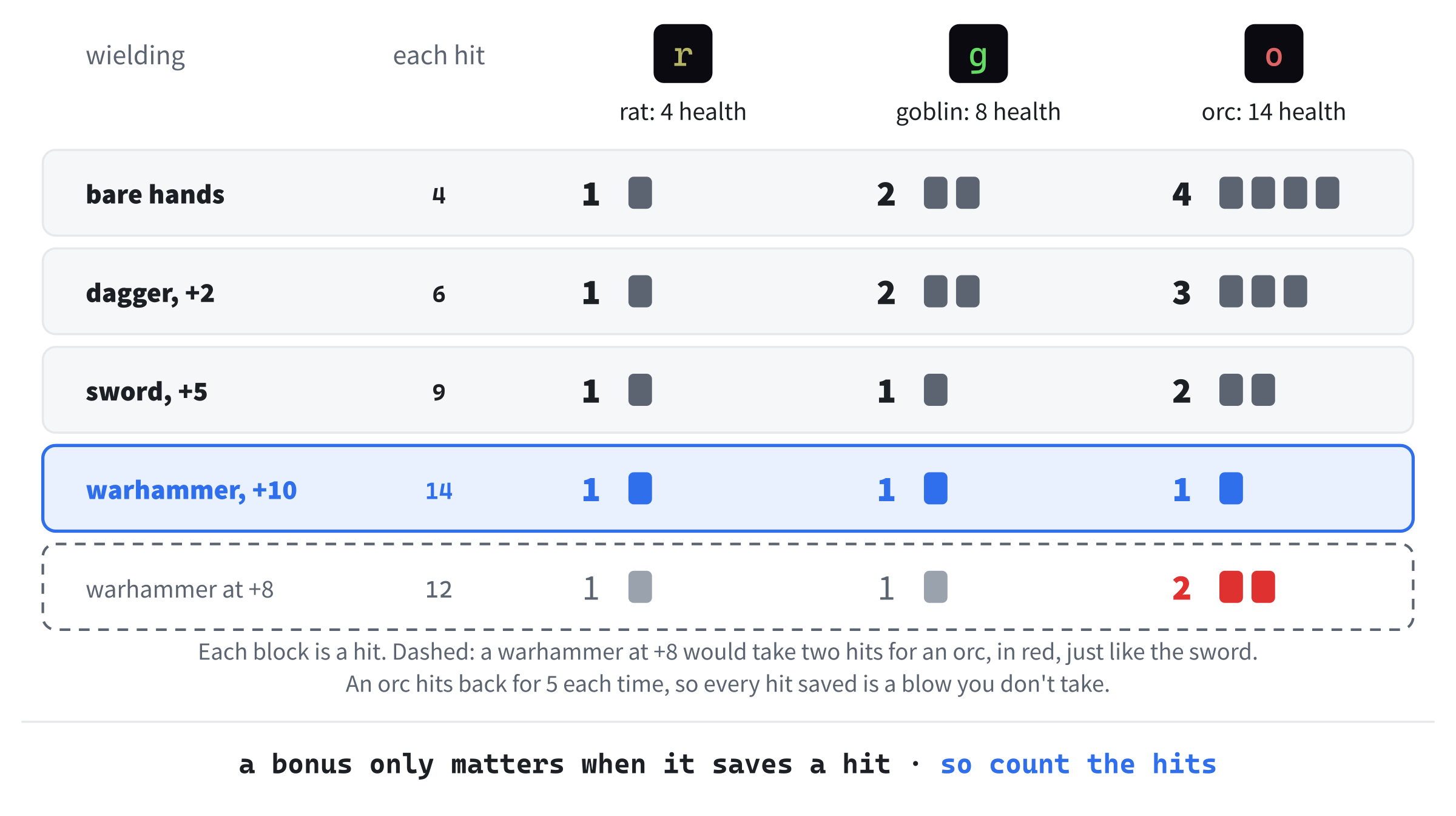
Every weapon is a step up. A dagger, at 6 a hit, saves a blow against an orc. The sword, at 9, kills a goblin at once, and an orc in two. And the warhammer, at 14, kills an orc with a single blow, which is worth having, since an orc hits back for 5, and every blow you don't need is one it doesn't get to answer.
It's easy to get this wrong. Give the warhammer a bonus of 8, which sounds generous, and it hits for 12, which kills a goblin at once and an orc in two, exactly like the sword. The rarest weapon in the game would be no better than a common one, and the only way to see it is to count, as the figure does. That's balancing, as Chapter 32 called it: the numbers in a table are the game's design, and they're worth checking against each other.
A Hand That Might Be Empty
The player is either wielding a weapon or isn't, and a new game starts with bare hands. So the player needs something that holds an ItemKind, or nothing at all.
The standard library has a type for exactly that: a std::optional, which holds a value or nothing, and says which. In Player.h, add this above #include <vector>:
#include <optional> // std::optional, for the weaponIn the preceding code, <optional> brings in std::optional. Then add this below getInventory’s declaration:
std::optional<ItemKind> getWeapon() const;In the preceding code, getWeapon returns a std::optional<ItemKind>: the kind of weapon, if there is one, or nothing. It returns it by value, as a copy, since it's small, just an ItemKind and a bool that says whether it holds one. Next, add this below void removeFromInventory(int slot);:
void wield(ItemKind weapon);In the preceding code, wield takes up a weapon. And last, add this below inventory_, at the bottom of the class:
std::optional<ItemKind> weapon_; // empty for bare handsIn the preceding code, weapon_ is the weapon in the player's hand. A std::optional made without a value starts empty, so the player starts with bare hands, as the comment says, without anything else to set up. Figure 36.3 shows the two ways it can be.
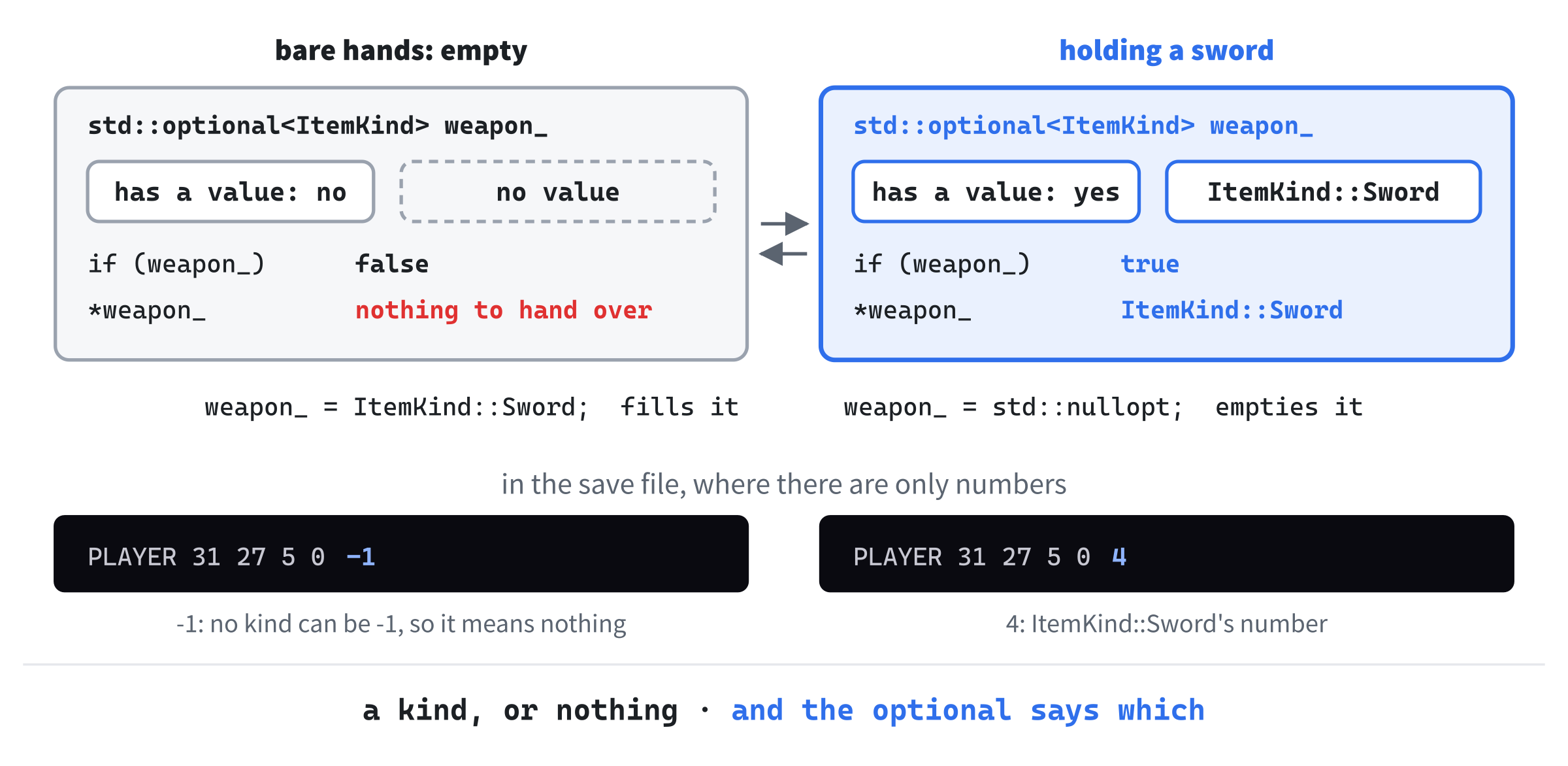
std::optional has no value, so its if is false, and the star has nothing to hand over. Holding a sword, the if is true, and the star hands over ItemKind::Sword. In the save file, where there are only numbers, -1 stands for nothing.Why not a special kind for "no weapon", such as an ItemKind::None? Because it would be a kind of item that isn't an item. It would need a row in the stats table, and every switch on a kind would have to think about it, and it would sit in the middle of the numbers that the save file writes. A std::optional keeps the idea of nothing out of ItemKind altogether: an ItemKind is always a real kind, and whether there is one at all is the optional's business.
Now the functions. In Player.cpp, replace the whole of getAttack with this:
// The damage of each hit: more with a weapon than with bare hands
int Player::getAttack() const
{
    if (weapon_)
        return PLAYER_ATTACK + statsOf(*weapon_).attackBonus;
    return PLAYER_ATTACK;
}
In the preceding code, an if tests the optional itself, which counts as true when it holds a value, just as a unique_ptr did in Chapter 35. With a weapon, the damage is PLAYER_ATTACK plus its bonus, and *weapon_ is the weapon's kind, taken out of the optional with a star, as if it were a pointer. It isn't one: the value lives inside the optional itself, and the star only hands it over. Like a pointer, though, an empty optional has nothing to hand over, so the star is only ever used after the if has checked.
A std::optional also has value(), which hands over the value just as the star does, but checks first, and throws a std::bad_optional_access exception if there's nothing there, as a vector's at did with a bad index in Chapter 13. The star doesn't check, so it's the usual choice right after an if, as in getAttack. Where nothing has checked, and you aren't sure, value() turns a mystery into an exception with a name.
Then add getWeapon below getInventory, with a blank line in between:
std::optional<ItemKind> Player::getWeapon() const
{
    return weapon_;
}
In the preceding code, getWeapon returns a copy of weapon_, empty or not. Next, add wield below removeFromInventory, with a blank line in between:
// Takes up a weapon. The weapon it replaces, if there is one, goes into
// the inventory
void Player::wield(ItemKind weapon)
{
    if (weapon_)
        inventory_.push_back(*weapon_);
    weapon_ = weapon;
}
In the preceding code, a weapon already in hand goes back into the pack first, and then weapon_ gets the new one: assigning an ItemKind to an optional fills it. There's always room in the pack for the old weapon, since the new one has just come out of it, as you'll see in useItem. Last, add this below inventory_.clear(); in reset:
weapon_ = std::nullopt;In the preceding code, std::nullopt stands for nothing, and assigning it empties the optional, so a new game starts with bare hands again.
Checkpoint: Click in Player.cpp, and press Ctrl+F7. It compiles on its own.
Wielding
Wielding happens when you use a weapon from the inventory. In Game.cpp, add this above default: in useItem:
case ItemKind::Dagger:
case ItemKind::Sword:
case ItemKind::Warhammer:
    player_.wield(kind);
    sounds_.pickup.play();
    hud_.addMessage("You wield the " + std::string(statsOf(kind).name) +
                    ".");
    break;
In the preceding code, the three weapons share one set of instructions, since each case label falls through to the next until there's something to do, as the arrow keys did in Chapter 30's switch. The player wields the weapon, which useItem has already taken out of the pack, the pickup sound plays, and the message names it, as in "You wield the sword." The name is a const char*, so std::string goes around it before the +, as Chapter 32's messages did, since two pieces of text in quotes can't be added together. And like everything else used from the inventory, wielding takes a turn.
What the HUD Says
The status line should say what you're holding. In HUD.cpp, find the status line, at the top of draw:
std::string status =
    "HP " + std::to_string(player.getHp()) + "/" +
    std::to_string(PLAYER_MAX_HP) +
    "   Gold " + std::to_string(player.getGold()) +
    "   Depth " + std::to_string(depth);
And change it to this:
std::string status =
    "HP " + std::to_string(player.getHp()) + "/" +
    std::to_string(PLAYER_MAX_HP) +
    "   Gold " + std::to_string(player.getGold()) +
    "   Depth " + std::to_string(depth) + "   Wielding ";
if (player.getWeapon())
    status += statsOf(*player.getWeapon()).name;
else
    status += "nothing";
In the preceding code, the status line ends with "Wielding", and then the weapon's name, or "nothing". The optional that getWeapon returns is tested with an if, and its value taken out with a star, as in getAttack, and += adds the name to the end of the line, which already holds everything before it.
Finding Them
Weapons turn up more often, and better ones, the deeper you go, so the treasure needs to know the depth. In MapGenerator.h, find the declaration of addTreasure:
void addTreasure(std::vector<Item>& items);And change it to this:
void addTreasure(int depth, std::vector<Item>& items);In the preceding code, addTreasure takes the depth, as addMonsters above it already does. Over in MapGenerator.cpp, find the call to it in generate:
addTreasure(items);And change it to this:
addTreasure(depth, items);In the preceding code, the depth that generate was given goes along to addTreasure. Then find the comment and the first line of addTreasure itself:
// Scatters potions, scrolls, and piles of gold through the rooms
void MapGenerator::addTreasure(std::vector<Item>& items)
And change them to this:
// Scatters potions, scrolls, weapons, and piles of gold through the rooms
void MapGenerator::addTreasure(int depth, std::vector<Item>& items)
In the preceding code, the comment names the weapons, and the function takes the depth. Then add this below the lines that place the scroll of magic mapping, with a blank line in between:
// A weapon now and then, more often deeper down, and a better one too
if (SDL_rand(100) < 25 + depth * 5)
{
    ItemKind weapon = ItemKind::Dagger;
    if (depth >= 5 && SDL_rand(3) == 0)
        weapon = ItemKind::Warhammer;
    else if (depth >= 3 && SDL_rand(2) == 0)
        weapon = ItemKind::Sword;
    items.push_back(Item(weapon, takeFreeSpot(false)));
}
In the preceding code, SDL_rand(100) is a whole number from 0 to 99, so the chance of a weapon on a level is 25 + depth * 5 in a hundred: 30 in a hundred at depth 1, 40 at depth 3, and 50 at depth 5. A weapon starts out as a dagger. From depth 5 on, a third of them are warhammers, and from depth 3, half of the rest are swords, so the deeper levels hold the better weapons, but never only those. At depth 5 and below, a weapon is as likely to be a dagger as a sword or a warhammer, a third each.
Saving the Weapon
The save file has to remember the weapon, which changes the format, so the version goes up again. In SaveLoad.cpp, find the version:
constexpr int SAVE_VERSION = 2;And change it to this:
constexpr int SAVE_VERSION = 3;In the preceding code, the version is 3, so a save from Part 6 is turned away, as Part 5's were in Chapter 35. Then find these lines in save:
Point at = player.getPosition();
file << "PLAYER " << at.x << " " << at.y << " " << player.getHp()
     << " " << player.getGold() << "\n";
And change them to this:
Point at = player.getPosition();

// The weapon is its kind's number, or -1 for bare hands
int weapon = -1;
if (player.getWeapon())
    weapon = static_cast<int>(*player.getWeapon());
file << "PLAYER " << at.x << " " << at.y << " " << player.getHp()
     << " " << player.getGold() << " " << weapon << "\n";
In the preceding code, the weapon goes on the end of the PLAYER line, as its kind's number, or -1 for bare hands. A file has no way to say "nothing" except with a number, so -1, which no kind can ever be, stands for it there. That's the kind of special value a std::optional is clearer than, and inside the program, it is. In a file, a special value is fine, as long as the format says what it means, and the code that reads it checks.
In load, find the part that reads the player:
else if (word == "PLAYER")
{
    int hp = 0;
    int gold = 0;
    file >> at.x >> at.y >> hp >> gold;
    newPlayer.setPosition(at);
    newPlayer.setHp(hp);
    newPlayer.setGold(gold);
}
And change it to this:
else if (word == "PLAYER")
{
    int hp = 0;
    int gold = 0;
    int weapon = -1;
    file >> at.x >> at.y >> hp >> gold >> weapon;
    if (weapon < -1 || weapon >= ITEM_KINDS)
        return false;

    newPlayer.setPosition(at);
    newPlayer.setHp(hp);
    newPlayer.setGold(gold);
    if (weapon != -1)
        newPlayer.wield(static_cast<ItemKind>(weapon));
}
In the preceding code, the weapon is read after the gold, and checked: -1 for bare hands, or one of the ITEM_KINDS kinds, and anything else turns the whole file away. Only then does the new player wield it, if there is one. The new player has no weapon yet, so wielding one here puts nothing into the pack.
The check stops a number that would crash the game, since statsOf would read past the end of its table, but it doesn't stop one that merely makes no sense. Change the weapon in a saved file to 0, and you'll load a game in which you're wielding a potion of healing, with a bonus of 0, which is harmless, and a good reminder of what a check like this is for.
That's the first stage. There are weapons to find, and to wield, and the save file remembers the one you're holding.
Checkpoint: Press F5. The HUD says "Wielding nothing". Explore until you find a gray ), pick it up, open the inventory, and press its letter. The message says what you're wielding now, and so does the HUD, and your hits are harder: with a sword, a goblin dies at a single blow. Find a second weapon, wield it, and the first one goes back into your pack.
Fire
A Scroll You Aim
A scroll of fireball bursts into flame wherever you aim it, and burns every monster near that spot. Aiming is the new part. When you pick the scroll's letter in the inventory, nothing is burned yet: the inventory closes, and an aiming state opens in its place, with a cursor on the @. The arrows move the cursor, and a see-through orange glow shows every cell that would burn, if the fireball landed there. Enter casts it, and Esc puts the scroll away, unread, and still in your pack.
Aiming costs nothing, because nothing in Rogue SDL moves until you act. That's one of the quiet strengths of a turn-based game: you can take as long as you like to line up the perfect shot, and the goblin will wait. A real-time game has to pause, or slow down, to give you the same chance, and many do.
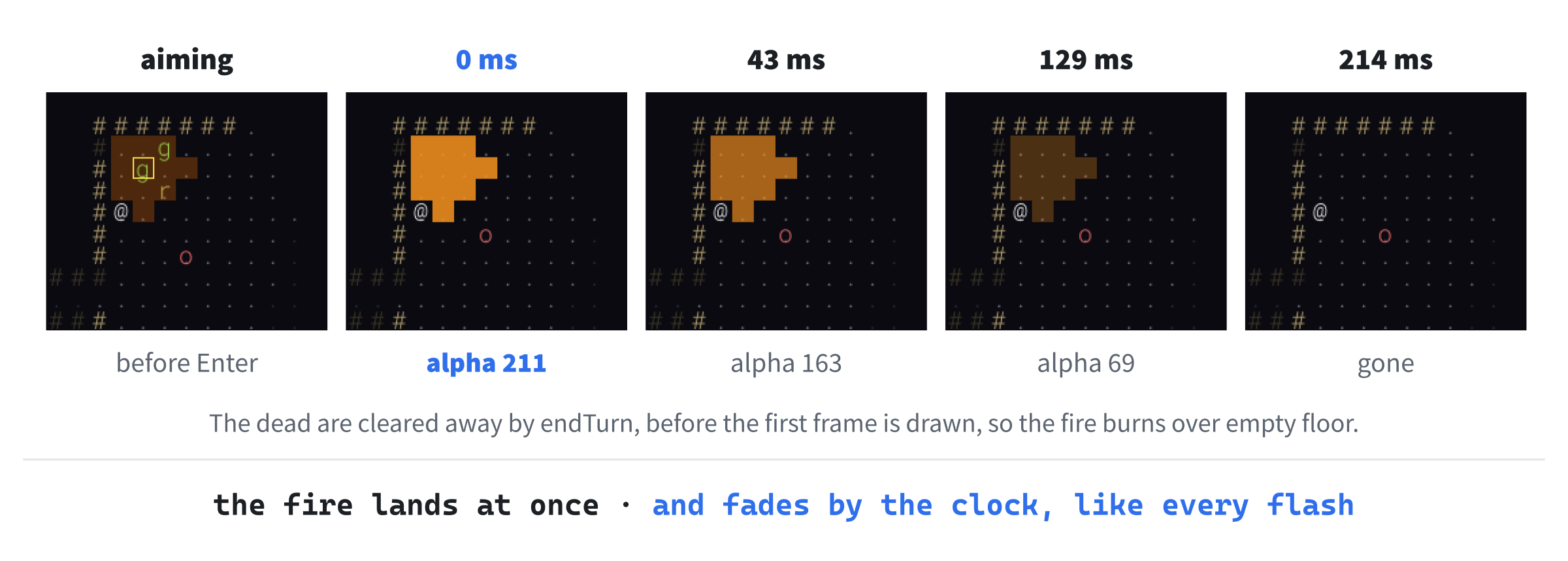
Opening the aiming state is Chapter 35's "both": the inventory asks to be closed and for the aiming state to be opened, in one change, so the aiming state takes the inventory's place on the stack, and the stack stays two states tall. Figure 36.4 follows a fireball all the way through.
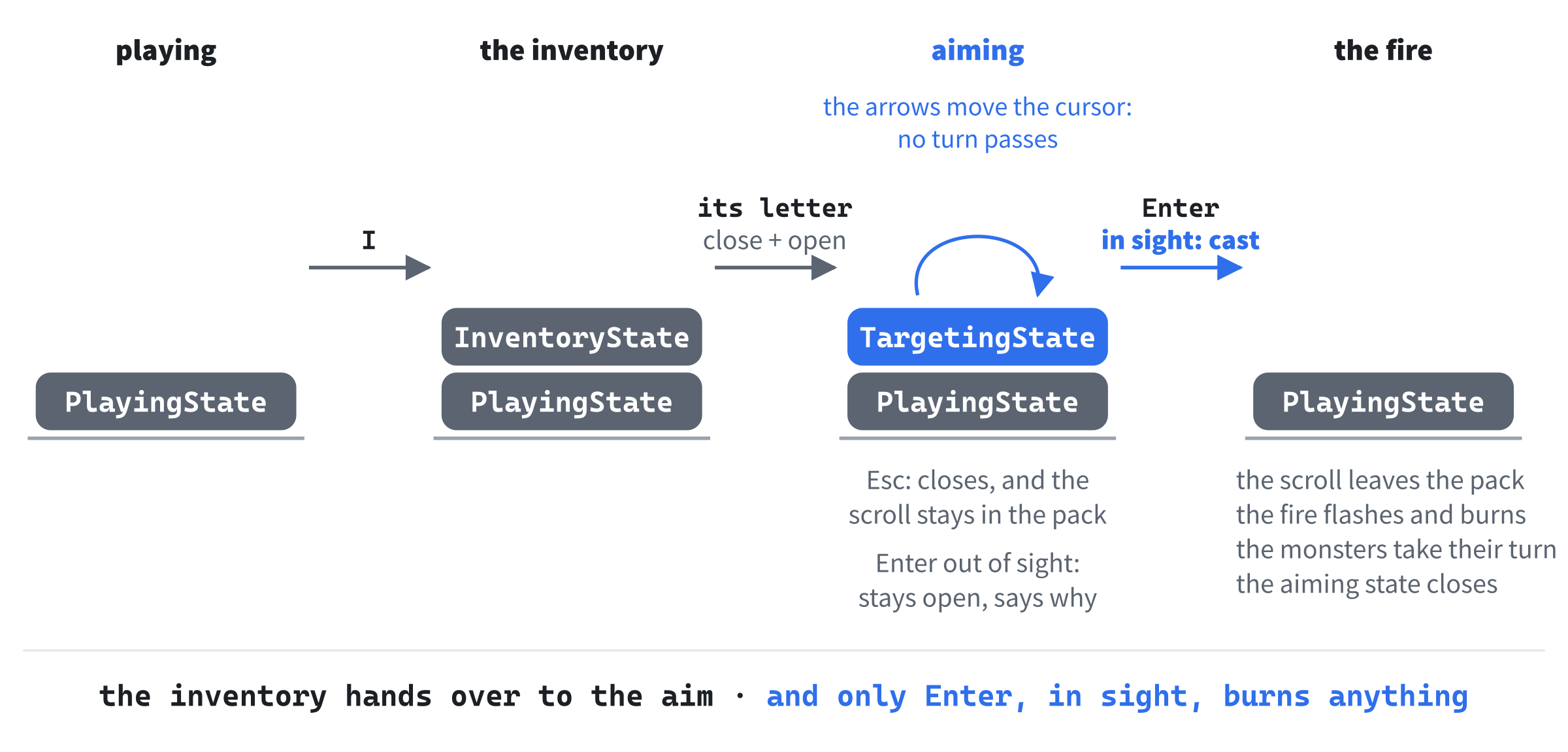
The aiming state is the first state with anything to remember between keys: which slot the scroll is in, so that the game can take out the right one, and where the cursor is. So it's the first state with member variables, and with a constructor to set them.
Why the Blast Is a Diamond
The fireball's reach is FIREBALL_RADIUS, 2, counted in steps: a cell burns if it's no more than two steps from the cell the fireball lands on, where each step goes up, down, left, or right, and the steps are the difference across added to the difference down, as A* counted them in Chapter 33. Cells within two steps make a diamond of 13 cells, as Figure 36.5 shows, not a square or a circle, because a corner cell of the square around it is four steps away.
Counting steps this way, the difference across plus the difference down, is called Manhattan distance, as Chapter 31 said, after the grid of streets in Manhattan, where you can't cut across a block. Its circles are always diamonds. Measure with the bigger of the two differences instead, and its circles are squares, which suits a game where you can move diagonally.
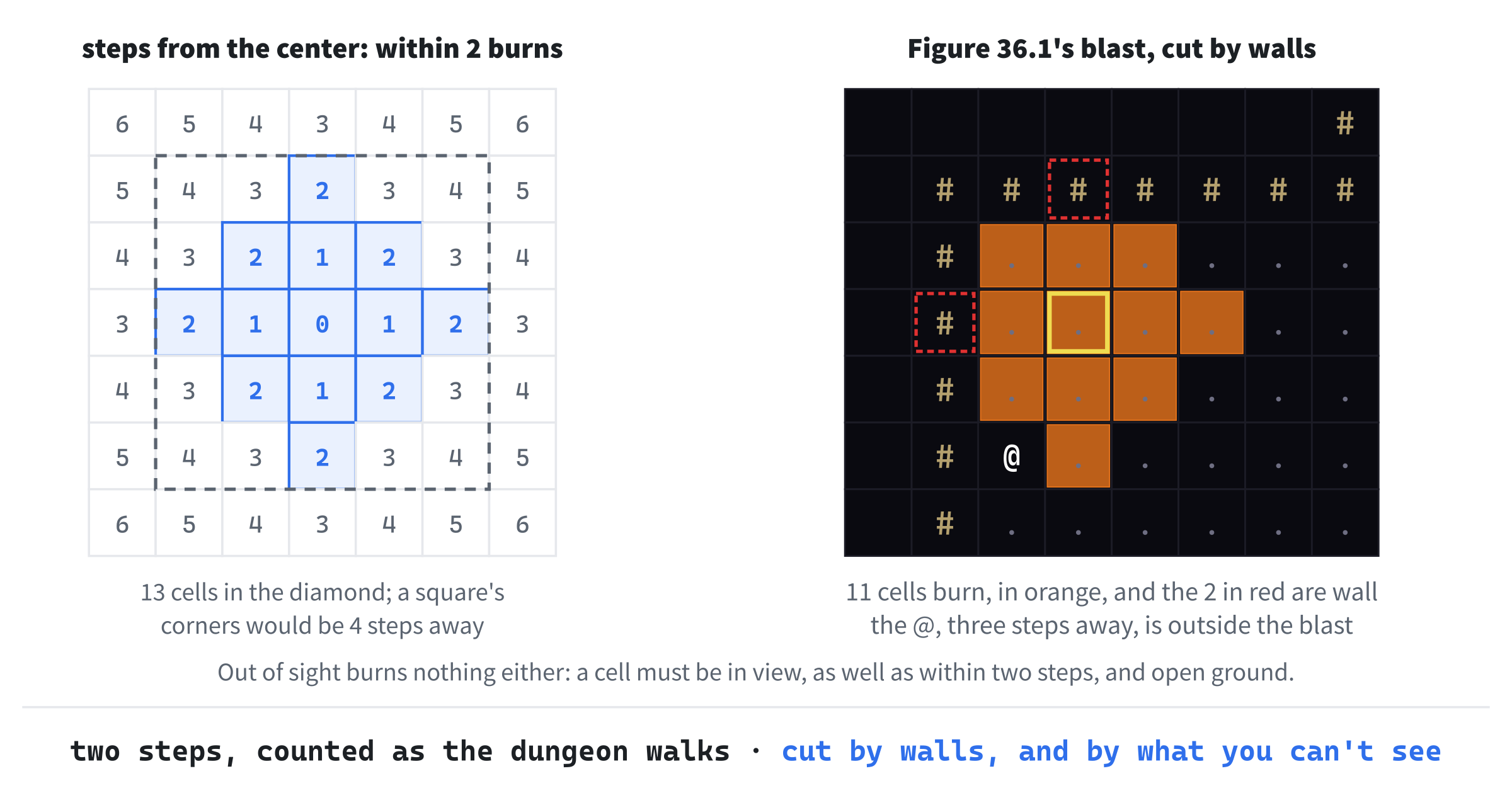
Steps are the right way to measure it, because they're how everything in the dungeon moves. Nothing in Rogue SDL walks diagonally, so a cell two steps away is exactly as far as a monster can get in two turns, and a blast measured the same way matches how the game feels to play.
Two more rules cut the diamond down. A wall doesn't burn, and nothing stands in one anyway. And a cell out of sight doesn't burn either, even within two steps: the fire only goes where you can see, so it never burns anything you didn't know was there. The fire never hurts you, either: it burns monsters, and only monsters, even when it lands at your feet.
The Fire's Numbers and Colors
The fireball's reach and damage go with the other rules of the game. In Common.h, add these below SIGHT_RADIUS, with a blank line in between:
// A fireball burns every cell up to this many steps from where it bursts,
// and does this much damage to every monster it burns
constexpr int FIREBALL_RADIUS = 2;
constexpr int FIREBALL_DAMAGE = 8;
In the preceding code, FIREBALL_RADIUS is how many steps the fire reaches, and FIREBALL_DAMAGE is how much each monster it reaches takes: 8, which kills a rat or a goblin outright, and leaves an orc with 6. Then add this below FLASH_HEAL:
constexpr SDL_Color FLASH_FIRE = { 255, 150, 30, 220 };In the preceding code, FLASH_FIRE is an orange flash, with an alpha of 220, stronger than the others, since a fireball should look like one. Then add these at the end of the palette, below SHADE, with a blank line in between:
// Aiming: the cursor, and a see-through orange over what would burn
constexpr SDL_Color TARGET = { 255, 230, 80, 255 };
constexpr SDL_Color BLAST = { 255, 120, 0, 70 };
In the preceding code, TARGET is a bright yellow, for the cursor's outline, and BLAST is an orange with an alpha of only 70, for the glow over the cells that would burn, faint enough that the monsters under it are still easy to see.
The fireball is a new kind of item too. In Item.h, find the end of the list of kinds, and the count below it:
    Warhammer
};

constexpr int ITEM_KINDS = 6;   // how many kinds there are
And change them to this:
    Warhammer,
    Fireball
};

constexpr int ITEM_KINDS = 7;   // how many kinds there are
In the preceding code, Fireball goes at the end, after the weapons, and ITEM_KINDS is 7. Then, in Item.cpp, find the warhammer's row:
{ "warhammer", ')', Palette::WEAPON, 10 }And change it to this:
{ "warhammer", ')', Palette::WEAPON, 10 },
{ "scroll of fireball", '?', Palette::SCROLL }
In the preceding code, a scroll of fireball looks just like a scroll of magic mapping on the map: a pale blue ?. You find out which it is when you pick it up, and the inventory lists it by name.
Casting
The aiming state needs two things from the game that nothing else has needed: the map, to keep the cursor on it, and a way to ask which cells a fireball would burn, to draw the glow. In Game.h, add this below const GlyphCache& getGlyphs() const;:
const Map& getMap() const;In the preceding code, getMap hands the map over as a const reference, so the aiming state can look at it, but not change it. Then add this below bool isGameOver() const;:
bool canBurn(Point cell, Point center) const;In the preceding code, canBurn says whether a fireball landing on one cell would burn another. It's const, so that a state's draw, which has only a const Game&, can call it. Then add this below void useItem(int slot);:
bool castFireball(int slot, Point target);In the preceding code, castFireball reads the scroll in a slot, and lands the fireball on a cell, and returns whether it worked. And add this below void attack(Enemy& enemy);, in the private part:
void burn(Enemy& enemy);In the preceding code, burn is the fire's version of attack, for one monster caught in a fireball. It's private, since only the game casts fireballs.
In Game.cpp, add getMap below getGlyphs, with a blank line in between:
const Map& Game::getMap() const
{
    return map_;
}
In the preceding code, getMap hands back a reference to the game's own map. Then add canBurn below isGameOver, with a blank line in between:
// Whether a fireball bursting on one cell would burn another: it must be
// no more than FIREBALL_RADIUS steps away, open ground, and in sight
bool Game::canBurn(Point cell, Point center) const
{
    int steps = std::abs(cell.x - center.x) + std::abs(cell.y - center.y);
    return steps <= FIREBALL_RADIUS && !map_.isBlocked(cell) &&
           map_.at(cell).visible;
}
In the preceding code, steps is the distance from the center, in steps, with std::abs making each difference positive, as the monsters' distances were in Chapter 32. A cell burns if it's no more than FIREBALL_RADIUS steps away, it isn't blocked, and it's visible. The order of the three tests matters: isBlocked is true for anything outside the map, and && stops at the first false, so map_.at(cell) is only ever reached for a cell on the map.
Next, the casting itself. Add castFireball below useItem, with a blank line in between:
// Reads the scroll of fireball in a slot, and bursts the fireball on a
// cell, burning everything near it. Only a cell the player can see will
// do: for any other, it returns false, and nothing happens
bool Game::castFireball(int slot, Point target)
{
    if (!map_.at(target).visible)
    {
        hud_.addMessage("You can only aim at a place you can see.");
        return false;
    }

    player_.removeFromInventory(slot);
    sounds_.scroll.play();
    hud_.addMessage("The scroll bursts into a ball of fire!");
    for (int dy = -FIREBALL_RADIUS; dy <= FIREBALL_RADIUS; ++dy)
    {
        for (int dx = -FIREBALL_RADIUS; dx <= FIREBALL_RADIUS; ++dx)
        {
            Point cell = { target.x + dx, target.y + dy };
            if (!canBurn(cell, target))
                continue;

            flashes_.add(cell, Palette::FLASH_FIRE);
            if (Enemy* enemy = enemyAt(cell))
                burn(*enemy);
        }
    }
    endTurn();
    return true;
}
In the preceding code, a target out of sight is turned away with a message, and the function returns false, having done nothing else: the scroll stays in the pack, and no turn passes. Otherwise, the scroll comes out of the pack, the scroll's sound plays, and the message says what happened.
Then two loops walk every cell of the square around the target, from two cells up and left to two cells down and right, and canBurn skips the ones outside the diamond, the walls, and anything out of sight. Every cell that burns gets an orange flash, and any monster standing in one is burned. Last, endTurn gives the surviving monsters their turn, and clears away the dead, and the function returns true.
Then add burn below castFireball, with a blank line in between:
// A monster caught in a fireball
void Game::burn(Enemy& enemy)
{
    enemy.takeDamage(FIREBALL_DAMAGE);
    std::string name = enemy.getStats().name;
    if (enemy.isAlive())
    {
        hud_.addMessage("The fire burns the " + name + ".");
    }
    else
    {
        sounds_.kill.play();
        hud_.addMessage("The fire kills the " + name + "!");
    }
}
In the preceding code, the monster takes FIREBALL_DAMAGE, and the message says whether the fire burned it, or killed it, with the kill sound for a kill. The fireball's own orange flash is already on the monster's cell, so burn adds no flash of its own, and it plays no hit sound either, since the scroll's sound has already played for the burst.
Checkpoint: Click in Game.cpp, and press Ctrl+F7. It compiles on its own.
TargetingState.h
Add a header called TargetingState.h, and below its #pragma once, type this:
#pragma once
#include "GameState.h"

// Aiming a scroll of fireball: the arrow keys move a cursor, Enter sends
// the fireball there, and Escape puts the scroll away unread
class TargetingState : public GameState
{
public:
    TargetingState(int slot, Point start);

    StateChange handleKey(Game& game, SDL_Keycode key) override;
    void draw(SDL_Renderer* renderer, const Game& game) const override;

private:
    int slot_;       // the scroll's slot in the inventory
    Point cursor_;   // the cell the fireball will burst on
};
In the preceding code, TargetingState is a GameState, overriding both of its functions, like the inventory. It's the first state with a constructor, which takes the scroll's slot and the cell where the cursor starts, and the first with member variables: slot_, to know which scroll to read, and cursor_, the cell the fireball will land on. They're private, and nothing outside the state needs to know they're there.
TargetingState.cpp
Add a C++ file called TargetingState.cpp, and type the includes and the constructor:
#include "TargetingState.h"
#include "Game.h"

TargetingState::TargetingState(int slot, Point start)
    : slot_(slot), cursor_(start)
{
}
In the preceding code, the constructor sets both members in its initializer list, as Chapter 18's constructors did. The body has nothing left to do, so it's empty.
Then add handleKey below the constructor, with a blank line in between:
// The arrows, or W, A, S, and D, move the cursor. Enter casts the fireball
// on it, and Escape puts the scroll away, unread
StateChange TargetingState::handleKey(Game& game, SDL_Keycode key)
{
    StateChange change;

    // A key that stands for a step moves the cursor, but never off the map
    Point step = directionOf(key);
    Point next = { cursor_.x + step.x, cursor_.y + step.y };
    if (game.getMap().isInside(next))
        cursor_ = next;

    if (key == SDLK_RETURN || key == SDLK_KP_ENTER)
        change.close = game.castFireball(slot_, cursor_);
    else if (key == SDLK_ESCAPE)
        change.close = true;
    return change;
}
In the preceding code, directionOf turns the key into a step, as it does for the playing state, and that's why Chapter 35 put it in the base class. The step moves the cursor, unless it would take it off the map, which isInside checks, through getMap. Any other key is no step, { 0, 0 }, so the cursor stays where it is. Moving the cursor takes no turn: the monsters wait while you aim.
Enter casts the fireball. There are two Enter keys on most keyboards, the big one and the one on the number pad, and SDL gives them different keycodes, SDLK_RETURN and SDLK_KP_ENTER, so both are checked. Whether the aiming state closes is whatever castFireball returns: true if the fireball was cast, and false if the target was out of sight, when the state stays open, so you can aim again. Esc closes it without casting anything, and the scroll stays in your pack.
Last, the drawing. Add the start of draw below handleKey, with a blank line in between:
// Shows where the fireball would burn, and a box around the cursor, with
// the keys in a banner along the top of the window
void TargetingState::draw(SDL_Renderer* renderer, const Game& game) const
{
    SDL_SetRenderDrawBlendMode(renderer, SDL_BLENDMODE_BLEND);
    SDL_SetRenderDrawColor(renderer, Palette::BLAST.r, Palette::BLAST.g,
                           Palette::BLAST.b, Palette::BLAST.a);
    for (int dy = -FIREBALL_RADIUS; dy <= FIREBALL_RADIUS; ++dy)
    {
        for (int dx = -FIREBALL_RADIUS; dx <= FIREBALL_RADIUS; ++dx)
        {
            Point cell = { cursor_.x + dx, cursor_.y + dy };
            if (!game.canBurn(cell, cursor_))
                continue;

            SDL_FRect box = { static_cast<float>(cell.x * CELL_PX),
                              static_cast<float>(cell.y * CELL_PX),
                              CELL_PX, CELL_PX };
            SDL_RenderFillRect(renderer, &box);
        }
    }
In the preceding code, the same two loops as castFireball’s walk the square around the cursor, and every cell that canBurn says would burn gets a square of the see-through BLAST orange, so the glow is exactly the fireball's reach, cut by walls and by what's out of sight. The cells' positions are variables, so they're cast to float for the SDL_FRect, as Chapter 35 found they must be, while CELL_PX, a constant, goes in as it is.
Then the cursor. Add this below the loops, with a blank line in between:
SDL_FRect cursor = { static_cast<float>(cursor_.x * CELL_PX),
                     static_cast<float>(cursor_.y * CELL_PX),
                     CELL_PX, CELL_PX };
SDL_SetRenderDrawColor(renderer, Palette::TARGET.r, Palette::TARGET.g,
                       Palette::TARGET.b, 255);
SDL_RenderRect(renderer, &cursor);
In the preceding code, the cursor's cell gets an outline in TARGET yellow, drawn with SDL_RenderRect, over the glow. It's solid, so it's bright whatever is under it.
Last, the banner. Add the rest of draw below the cursor, with a blank line in between:
    SDL_FRect banner = { 0, 0, WINDOW_W, 2 * CELL_PX };
    SDL_SetRenderDrawColor(renderer, Palette::BACKGROUND.r,
                           Palette::BACKGROUND.g, Palette::BACKGROUND.b, 255);
    SDL_RenderFillRect(renderer, &banner);
    game.getGlyphs().drawText(renderer,
                              "Aim with the arrows or WASD   Enter: cast the "
                              "fireball   Esc: put the scroll away",
                              { 1, 1 }, Palette::TARGET);
}
In the preceding code, a banner across the top two rows of the window, in the background color, says what the keys do, in the cursor's yellow. It's needed, since while you're aiming, the HUD's row of keys is wrong: I, the period, and F5 do nothing here. The constant WINDOW_W is the window's width, from Chapter 30, so the banner reaches across the whole window. Figure 36.6 shows all of it on the screen.
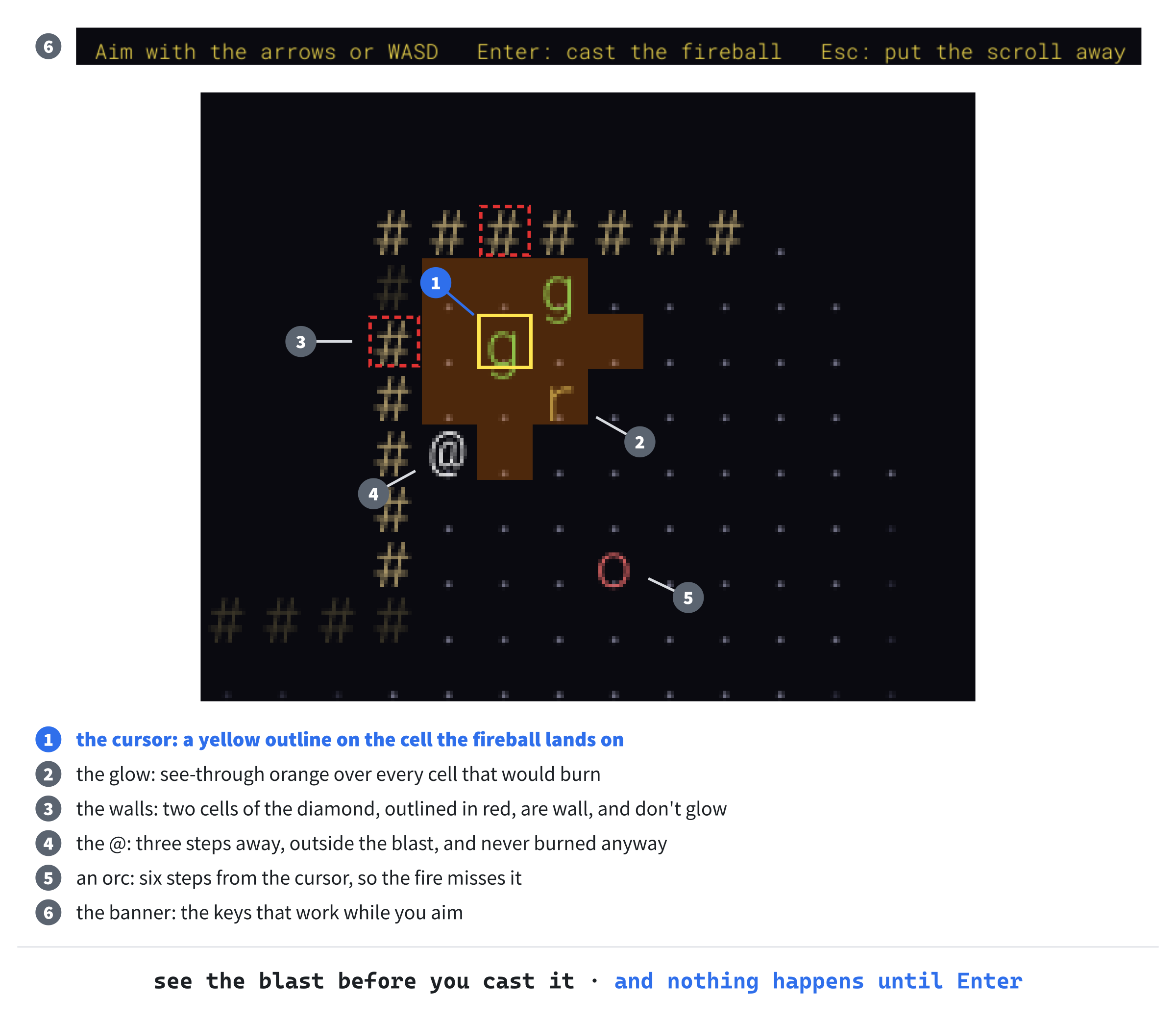
Checkpoint: Click in TargetingState.cpp, and press Ctrl+F7. It compiles on its own.
Opening It
The inventory opens the aiming state, in place of using the scroll. In InventoryState.cpp, add this below #include "InventoryState.h":
#include <memory> // std::make_uniqueIn the preceding code, <memory> is for std::make_unique. Then add this below #include "Game.h":
#include "TargetingState.h"In the preceding code, the inventory includes the aiming state, since it's about to make one. Then find these lines, at the end of handleKey:
game.useItem(slot);
change.close = true;
And change them to this:
// A scroll of fireball needs aiming first, and the rest are used now
change.close = true;
if (game.getPlayer().getInventory()[slot] == ItemKind::Fireball)
{
    Point start = game.getPlayer().getPosition();
    change.open = std::make_unique<TargetingState>(slot, start);
}
else
{
    game.useItem(slot);
}
In the preceding code, the inventory always asks to be closed, as before. For a scroll of fireball, it also asks for a new aiming state to be opened, with the scroll's slot, and the cursor starting on the @. That's "both", and it replaces the inventory with the aiming state, so when the aiming state closes, you're back in the game, not the inventory. For anything else, the item is used at once, as it always was.
The scroll isn't used here. It stays in the pack while you aim, and only castFireball takes it out, so putting it away with Esc costs nothing at all.
Finding One
Last, the scrolls have to be somewhere. In MapGenerator.cpp, find the comment above the scroll of magic mapping:
// A scroll of magic mapping on about half of the levelsAnd change it to this:
// A scroll of magic mapping on about half of the levels, and a scroll
// of fireball on about a third
In the preceding code, the comment covers both scrolls. Then add this below the lines that place the scroll of magic mapping:
if (SDL_rand(3) == 0)
    items.push_back(Item(ItemKind::Fireball, takeFreeSpot(false)));
In the preceding code, SDL_rand(3) is 0, 1, or 2, so about a third of the levels get a scroll of fireball.
That's the whole of Part 7, and of Rogue SDL: two new files, and every change to the old files typed.
Checkpoint: Press F5, and explore until you find a pale blue ?, and pick it up. If the inventory calls it a scroll of magic mapping, keep looking: about a third of the levels have a fireball. Once you have one, find a monster, or better, two or three together. Open the inventory, press the scroll's letter, and the banner appears, with the cursor on the @. Move it onto the monsters, watch the glow, and press Enter: the fire flashes orange, and anything it kills is gone, as Figure 36.7 shows.
The Complete Files
Here are the fourteen files that are new or changed, in full, exactly as they are in the repository's SDL3 Projects/Rogue SDL Part 7. The other twenty-four are just as they were at the end of Chapter 35. First, Common.h:
#pragma once
#include <SDL3/SDL.h>
#include <functional>   // std::hash

// A place on the map, counted in cells, not pixels
struct Point
{
    int x = 0;
    int y = 0;

    bool operator==(const Point& other) const = default;
};

// The map is a grid of square cells, CELL_PX pixels across, MAP_W cells
// wide and MAP_H cells tall. Below it are HUD_ROWS rows of text, and the
// window is exactly the size of both: 1280 by 720 pixels
constexpr int CELL_PX = 16;
constexpr int MAP_W = 80;
constexpr int MAP_H = 40;
constexpr int HUD_ROWS = 5;
constexpr int WINDOW_W = MAP_W * CELL_PX;
constexpr int WINDOW_H = (MAP_H + HUD_ROWS) * CELL_PX;

// How to hash a Point, so that it can be a key in an unordered_map. Each
// cell gets its own number: the same number as its tile's index in the
// Map's vector
template <>
struct std::hash<Point>
{
    size_t operator()(const Point& point) const
    {
        return point.y * MAP_W + point.x;
    }
};

// How far the player can see, in cells
constexpr int SIGHT_RADIUS = 8;

// A fireball burns every cell up to this many steps from where it bursts,
// and does this much damage to every monster it burns
constexpr int FIREBALL_RADIUS = 2;
constexpr int FIREBALL_DAMAGE = 8;

// Every color in the game, in one place
namespace Palette
{
    constexpr SDL_Color BACKGROUND = { 10, 10, 16, 255 };
    constexpr SDL_Color WALL = { 180, 160, 110, 255 };
    constexpr SDL_Color FLOOR = { 110, 110, 130, 255 };
    constexpr SDL_Color PLAYER = { 255, 255, 255, 255 };

    // The stairs down
    constexpr SDL_Color STAIRS = { 240, 220, 80, 255 };

    // The colors of things remembered, but out of sight
    constexpr SDL_Color WALL_REMEMBERED = { 60, 55, 40, 255 };
    constexpr SDL_Color FLOOR_REMEMBERED = { 40, 40, 55, 255 };
    constexpr SDL_Color STAIRS_REMEMBERED = { 110, 100, 40, 255 };

    // The HUD's text
    constexpr SDL_Color TEXT = { 200, 200, 210, 255 };
    constexpr SDL_Color TEXT_DIM = { 100, 100, 110, 255 };
    constexpr SDL_Color TEXT_BAD = { 240, 80, 80, 255 };

    // Monsters and treasure
    constexpr SDL_Color RAT = { 180, 180, 100, 255 };
    constexpr SDL_Color GOBLIN = { 100, 220, 100, 255 };
    constexpr SDL_Color ORC = { 220, 100, 100, 255 };
    constexpr SDL_Color POTION = { 220, 80, 220, 255 };
    constexpr SDL_Color GOLD = { 240, 220, 80, 255 };
    constexpr SDL_Color SCROLL = { 180, 220, 255, 255 };
    constexpr SDL_Color WEAPON = { 200, 200, 220, 255 };

    // Flashes, which start see-through, and fade from there
    constexpr SDL_Color FLASH_HIT = { 255, 60, 60, 170 };
    constexpr SDL_Color FLASH_HEAL = { 80, 255, 120, 140 };
    constexpr SDL_Color FLASH_FIRE = { 255, 150, 30, 220 };

    // A see-through black, to dim the dungeon behind the inventory
    constexpr SDL_Color SHADE = { 0, 0, 0, 170 };

    // Aiming: the cursor, and a see-through orange over what would burn
    constexpr SDL_Color TARGET = { 255, 230, 80, 255 };
    constexpr SDL_Color BLAST = { 255, 120, 0, 70 };
}
In the preceding code, the fireball's reach and damage join the game's rules, and the palette adds the weapons' gray and the colors of fire and aiming.
Next, Item.h:
#pragma once
#include "Entity.h"

// The kinds of treasure
enum class ItemKind
{
    Potion,
    Gold,
    MagicMapping,
    Dagger,
    Sword,
    Warhammer,
    Fireball
};

constexpr int ITEM_KINDS = 7;   // how many kinds there are

// What every item of one kind is like
struct ItemStats
{
    const char* name;
    char glyph;
    SDL_Color color;
    int attackBonus = 0;   // for a weapon, the extra damage of each hit
};

const ItemStats& statsOf(ItemKind kind);

// Something lying on the floor, waiting to be picked up
class Item : public Entity
{
public:
    Item(ItemKind kind, Point position, int amount = 1);

    ItemKind getKind() const;
    int getAmount() const;

private:
    ItemKind kind_;
    int amount_;   // how many coins, for gold
};
In the preceding code, there are seven kinds of item, and every kind's stats have an attack bonus.
Then Item.cpp:
#include "Item.h"
#include <iterator>   // std::size

namespace
{
    // One for each kind of item, in the same order as the enum
    constexpr ItemStats ITEM_STATS[] = {
        { "potion of healing", '!', Palette::POTION },
        { "gold", '$', Palette::GOLD },
        { "scroll of magic mapping", '?', Palette::SCROLL },
        { "dagger", ')', Palette::WEAPON, 2 },
        { "sword", ')', Palette::WEAPON, 5 },
        { "warhammer", ')', Palette::WEAPON, 10 },
        { "scroll of fireball", '?', Palette::SCROLL }
    };
    static_assert(std::size(ITEM_STATS) == ITEM_KINDS,
                  "There must be one ItemStats for each ItemKind");
}

const ItemStats& statsOf(ItemKind kind)
{
    return ITEM_STATS[static_cast<int>(kind)];
}

Item::Item(ItemKind kind, Point position, int amount)
    : Entity(position, statsOf(kind).glyph, statsOf(kind).color),
      kind_(kind),
      amount_(amount)
{
}

ItemKind Item::getKind() const
{
    return kind_;
}

int Item::getAmount() const
{
    return amount_;
}
In the preceding code, the stats table has a row for each weapon, with its bonus, and one for the scroll of fireball.
Then Player.h:
#pragma once
#include <optional>   // std::optional, for the weapon
#include <vector>   // std::vector, for the inventory
#include "Entity.h"
#include "Item.h"

class Map;

constexpr int PLAYER_MAX_HP = 20;   // the player's health, when it's full
constexpr int PLAYER_ATTACK = 4;    // the damage the player does with a hit
constexpr int POTION_HEAL = 8;      // the health a potion gives back
constexpr int INVENTORY_SIZE = 12;  // slots, one for each letter a to l

// You: the @
class Player : public Entity
{
public:
    Player();

    bool tryMove(int dx, int dy, const Map& map);

    int getHp() const;
    void setHp(int hp);
    int getAttack() const;
    int getGold() const;
    void setGold(int gold);
    const std::vector<ItemKind>& getInventory() const;
    std::optional<ItemKind> getWeapon() const;
    bool isAlive() const;

    void takeDamage(int amount);
    void heal(int amount);
    void addGold(int amount);
    bool addToInventory(ItemKind kind);
    void removeFromInventory(int slot);
    void wield(ItemKind weapon);
    void reset();

private:
    int hp_ = PLAYER_MAX_HP;
    int gold_ = 0;
    std::vector<ItemKind> inventory_;   // everything carried, but gold
    std::optional<ItemKind> weapon_;    // empty for bare hands
};
In the preceding code, the player has a weapon that may or may not be there, in a std::optional.
Then Player.cpp:
#include "Player.h"
#include <algorithm>   // std::min and std::max
#include "Map.h"

Player::Player()
    : Entity({ 0, 0 }, '@', Palette::PLAYER)
{
}

// Steps one cell, unless the way is blocked. Returns true if the player
// moved
bool Player::tryMove(int dx, int dy, const Map& map)
{
    Point next = { getPosition().x + dx, getPosition().y + dy };
    if (map.isBlocked(next))
        return false;

    setPosition(next);
    return true;
}

int Player::getHp() const
{
    return hp_;
}

void Player::setHp(int hp)
{
    hp_ = hp;
}

// The damage of each hit: more with a weapon than with bare hands
int Player::getAttack() const
{
    if (weapon_)
        return PLAYER_ATTACK + statsOf(*weapon_).attackBonus;
    return PLAYER_ATTACK;
}

int Player::getGold() const
{
    return gold_;
}

void Player::setGold(int gold)
{
    gold_ = gold;
}

const std::vector<ItemKind>& Player::getInventory() const
{
    return inventory_;
}

std::optional<ItemKind> Player::getWeapon() const
{
    return weapon_;
}

bool Player::isAlive() const
{
    return hp_ > 0;
}

// Never below zero, so that the HUD never shows a negative number
void Player::takeDamage(int amount)
{
    hp_ = std::max(hp_ - amount, 0);
}

void Player::addGold(int amount)
{
    gold_ += amount;
}

// Heals, though never past full health
void Player::heal(int amount)
{
    hp_ = std::min(hp_ + amount, PLAYER_MAX_HP);
}

// Puts an item in the inventory, if there's room. Returns true if there was
bool Player::addToInventory(ItemKind kind)
{
    if (static_cast<int>(inventory_.size()) == INVENTORY_SIZE)
        return false;

    inventory_.push_back(kind);
    return true;
}

// Takes the item in a slot out of the inventory. The items after it move
// up a slot each
void Player::removeFromInventory(int slot)
{
    inventory_.erase(inventory_.begin() + slot);
}

// Takes up a weapon. The weapon it replaces, if there is one, goes into
// the inventory
void Player::wield(ItemKind weapon)
{
    if (weapon_)
        inventory_.push_back(*weapon_);
    weapon_ = weapon;
}

// Everything back to how it was at the start of the game
void Player::reset()
{
    hp_ = PLAYER_MAX_HP;
    gold_ = 0;
    inventory_.clear();
    weapon_ = std::nullopt;
}
In the preceding code, a weapon adds its bonus to each hit, wielding a new one puts the old one in the pack, and a new game starts with bare hands.
Then HUD.cpp:
#include "HUD.h"
#include "Common.h"
#include "GlyphCache.h"
#include "Player.h"

// The first row is how things stand, and the second is the keys, so the
// messages get the rows left over
constexpr int MESSAGE_ROWS = HUD_ROWS - 2;

// Adds a message at the bottom, and drops the oldest from the top when
// there are too many to show
void HUD::addMessage(const std::string& message)
{
    messages_.push_back(message);
    if (messages_.size() > MESSAGE_ROWS)
        messages_.pop_front();
}

void HUD::clear()
{
    messages_.clear();
}

void HUD::draw(SDL_Renderer* renderer, const GlyphCache& glyphs,
               const Player& player, int depth, bool gameOver) const
{
    int row = MAP_H;   // the first row below the map
    std::string status =
        "HP " + std::to_string(player.getHp()) + "/" +
        std::to_string(PLAYER_MAX_HP) +
        "   Gold " + std::to_string(player.getGold()) +
        "   Depth " + std::to_string(depth) + "   Wielding ";
    if (player.getWeapon())
        status += statsOf(*player.getWeapon()).name;
    else
        status += "nothing";
    glyphs.drawText(renderer, status, { 1, row }, Palette::TEXT);

    // The keys, or once the player has died, what to do about it
    std::string help = "Arrows or WASD: move and attack   I: inventory"
                       "   .: go down   F5: save   F9: load   Esc: quit";
    SDL_Color helpColor = Palette::TEXT_DIM;
    if (gameOver)
    {
        help = "You have died. Press R to play again, or Esc to quit.";
        helpColor = Palette::TEXT_BAD;
    }
    glyphs.drawText(renderer, help, { 1, row + 1 }, helpColor);

    // The newest message is bright, and the older ones are dim
    for (size_t i = 0; i < messages_.size(); ++i)
    {
        bool newest = i + 1 == messages_.size();
        glyphs.drawText(renderer, messages_[i],
                        { 1, row + 2 + static_cast<int>(i) },
                        newest ? Palette::TEXT : Palette::TEXT_DIM);
    }
}
In the preceding code, the status line ends with what you're wielding.
Then MapGenerator.h:
#pragma once
#include <SDL3/SDL.h>
#include <vector>   // std::vector, for the rooms
#include "Common.h"

class Enemy;
class Item;
class Map;

// Builds a new level on a map: it splits the map into areas, puts a room
// in each one, joins the rooms with corridors, puts stairs down in one of
// them, and fills the rooms with monsters and treasure
class MapGenerator
{
public:
    MapGenerator(Map& map);

    Point generate(int depth, std::vector<Enemy>& enemies,
                   std::vector<Item>& items);

private:
    void split(SDL_Rect area, int cuts);
    void addRoom(SDL_Rect area);
    void carve(Point a, Point b);
    void carveCorridor(Point from, Point to);
    Point takeFreeSpot(bool awayFromStart);
    void addMonsters(int depth, std::vector<Enemy>& enemies);
    void addTreasure(int depth, std::vector<Item>& items);

    Map& map_;                      // the map being built, not owned
    std::vector<SDL_Rect> rooms_;   // every room, in the order it was made
    int startRoom_ = 0;             // the room the player starts in
    std::vector<Point> taken_;      // cells that already have something
};
In the preceding code, addTreasure takes the depth.
Then MapGenerator.cpp:
#include "MapGenerator.h"
#include <algorithm>   // std::min, std::max, and std::find
#include <cstdlib>   // std::abs
#include "Enemy.h"
#include "Item.h"
#include "Map.h"

// An area is cut in two only if its longer side is at least twice this, so
// both pieces are at least this long
constexpr int MIN_AREA = 10;
// and after this many cuts, it isn't cut again, however big it is
constexpr int MAX_CUTS = 6;
// The smallest room, in cells
constexpr int MIN_ROOM_W = 4;
constexpr int MIN_ROOM_H = 3;

namespace
{
    // A random whole number from low to high, including both
    int randomBetween(int low, int high)
    {
        if (high <= low)
            return low;
        return low + SDL_rand(high - low + 1);
    }

    Point centerOf(SDL_Rect room)
    {
        return { room.x + room.w / 2, room.y + room.h / 2 };
    }
}

MapGenerator::MapGenerator(Map& map)
    : map_(map)
{
}

// Builds the level for a depth, adds its monsters and treasure to the two
// vectors, and returns the cell where the player starts
Point MapGenerator::generate(int depth, std::vector<Enemy>& enemies,
                             std::vector<Item>& items)
{
    map_.fill(Terrain::Wall);
    rooms_.clear();
    taken_.clear();
    split({ 0, 0, MAP_W, MAP_H }, 0);

    // Join each room to the one made after it, so that every room can be
    // reached from every other
    for (size_t i = 1; i < rooms_.size(); ++i)
        carveCorridor(centerOf(rooms_[i - 1]), centerOf(rooms_[i]));

    // Start in the middle of a room chosen at random
    int roomCount = static_cast<int>(rooms_.size());
    startRoom_ = SDL_rand(roomCount);
    Point start = centerOf(rooms_[startRoom_]);

    // and put the stairs in the middle of the room farthest away from it
    Point stairs = start;
    int farthest = 0;
    for (const SDL_Rect& room : rooms_)
    {
        Point center = centerOf(room);
        int distance = std::abs(center.x - start.x) +
                       std::abs(center.y - start.y);
        if (distance > farthest)
        {
            farthest = distance;
            stairs = center;
        }
    }
    map_.at(stairs).terrain = Terrain::StairsDown;

    // Nothing else can go where the player starts, or on the stairs
    taken_.push_back(start);
    taken_.push_back(stairs);
    addMonsters(depth, enemies);
    addTreasure(depth, items);
    return start;
}

// Cuts an area in two, then cuts each piece in two, and so on. An area
// that's too small to cut, or has been cut out by MAX_CUTS cuts, gets a
// room instead
void MapGenerator::split(SDL_Rect area, int cuts)
{
    // Cut across the longer side, so that the pieces don't get too thin
    bool cutAcross = area.h > area.w;
    int length = cutAcross ? area.h : area.w;
    if (cuts == MAX_CUTS || length < MIN_AREA * 2)
    {
        addRoom(area);
        return;
    }

    int cut = randomBetween(MIN_AREA, length - MIN_AREA);
    if (cutAcross)
    {
        split({ area.x, area.y, area.w, cut }, cuts + 1);
        split({ area.x, area.y + cut, area.w, area.h - cut }, cuts + 1);
    }
    else
    {
        split({ area.x, area.y, cut, area.h }, cuts + 1);
        split({ area.x + cut, area.y, area.w - cut, area.h }, cuts + 1);
    }
}

// Carves a room of a random size somewhere inside an area, with at least
// one cell of wall between it and the area's edges
void MapGenerator::addRoom(SDL_Rect area)
{
    SDL_Rect room;
    room.w = randomBetween(MIN_ROOM_W, area.w - 2);
    room.h = randomBetween(MIN_ROOM_H, area.h - 2);
    room.x = randomBetween(area.x + 1, area.x + area.w - room.w - 1);
    room.y = randomBetween(area.y + 1, area.y + area.h - room.h - 1);

    carve({ room.x, room.y }, { room.x + room.w - 1, room.y + room.h - 1 });
    rooms_.push_back(room);
}

// Turns every cell in the box with corners a and b into floor. When a and
// b are in the same row, or the same column, the box is a straight line
void MapGenerator::carve(Point a, Point b)
{
    for (int y = std::min(a.y, b.y); y <= std::max(a.y, b.y); ++y)
    {
        for (int x = std::min(a.x, b.x); x <= std::max(a.x, b.x); ++x)
            map_.at({ x, y }).terrain = Terrain::Floor;
    }
}

// Carves an L-shaped corridor between two cells, turning its corner at
// one end or the other, chosen at random
void MapGenerator::carveCorridor(Point from, Point to)
{
    Point corner = { to.x, from.y };
    if (SDL_rand(2) == 0)
        corner = { from.x, to.y };

    carve(from, corner);
    carve(corner, to);
}

// A random cell in a random room, where nothing has been put yet, and, if
// asked, not in the room where the player starts. It's taken from then on
Point MapGenerator::takeFreeSpot(bool awayFromStart)
{
    int roomCount = static_cast<int>(rooms_.size());
    while (true)
    {
        int index = SDL_rand(roomCount);
        if (awayFromStart && index == startRoom_)
            continue;

        const SDL_Rect& room = rooms_[index];
        Point spot = { randomBetween(room.x, room.x + room.w - 1),
                       randomBetween(room.y, room.y + room.h - 1) };
        if (std::find(taken_.begin(), taken_.end(), spot) == taken_.end())
        {
            taken_.push_back(spot);
            return spot;
        }
    }
}

// Puts monsters in the rooms, away from the player: more of them the
// deeper the level, and stronger ones too
void MapGenerator::addMonsters(int depth, std::vector<Enemy>& enemies)
{
    int count = 3 + depth + SDL_rand(3);
    for (int i = 0; i < count; ++i)
    {
        // Rats at every depth, goblins from depth 2, and orcs from depth 4
        int roll = SDL_rand(100);
        MonsterKind kind = MonsterKind::Rat;
        if (depth >= 4 && roll >= 85)
            kind = MonsterKind::Orc;
        else if (depth >= 2 && roll >= 60)
            kind = MonsterKind::Goblin;

        enemies.push_back(Enemy(kind, takeFreeSpot(true)));
    }
}

// Scatters potions, scrolls, weapons, and piles of gold through the rooms
void MapGenerator::addTreasure(int depth, std::vector<Item>& items)
{
    int potions = randomBetween(1, 3);
    for (int i = 0; i < potions; ++i)
        items.push_back(Item(ItemKind::Potion, takeFreeSpot(false)));

    // A scroll of magic mapping on about half of the levels, and a scroll
    // of fireball on about a third
    if (SDL_rand(2) == 0)
        items.push_back(Item(ItemKind::MagicMapping, takeFreeSpot(false)));
    if (SDL_rand(3) == 0)
        items.push_back(Item(ItemKind::Fireball, takeFreeSpot(false)));

    // A weapon now and then, more often deeper down, and a better one too
    if (SDL_rand(100) < 25 + depth * 5)
    {
        ItemKind weapon = ItemKind::Dagger;
        if (depth >= 5 && SDL_rand(3) == 0)
            weapon = ItemKind::Warhammer;
        else if (depth >= 3 && SDL_rand(2) == 0)
            weapon = ItemKind::Sword;
        items.push_back(Item(weapon, takeFreeSpot(false)));
    }

    int piles = randomBetween(2, 5);
    for (int i = 0; i < piles; ++i)
    {
        int coins = randomBetween(5, 15);
        items.push_back(Item(ItemKind::Gold, takeFreeSpot(false), coins));
    }
}
In the preceding code, weapons turn up more often, and better, the deeper you go, and a scroll of fireball on about a third of the levels.
Then SaveLoad.cpp:
#include "SaveLoad.h"
#include <fstream>   // std::ofstream and std::ifstream
#include "Enemy.h"
#include "Item.h"
#include "Map.h"
#include "Player.h"

// The first word of every save file, and the version of the format that
// follows it. The version goes up whenever the format changes, so that an
// old file is turned away, rather than read wrongly
const std::string SAVE_HEADER = "ROGUE_SDL_SAVE";
constexpr int SAVE_VERSION = 3;

namespace
{
    // A tile as one letter: W for wall, F for floor, and S for stairs, as
    // a capital if the player has explored it
    char encode(const Tile& tile)
    {
        switch (tile.terrain)
        {
        case Terrain::Floor:
            return tile.explored ? 'F' : 'f';
        case Terrain::StairsDown:
            return tile.explored ? 'S' : 's';
        default:
            return tile.explored ? 'W' : 'w';
        }
    }

    // The tile a letter stands for. Anything but F or S is wall
    Tile decode(char letter)
    {
        Tile tile;
        tile.explored = letter >= 'A' && letter <= 'Z';
        if (letter == 'F' || letter == 'f')
            tile.terrain = Terrain::Floor;
        else if (letter == 'S' || letter == 's')
            tile.terrain = Terrain::StairsDown;
        return tile;
    }
}

namespace SaveLoad
{
    // Writes everything the game needs to carry on later: the depth, the
    // player, the monsters, the treasure, and the map. Returns false if the
    // file couldn't be written
    bool save(const std::string& path, const Map& map, const Player& player,
              const std::vector<Enemy>& enemies,
              const std::vector<Item>& items, int depth)
    {
        std::ofstream file(path);
        file << SAVE_HEADER << " " << SAVE_VERSION << "\n";
        file << "DEPTH " << depth << "\n";

        Point at = player.getPosition();

        // The weapon is its kind's number, or -1 for bare hands
        int weapon = -1;
        if (player.getWeapon())
            weapon = static_cast<int>(*player.getWeapon());
        file << "PLAYER " << at.x << " " << at.y << " " << player.getHp()
             << " " << player.getGold() << " " << weapon << "\n";
        for (ItemKind kind : player.getInventory())
            file << "CARRY " << static_cast<int>(kind) << "\n";

        for (const Enemy& enemy : enemies)
        {
            at = enemy.getPosition();
            file << "MONSTER " << static_cast<int>(enemy.getKind()) << " "
                 << at.x << " " << at.y << " " << enemy.getHp() << "\n";
        }
        for (const Item& item : items)
        {
            at = item.getPosition();
            file << "ITEM " << static_cast<int>(item.getKind()) << " "
                 << at.x << " " << at.y << " " << item.getAmount() << "\n";
        }

        // The map last, a row of letters to a line
        file << "MAP\n";
        for (int y = 0; y < MAP_H; ++y)
        {
            for (int x = 0; x < MAP_W; ++x)
                file << encode(map.at({ x, y }));
            file << "\n";
        }

        // Closing the file finishes the writing, so any problem shows now
        file.close();
        return !file.fail();
    }

    // Reads a saved game back into the game's variables. If anything in
    // the file is missing or wrong, it returns false, and leaves the game
    // exactly as it was
    bool load(const std::string& path, Map& map, Player& player,
              std::vector<Enemy>& enemies, std::vector<Item>& items,
              int& depth)
    {
        std::ifstream file(path);
        std::string word;
        int version = 0;
        file >> word >> version;
        if (word != SAVE_HEADER || version != SAVE_VERSION)
            return false;

        // Read everything into new variables first
        int newDepth = 1;
        Player newPlayer;
        std::vector<Enemy> newEnemies;
        std::vector<Item> newItems;
        Map newMap;

        // A line at a time, each starting with a word that says what it is,
        // until the map
        while (file >> word && word != "MAP")
        {
            Point at;
            if (word == "DEPTH")
            {
                file >> newDepth;
            }
            else if (word == "PLAYER")
            {
                int hp = 0;
                int gold = 0;
                int weapon = -1;
                file >> at.x >> at.y >> hp >> gold >> weapon;
                if (weapon < -1 || weapon >= ITEM_KINDS)
                    return false;

                newPlayer.setPosition(at);
                newPlayer.setHp(hp);
                newPlayer.setGold(gold);
                if (weapon != -1)
                    newPlayer.wield(static_cast<ItemKind>(weapon));
            }
            else if (word == "CARRY")
            {
                int kind = 0;
                file >> kind;
                if (kind < 0 || kind >= ITEM_KINDS)
                    return false;

                newPlayer.addToInventory(static_cast<ItemKind>(kind));
            }
            else if (word == "MONSTER")
            {
                int kind = 0;
                int hp = 0;
                file >> kind >> at.x >> at.y >> hp;
                if (kind < 0 || kind >= MONSTER_KINDS)
                    return false;

                Enemy enemy(static_cast<MonsterKind>(kind), at);
                enemy.setHp(hp);
                newEnemies.push_back(enemy);
            }
            else if (word == "ITEM")
            {
                int kind = 0;
                int amount = 0;
                file >> kind >> at.x >> at.y >> amount;
                if (kind < 0 || kind >= ITEM_KINDS)
                    return false;

                newItems.push_back(Item(static_cast<ItemKind>(kind), at,
                                        amount));
            }
            else
            {
                return false;   // a word that has no business here
            }

            // A place outside the map would crash the game when it's drawn
            if (!newMap.isInside(at))
                return false;
        }

        // The map, which must be a full MAP_W letters by MAP_H lines
        for (int y = 0; y < MAP_H; ++y)
        {
            std::string row;
            file >> row;
            if (static_cast<int>(row.size()) != MAP_W)
                return false;

            for (int x = 0; x < MAP_W; ++x)
                newMap.at({ x, y }) = decode(row[x]);
        }

        // The whole file was good, so now the game can have it
        map = newMap;
        player = newPlayer;
        enemies = newEnemies;
        items = newItems;
        depth = newDepth;
        return true;
    }
}
In the preceding code, version 3 of the save file puts the weapon on the PLAYER line, as its kind's number, or -1.
Then TargetingState.h:
#pragma once
#include "GameState.h"

// Aiming a scroll of fireball: the arrow keys move a cursor, Enter sends
// the fireball there, and Escape puts the scroll away unread
class TargetingState : public GameState
{
public:
    TargetingState(int slot, Point start);

    StateChange handleKey(Game& game, SDL_Keycode key) override;
    void draw(SDL_Renderer* renderer, const Game& game) const override;

private:
    int slot_;       // the scroll's slot in the inventory
    Point cursor_;   // the cell the fireball will burst on
};
In the preceding code, the aiming state keeps the scroll's slot and the cursor.
Then TargetingState.cpp:
#include "TargetingState.h"
#include "Game.h"

TargetingState::TargetingState(int slot, Point start)
    : slot_(slot), cursor_(start)
{
}

// The arrows, or W, A, S, and D, move the cursor. Enter casts the fireball
// on it, and Escape puts the scroll away, unread
StateChange TargetingState::handleKey(Game& game, SDL_Keycode key)
{
    StateChange change;

    // A key that stands for a step moves the cursor, but never off the map
    Point step = directionOf(key);
    Point next = { cursor_.x + step.x, cursor_.y + step.y };
    if (game.getMap().isInside(next))
        cursor_ = next;

    if (key == SDLK_RETURN || key == SDLK_KP_ENTER)
        change.close = game.castFireball(slot_, cursor_);
    else if (key == SDLK_ESCAPE)
        change.close = true;
    return change;
}

// Shows where the fireball would burn, and a box around the cursor, with
// the keys in a banner along the top of the window
void TargetingState::draw(SDL_Renderer* renderer, const Game& game) const
{
    SDL_SetRenderDrawBlendMode(renderer, SDL_BLENDMODE_BLEND);
    SDL_SetRenderDrawColor(renderer, Palette::BLAST.r, Palette::BLAST.g,
                           Palette::BLAST.b, Palette::BLAST.a);
    for (int dy = -FIREBALL_RADIUS; dy <= FIREBALL_RADIUS; ++dy)
    {
        for (int dx = -FIREBALL_RADIUS; dx <= FIREBALL_RADIUS; ++dx)
        {
            Point cell = { cursor_.x + dx, cursor_.y + dy };
            if (!game.canBurn(cell, cursor_))
                continue;

            SDL_FRect box = { static_cast<float>(cell.x * CELL_PX),
                              static_cast<float>(cell.y * CELL_PX),
                              CELL_PX, CELL_PX };
            SDL_RenderFillRect(renderer, &box);
        }
    }

    SDL_FRect cursor = { static_cast<float>(cursor_.x * CELL_PX),
                         static_cast<float>(cursor_.y * CELL_PX),
                         CELL_PX, CELL_PX };
    SDL_SetRenderDrawColor(renderer, Palette::TARGET.r, Palette::TARGET.g,
                           Palette::TARGET.b, 255);
    SDL_RenderRect(renderer, &cursor);

    SDL_FRect banner = { 0, 0, WINDOW_W, 2 * CELL_PX };
    SDL_SetRenderDrawColor(renderer, Palette::BACKGROUND.r,
                           Palette::BACKGROUND.g, Palette::BACKGROUND.b, 255);
    SDL_RenderFillRect(renderer, &banner);
    game.getGlyphs().drawText(renderer,
                              "Aim with the arrows or WASD   Enter: cast the "
                              "fireball   Esc: put the scroll away",
                              { 1, 1 }, Palette::TARGET);
}
In the preceding code, the arrows move the cursor, Enter casts, Esc puts the scroll away, and draw shows the glow, the cursor, and the banner.
Then InventoryState.cpp:
#include "InventoryState.h"
#include <memory>   // std::make_unique
#include <string>   // std::string, for each line
#include <vector>   // std::vector, for the inventory
#include "Game.h"
#include "TargetingState.h"

// The box the inventory is shown in, in cells
constexpr int BOX_X = 22;
constexpr int BOX_Y = 6;
constexpr int BOX_W = 36;
constexpr int BOX_H = INVENTORY_SIZE + 6;

// A letter uses the item in the slot it stands for, and closes the
// inventory. Escape closes it without using anything
StateChange InventoryState::handleKey(Game& game, SDL_Keycode key)
{
    StateChange change;
    if (key == SDLK_ESCAPE)
    {
        change.close = true;
        return change;
    }

    // SDL's keycodes for the letters are in order, like the letters, so a
    // is slot 0, b is slot 1, and so on
    if (key < SDLK_A || key > SDLK_Z)
        return change;
    int slot = static_cast<int>(key - SDLK_A);
    if (slot >= static_cast<int>(game.getPlayer().getInventory().size()))
        return change;

    // A scroll of fireball needs aiming first, and the rest are used now
    change.close = true;
    if (game.getPlayer().getInventory()[slot] == ItemKind::Fireball)
    {
        Point start = game.getPlayer().getPosition();
        change.open = std::make_unique<TargetingState>(slot, start);
    }
    else
    {
        game.useItem(slot);
    }
    return change;
}

// Dims the dungeon, and lists the inventory in a box over it
void InventoryState::draw(SDL_Renderer* renderer, const Game& game) const
{
    SDL_SetRenderDrawBlendMode(renderer, SDL_BLENDMODE_BLEND);
    SDL_SetRenderDrawColor(renderer, Palette::SHADE.r, Palette::SHADE.g,
                           Palette::SHADE.b, Palette::SHADE.a);
    SDL_RenderFillRect(renderer, nullptr);

    SDL_FRect box = { BOX_X * CELL_PX, BOX_Y * CELL_PX, BOX_W * CELL_PX,
                      BOX_H * CELL_PX };
    SDL_SetRenderDrawColor(renderer, Palette::BACKGROUND.r,
                           Palette::BACKGROUND.g, Palette::BACKGROUND.b, 255);
    SDL_RenderFillRect(renderer, &box);
    SDL_SetRenderDrawColor(renderer, Palette::TEXT_DIM.r, Palette::TEXT_DIM.g,
                           Palette::TEXT_DIM.b, 255);
    SDL_RenderRect(renderer, &box);

    const GlyphCache& glyphs = game.getGlyphs();
    glyphs.drawText(renderer, "Inventory", { BOX_X + 2, BOX_Y + 1 },
                    Palette::TEXT);

    // Every item on a line of its own, after its letter
    const std::vector<ItemKind>& items = game.getPlayer().getInventory();
    if (items.empty())
    {
        glyphs.drawText(renderer, "Nothing yet.", { BOX_X + 2, BOX_Y + 3 },
                        Palette::TEXT_DIM);
    }
    for (size_t i = 0; i < items.size(); ++i)
    {
        char letter = static_cast<char>('a' + i);
        std::string line = std::string(1, letter) + ")  " +
                           statsOf(items[i]).name;
        glyphs.drawText(renderer, line,
                        { BOX_X + 2, BOX_Y + 3 + static_cast<int>(i) },
                        Palette::TEXT);
    }

    glyphs.drawText(renderer, "Press a letter to use an item, or Esc.",
                    { BOX_X + 2, BOX_Y + BOX_H - 2 }, Palette::TEXT_DIM);
}
In the preceding code, a scroll of fireball replaces the inventory with an aiming state, and everything else is used at once.
Then Game.h:
#pragma once
#include <SDL3/SDL.h>
#include <memory>   // std::unique_ptr, for the states
#include <vector>   // std::vector, for the monsters, treasure, and states
#include "Enemy.h"
#include "FlashEffects.h"
#include "GameState.h"
#include "GlyphCache.h"
#include "HUD.h"
#include "Item.h"
#include "Map.h"
#include "Player.h"
#include "Sound.h"

// The whole game. It owns the glyphs, the map, the player, the monsters,
// the treasure, the HUD, the sounds, and the flashes, and runs the loop
// that waits for a key, and hands it to the state on top of the stack
class Game
{
public:
    Game(SDL_Renderer* renderer);

    bool isLoaded() const;
    void run();

    // What the states can look at
    const GlyphCache& getGlyphs() const;
    const Map& getMap() const;
    const Player& getPlayer() const;
    bool isGameOver() const;
    bool canBurn(Point cell, Point center) const;

    // What the states can ask the game to do
    void newGame();
    void quit();
    void moveOrAttack(int dx, int dy);
    void useItem(int slot);
    bool castFireball(int slot, Point target);
    void takeStairs();
    void saveGame();
    void loadGame();

private:
    void newLevel();
    void handleKey(SDL_Keycode key);
    void attack(Enemy& enemy);
    void burn(Enemy& enemy);
    void pickUp();
    void endTurn();
    void monsterTurn(Enemy& enemy);
    bool notices(const Enemy& enemy) const;
    Enemy* enemyAt(Point cell);
    Item* itemAt(Point cell);
    void draw() const;

    SDL_Renderer* renderer_;
    GlyphCache glyphs_;
    Map map_;
    Player player_;
    std::vector<Enemy> enemies_;
    std::vector<Item> items_;
    HUD hud_;
    Sounds sounds_;
    FlashEffects flashes_;
    std::vector<std::unique_ptr<GameState>> states_;   // the top is last
    int depth_ = 1;          // how many levels down the player is
    bool gameOver_ = false;  // true once the player has died
    bool running_ = true;
    bool dirty_ = true;      // true when the window needs drawing again
};
In the preceding code, the states can look at the map and ask what would burn, and ask the game to cast a fireball.
And last, Game.cpp:
#include "Game.h"
#include <cstdlib>   // std::abs
#include <string>   // std::string and std::to_string
#include <utility>   // std::move
#include "AStar.h"
#include "FOV.h"
#include "MapGenerator.h"
#include "PlayingState.h"
#include "SaveLoad.h"

// The font every character is drawn in, and its size
const std::string FONT_PATH = "assets/RobotoMono-Light.ttf";
constexpr float FONT_SIZE = 18.0f;

// A frame, in milliseconds, at 60 frames a second
constexpr Sint32 FRAME_MS = 16;

// The save file. It goes in the working directory, which is the project
// folder when the game runs from Visual Studio
const std::string SAVE_PATH = "rogue_save.txt";

// The game starts with one state on its stack: playing
Game::Game(SDL_Renderer* renderer)
    : renderer_(renderer), glyphs_(renderer, FONT_PATH, FONT_SIZE)
{
    states_.push_back(std::make_unique<PlayingState>());
    newGame();
}

bool Game::isLoaded() const
{
    return glyphs_.isLoaded();
}

const GlyphCache& Game::getGlyphs() const
{
    return glyphs_;
}

const Map& Game::getMap() const
{
    return map_;
}

const Player& Game::getPlayer() const
{
    return player_;
}

bool Game::isGameOver() const
{
    return gameOver_;
}

// Whether a fireball bursting on one cell would burn another: it must be
// no more than FIREBALL_RADIUS steps away, open ground, and in sight
bool Game::canBurn(Point cell, Point center) const
{
    int steps = std::abs(cell.x - center.x) + std::abs(cell.y - center.y);
    return steps <= FIREBALL_RADIUS && !map_.isBlocked(cell) &&
           map_.at(cell).visible;
}

void Game::quit()
{
    running_ = false;
}

// Sleeps until something happens, deals with it, and draws the window again
// if anything changed. While anything is flashing, it wakes up every frame
// as well, to draw the flash fading
void Game::run()
{
    while (running_)
    {
        if (dirty_)
        {
            draw();
            dirty_ = false;
        }

        SDL_Event event;
        if (flashes_.isEmpty())
        {
            if (!SDL_WaitEvent(&event))
                break;
        }
        else
        {
            // Wait for an event, but for no longer than one frame
            bool gotEvent = SDL_WaitEventTimeout(&event, FRAME_MS);
            flashes_.removeFinished();
            dirty_ = true;
            if (!gotEvent)
                continue;
        }

        switch (event.type)
        {
        case SDL_EVENT_QUIT:
            running_ = false;
            break;
        case SDL_EVENT_WINDOW_EXPOSED:
            dirty_ = true;
            break;
        case SDL_EVENT_KEY_DOWN:
            handleKey(event.key.key);
            dirty_ = true;
            break;
        }
    }
}

// Starts again from the top, with a fresh player at depth 1
void Game::newGame()
{
    depth_ = 1;
    gameOver_ = false;
    player_.reset();
    hud_.clear();
    newLevel();
    hud_.addMessage("Welcome to Rogue SDL. Find the stairs down: >");
}

// Builds a new level, with its monsters and treasure, puts the player at
// its start, and looks around
void Game::newLevel()
{
    enemies_.clear();
    items_.clear();
    MapGenerator generator(map_);
    player_.setPosition(generator.generate(depth_, enemies_, items_));
    FOV::compute(map_, player_.getPosition(), SIGHT_RADIUS);
}

// Hands a key to the state on top of the stack, and then changes the stack
// as it asks. A state is only ever closed here, after it has finished with
// the key, and never while it's still dealing with it
void Game::handleKey(SDL_Keycode key)
{
    StateChange change = states_.back()->handleKey(*this, key);
    if (change.close)
        states_.pop_back();
    if (change.open)
        states_.push_back(std::move(change.open));
}

// Attacks the monster in the way, if there is one. Otherwise, steps, looks
// around, and picks up anything lying there. Either way, it's a turn
void Game::moveOrAttack(int dx, int dy)
{
    Point next = { player_.getPosition().x + dx,
                   player_.getPosition().y + dy };
    if (Enemy* enemy = enemyAt(next))
    {
        attack(*enemy);
        endTurn();
        return;
    }

    if (player_.tryMove(dx, dy, map_))
    {
        FOV::compute(map_, player_.getPosition(), SIGHT_RADIUS);
        if (map_.at(player_.getPosition()).terrain == Terrain::StairsDown)
            hud_.addMessage("There are stairs down here. Press . to go down.");
        pickUp();
        endTurn();
    }
}

// The player hits a monster, which may die
void Game::attack(Enemy& enemy)
{
    int damage = player_.getAttack();
    enemy.takeDamage(damage);
    flashes_.add(enemy.getPosition(), Palette::FLASH_HIT);

    std::string name = enemy.getStats().name;
    if (enemy.isAlive())
    {
        sounds_.hit.play();
        hud_.addMessage("You hit the " + name + " for " +
                        std::to_string(damage) + ".");
    }
    else
    {
        sounds_.kill.play();
        hud_.addMessage("You kill the " + name + "!");
    }
}

// Picks up anything lying where the player stands
void Game::pickUp()
{
    Point here = player_.getPosition();
    Item* item = itemAt(here);
    if (!item)
        return;

    std::string name = statsOf(item->getKind()).name;
    if (item->getKind() == ItemKind::Gold)
    {
        player_.addGold(item->getAmount());
        hud_.addMessage("You pick up " + std::to_string(item->getAmount()) +
                        " gold.");
    }
    else if (player_.addToInventory(item->getKind()))
    {
        hud_.addMessage("You pick up a " + name + ".");
    }
    else
    {
        hud_.addMessage("Your inventory is full, so you leave the " + name +
                        ".");
        return;
    }
    sounds_.pickup.play();

    // It's the player's now, so it isn't lying on the floor anymore
    std::erase_if(items_, [here](const Item& lying)
    {
        return lying.getPosition() == here;
    });
}

// Uses the item in a slot of the inventory, which takes a turn
void Game::useItem(int slot)
{
    ItemKind kind = player_.getInventory()[slot];
    player_.removeFromInventory(slot);
    switch (kind)
    {
    case ItemKind::Potion:
        player_.heal(POTION_HEAL);
        sounds_.drink.play();
        flashes_.add(player_.getPosition(), Palette::FLASH_HEAL);
        hud_.addMessage("You drink the potion, and feel better.");
        break;
    case ItemKind::MagicMapping:
        map_.exploreAll();
        sounds_.scroll.play();
        hud_.addMessage("The scroll shows you the whole level.");
        break;
    case ItemKind::Dagger:
    case ItemKind::Sword:
    case ItemKind::Warhammer:
        player_.wield(kind);
        sounds_.pickup.play();
        hud_.addMessage("You wield the " + std::string(statsOf(kind).name) +
                        ".");
        break;
    default:
        break;
    }
    endTurn();
}

// Reads the scroll of fireball in a slot, and bursts the fireball on a
// cell, burning everything near it. Only a cell the player can see will
// do: for any other, it returns false, and nothing happens
bool Game::castFireball(int slot, Point target)
{
    if (!map_.at(target).visible)
    {
        hud_.addMessage("You can only aim at a place you can see.");
        return false;
    }

    player_.removeFromInventory(slot);
    sounds_.scroll.play();
    hud_.addMessage("The scroll bursts into a ball of fire!");
    for (int dy = -FIREBALL_RADIUS; dy <= FIREBALL_RADIUS; ++dy)
    {
        for (int dx = -FIREBALL_RADIUS; dx <= FIREBALL_RADIUS; ++dx)
        {
            Point cell = { target.x + dx, target.y + dy };
            if (!canBurn(cell, target))
                continue;

            flashes_.add(cell, Palette::FLASH_FIRE);
            if (Enemy* enemy = enemyAt(cell))
                burn(*enemy);
        }
    }
    endTurn();
    return true;
}

// A monster caught in a fireball
void Game::burn(Enemy& enemy)
{
    enemy.takeDamage(FIREBALL_DAMAGE);
    std::string name = enemy.getStats().name;
    if (enemy.isAlive())
    {
        hud_.addMessage("The fire burns the " + name + ".");
    }
    else
    {
        sounds_.kill.play();
        hud_.addMessage("The fire kills the " + name + "!");
    }
}

// Goes down to a new level, if the player is standing on the stairs
void Game::takeStairs()
{
    if (map_.at(player_.getPosition()).terrain != Terrain::StairsDown)
    {
        hud_.addMessage("There are no stairs here.");
        return;
    }

    ++depth_;
    newLevel();
    sounds_.stairs.play();
    hud_.addMessage("You go down the stairs to depth " +
                    std::to_string(depth_) + ".");
}

// Saves the game, and says whether it worked. Saving doesn't take a turn
void Game::saveGame()
{
    if (SaveLoad::save(SAVE_PATH, map_, player_, enemies_, items_, depth_))
        hud_.addMessage("Game saved.");
    else
        hud_.addMessage("The game couldn't be saved.");
}

// Loads the saved game in place of this one, if there's one to load
void Game::loadGame()
{
    if (!SaveLoad::load(SAVE_PATH, map_, player_, enemies_, items_, depth_))
    {
        hud_.addMessage("There's no saved game, or it couldn't be read.");
        return;
    }

    FOV::compute(map_, player_.getPosition(), SIGHT_RADIUS);
    hud_.addMessage("Game loaded.");
}

// The player has taken a turn, so now the monsters take theirs. The dead
// are cleared away first
void Game::endTurn()
{
    std::erase_if(enemies_, [](const Enemy& enemy)
    {
        return !enemy.isAlive();
    });

    for (Enemy& enemy : enemies_)
    {
        monsterTurn(enemy);
        if (!player_.isAlive())
        {
            gameOver_ = true;
            hud_.addMessage("You die.");
            return;
        }
    }
}

// A monster that sees the player hunts them. It attacks if it's next to
// them, and otherwise steps along the shortest path to where it saw them
// last, so that it can follow them around corners
void Game::monsterTurn(Enemy& enemy)
{
    if (notices(enemy))
        enemy.hunt(player_.getPosition());
    if (!enemy.isHunting())
        return;

    Point from = enemy.getPosition();
    Point to = player_.getPosition();
    if (std::abs(to.x - from.x) + std::abs(to.y - from.y) == 1)
    {
        int damage = enemy.getStats().attack;
        player_.takeDamage(damage);
        sounds_.hurt.play();
        flashes_.add(to, Palette::FLASH_HIT);
        hud_.addMessage("The " + std::string(enemy.getStats().name) +
                        " hits you for " + std::to_string(damage) + ".");
        return;
    }

    // An empty path means it's where it saw the player last, and they're
    // gone, or that there's no way there. Either way, it loses the trail
    std::vector<Point> path = AStar::findPath(map_, from, enemy.getLastSeen());
    if (path.empty())
    {
        enemy.giveUp();
        return;
    }

    // It waits, if another monster is in the way
    if (!enemyAt(path[0]))
        enemy.setPosition(path[0]);
}

// A monster notices the player when it stands where the player can see it,
// and the player is within its own sight
bool Game::notices(const Enemy& enemy) const
{
    Point from = enemy.getPosition();
    Point to = player_.getPosition();
    int dx = to.x - from.x;
    int dy = to.y - from.y;
    int sight = enemy.getStats().sight;
    return map_.at(from).visible && dx * dx + dy * dy <= sight * sight;
}

// The monster at a cell, or nullptr if there isn't one. The pointer is
// only good until the vector of monsters next changes
Enemy* Game::enemyAt(Point cell)
{
    for (Enemy& enemy : enemies_)
    {
        if (enemy.getPosition() == cell)
            return &enemy;
    }
    return nullptr;
}

// The item at a cell, or nullptr if there isn't one, with the same warning
Item* Game::itemAt(Point cell)
{
    for (Item& item : items_)
    {
        if (item.getPosition() == cell)
            return &item;
    }
    return nullptr;
}

void Game::draw() const
{
    SDL_SetRenderDrawColor(renderer_, Palette::BACKGROUND.r,
                           Palette::BACKGROUND.g, Palette::BACKGROUND.b, 255);
    SDL_RenderClear(renderer_);

    map_.draw(renderer_, glyphs_);

    // Treasure, then monsters, wherever the player can see them
    for (const Item& item : items_)
    {
        if (map_.at(item.getPosition()).visible)
            item.draw(renderer_, glyphs_);
    }
    for (const Enemy& enemy : enemies_)
    {
        if (map_.at(enemy.getPosition()).visible)
            enemy.draw(renderer_, glyphs_);
    }

    player_.draw(renderer_, glyphs_);
    flashes_.draw(renderer_);
    hud_.draw(renderer_, glyphs_, player_, depth_, gameOver_);

    // Anything the states add, over the top, starting at the bottom
    for (const std::unique_ptr<GameState>& state : states_)
        state->draw(renderer_, *this);

    SDL_RenderPresent(renderer_);
}
In the preceding code, weapons are wielded from the inventory, and a fireball burns every monster in its reach, in sight.
Playing the Game
Press F5, and play. Figure 36.8 shows the finished game, six levels down.
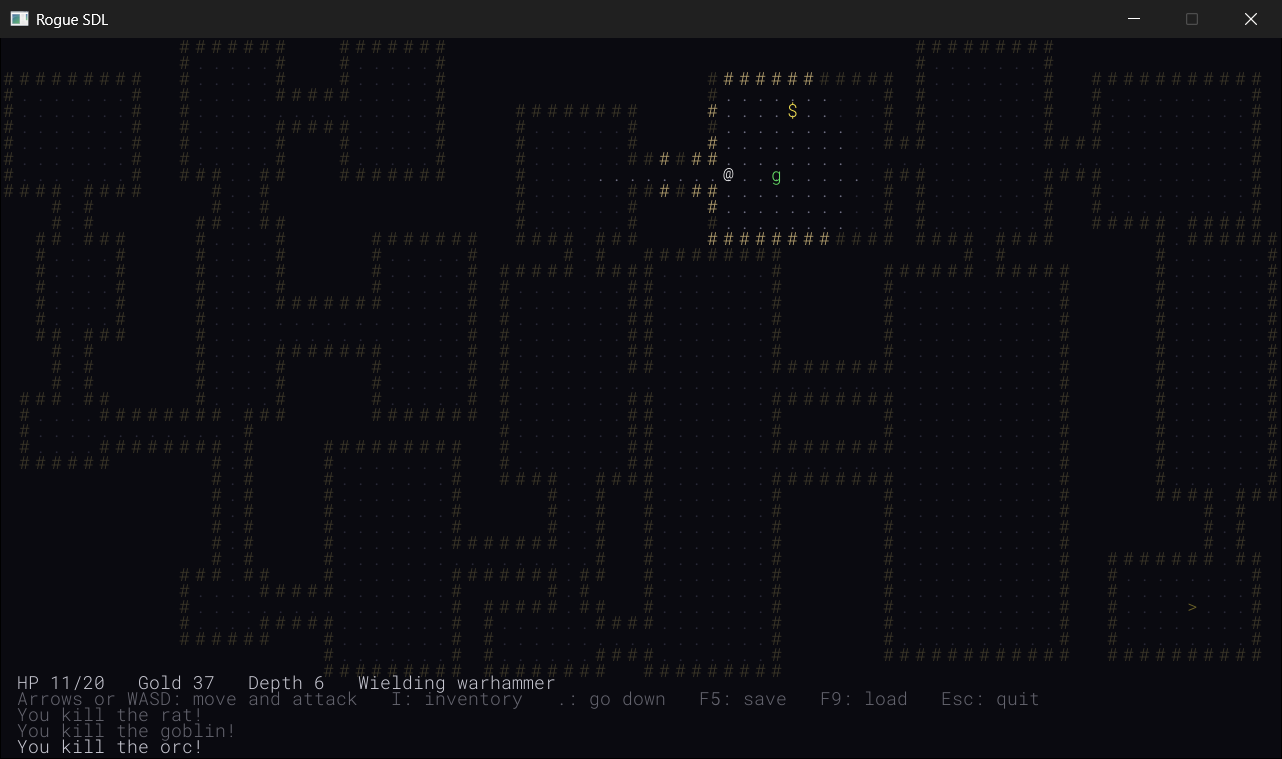
Compare it with Figure 30.1, the picture Chapter 30 started from. It's the same game, with every part of it in place now, and you've written all of it.
The game has real choices in it now. A weapon changes every fight, so it's worth carrying the next one down with you, and wielding it the moment it's better. The scroll of fireball is worth saving for a crowd, or for an orc you'd rather not trade blows with, and it's at its best in a corridor, where monsters queue up behind each other, and a blast along it catches up to five of them. And since aiming costs nothing, you can always look before you decide.
Rogue SDL is hard, as roguelikes are meant to be, and most games end in death. Each one teaches you something: to drink sooner, to read the map before you go looking for the stairs, or not to walk into a room with three orcs in it. Press R, and go again.
Understanding the Code
Follow a fireball from the pack to the burn. You open the inventory, and press the scroll's letter. The inventory state finds a fireball in that slot, and returns a change that asks for both: close the inventory, and open a new aiming state, made with the slot and the @’s cell. The game makes the change, once the inventory's handleKey has returned, so the stack is the playing state and the aiming state, and every key goes to the aiming state now.
You press the arrows. Each one moves the cursor a step, and the loop draws the dungeon, the HUD, and then each state, from the bottom up: the playing state adds nothing, and the aiming state adds the glow, the cursor, and the banner. None of this takes a turn, so the monsters don't move.
Then you press Enter. The aiming state asks the game to cast the fireball, and the game checks the target, takes the scroll out of the pack, burns every monster in the diamond, starts the orange flashes, and gives the survivors their turn. It says it worked, so the aiming state asks to be closed, and the game pops it off the stack, which destroys it, and the playing state is on top again. And the loop, seeing flashes, wakes every frame until they've faded, as Chapter 34 taught it to.
Notice what didn't change. Nothing in Game::handleKey did: it's the same five lines it was in Chapter 35, and so is the loop that draws the states. The playing state doesn't know the aiming state exists, and the aiming state knows nothing about the inventory that opened it. Adding a whole new way to play took one new class, one change in the state that opens it, and the game functions it needed. That's what the stack of states was for.
Notice, too, how the game has grown. Figure 36.9 shows every file in the finished game, grouped by what it does, with the chapter that added it.
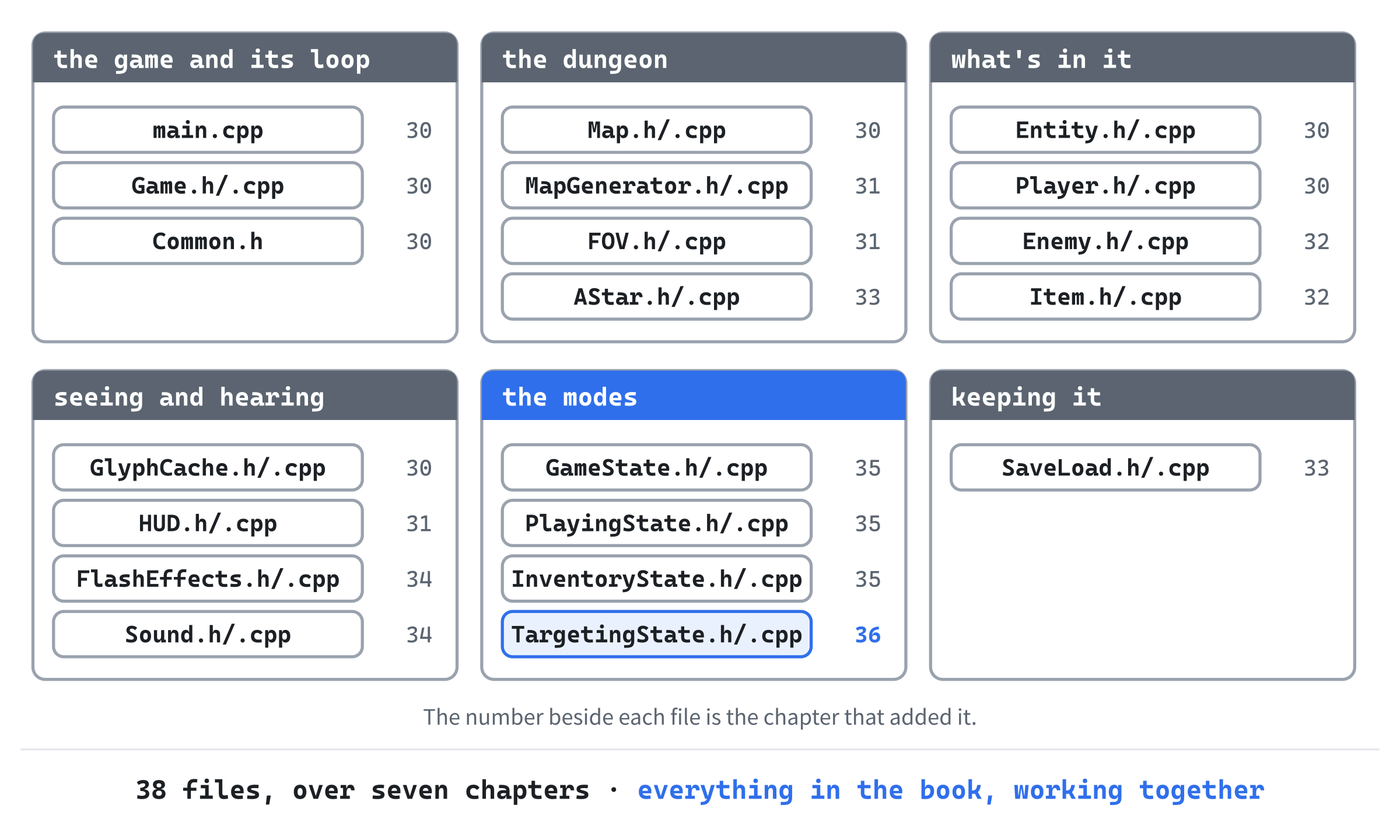
Almost every part of it is something an earlier chapter taught first, on something smaller.
The game loop that sleeps is Chapter 30's, the vector that holds the whole map in one piece is Chapter 13's vectors grown up, and the dungeon's pieces come from a recursive function, as Chapter 31 showed. The monsters are values in a vector, and their kinds are rows in a table. A* is Chapter 15's priority queue put to work.
The save file is Chapter 24's file streams, the sounds are Chapter 18's RAII, and the states are Chapter 22's virtual functions, owned by Chapter 10's smart pointers. None of it is magic. It's everything you've learned, used together.
Experimenting
Rogue SDL is yours now, so change whatever you like. There's no next chapter to keep it ready for, though you might want to keep a copy of it as the book leaves it.
- A bigger bang. Change
FIREBALL_RADIUSto 3, and the diamond grows from 13 cells to 25. Change it to 1, and it's a small cross of 5. - A square blast. In
canBurn, changeint steps = std::abs(cell.x - center.x) + std::abs(cell.y - center.y);toint steps = std::max(std::abs(cell.x - center.x), std::abs(cell.y - center.y));. The blast is a square now, five cells by five, and the glow shows it before you cast. Forstd::max, add#include <algorithm>at the top ofGame.cpp. - Friendly fire. In
castFireball, addif (cell == player_.getPosition()) player_.takeDamage(FIREBALL_DAMAGE);above the line that looks for a monster to burn. Now a fireball at your own feet hurts you too, and aiming starts to matter. - A warhammer at 8. Change the warhammer's bonus to 8, and fight an orc with it, then with a sword. Two blows each, as Figure 36.2 predicts.
- Start armed. In
Player::reset, changeweapon_ = std::nullopt;toweapon_ = ItemKind::Dagger;, and every game starts with a dagger in hand. - A save you've edited. Save a game, open
rogue_save.txtin the project folder, change the number at the end of thePLAYERline to 0, and load it. You're wielding a potion of healing. Change it to 9, and the game turns the file away.
Common Errors and Fixes
C2664: 'const ItemStats &statsOf(ItemKind)': cannot convert argument 1 from 'const std::optional<ItemKind>' to 'ItemKind', in Player.cpp, or in HUD.cpp. The optional has gone into statsOf as it is, but statsOf wants the kind inside it. Put the star in front, as in statsOf(*weapon_), after the if that checks there's a kind there to hand over.
C2039: 'optional': is not a member of 'std', in Player.h, followed by C7568 and a few more. Nothing includes <optional>, so std::optional means nothing yet. Add #include <optional> at the top of Player.h.
C2679: binary '=': no operator found which takes a right-hand operand of type 'nullptr' (or there is no acceptable conversion), in Player::reset. The weapon is emptied with weapon_ = nullptr;, but an optional isn't a pointer, and nullptr means nothing to it. Write weapon_ = std::nullopt;.
C2512: 'TargetingState::TargetingState': no appropriate default constructor available, in a file called memory, which isn't one of yours. The aiming state is made with std::make_unique<TargetingState>(), with nothing in the parentheses, but its only constructor needs the scroll's slot and the cell to start on. The function std::make_unique passes its arguments on to the constructor, as Chapter 23 showed, so pass them: std::make_unique<TargetingState>(slot, start).
C2662: 'bool Game::canBurn(Point,Point)': cannot convert 'this' pointer from 'const Game' to 'Game &', in TargetingState.cpp. The const has gone from canBurn, and the aiming state's draw has only a const Game&, which can only call const functions. Put const back at the end of canBurn’s first line, in both Game.h and Game.cpp.
C2065: 'SDLK_ENTER': undeclared identifier, in TargetingState.cpp. SDL has no SDLK_ENTER. The big Enter key is SDLK_RETURN, named after the carriage return of the old typewriters, and the one on the number pad is SDLK_KP_ENTER.
The aiming state opens over the inventory, and when you cast, or press Esc, the inventory is still there. The inventory asks to be closed only for the items it uses at once, so for a scroll of fireball, it opens the aiming state on top of itself, and the stack is three states tall. Move change.close = true; above the if, as in the chapter, so that the inventory closes whatever happens.
Debug Assertion Failed!, with "Expression: vector subscript out of range", in a file called vector, when you press Enter. The cursor has wandered off the map, since nothing stopped it, and castFireball looked up a tile that isn't there. A test build that moved the cursor above the top of the window did exactly this. Put back the check in handleKey that moves the cursor only when isInside says the new cell is on the map.
F9 says "There's no saved game, or it couldn't be read.", though you saved a game in Chapter 35. That save is version 2, and the game reads version 3 now. Start a new game, and save that.
AI Exercise (Optional)
A scroll of fireball waits for you to choose where it lands. If you'd like to try a new kind of item with an AI's help, here's one that uses the aiming state again: a scroll of teleportation, which moves you to any floor cell you can see. As always, it's optional.
Open your AI chatbot of choice and try a prompt like this:
"I'm writing a turn-based roguelike in C++ with SDL 3. Items have an enum class ItemKind, with its kinds in the order Potion, Gold, MagicMapping, Dagger, Sword, Warhammer, Fireball, a stats table in the same order, and a save file that stores kinds as numbers, so new kinds must go at the end. The game keeps a stack of states, each with a virtual StateChange handleKey(Game& game, SDL_Keycode key) and draw(SDL_Renderer*, const Game&) const, and a state asks for the stack to change by returning a StateChange with close and open. A TargetingState(int slot, Point start) aims a scroll of fireball: the arrows move a cursor, Enter calls game.castFireball(slot_, cursor_), which returns false for a cell the player can't see, and Esc closes it. InventoryState opens it with close and open together. I'd like a scroll of teleportation, used the same way: aim at a floor cell in sight, press Enter, and the player moves there, and sees from there, as after a step, and then the monsters take their turn. Show me every change, with each curly brace on its own line, and explain how the targeting state knows which scroll it's aiming."
Notice what the preceding prompt does. It gives the order of the kinds, and the reason new ones go at the end, so that the AI doesn't slip the new scroll into the middle of the enum and quietly break every save. Describing the aiming state exactly lets the AI reuse it, and the prompt asks the one question that decides how: whether the aiming state learns what it's aiming from the scroll's kind, or needs something new.
When the answer comes back, check it against this chapter. Is the new kind at the end of the enum, with a row at the end of the table, and does ITEM_KINDS go up, so that the static_assert passes? Does teleporting check that the target is floor, and in sight, as canBurn does? After the move, is the field of view worked out again, as moveOrAttack does after a step, and does the turn end? And if the AI made a second aiming state, would one aiming state, told which scroll it's aiming, have done?
To try it, find the scroll, or add one to the pack in Player::reset, as Chapter 35's "Start with a map" experiment did with a scroll of magic mapping, and teleport across a room. If the @ lands in a wall, or the dungeon around it stays dark until your next step, ask the AI why.
Summary
The @ is armed. A weapon is an item with an attack bonus, and a row in the stats table, and the player holds one in a std::optional<ItemKind>, which is either a kind or nothing, tested with an if, opened with a star, and emptied with std::nullopt. The bonuses were balanced by counting hits, and the save file, in version 3, keeps the weapon as a number, with -1 for bare hands.
And the @ has fire. A scroll of fireball opens an aiming state, which replaces the inventory on the stack, moves a cursor with the arrows, shows the blast before you commit, and casts on Enter. The blast is a diamond of cells within two steps, cut by walls and by what you can't see, and it burns every monster in it. The aiming state is the first with members of its own, and adding it didn't change a line of the code that runs the stack.
That's Rogue SDL, finished: a roguelike of thirty-eight files, with dungeons that are new every time, sight, memory, monsters that hunt, a save file, sound and light, a pack, and magic. And it's the end of the book.
Where to Go from Here
Think back to Chapter 1. It ended with a window, and an orange square that you could steer around it with the keyboard, and even that took a chapter of setting up. Since then, things have bounced, invaded, cascaded, and shot back. You've learned how a computer keeps its numbers, and where your objects live in memory, and you've built classes, families of classes, and interfaces. Then came templates and lambdas, files that remember, and code you timed yourself, and two games built with an AI, with your own hands on the wheel.
And over the last seven chapters, you've built a roguelike: thirty-eight files, from a grid of characters to a dungeon full of monsters that hunt you, and fire that you aim.
Rogue SDL isn't finished, because no roguelike ever is. Here are some ways to take it further, each one built on something you already have:
- More modes. A help screen, a character sheet, or the box from Chapter 35's AI exercise, which asks whether you really want to quit. Each is one more state, and nothing else has to change.
- More monsters. A monster is a row in a table, so a new one costs a line and a letter. Something tougher than an orc would give the warhammer something to do.
- Monsters that do more. One that keeps its distance and throws things, using A* to find a spot that can see you; one that runs away when it's hurt; one that wakes the others.
- More magic. A potion that confuses, the scroll of teleportation from this chapter's AI exercise, or armor that takes something off every hit. Each is a kind, a row, and a case in
useItem. - Things you have to learn. In Rogue, a scroll starts out with a strange made-up title, and you find out what it does only by reading one. Shuffle the names at the start of each game, and every scroll is a gamble until you know.
- A reason to go down. Rogue kept the Amulet of Yendor at the bottom of its dungeon, and you only won by carrying it back up. Having a goal changes how every level feels.
- Hunger. Rogue made you eat, so that you couldn't wait around forever. A counter, and some food on the floor, and the game has a clock.
- A table of the best runs. Chapter 24's file streams, and a list of your deepest games and their gold, kept between games.
If it's roguelikes that have caught you, my book Using C++ to Build a Traditional Roguelike goes a long way further down. It builds one bigger game, from a blank SDL3 window: rooms, and caves grown from random noise, a field of view cast by recursive shadowcasting, with a map the player remembers, and monsters that hunt you around corners and run when they're hurt. Much of it will feel familiar after Rogue SDL, which is the point: it starts where this book stops. You'll find it, and a free roguelike tutorial series, at GameCodeSchool.com.
When you want to go further, a few places are worth knowing. Robert Nystrom's Game Programming Patterns, which this book has recommended more than once, is free to read online. RogueBasin, at roguebasin.com, is a wiki full of articles on making roguelikes, from fields of view to dungeon generators, written by people who make them. The Seven Day Roguelike Challenge, 7DRL, is a yearly game jam where people build a whole roguelike in a week, and its entries show how small a good one can be. And the classics are all still played: NetHack, Brogue, and Dungeon Crawl Stone Soup are free, and each of them is worth playing with a programmer's eye, asking how you'd build every part of it.
What comes next isn't another chapter. It's your own game. You have C++, and SDL, and you know how to work with an AI without handing it your thinking. You've seen a big program grow from a small one, one step at a time, without falling apart, and you know how to do it again: a window, a loop, and a step, built and run before the next one. So open a new project, put a window on the screen, and go and build something.
Thanks for reading. Truly.