
Rogue SDL is a silent game. When you hit a goblin, a line of text says so, and when the goblin hits you back, another line says that. You can follow a fight perfectly well, but you're reading about it, rather than feeling it, and the moment you look away from the messages, you've missed it.
This chapter makes every blow land. There's a sound when you hit something, another when it dies, and another when something hits you, and more for picking things up, drinking a potion, and taking the stairs. And the cells light up: red for a moment where blood is drawn, and green where you heal, fading away in a fifth of a second. Game developers call this kind of thing juice. None of it changes the rules, but all of it changes how the game feels.
Along the way, you'll meet SDL's audio for the first time in the book: how a computer makes a sound at all, what's inside a WAV file, and how SDL gets its samples to the speakers. The sounds get a class of their own, which owns everything it loads, as Chapter 18 taught. And the loop from Chapter 30, which sleeps until a key is pressed, learns to wake itself up while a flash fades, just as Chapter 30 promised. By the end of the chapter, a fight looks and sounds like Figure 34.1.
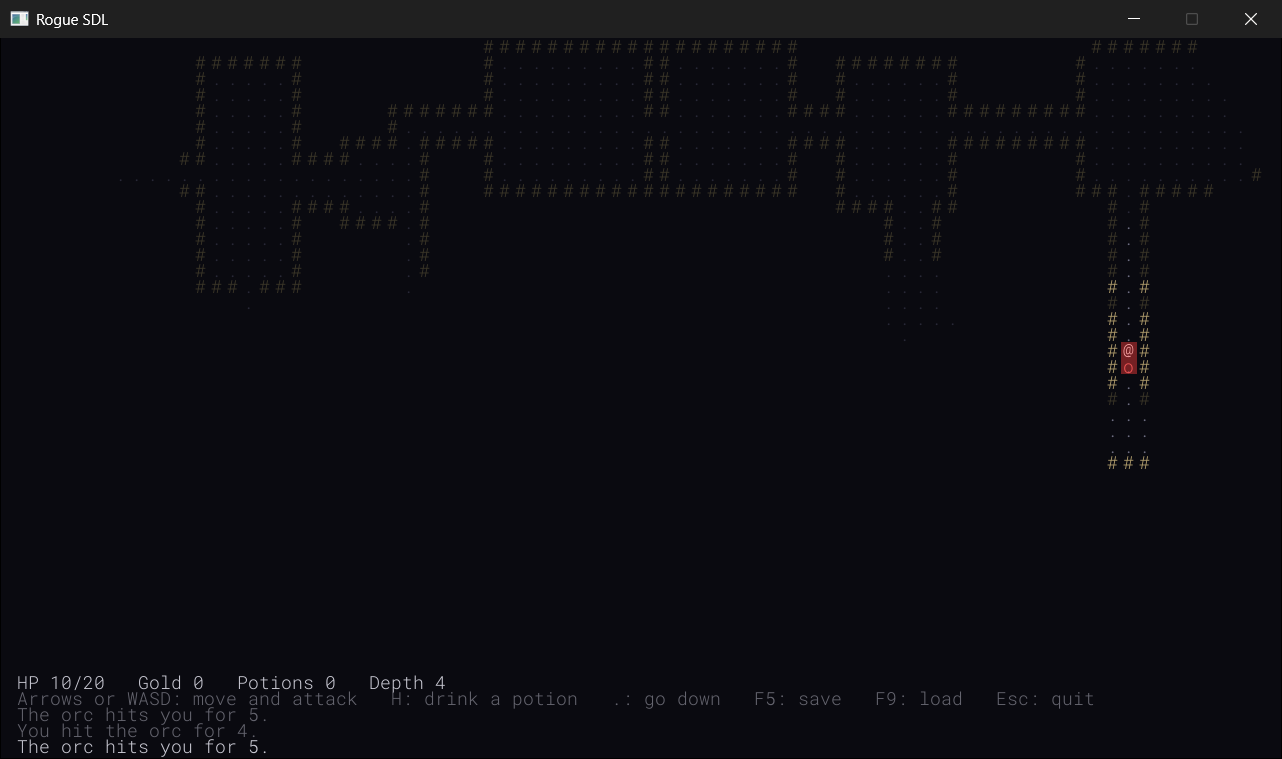
SDL3 Projects/Rogue SDL Part 5 — the complete source for this chapter lives here, with its thirty files and the assets folder, which now holds six sounds beside the font. The chapter carries on in your own project from Chapter 33. If you'd rather start from the book's copy of Part 4, make a copy of the Rogue SDL Part 4 folder beside it in SDL3 Projects, where it still finds the SDL3 and SDL3_ttf folders, and open the copy's .slnx file.In this chapter, we will:
- See how a computer plays a sound, from the samples in a WAV file to the speakers
- Switch on SDL's audio, load WAV files with
SDL_LoadWAV, and play them through audio streams - Wrap each sound in a class that owns its samples and its stream, and can't be copied
- Play a sound for every hit, kill, pickup, and potion, and for every trip down the stairs
- Light up a cell for a moment with a see-through color that fades away
- Teach the sleeping loop to wake up every frame, but only while something is fading
- Play, experiment, fix the most common mistakes, and try an optional AI exercise
Let's make some noise.
Planning Part 5
Part 4 finished with twenty-six files. Part 5 adds four more, and changes four. Here's what each one is for:
| File | What's new |
|---|---|
Sound.h, Sound.cpp |
New: a sound effect, loaded from a WAV file, and every sound in the game |
FlashEffects.h, FlashEffects.cpp |
New: short flashes of color over cells, which fade away |
Common.h |
The flashes' two colors |
main.cpp |
SDL's audio, switched on |
Game.h, Game.cpp |
The sounds and the flashes, and a loop that wakes up while a flash fades |
There's something else to add, too: the sounds themselves, six WAV files that go in the assets folder beside the font.
We'll add Part 5 in three stages, and play the game at the end of each. First, the sounds, which need no changes to the loop at all, since a sound plays by itself once it's started. Then the flashes, which you'll find don't work properly at first, for an interesting reason. And last, the loop learns to keep them moving.
Sound
How a Computer Makes a Sound
A sound is air moving back and forth, very quickly: pushed toward your ear, pulled away, and pushed again, hundreds or thousands of times a second. Speakers make those movements with a cone that a voltage pushes out and pulls back. So to make a sound, the computer only has to set that voltage, again and again, fast enough.
It does it with numbers. A sound, to a computer, is a long list of samples, each one a number that says how far the speaker's cone should be pushed out, or pulled in, at one moment. Play the numbers in order, fast enough, and the cone traces the sound's shape through the air. The sounds in this chapter have 44,100 samples for every second, which is the rate CDs use, and each sample is a 16-bit number, from -32,768 to 32,767. They're mono, a single list of samples for both speakers, rather than stereo, which would have a list for each.
How many samples, and how big? The more samples a second, the higher the sounds that can be kept, and the more bits in each sample, the finer the steps between loud and soft. At 44,100 a second, and 16 bits each, a recording keeps everything a human ear can hear, which is why CDs use those numbers, and it's far more than a sound effect needs. But it's what most sound tools make, and SDL doesn't mind.
Inside a WAV File
A WAV file holds exactly that: a short header that says how the samples are stored, and then the samples themselves. There's no compression, so a WAV file is big, for a sound, but it's simple, and it's quick to load. Figure 34.2 shows the start of Rogue SDL's hit sound, byte by byte.
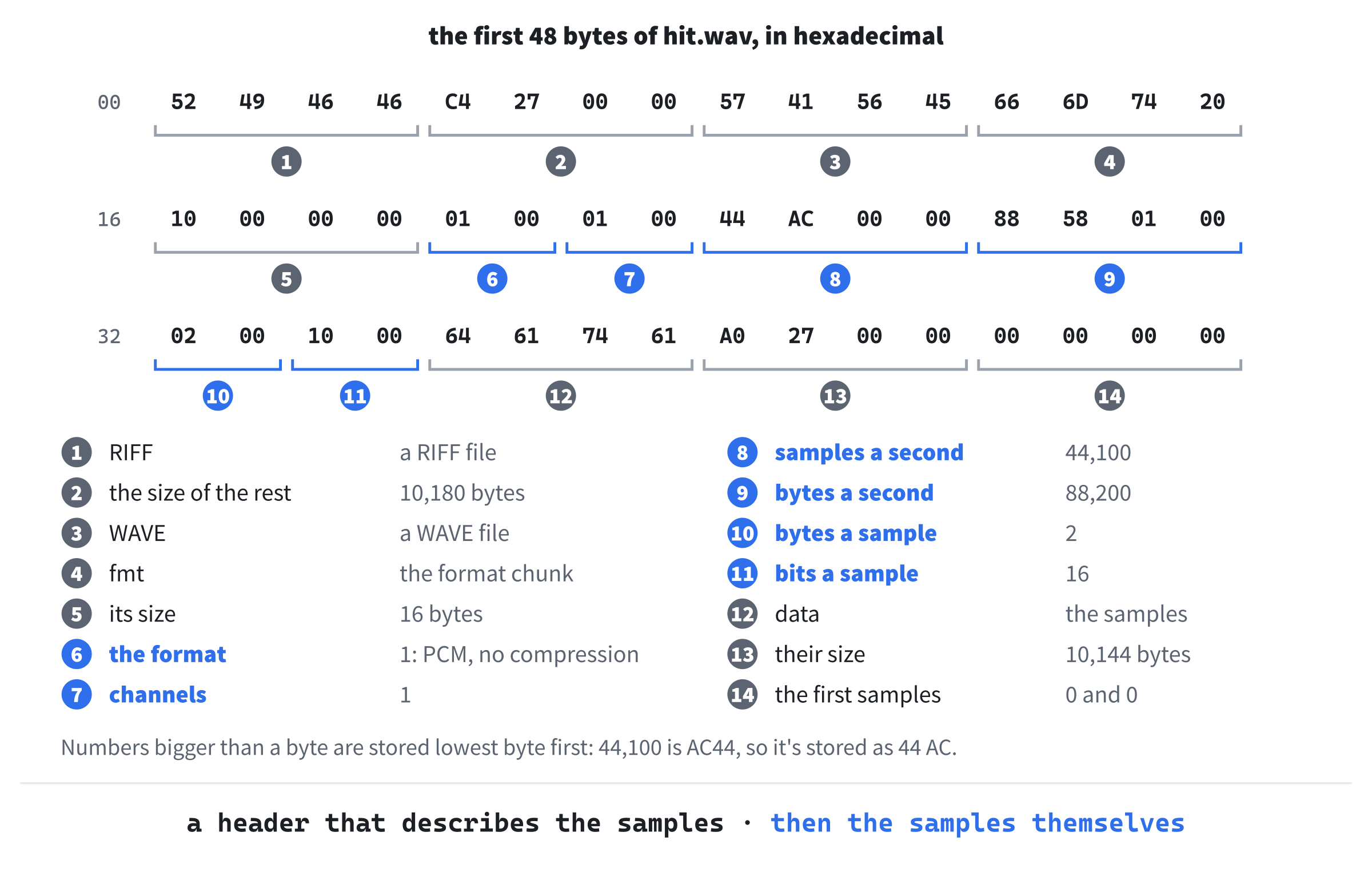
The header is made of chunks, each starting with a name four letters long. The name RIFF says what kind of file this is, and WAVE which kind of RIFF file. The fmt chunk, with a space to make its name four letters, holds the numbers that matter: 1, for plain samples with no compression, which is called PCM; 1, for one channel; 44,100 samples a second; 88,200 bytes a second, which is the rate times the two bytes of each sample; and 16 bits a sample. Then the data chunk says how many bytes of samples follow, 10,144, and the samples start.
Numbers bigger than a byte are stored lowest byte first, which is called little-endian, so 44,100, which is AC44 in hexadecimal, is stored as 44 AC. Intel and AMD processors keep their numbers in memory the same way, so a program can use them just as they are. Every sample is a 16-bit number stored like that, two bytes each, which makes Rogue SDL's hit sound 5,072 samples, or 0.115 seconds, long.
Streams and Devices
Getting samples to the speakers is the sound card's job, and it has to be fed steadily: a sound card that runs out of samples, even for a moment, clicks. So SDL gives the game an audio stream, a queue that the game puts samples into whenever it likes, and that SDL takes samples out of, as fast as the sound card needs them, from a thread of its own. The stream also converts the samples on the way, if the sound card wants them in a different form, such as 48,000 a second, in stereo. Figure 34.3 shows the whole journey.
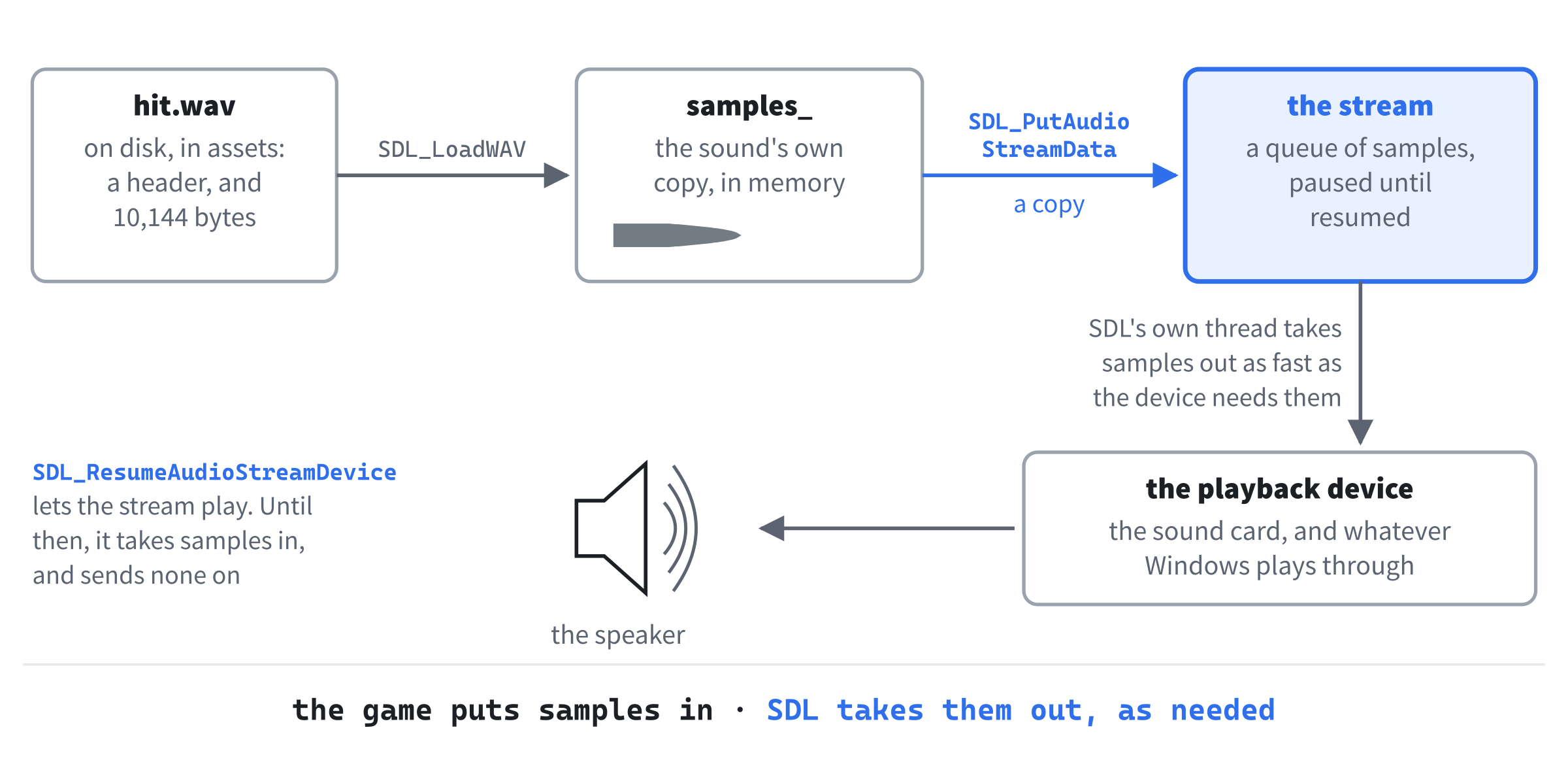
SDL_LoadWAV reads the file into memory, then SDL_PutAudioStreamData copies the samples into the stream, and SDL's own thread takes them out again, as fast as the playback device needs them. A new stream holds on to everything it's given until it's resumed.SDL calls the thing at the end of the journey a playback device: a pair of speakers, some headphones, or a monitor's own speakers. A computer can have several, and the one this book was written on has four, from its monitor to a digital output. A game usually asks for the default device, which is whichever one Windows is set to play through, so the sounds go wherever the rest of the computer's sounds go.
A new stream's device starts paused, so the stream takes samples in, and sends none of them on, and nothing reaches the speakers until the program says so. A test program put the hit sound into a paused stream, and 100 milliseconds later, all 10,144 bytes were still waiting. Once the stream was resumed, 25 milliseconds later there were 8,380 left, and by 125 milliseconds, there were none: the sound had played, at exactly its own speed.
The Sound Files
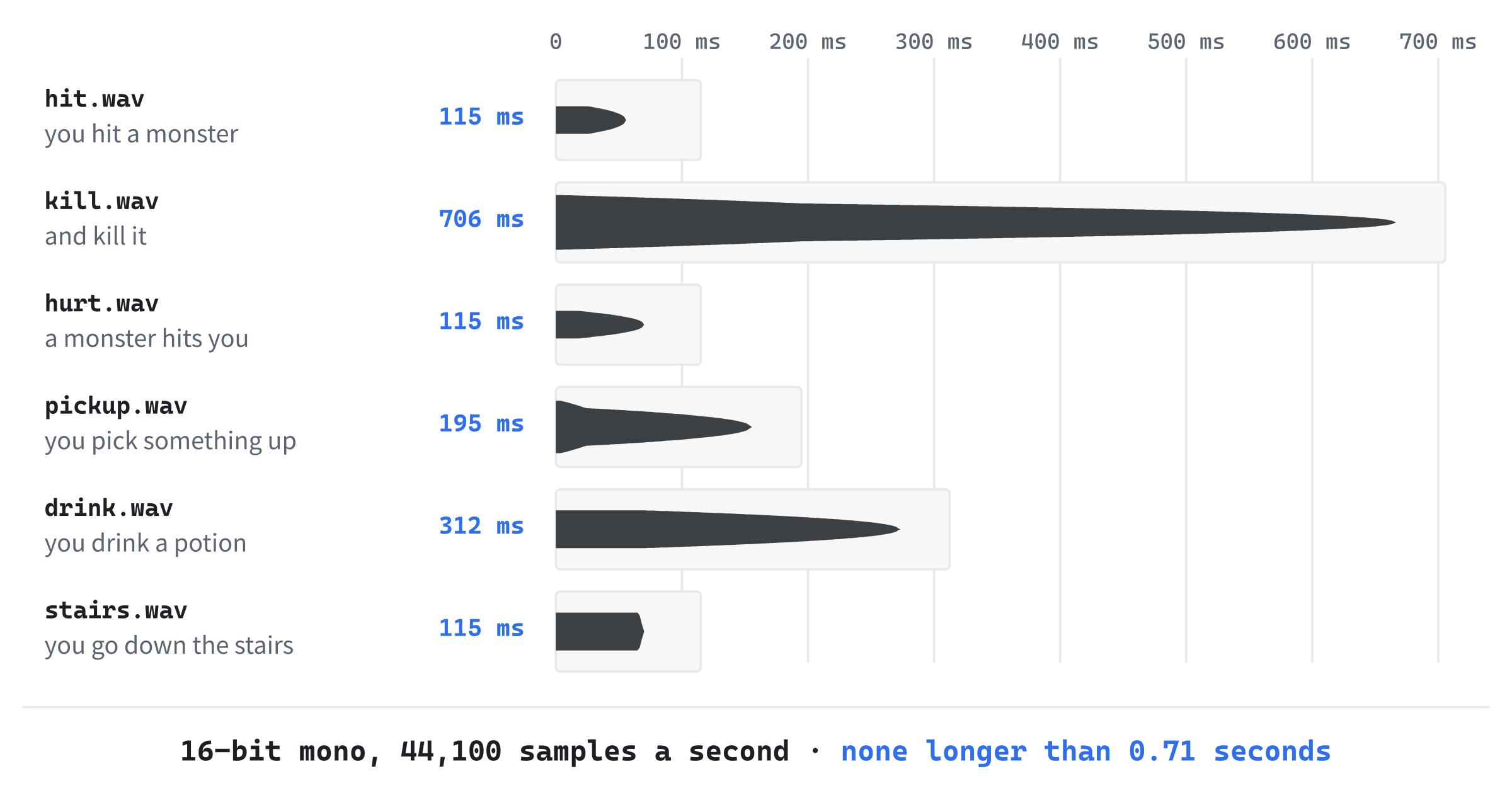
The book's repository has six short sound effects, in SDL3 Projects/Rogue SDL Part 5/assets: hit.wav, kill.wav, hurt.wav, pickup.wav, drink.wav, and stairs.wav. Copy the six of them into your own project's assets folder, beside RobotoMono-Light.ttf. They're all 16-bit mono WAV files, with 44,100 samples a second, and the longest, kill.wav, is only 0.7 seconds, as Figure 34.4 shows.
The book's sounds were made with Bfxr, a free tool for retro sound effects, and yours can be too. Bfxr, at bfxr.net, and jsfxr, at sfxr.me, both run in a browser. Pick a starting point, such as a hit, a pickup, or an explosion, press it until you hear one you like, and save it as a WAV file. Put it in assets, with the name of the sound it replaces, and the game plays yours instead.
The paths in the code will be assets/hit.wav and so on, relative paths like the font's, found from the working directory, which is the project folder when you run the game from Visual Studio.
Switching Audio On
SDL starts only the parts of itself that it's asked to, and so far, Rogue SDL has only asked for video. In main.cpp, find these lines in main:
// Start SDL and SDL3_ttf, then make the window and the renderer
if (!SDL_Init(SDL_INIT_VIDEO))
And change them to this:
// Start SDL, with its video and its audio, and SDL3_ttf, then make the
// window and the renderer
if (!SDL_Init(SDL_INIT_VIDEO | SDL_INIT_AUDIO))
In the preceding code, SDL_INIT_AUDIO asks for SDL's audio as well as its video, and the comment says so too. The single bar between them, |, is bitwise or, which isn't Chapter 4's ||. Each of SDL's SDL_INIT_ flags is a number with just one of its bits set, as in Chapter 2's bits, and | makes a number with every bit that's set in either, so SDL_Init gets both requests in one argument. And since SDL_Quit shuts audio down along with everything else, nothing changes at the end of main.
Sound.h
Every sound needs the same three things: its samples, how many bytes of them there are, and a stream to play them through. That's a class, and one that owns what it holds, like Chapter 18's classes that loaded something in their constructors and let it go in their destructors. Add a header called Sound.h, and below its #pragma once, type this:
#pragma once
#include <SDL3/SDL.h>
#include <string>   // std::string, for the file's path

// One sound effect, loaded from a WAV file when it's made, and ready to
// play at any moment
class Sound
{
public:
    Sound(const std::string& path);
    ~Sound();

    Sound(const Sound&) = delete;
    Sound& operator=(const Sound&) = delete;

    bool isLoaded() const;
    void play() const;

private:
    Uint8* samples_ = nullptr;            // the sound itself
    Uint32 length_ = 0;                   // its size, in bytes
    SDL_AudioStream* stream_ = nullptr;   // the way to the speakers
};
In the preceding code, a Sound is made from the path of its WAV file, and the constructor loads it. The destructor lets go of everything the constructor took. Its copy constructor and copy assignment are deleted, with = delete, as Chapter 18 showed for a class that owns something: a copy would point at the same samples and the same stream, and the first of the two to be destroyed would free them out from under the other. So a Sound can't be copied at all, and the compiler says so if you try.
Chapter 13 gave a first taste of moving, the other way to hand something on: a moved string hands its text over to the new one, and is left empty. A class of your own can offer to be moved in the same way, handing its samples and its stream over, but a Sound doesn't need to be. Each one is made in its place, inside the game's Sounds, and stays there until the game ends, so nothing ever has to hand one on. Deleting the copies, and saying nothing about moves, leaves it with neither, which is exactly right for it.
The isLoaded function says whether the sound is ready to play, like the glyph cache's in Chapter 30, and play plays it. The three members start empty, with a null pointer, a length of 0, and another null pointer, so a sound that failed to load is still in a state that's safe to destroy. The types Uint8 and Uint32 are SDL's unsigned 8-bit and 32-bit whole numbers, from Chapter 2, and a Uint8* is the usual way to point at raw bytes.
Sound.cpp
Add a C++ file called Sound.cpp, and type the include and the constructor:
#include "Sound.h"

// Loads the sound, and opens a stream to the speakers that can play it
Sound::Sound(const std::string& path)
{
    SDL_AudioSpec spec;
    if (!SDL_LoadWAV(path.c_str(), &spec, &samples_, &length_))
    {
        SDL_Log("Couldn't load %s: %s", path.c_str(), SDL_GetError());
        return;
    }

    stream_ = SDL_OpenAudioDeviceStream(SDL_AUDIO_DEVICE_DEFAULT_PLAYBACK,
                                        &spec, nullptr, nullptr);
    if (!stream_)
    {
        SDL_Log("Couldn't open audio for %s: %s", path.c_str(),
                SDL_GetError());
        return;
    }

    // A new stream starts paused, so that nothing plays until it's ready
    SDL_ResumeAudioStreamDevice(stream_);
}
In the preceding code, the constructor does two jobs, and gives up with a message in the console if either fails. First, SDL_LoadWAV reads the WAV file. It needs to hand back three things, so it takes the addresses of three variables to fill in, as Chapter 10's pointers allow: spec, an SDL_AudioSpec, gets the samples' format, how many channels there are, and how many samples there are to a second; samples_ gets the address of the samples, which SDL_LoadWAV makes room for itself; and length_ gets their size in bytes.
Since samples_ is itself a pointer, &samples_ is the address of a pointer, which is how a function can set a pointer that belongs to its caller. For hit.wav, SDL_LoadWAV fills spec with the numbers from the header: SDL_AUDIO_S16 for the format, meaning signed 16-bit samples, one channel, and 44,100 samples a second. And length_ gets 10,144.
Second, SDL_OpenAudioDeviceStream opens the sound card, and makes a stream that feeds it. Its first argument, SDL_AUDIO_DEVICE_DEFAULT_PLAYBACK, asks for whatever speakers or headphones Windows is using, and &spec tells the stream what form the samples it's given will be in, so that it can convert them if the device wants something else. The two nullptrs say that the game will put samples into the stream itself, rather than having SDL call a function of the game's to ask for them.
The device it opens starts paused, so that nothing reaches the speakers until the program is ready, and SDL_ResumeAudioStreamDevice sets it going. A paused stream is still perfectly happy to take samples: it just keeps them, and plays nothing.
Next, letting it all go. Add the destructor and isLoaded below the constructor, with a blank line in between:
// Closes the stream, which stops the sound, and frees its memory
Sound::~Sound()
{
    if (stream_)
        SDL_DestroyAudioStream(stream_);
    SDL_free(samples_);
}

bool Sound::isLoaded() const
{
    return stream_ != nullptr;
}
In the preceding code, SDL_DestroyAudioStream stops the stream, and since it was made by SDL_OpenAudioDeviceStream, it closes the device it opened, too. The if skips it for a sound whose stream never opened. Then SDL_free gives back the samples' memory: SDL_LoadWAV got it with SDL's own allocator, so SDL's own function has to free it, rather than delete. Freeing a null pointer does nothing, so a sound that never loaded is safe here too. A sound counts as loaded once its stream is open, since that's the last thing the constructor checks.
Last, playing. Add play below isLoaded, with a blank line in between:
// Plays the sound from the start, cutting off any of it still playing
void Sound::play() const
{
    if (!stream_)
        return;

    SDL_ClearAudioStream(stream_);
    SDL_PutAudioStreamData(stream_, samples_, static_cast<int>(length_));
}
In the preceding code, a sound that failed to load plays nothing, quietly. Otherwise, SDL_ClearAudioStream throws away anything still waiting in the stream, and SDL_PutAudioStreamData puts the whole sound in, from its first sample. SDL copies the samples into the stream, so the sound's own copy is still there, for next time. The length goes in as an int, which is what SDL_PutAudioStreamData takes, hence the static_cast.
Clearing first means that a sound that's played again before it has finished starts over, rather than queuing up behind itself and lagging further and further behind the fight.
One Stream Each
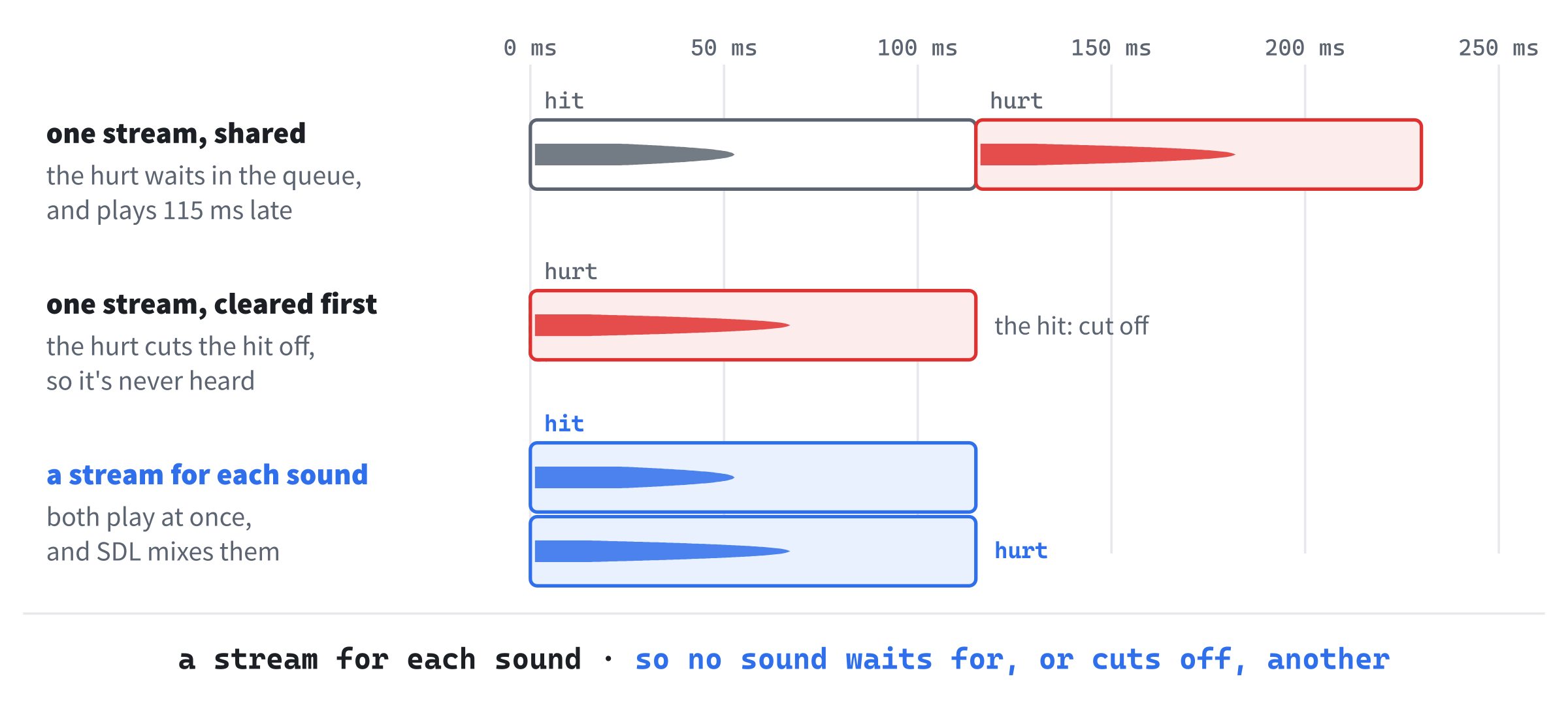
Why does every sound have a stream of its own? Picture one stream, shared by all six. Put a hit into it, and then, in the same turn, a hurt, and the hurt waits in the queue until the hit has finished, 115 milliseconds later, so it comes late. Clear the stream before each sound, and the hurt cuts the hit off instead, so you never hear it.
With a stream for each sound, the hit and the hurt start at the same moment, each from its own stream. SDL adds their samples together on the way to the sound card, which is called mixing, and you hear both, as Figure 34.5 shows. Six streams cost SDL next to nothing, and each one can be cleared and restarted without touching the others.
SDL has a companion library, SDL_mixer, for playing music and many sounds at once, in more formats than WAV. It's worth a look for a bigger game. For six short effects, SDL's own audio streams are all we need, and they show what a library like that does underneath.
Checkpoint: Click in Sound.cpp, and press Ctrl+F7 to compile it on its own. The Error List should stay empty.
Every Sound in the Game
The game needs six sounds, and it would be easy to scatter six Sound members through the Game class. They belong together, though, so they go in a struct of their own. In Sound.h, add this at the end of the file, below Sound’s closing brace, with a blank line in between:
// Every sound in the game, each loaded from its own file
struct Sounds
{
    Sound hit{ "assets/hit.wav" };         // the player hits a monster
    Sound kill{ "assets/kill.wav" };       // and kills it
    Sound hurt{ "assets/hurt.wav" };       // a monster hits the player
    Sound pickup{ "assets/pickup.wav" };   // anything picked up
    Sound drink{ "assets/drink.wav" };     // a potion
    Sound stairs{ "assets/stairs.wav" };   // going down
};
In the preceding code, each member is a Sound, with its file's path in braces. Those are default member values, as Chapter 11's structs had, which C++ calls default member initializers, and they mean that making a Sounds makes all six Sounds, each loading its own file, in the order they're written. Braces are the way to hand a member's constructor its arguments there: parentheses, as in Sound hit("assets/hit.wav");, look like the start of a function to the compiler, and it stops with C2059.
Since a Sound can't be copied, neither can a Sounds, nor anything that holds one, and that's exactly right: there's one set of sounds, owned by the game.
Playing Them
The game owns the sounds. In Game.h, add this below #include "Player.h":
#include "Sound.h"In the preceding code, Sound.h brings in Sounds. Then find the comment above the class:
// The whole game. It owns the glyphs, the map, the player, the monsters,
// the treasure, and the HUD, and runs the loop that waits for a key, acts
// on it, and draws what happened
And change it to this:
// The whole game. It owns the glyphs, the map, the player, the monsters,
// the treasure, the HUD, and the sounds, and runs the loop that waits for
// a key, acts on it, and draws what happened
In the preceding code, the comment names the sounds among what the game owns. Then add this below HUD hud_;:
Sounds sounds_;In the preceding code, sounds_ is made along with the rest of the game, which is after SDL_Init has switched audio on, since runGame makes the game, and main calls runGame after SDL_Init, as Chapter 19 arranged. And it's destroyed with the rest of the game, when runGame ends, before main calls SDL_Quit. So every sound is made while SDL's audio is running, and let go before it stops, without any code saying so.
Now each thing that happens gets its sound. In Game.cpp, find the if in attack that says what happened:
if (enemy.isAlive())
{
    hud_.addMessage("You hit the " + name + " for " +
                    std::to_string(damage) + ".");
}
else
{
    hud_.addMessage("You kill the " + name + "!");
}
And change it to this:
if (enemy.isAlive())
{
    sounds_.hit.play();
    hud_.addMessage("You hit the " + name + " for " +
                    std::to_string(damage) + ".");
}
else
{
    sounds_.kill.play();
    hud_.addMessage("You kill the " + name + "!");
}
In the preceding code, a hit that leaves the monster alive plays hit, and one that kills it plays kill instead. In pickUp, add this above if (item->getKind() == ItemKind::Gold):
sounds_.pickup.play();In the preceding code, anything picked up, gold or potion, makes the pickup sound. Then, in drinkPotion, add this above the message that says you feel better:
sounds_.drink.play();In the preceding code, drinking plays drink, and it's below the check for having a potion, so trying to drink one you haven't got stays silent. Next, in takeStairs, add this below newLevel();:
sounds_.stairs.play();In the preceding code, going down plays stairs, once the new level is built. And in monsterTurn, add this below player_.takeDamage(damage);:
sounds_.hurt.play();In the preceding code, a monster's hit makes the hurt sound. Two monsters hitting you in the same turn play it twice, and since play clears the stream first, you hear the second one start over, rather than the two queued one after the other.
Checkpoint: Press F5, and go and hit something. You hear the hit, and when it dies, you hear that, and when it hits back, you hear that too. Pick up some gold, drink a potion, and take the stairs, and each has its own sound. If everything is silent, look in the console window: each sound that couldn't load or couldn't open says why there.
Light
A Flash That Fades
Sound says that something happened. A flash says where. When you hit a monster, its cell turns red for a moment, and when you heal, your own cell turns green, and either way, the color fades until it's gone, as Figure 34.6 shows.
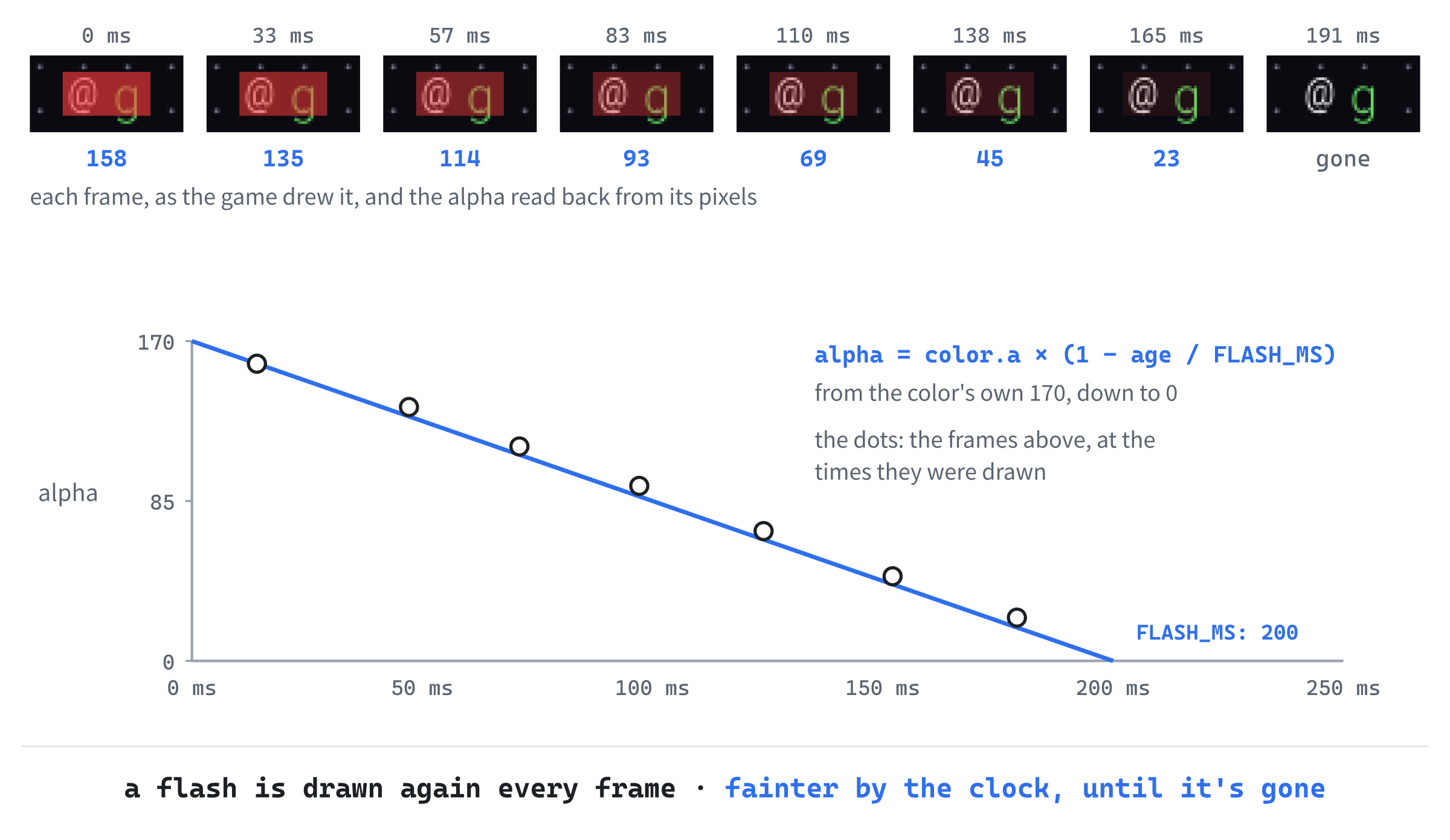
A flash is a colored square drawn over a cell, after the character in it, and it has to be see-through, so that the character still shows. Chapters 11 and 14 did that with alpha: a color's fourth number says how solid it is, from 0, invisible, to 255, solid, as long as the renderer's blend mode is SDL_BLENDMODE_BLEND. A flash starts at its color's own alpha, which is already partly see-through, and fades to 0 over 200 milliseconds.
How does a color become see-through? With SDL_BLENDMODE_BLEND, every pixel that's drawn is mixed with the pixel already there, in proportion to its alpha: the new color counts for alpha parts out of 255, and the color underneath for the rest. The background is 10, 10, 16, so a red flash at its full 170 comes out as 173, 43, 45, a strong red. Halfway through, at an alpha of 85, it's 92, 27, 31, a dark red, which is exactly the color a capture of the game shows in a flashing cell at that moment.
To fade, a flash has to know how old it is, so it keeps the time it began, from SDL_GetTicks, the milliseconds since SDL started. Whenever it's drawn, its age is the time now, less the time it began. At an age of 0, it's drawn with all of its color's alpha; halfway through, with half; and at 200 milliseconds, it's finished, and it's forgotten.
The Flashes' Colors
The two colors go in the palette. In Common.h, add these at the end of the palette, below GOLD, with a blank line in between:
// Flashes, which start see-through, and fade from there
constexpr SDL_Color FLASH_HIT = { 255, 60, 60, 170 };
constexpr SDL_Color FLASH_HEAL = { 80, 255, 120, 140 };
In the preceding code, FLASH_HIT is a bright red, and FLASH_HEAL a bright green. Their fourth numbers, 170 and 140, are their alphas, so both start partly see-through, and the character under a flash shows through it, tinted, even at its brightest.
FlashEffects.h and FlashEffects.cpp
A game can have several flashes at once, such as one on a monster you hit, and one on you when it hits back, so they're kept in a vector, in a class that looks after them all. Add a header called FlashEffects.h, and below its #pragma once, type the includes, the flash's length, and a flash:
#pragma once
#include <SDL3/SDL.h>
#include <vector>   // std::vector, for the flashes
#include "Common.h"

// How long a flash takes to fade away, in milliseconds
constexpr Uint64 FLASH_MS = 200;

// A cell lit up in a color for a moment
struct Flash
{
    Point cell;
    SDL_Color color;
    Uint64 startMs;   // when it began, from SDL_GetTicks
};
In the preceding code, FLASH_MS is how long a flash lasts, 200 milliseconds, and it's a Uint64, since that's what SDL_GetTicks returns. A Flash is the cell it lights, its color, and the time it began.
Then add the class below the struct, with a blank line in between:
// Short flashes of color over cells: red where something is hit, green
// where the player heals. Each one fades away over FLASH_MS
class FlashEffects
{
public:
    void add(Point cell, SDL_Color color);
    bool isEmpty() const;
    void removeFinished();
    void draw(SDL_Renderer* renderer) const;

private:
    std::vector<Flash> flashes_;
};
In the preceding code, add starts a flash, isEmpty says whether any are still going, which the loop will need, removeFinished forgets the ones that have faded away, and draw draws the rest. The vector of flashes is private, and nothing outside the class needs to know it's there.
Add a C++ file called FlashEffects.cpp, and type the include and the first two functions:
#include "FlashEffects.h"

// Starts a flash on a cell, now
void FlashEffects::add(Point cell, SDL_Color color)
{
    flashes_.push_back({ cell, color, SDL_GetTicks() });
}

bool FlashEffects::isEmpty() const
{
    return flashes_.empty();
}
In the preceding code, add pushes a new flash onto the vector, made with braces from its cell, its color, and the time now. And isEmpty asks the vector. Then add removeFinished below isEmpty, with a blank line in between:
// Forgets every flash that has faded away completely
void FlashEffects::removeFinished()
{
    Uint64 now = SDL_GetTicks();
    std::erase_if(flashes_, [now](const Flash& flash)
    {
        return now - flash.startMs >= FLASH_MS;
    });
}
In the preceding code, std::erase_if removes every flash whose age has reached FLASH_MS, as it removed the dead monsters in Chapter 32. The lambda captures now, the time taken once, before it starts, so that every flash is judged against the same moment.
Last, the drawing. Add draw below removeFinished, with a blank line in between:
// Fills each flashing cell with its color, see-through, and more so the
// older the flash is, until it's gone
void FlashEffects::draw(SDL_Renderer* renderer) const
{
    Uint64 now = SDL_GetTicks();
    SDL_SetRenderDrawBlendMode(renderer, SDL_BLENDMODE_BLEND);
    for (const Flash& flash : flashes_)
    {
        Uint64 age = now - flash.startMs;
        if (age >= FLASH_MS)
            continue;

        // From the color's own alpha when it starts, down to 0 at the end
        float left = 1.0f - static_cast<float>(age) / FLASH_MS;
        Uint8 alpha = static_cast<Uint8>(flash.color.a * left);
        SDL_SetRenderDrawColor(renderer, flash.color.r, flash.color.g,
                               flash.color.b, alpha);

        SDL_FRect box = { static_cast<float>(flash.cell.x * CELL_PX),
                          static_cast<float>(flash.cell.y * CELL_PX),
                          CELL_PX, CELL_PX };
        SDL_RenderFillRect(renderer, &box);
    }
}
In the preceding code, the blend mode comes first, so that alpha counts, and then each flash is drawn in turn. A flash that has finished, but hasn't been removed yet, is skipped. For the rest, left is how much of the flash is left, from 1 when it's new down to 0 when it's done: its age as a fraction of FLASH_MS, taken from 1. The alpha is the color's own alpha times that, so it fades evenly from the start to nothing. Then the flash's cell, turned into pixels with CELL_PX, as the glyphs are, is filled with the color.
Checkpoint: Click in FlashEffects.cpp, and press Ctrl+F7. It compiles on its own.
Lighting Them Up
The game owns the flashes, as it owns the sounds. In Game.h, add this below #include "Enemy.h":
#include "FlashEffects.h"In the preceding code, FlashEffects.h brings in the class. Then find the comment above the class again:
// The whole game. It owns the glyphs, the map, the player, the monsters,
// the treasure, the HUD, and the sounds, and runs the loop that waits for
// a key, acts on it, and draws what happened
And change it to this:
// The whole game. It owns the glyphs, the map, the player, the monsters,
// the treasure, the HUD, the sounds, and the flashes, and runs the loop
// that waits for a key, acts on it, and draws what happened
In the preceding code, the flashes join the list. Then add this below Sounds sounds_;:
FlashEffects flashes_;In the preceding code, flashes_ starts with no flashes at all. Over in Game.cpp, a hit on a monster lights its cell, so in attack, add this below enemy.takeDamage(damage);:
flashes_.add(enemy.getPosition(), Palette::FLASH_HIT);In the preceding code, the monster's cell gets a red flash, whether the hit kills it or not. Then, in drinkPotion, add this below sounds_.drink.play();:
flashes_.add(player_.getPosition(), Palette::FLASH_HEAL);In the preceding code, drinking lights the player's own cell green. And in monsterTurn, add this below sounds_.hurt.play();:
flashes_.add(to, Palette::FLASH_HIT);In the preceding code, a monster's hit gives the player's cell a red flash. The variable to is where the player stands, from the top of monsterTurn.
Finally, the flashes need drawing. In draw, add this below player_.draw(renderer_, glyphs_);:
flashes_.draw(renderer_);In the preceding code, the flashes are drawn after everything on the map, the player included, so that they lie on top, and before the HUD, so that they never cover its text.
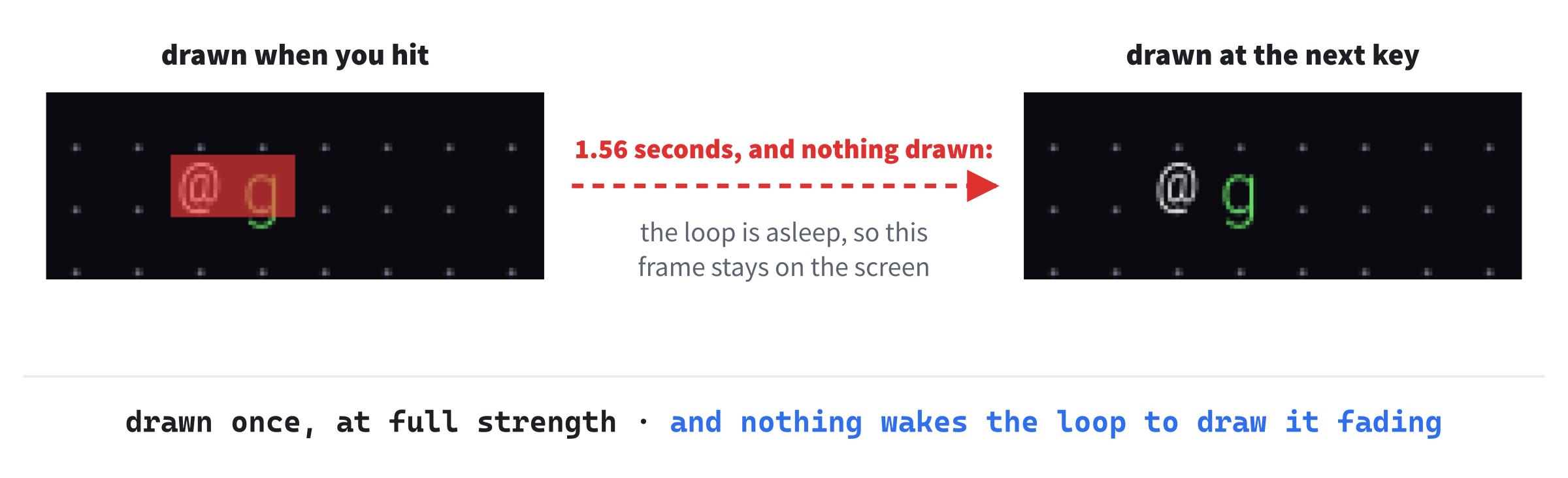
Checkpoint: Press F5, and hit a monster. Its cell turns red, and so does yours, when it hits back. But look closely: the red doesn't fade. It stays exactly as it is, until you press another key, and then it's gone at once, as Figure 34.7 shows. That isn't a mistake in the flashes. It's the loop.
Waking Up While It Fades
Chapter 30's loop sleeps in SDL_WaitEvent until something happens, and draws the window only when something has changed. For a turn-based game, that's perfect: nothing moves between your turns, so there's nothing to draw, and the game uses no time at all while you think. But a flash that fades is changing all the time, without any event to say so. The loop draws the flash once, at full strength, when your key press wakes it, and then it goes back to sleep, and the flash stays as it was drawn until the next key wakes the loop again. By then, the flash is too old to draw, so it vanishes at once.
Why not just wake up every frame, all the time, as the earlier games' loops did? Because of what it costs. A copy of Rogue SDL that never went back to sleep, drawing every frame whether anything changed or not, used about a fifth of a processor core while it sat idle, in a timing run, where the real one used almost nothing. On a laptop, that's battery, and for a game that spends most of its time waiting for you, it's all waste.
The loop needs two ways to wait. With nothing fading, it should sleep, as it always has. With a flash fading, it should wake up about once a frame to draw it again, a little fainter each time, and go back to sleep once the last flash is gone, as in Figure 34.8. SDL has a function for waiting with a limit: SDL_WaitEventTimeout waits for an event, as SDL_WaitEvent does, but gives up after a number of milliseconds, and says which it was, returning true if an event came, and false if the time ran out first.
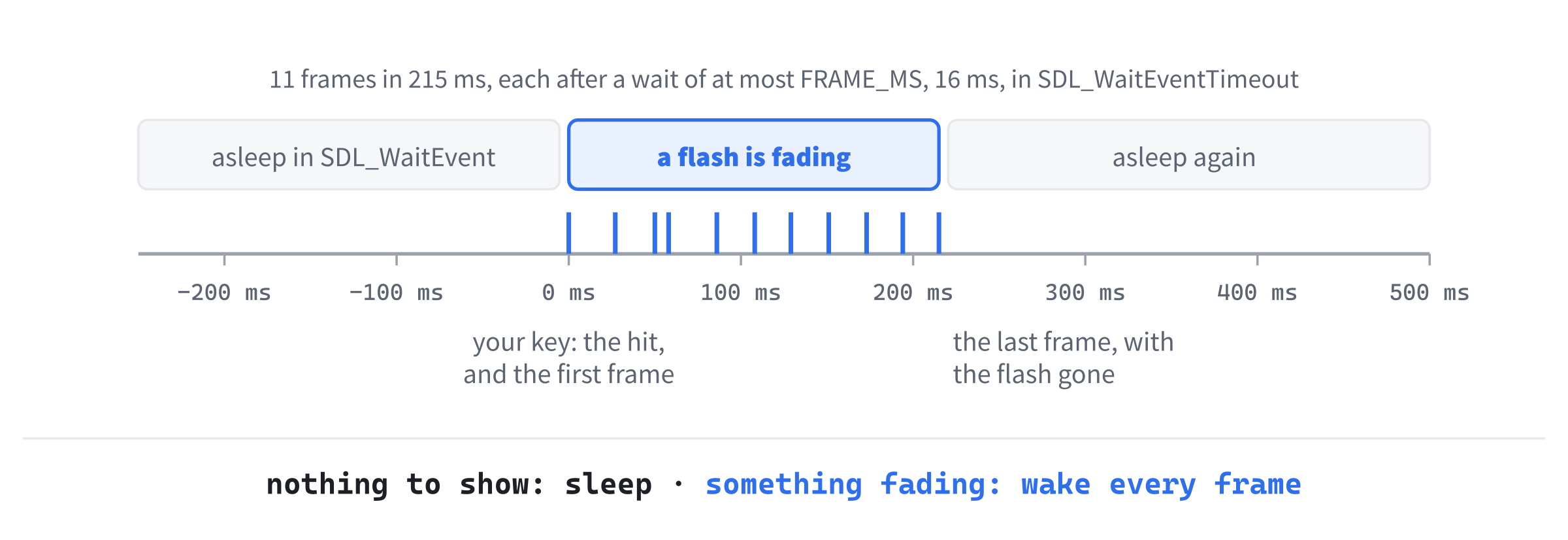
SDL_WaitEvent. The key wakes it, and while the flash fades, it waits at most 16 milliseconds at a time, drawing a frame each time it wakes. After 215 milliseconds, the flash is gone, and the loop goes back to sleep.In Game.cpp, add the length of a frame below FONT_SIZE, with a blank line in between:
// A frame, in milliseconds, at 60 frames a second
constexpr Sint32 FRAME_MS = 16;
In the preceding code, FRAME_MS is 16, about a sixtieth of a second, the time between frames at 60 frames a second. It's a Sint32, SDL's signed 32-bit whole number, since that's what SDL_WaitEventTimeout takes.
Then find the comment above run:
// Sleeps until something happens, deals with it, and draws the window again
// if anything changed
And change it to this:
// Sleeps until something happens, deals with it, and draws the window again
// if anything changed. While anything is flashing, it wakes up every frame
// as well, to draw the flash fading
In the preceding code, the comment says what the loop will do now. Next, find the lines in run that wait for an event:
if (!SDL_WaitEvent(&event))
    break;
And change them to this:
if (flashes_.isEmpty())
{
    if (!SDL_WaitEvent(&event))
        break;
}
else
{
    // Wait for an event, but for no longer than one frame
    bool gotEvent = SDL_WaitEventTimeout(&event, FRAME_MS);
    flashes_.removeFinished();
    dirty_ = true;
    if (!gotEvent)
        continue;
}
In the preceding code, with no flashes, the loop sleeps in SDL_WaitEvent, exactly as before. With a flash going, it waits in SDL_WaitEventTimeout instead, for at most one frame. Whether an event came or the time ran out, the finished flashes are then forgotten, and the window is marked dirty, so that the next time around, it's drawn again, with every flash a little fainter. If no event came, there's nothing else to do, so continue goes straight back to the top of the loop, and its drawing. If an event did come, it's handled as usual, below.
Once removeFinished has cleared the last flash, the window is drawn one more time, without it, and then the loop goes back to sleep in SDL_WaitEvent. So the game still uses no time at all while you think, and only works while there's something to show. Chapter 30's Task Manager test still passes: sitting idle after a fight, timing runs of the game used at most 31 milliseconds of the processor in five seconds, which Task Manager shows as 0%.
That's the whole of Part 5: four new files, six sounds, and every change to the old files typed.
Checkpoint: Press F5, and hit a monster. The red fades away smoothly now, over a fifth of a second, and so does the green when you drink a potion. Every blow sounds, and flashes, and the fights are a good deal livelier, as in Figure 34.1.
The Complete Files
Here are the eight files that are new or changed, in full, exactly as they are in the repository's SDL3 Projects/Rogue SDL Part 5. The other twenty-two are just as they were at the end of Chapter 33. First, Common.h:
#pragma once
#include <SDL3/SDL.h>
#include <functional>   // std::hash

// A place on the map, counted in cells, not pixels
struct Point
{
    int x = 0;
    int y = 0;

    bool operator==(const Point& other) const = default;
};

// The map is a grid of square cells, CELL_PX pixels across, MAP_W cells
// wide and MAP_H cells tall. Below it are HUD_ROWS rows of text, and the
// window is exactly the size of both: 1280 by 720 pixels
constexpr int CELL_PX = 16;
constexpr int MAP_W = 80;
constexpr int MAP_H = 40;
constexpr int HUD_ROWS = 5;
constexpr int WINDOW_W = MAP_W * CELL_PX;
constexpr int WINDOW_H = (MAP_H + HUD_ROWS) * CELL_PX;

// How to hash a Point, so that it can be a key in an unordered_map. Each
// cell gets its own number: the same number as its tile's index in the
// Map's vector
template <>
struct std::hash<Point>
{
    size_t operator()(const Point& point) const
    {
        return point.y * MAP_W + point.x;
    }
};

// How far the player can see, in cells
constexpr int SIGHT_RADIUS = 8;

// Every color in the game, in one place
namespace Palette
{
    constexpr SDL_Color BACKGROUND = { 10, 10, 16, 255 };
    constexpr SDL_Color WALL = { 180, 160, 110, 255 };
    constexpr SDL_Color FLOOR = { 110, 110, 130, 255 };
    constexpr SDL_Color PLAYER = { 255, 255, 255, 255 };

    // The stairs down
    constexpr SDL_Color STAIRS = { 240, 220, 80, 255 };

    // The colors of things remembered, but out of sight
    constexpr SDL_Color WALL_REMEMBERED = { 60, 55, 40, 255 };
    constexpr SDL_Color FLOOR_REMEMBERED = { 40, 40, 55, 255 };
    constexpr SDL_Color STAIRS_REMEMBERED = { 110, 100, 40, 255 };

    // The HUD's text
    constexpr SDL_Color TEXT = { 200, 200, 210, 255 };
    constexpr SDL_Color TEXT_DIM = { 100, 100, 110, 255 };
    constexpr SDL_Color TEXT_BAD = { 240, 80, 80, 255 };

    // Monsters and treasure
    constexpr SDL_Color RAT = { 180, 180, 100, 255 };
    constexpr SDL_Color GOBLIN = { 100, 220, 100, 255 };
    constexpr SDL_Color ORC = { 220, 100, 100, 255 };
    constexpr SDL_Color POTION = { 220, 80, 220, 255 };
    constexpr SDL_Color GOLD = { 240, 220, 80, 255 };

    // Flashes, which start see-through, and fade from there
    constexpr SDL_Color FLASH_HIT = { 255, 60, 60, 170 };
    constexpr SDL_Color FLASH_HEAL = { 80, 255, 120, 140 };
}
In the preceding code, the palette ends with the two flashes' colors.
Next, Sound.h:
#pragma once
#include <SDL3/SDL.h>
#include <string>   // std::string, for the file's path

// One sound effect, loaded from a WAV file when it's made, and ready to
// play at any moment
class Sound
{
public:
    Sound(const std::string& path);
    ~Sound();

    Sound(const Sound&) = delete;
    Sound& operator=(const Sound&) = delete;

    bool isLoaded() const;
    void play() const;

private:
    Uint8* samples_ = nullptr;            // the sound itself
    Uint32 length_ = 0;                   // its size, in bytes
    SDL_AudioStream* stream_ = nullptr;   // the way to the speakers
};

// Every sound in the game, each loaded from its own file
struct Sounds
{
    Sound hit{ "assets/hit.wav" };         // the player hits a monster
    Sound kill{ "assets/kill.wav" };       // and kills it
    Sound hurt{ "assets/hurt.wav" };       // a monster hits the player
    Sound pickup{ "assets/pickup.wav" };   // anything picked up
    Sound drink{ "assets/drink.wav" };     // a potion
    Sound stairs{ "assets/stairs.wav" };   // going down
};
In the preceding code, a Sound owns its samples and its stream, and can't be copied, and Sounds holds every sound in the game.
Then Sound.cpp:
#include "Sound.h"

// Loads the sound, and opens a stream to the speakers that can play it
Sound::Sound(const std::string& path)
{
    SDL_AudioSpec spec;
    if (!SDL_LoadWAV(path.c_str(), &spec, &samples_, &length_))
    {
        SDL_Log("Couldn't load %s: %s", path.c_str(), SDL_GetError());
        return;
    }

    stream_ = SDL_OpenAudioDeviceStream(SDL_AUDIO_DEVICE_DEFAULT_PLAYBACK,
                                        &spec, nullptr, nullptr);
    if (!stream_)
    {
        SDL_Log("Couldn't open audio for %s: %s", path.c_str(),
                SDL_GetError());
        return;
    }

    // A new stream starts paused, so that nothing plays until it's ready
    SDL_ResumeAudioStreamDevice(stream_);
}

// Closes the stream, which stops the sound, and frees its memory
Sound::~Sound()
{
    if (stream_)
        SDL_DestroyAudioStream(stream_);
    SDL_free(samples_);
}

bool Sound::isLoaded() const
{
    return stream_ != nullptr;
}

// Plays the sound from the start, cutting off any of it still playing
void Sound::play() const
{
    if (!stream_)
        return;

    SDL_ClearAudioStream(stream_);
    SDL_PutAudioStreamData(stream_, samples_, static_cast<int>(length_));
}
In the preceding code, a sound is loaded and its stream opened in the constructor, both are let go in the destructor, and play starts it again from the top.
Then FlashEffects.h:
#pragma once
#include <SDL3/SDL.h>
#include <vector>   // std::vector, for the flashes
#include "Common.h"

// How long a flash takes to fade away, in milliseconds
constexpr Uint64 FLASH_MS = 200;

// A cell lit up in a color for a moment
struct Flash
{
    Point cell;
    SDL_Color color;
    Uint64 startMs;   // when it began, from SDL_GetTicks
};

// Short flashes of color over cells: red where something is hit, green
// where the player heals. Each one fades away over FLASH_MS
class FlashEffects
{
public:
    void add(Point cell, SDL_Color color);
    bool isEmpty() const;
    void removeFinished();
    void draw(SDL_Renderer* renderer) const;

private:
    std::vector<Flash> flashes_;
};
In the preceding code, a Flash is a cell, a color, and a start time, and FlashEffects keeps them all.
Then FlashEffects.cpp:
#include "FlashEffects.h"

// Starts a flash on a cell, now
void FlashEffects::add(Point cell, SDL_Color color)
{
    flashes_.push_back({ cell, color, SDL_GetTicks() });
}

bool FlashEffects::isEmpty() const
{
    return flashes_.empty();
}

// Forgets every flash that has faded away completely
void FlashEffects::removeFinished()
{
    Uint64 now = SDL_GetTicks();
    std::erase_if(flashes_, [now](const Flash& flash)
    {
        return now - flash.startMs >= FLASH_MS;
    });
}

// Fills each flashing cell with its color, see-through, and more so the
// older the flash is, until it's gone
void FlashEffects::draw(SDL_Renderer* renderer) const
{
    Uint64 now = SDL_GetTicks();
    SDL_SetRenderDrawBlendMode(renderer, SDL_BLENDMODE_BLEND);
    for (const Flash& flash : flashes_)
    {
        Uint64 age = now - flash.startMs;
        if (age >= FLASH_MS)
            continue;

        // From the color's own alpha when it starts, down to 0 at the end
        float left = 1.0f - static_cast<float>(age) / FLASH_MS;
        Uint8 alpha = static_cast<Uint8>(flash.color.a * left);
        SDL_SetRenderDrawColor(renderer, flash.color.r, flash.color.g,
                               flash.color.b, alpha);

        SDL_FRect box = { static_cast<float>(flash.cell.x * CELL_PX),
                          static_cast<float>(flash.cell.y * CELL_PX),
                          CELL_PX, CELL_PX };
        SDL_RenderFillRect(renderer, &box);
    }
}
In the preceding code, flashes are added, forgotten once they've faded, and drawn fainter the older they are.
Then main.cpp:
/*
    Rogue SDL
    The final project from Learning C++ by Building Games, built over
    Chapters 30 to 36

    A dungeon crawler in the tradition of Rogue, drawn entirely in
    characters. You're the @, and nothing happens until you move.

    New in this project: SDL3_ttf, SDL's add-on library for drawing text.
*/

#include <SDL3/SDL.h>
#include <SDL3/SDL_main.h>
#include <SDL3_ttf/SDL_ttf.h>

#include "Common.h"
#include "Game.h"

// The whole game. The Game, and everything it owns, is destroyed when this
// returns, before main destroys the renderer
bool runGame(SDL_Renderer* renderer)
{
    Game game(renderer);
    if (!game.isLoaded())
        return false;

    game.run();
    return true;
}

int main(int argc, char* argv[])
{
    // Start SDL, with its video and its audio, and SDL3_ttf, then make the
    // window and the renderer
    if (!SDL_Init(SDL_INIT_VIDEO | SDL_INIT_AUDIO))
    {
        SDL_Log("SDL_Init failed: %s", SDL_GetError());
        return 1;
    }

    if (!TTF_Init())
    {
        SDL_Log("TTF_Init failed: %s", SDL_GetError());
        SDL_Quit();
        return 1;
    }

    SDL_Window* window = SDL_CreateWindow("Rogue SDL", WINDOW_W, WINDOW_H, 0);
    if (!window)
    {
        SDL_Log("SDL_CreateWindow failed: %s", SDL_GetError());
        TTF_Quit();
        SDL_Quit();
        return 1;
    }

    SDL_Renderer* renderer = SDL_CreateRenderer(window, nullptr);
    if (!renderer)
    {
        SDL_Log("SDL_CreateRenderer failed: %s", SDL_GetError());
        SDL_DestroyWindow(window);
        TTF_Quit();
        SDL_Quit();
        return 1;
    }

    // Show each frame in step with the monitor's refresh
    SDL_SetRenderVSync(renderer, 1);

    // Play until the player quits, then clean up, in the reverse order
    // we created things
    bool played = runGame(renderer);

    SDL_DestroyRenderer(renderer);
    SDL_DestroyWindow(window);
    TTF_Quit();
    SDL_Quit();

    return played ? 0 : 1;
}
In the preceding code, SDL_Init starts SDL's audio along with its video.
Then Game.h:
#pragma once
#include <SDL3/SDL.h>
#include <vector>   // std::vector, for the monsters and the treasure
#include "Enemy.h"
#include "FlashEffects.h"
#include "GlyphCache.h"
#include "HUD.h"
#include "Item.h"
#include "Map.h"
#include "Player.h"
#include "Sound.h"

// The whole game. It owns the glyphs, the map, the player, the monsters,
// the treasure, the HUD, the sounds, and the flashes, and runs the loop
// that waits for a key, acts on it, and draws what happened
class Game
{
public:
    Game(SDL_Renderer* renderer);

    bool isLoaded() const;
    void run();

private:
    void newGame();
    void newLevel();
    void handleKey(SDL_Keycode key);
    void moveOrAttack(int dx, int dy);
    void attack(Enemy& enemy);
    void pickUp();
    void drinkPotion();
    void takeStairs();
    void saveGame();
    void loadGame();
    void endTurn();
    void monsterTurn(Enemy& enemy);
    bool notices(const Enemy& enemy) const;
    Enemy* enemyAt(Point cell);
    Item* itemAt(Point cell);
    void draw() const;

    SDL_Renderer* renderer_;
    GlyphCache glyphs_;
    Map map_;
    Player player_;
    std::vector<Enemy> enemies_;
    std::vector<Item> items_;
    HUD hud_;
    Sounds sounds_;
    FlashEffects flashes_;
    int depth_ = 1;          // how many levels down the player is
    bool gameOver_ = false;  // true once the player has died
    bool running_ = true;
    bool dirty_ = true;      // true when the window needs drawing again
};
In the preceding code, the game owns the sounds and the flashes, along with everything else.
And last, Game.cpp:
#include "Game.h"
#include <cstdlib>   // std::abs
#include <string>   // std::string and std::to_string
#include "AStar.h"
#include "FOV.h"
#include "MapGenerator.h"
#include "SaveLoad.h"

// The font every character is drawn in, and its size
const std::string FONT_PATH = "assets/RobotoMono-Light.ttf";
constexpr float FONT_SIZE = 18.0f;

// A frame, in milliseconds, at 60 frames a second
constexpr Sint32 FRAME_MS = 16;

// The save file. It goes in the working directory, which is the project
// folder when the game runs from Visual Studio
const std::string SAVE_PATH = "rogue_save.txt";

Game::Game(SDL_Renderer* renderer)
    : renderer_(renderer), glyphs_(renderer, FONT_PATH, FONT_SIZE)
{
    newGame();
}

bool Game::isLoaded() const
{
    return glyphs_.isLoaded();
}

// Sleeps until something happens, deals with it, and draws the window again
// if anything changed. While anything is flashing, it wakes up every frame
// as well, to draw the flash fading
void Game::run()
{
    while (running_)
    {
        if (dirty_)
        {
            draw();
            dirty_ = false;
        }

        SDL_Event event;
        if (flashes_.isEmpty())
        {
            if (!SDL_WaitEvent(&event))
                break;
        }
        else
        {
            // Wait for an event, but for no longer than one frame
            bool gotEvent = SDL_WaitEventTimeout(&event, FRAME_MS);
            flashes_.removeFinished();
            dirty_ = true;
            if (!gotEvent)
                continue;
        }

        switch (event.type)
        {
        case SDL_EVENT_QUIT:
            running_ = false;
            break;
        case SDL_EVENT_WINDOW_EXPOSED:
            dirty_ = true;
            break;
        case SDL_EVENT_KEY_DOWN:
            handleKey(event.key.key);
            dirty_ = true;
            break;
        }
    }
}

// Starts again from the top, with a fresh player at depth 1
void Game::newGame()
{
    depth_ = 1;
    gameOver_ = false;
    player_.reset();
    hud_.clear();
    newLevel();
    hud_.addMessage("Welcome to Rogue SDL. Find the stairs down: >");
}

// Builds a new level, with its monsters and treasure, puts the player at
// its start, and looks around
void Game::newLevel()
{
    enemies_.clear();
    items_.clear();
    MapGenerator generator(map_);
    player_.setPosition(generator.generate(depth_, enemies_, items_));
    FOV::compute(map_, player_.getPosition(), SIGHT_RADIUS);
}

// Every key press is one action, or none
void Game::handleKey(SDL_Keycode key)
{
    // Once the player has died, only two keys do anything
    if (gameOver_)
    {
        if (key == SDLK_R)
            newGame();
        else if (key == SDLK_ESCAPE)
            running_ = false;
        return;
    }

    int dx = 0;
    int dy = 0;
    switch (key)
    {
    case SDLK_UP:
    case SDLK_W:
        dy = -1;
        break;
    case SDLK_DOWN:
    case SDLK_S:
        dy = 1;
        break;
    case SDLK_LEFT:
    case SDLK_A:
        dx = -1;
        break;
    case SDLK_RIGHT:
    case SDLK_D:
        dx = 1;
        break;
    case SDLK_H:
        drinkPotion();
        return;
    case SDLK_PERIOD:
        takeStairs();
        return;
    case SDLK_F5:
        saveGame();
        return;
    case SDLK_F9:
        loadGame();
        return;
    case SDLK_ESCAPE:
        running_ = false;
        return;
    default:
        return;
    }

    moveOrAttack(dx, dy);
}

// Attacks the monster in the way, if there is one. Otherwise, steps, looks
// around, and picks up anything lying there. Either way, it's a turn
void Game::moveOrAttack(int dx, int dy)
{
    Point next = { player_.getPosition().x + dx,
                   player_.getPosition().y + dy };
    if (Enemy* enemy = enemyAt(next))
    {
        attack(*enemy);
        endTurn();
        return;
    }

    if (player_.tryMove(dx, dy, map_))
    {
        FOV::compute(map_, player_.getPosition(), SIGHT_RADIUS);
        if (map_.at(player_.getPosition()).terrain == Terrain::StairsDown)
            hud_.addMessage("There are stairs down here. Press . to go down.");
        pickUp();
        endTurn();
    }
}

// The player hits a monster, which may die
void Game::attack(Enemy& enemy)
{
    int damage = player_.getAttack();
    enemy.takeDamage(damage);
    flashes_.add(enemy.getPosition(), Palette::FLASH_HIT);

    std::string name = enemy.getStats().name;
    if (enemy.isAlive())
    {
        sounds_.hit.play();
        hud_.addMessage("You hit the " + name + " for " +
                        std::to_string(damage) + ".");
    }
    else
    {
        sounds_.kill.play();
        hud_.addMessage("You kill the " + name + "!");
    }
}

// Picks up anything lying where the player stands
void Game::pickUp()
{
    Point here = player_.getPosition();
    Item* item = itemAt(here);
    if (!item)
        return;

    sounds_.pickup.play();
    if (item->getKind() == ItemKind::Gold)
    {
        player_.addGold(item->getAmount());
        hud_.addMessage("You pick up " + std::to_string(item->getAmount()) +
                        " gold.");
    }
    else
    {
        player_.addPotion();
        hud_.addMessage("You pick up a potion. Press H to drink it.");
    }

    // It's the player's now, so it isn't lying on the floor anymore
    std::erase_if(items_, [here](const Item& lying)
    {
        return lying.getPosition() == here;
    });
}

// Drinking a potion takes a turn, but trying to drink one you haven't got
// doesn't
void Game::drinkPotion()
{
    if (!player_.drinkPotion())
    {
        hud_.addMessage("You have no potions.");
        return;
    }

    sounds_.drink.play();
    flashes_.add(player_.getPosition(), Palette::FLASH_HEAL);
    hud_.addMessage("You drink a potion, and feel better.");
    endTurn();
}

// Goes down to a new level, if the player is standing on the stairs
void Game::takeStairs()
{
    if (map_.at(player_.getPosition()).terrain != Terrain::StairsDown)
    {
        hud_.addMessage("There are no stairs here.");
        return;
    }

    ++depth_;
    newLevel();
    sounds_.stairs.play();
    hud_.addMessage("You go down the stairs to depth " +
                    std::to_string(depth_) + ".");
}

// Saves the game, and says whether it worked. Saving doesn't take a turn
void Game::saveGame()
{
    if (SaveLoad::save(SAVE_PATH, map_, player_, enemies_, items_, depth_))
        hud_.addMessage("Game saved.");
    else
        hud_.addMessage("The game couldn't be saved.");
}

// Loads the saved game in place of this one, if there's one to load
void Game::loadGame()
{
    if (!SaveLoad::load(SAVE_PATH, map_, player_, enemies_, items_, depth_))
    {
        hud_.addMessage("There's no saved game, or it couldn't be read.");
        return;
    }

    FOV::compute(map_, player_.getPosition(), SIGHT_RADIUS);
    hud_.addMessage("Game loaded.");
}

// The player has taken a turn, so now the monsters take theirs. The dead
// are cleared away first
void Game::endTurn()
{
    std::erase_if(enemies_, [](const Enemy& enemy)
    {
        return !enemy.isAlive();
    });

    for (Enemy& enemy : enemies_)
    {
        monsterTurn(enemy);
        if (!player_.isAlive())
        {
            gameOver_ = true;
            hud_.addMessage("You die.");
            return;
        }
    }
}

// A monster that sees the player hunts them. It attacks if it's next to
// them, and otherwise steps along the shortest path to where it saw them
// last, so that it can follow them around corners
void Game::monsterTurn(Enemy& enemy)
{
    if (notices(enemy))
        enemy.hunt(player_.getPosition());
    if (!enemy.isHunting())
        return;

    Point from = enemy.getPosition();
    Point to = player_.getPosition();
    if (std::abs(to.x - from.x) + std::abs(to.y - from.y) == 1)
    {
        int damage = enemy.getStats().attack;
        player_.takeDamage(damage);
        sounds_.hurt.play();
        flashes_.add(to, Palette::FLASH_HIT);
        hud_.addMessage("The " + std::string(enemy.getStats().name) +
                        " hits you for " + std::to_string(damage) + ".");
        return;
    }

    // An empty path means it's where it saw the player last, and they're
    // gone, or that there's no way there. Either way, it loses the trail
    std::vector<Point> path = AStar::findPath(map_, from, enemy.getLastSeen());
    if (path.empty())
    {
        enemy.giveUp();
        return;
    }

    // It waits, if another monster is in the way
    if (!enemyAt(path[0]))
        enemy.setPosition(path[0]);
}

// A monster notices the player when it stands where the player can see it,
// and the player is within its own sight
bool Game::notices(const Enemy& enemy) const
{
    Point from = enemy.getPosition();
    Point to = player_.getPosition();
    int dx = to.x - from.x;
    int dy = to.y - from.y;
    int sight = enemy.getStats().sight;
    return map_.at(from).visible && dx * dx + dy * dy <= sight * sight;
}

// The monster at a cell, or nullptr if there isn't one. The pointer is
// only good until the vector of monsters next changes
Enemy* Game::enemyAt(Point cell)
{
    for (Enemy& enemy : enemies_)
    {
        if (enemy.getPosition() == cell)
            return &enemy;
    }
    return nullptr;
}

// The item at a cell, or nullptr if there isn't one, with the same warning
Item* Game::itemAt(Point cell)
{
    for (Item& item : items_)
    {
        if (item.getPosition() == cell)
            return &item;
    }
    return nullptr;
}

void Game::draw() const
{
    SDL_SetRenderDrawColor(renderer_, Palette::BACKGROUND.r,
                           Palette::BACKGROUND.g, Palette::BACKGROUND.b, 255);
    SDL_RenderClear(renderer_);

    map_.draw(renderer_, glyphs_);

    // Treasure, then monsters, wherever the player can see them
    for (const Item& item : items_)
    {
        if (map_.at(item.getPosition()).visible)
            item.draw(renderer_, glyphs_);
    }
    for (const Enemy& enemy : enemies_)
    {
        if (map_.at(enemy.getPosition()).visible)
            enemy.draw(renderer_, glyphs_);
    }

    player_.draw(renderer_, glyphs_);
    flashes_.draw(renderer_);
    hud_.draw(renderer_, glyphs_, player_, depth_, gameOver_);

    SDL_RenderPresent(renderer_);
}
In the preceding code, every hit, kill, pickup, potion, and trip down the stairs has its sound, hits and potions light their cells, and the loop wakes every frame while anything is fading.
Playing the Game
Press F5, and pick a fight. Figure 34.9 shows one, a few levels down.
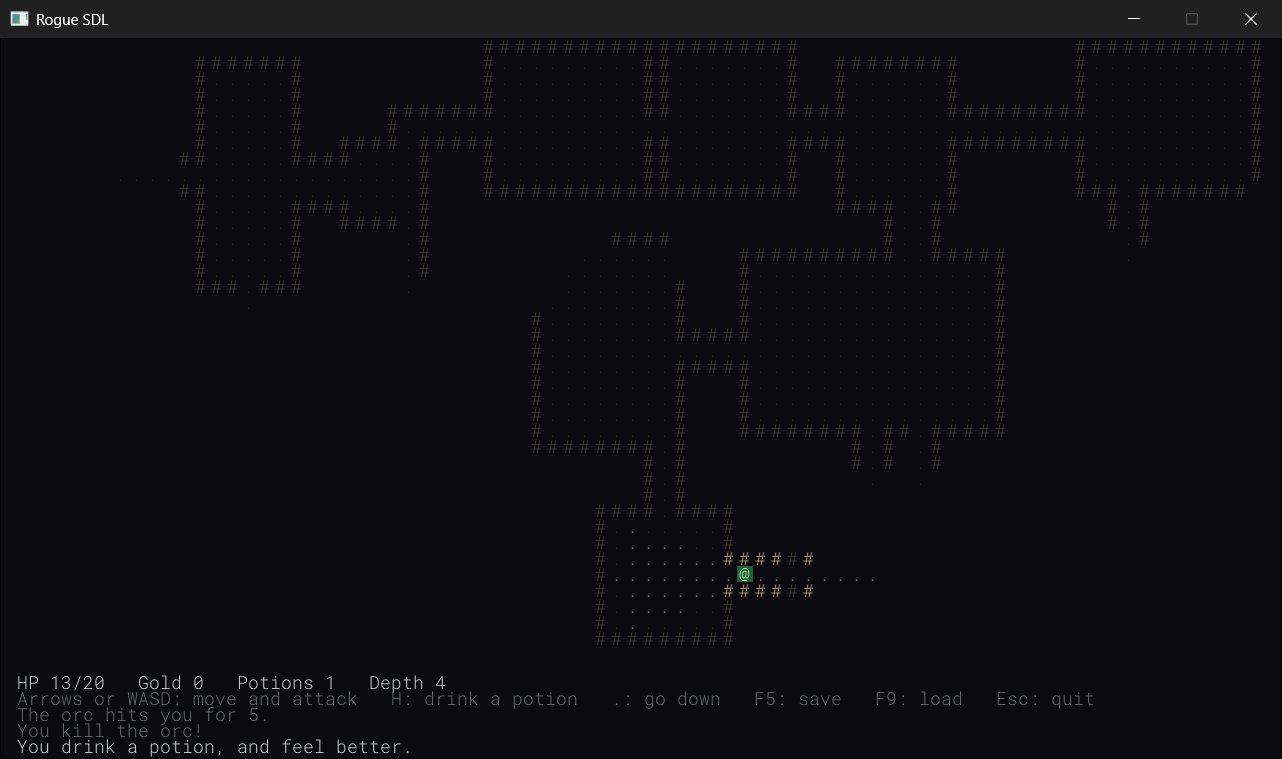
The sounds tell you things the messages only say. Once you know them, the kill sound means a kill, without your having to read a word, and the hurt sound, while you're looking somewhere else, means something has reached you, and a red flash on the @ says it's time to look. With your eyes on the map, you'll find you read the messages less, and play faster.
Understanding the Code
Follow a hit from the key to the speaker. The key wakes the loop, and handleKey hands the step to moveOrAttack, which calls attack. That starts a flash on the monster's cell, and play puts the hit sound into its stream, which SDL starts feeding to the sound card at once, on its own thread, while the game carries on.
The loop draws the window with the flash at full strength, and since there's a flash, it waits in SDL_WaitEventTimeout. Sixteen milliseconds later, it draws the flash again, fainter, and again, and again, until the flash is 200 milliseconds old. Then it's removed, the window is drawn once more, and the loop goes back to sleep.
Notice that the game never waits for a sound. A call to play only puts samples into a queue, which takes a moment, and returns, and SDL's own thread does the rest, feeding the sound card for as long as the sound lasts, while the game carries on drawing, or goes back to sleep. That's why a sound can outlast the turn that started it, and why the loop didn't need to change for the sounds at all.
The flash fades by the clock, not by counting frames. Each frame comes 16 milliseconds after the last, and a little more, since drawing one takes a moment too, so the flash is drawn ten or a dozen times as it fades. But the count doesn't matter: the flash lasts 200 milliseconds, because its alpha comes from its age, whatever the frames are doing.
Notice where the sounds and the flashes live. The Sounds struct is one member of Game, and every sound in it is made when the game is made, and destroyed when the game is destroyed, with no code to do either, since each Sound looks after itself. That's RAII again, from Chapter 18, and it's why the sounds can't be played after audio has stopped: they're gone by then.
And notice what doesn't change: the rules. Every sound and every flash is added next to a line that was already there, telling the HUD what happened, and none of them takes a turn, changes a number, or makes a decision. That's what juice is: the same game, felt more.
The word juice comes from game developers, and the best-known demonstration of it is a 2012 talk by Martin Jonasson and Petri Purho, "Juice It or Lose It," in which they took a dull Breakout clone and added sounds, flashes, shakes, and bounces, one at a time, until it felt alive, without changing its rules at all. It's easy to find online, and well worth its quarter of an hour.
The loop's two ways of waiting are a pattern you'll see again: sleep while nothing moves, and wake every frame while something does. Anything that animates for a moment, such as a flash, a shake, or a number that floats up from a hit, only has to say whether it's still going, and the loop can do the rest.
Experimenting
A few of these change the sounds or the flashes, so put them back afterward, since the next chapter carries on from this one.
- A slow glow. Change
FLASH_MSto1000. Every flash now takes a whole second to fade, and the loop wakes every frame for that whole second. - Glittering gold. In
pickUp, addflashes_.add(here, Palette::GOLD);belowsounds_.pickup.play();. Gold is solid, with an alpha of 255, so the flash hides the@at first, and fades from there. Try a gold of your own, with an alpha of 120. - A different hit. Make a sound of your own with Bfxr or jsfxr, save it as
hit.wavinassets, and every hit sounds like yours. - A missing sound. Rename
kill.wavtokill_.wav, and run the game. The console says it couldn't load the file, and kills are silent, but everything else carries on as before. Name it back afterward. - Softer sounds. In
Sound’s constructor, addSDL_SetAudioStreamGain(stream_, 0.3f);below the call toSDL_ResumeAudioStreamDevice. A stream's gain multiplies every sample on the way out, so 0.3 plays everything at about a third of its volume. - No redrawing. Put
//in front ofdirty_ = true;in the new part ofrun, and watch the flashes stop fading again. The loop still wakes every frame, and clears away the finished flashes, but it never draws them.
Common Errors and Fixes
C2059: syntax error: 'string', in Sound.h. One of the Sounds members has its path in parentheses, as in Sound hit("assets/hit.wav");. A default member initializer can use braces or =, but not parentheses. Use braces: Sound hit{ "assets/hit.wav" };.
C2280: 'Sound::Sound(const Sound &)': attempting to reference a deleted function. Something tries to copy a Sound, as in Sound hit = sounds_.hit;. A Sound can't be copied, on purpose, since two copies would share one stream and one set of samples. Use the sound where it is: sounds_.hit.play();.
C3646: 'sounds_': unknown override specifier, and C4430: missing type specifier, in Game.h, then C2065: 'sounds_': undeclared identifier, all through Game.cpp. Nothing in Game.h includes Sound.h, so Sounds means nothing there. Add the include.
The game is silent, and the console says "Couldn't open audio for assets/hit.wav: Audio subsystem is not initialized", once for each sound. The call to SDL_Init in main asks only for SDL_INIT_VIDEO. Add | SDL_INIT_AUDIO.
The console says "Couldn't load assets/hit.wav: Couldn't open assets/hit.wav: The system cannot find the file specified." The WAV file isn't in your project's assets folder, or it has a different name. Copy it there from the book's repository. Only that sound is silent; the game carries on without it.
The game is completely silent, and the console says nothing at all. The call to SDL_ResumeAudioStreamDevice is missing from the constructor, so every stream stays paused, taking in samples and playing none of them. Put it back, below the check that the stream opened.
A flash is a solid block of color that hides the character under it, and then vanishes. The blend mode line at the top of FlashEffects::draw is missing, so the renderer ignores alpha, as Chapter 14's particles did without it. Put SDL_SetRenderDrawBlendMode(renderer, SDL_BLENDMODE_BLEND); back.
The flashes don't fade: each one stays at full strength until you press a key. Either run still sleeps in SDL_WaitEvent whatever is happening, or the dirty_ = true; in its new part is missing, so the loop wakes up, but never draws. Put back whichever is missing.
After the first flash, the game never goes back to sleep. The flashes fade properly, but the loop carries on drawing every frame, forever, even while you do nothing, and in Task Manager, the game's CPU column never drops back to 0%. The call to removeFinished is missing from run, so the vector of flashes never empties, and isEmpty is never true again. A timing build drew 95 frames in the two seconds after a single hit, against 10 for the right code, and sitting idle, it used about a fifth of a processor core, where the right code used almost none. Put flashes_.removeFinished(); back.
AI Exercise (Optional)
A flash is one kind of juice. If you'd like to add another with an AI's help, here's a challenge that puts the loop's new trick to work: a short shake of the whole map when a monster hits you. As always, it's optional.
Open your AI chatbot of choice and try a prompt like this:
"I'm writing a turn-based roguelike in C++ with SDL 3. My Game::run loop sleeps in SDL_WaitEvent while nothing is animating, but while any flash is fading, it waits with SDL_WaitEventTimeout(&event, FRAME_MS), where FRAME_MS is 16, then calls flashes_.removeFinished() and sets dirty_ = true, so that the window is drawn again. Game::draw draws the map, the items, the monsters, the player, the flashes (flashes_.draw(renderer_)), and then the HUD, which sits in the rows below the map. Flashes keep their start time from SDL_GetTicks and fade over FLASH_MS, 200 milliseconds. I'd like a screen shake when a monster hits the player: for 150 milliseconds, the map, and everything on it, is drawn a few pixels off in a random direction each frame, while the HUD stays still. Use SDL_SetRenderViewport to move the drawing, and make the loop keep waking up while the shake lasts, as it does for flashes. Show me every change, with each curly brace on its own line, and explain how the loop knows when to go back to sleep."
Notice what the preceding prompt does. It explains the loop's two ways of waiting exactly, so that the AI adds the shake to the loop's test, rather than writing a second loop, or a delay. Spelling out the drawing order, and that the HUD must stay still, means the viewport has to be put back before the HUD is drawn. And it names SDL_SetRenderViewport, SDL 3's name, which saves the AI from reaching for an older one.
When the answer comes back, check it against this chapter. Does the shake keep its start time from SDL_GetTicks, and end by the clock, as the flashes do? Will the loop wake while either a flash or a shake is going, and sleep only when neither is? Is the viewport set back to the whole window, or to none, before the HUD? And does anything in it take a turn, or change a number, which a shake never should?
To try it, let a rat bite you. If the HUD shakes too, or the shake never stops, or it stops only when you press a key, ask the AI why.
Summary
The game has a voice. SDL plays sounds from samples, thousands of numbers a second, and a Sound loads them from a WAV file with SDL_LoadWAV, opens a stream to the speakers with SDL_OpenAudioDeviceStream, and plays them by clearing the stream and putting the samples in. It owns everything it loads, and lets it all go in its destructor, so it can't be copied, and the six sounds in Sounds live and die with the game.
The game has light, too. A flash is a see-through color over a cell, which fades by the clock over 200 milliseconds. And the loop that sleeps between turns now wakes once a frame while anything is fading, and goes back to sleep the moment it's done, so the game still uses nothing while you think.
Next, in Chapter 35, the game gets a pack, and a way to look inside it. You'll carry what you find, and use it when you choose, from an inventory screen, which is a new state of the game, stacked on top of the one you play in. That's where virtual finally earns its keep, as Chapter 30 promised, in a small family of game states. And one of the things you'll find is a scroll that shows you the whole level at once.