
A world built from exact numbers feels dead. Real hills aren't regular, and real crowds don't march in step. Games reach for randomness to break that perfection: to scatter trees, vary enemies, roll dice, and make no two games alike. But there are two very different kinds of randomness, and knowing which to use is the art of this chapter. One is the dice roll, where each number has nothing to do with the last. The other is noise, a smooth randomness in which nearby places have nearby values. Noise shapes hills, rivers and drifting fog.
We'll start with random numbers, done properly in C++, and the everyday jobs they do, such as scattering points in a circle. Then we'll see why plain randomness looks wrong for anything that should be smooth, and build noise that isn't: value noise, and its layered form, fractal noise. Last, we'll turn noise into a flow field, which sends thousands of particles drifting in streams.
In this chapter, we will:
- Get random numbers from a generator and a distribution, and see what's wrong with
rand() % n - Seed a generator, for a world that's the same every time or different every time
- Scatter points evenly in a circle
- Make a repeatable random value for any point, with a hash
- Build value noise in one dimension, then two, and see what its smoothing costs
- Layer octaves into fractal noise
- Turn noise into a flow field, in Noise Fields
We'll start with random numbers.
Random Numbers
Chapter 9's critters wandered by random numbers, and Noise Fields gets its own the same way. This section looks at how that works, and at the old way it replaces.
A Generator and a Distribution
Here's how Chapter 9 made its random numbers, which Noise Fields uses unchanged:
// A random float from lo to hi. The generator is made once, and seeded
// from the system, so that every run is different.
std::mt19937 rng{ std::random_device{}() };
The randRange function after it makes a std::uniform_real_distribution<float> from lo to hi, and hands it the generator. That's the pattern C++'s <random> header uses for everything. A generator makes raw random numbers. The Mersenne Twister, std::mt19937, makes whole numbers of 32 bits, evenly spread. Its sequence doesn't repeat for longer than anyone will ever run it. A distribution shapes them into what you asked for: floats from lo to hi, whole numbers in a range, or numbers that cluster around an average.
A distribution's range takes care with its ends. A real distribution includes its bottom but not its top, so randRange(0.0f, 1.0f) gives values from 0 up to, but never quite reaching, 1. A whole-number distribution includes both ends. Here's a sketch of a die:
// A sketch: a die, from 1 to 6, both ends included.
std::uniform_int_distribution<int> die(1, 6);
int roll = die(rng);
Rolled 600,000 times, it gives each number from 1 to 6 about 100,000 times. It never gives anything else. The distribution is cheap to make, so making one where it's needed, as randRange does, is fine. The generator is another matter. It holds the sequence's state, so there must be one, made once and kept, as rng is.
Why Not rand() % n
Older C++ code makes random numbers with rand(), from C, and fits them to a range with the remainder operator. That has two faults. The first is quality. The numbers rand() makes run only from 0 to RAND_MAX, which with Visual Studio is 32,767. The second is the remainder itself. With rand() % 1000, the 32,768 values rand() can give don't divide evenly into 1,000 piles. The values 0 to 767 each come up 33 times in every 32,768, and 768 to 999 come up 32 times. So the low numbers are about 3% more likely than the high ones. That's modulo bias, and a distribution avoids it, by throwing away the raw numbers that would make the piles uneven.
Seeds
A generator's whole sequence is decided by its starting number, its seed. The same seed always gives the same sequence. That sounds like a fault, but it's a feature. A fixed seed makes a "random" world the same every run. That helps with testing and with replays, and it lets players share a level by its seed, as many games do. A seed from std::random_device, as Chapter 9 explained, makes every run different.
Noise Fields uses both. Its generator is seeded from the system, so its particles start in different places every run. Its noise has a seed of its own, which starts at 1234, so its field is the same at every launch. The readout shows it. Space picks a new one at random, and Left and Right step it down and up by one, so a field you liked is easy to come back to. And seeds next to each other, such as 1234 and 1235, give fields with nothing in common, for reasons that A Random Value for Any Point explains.
Scattering
Most of a game's randomness is small and practical: a random direction for a spark, or a random place for a pickup.
Directions and Points in a Box
A random direction is a random angle, made into a vector by Chapter 5's fromAngle: Vec2::fromAngle(randRange(0.0f, 2.0f * PI)). Every direction is equally likely, since the angle is spread evenly around the circle. A random point in a box is just as easy: a random x across its width, and a random y down its height. Noise Fields scatters its particles over the window that way.
Points in a Circle
A circle has a trap. The obvious way to scatter points in one is a random angle and a random radius, from 0 to the circle's radius R. The points come out crowded in the middle. Half of them fall within half the radius, but that inner circle is only a quarter of the area, so it's twice as crowded as the circle as a whole.
The cure comes from the areas. The area within a radius r of the middle grows with r squared, so the share of the circle within r is (r / R) squared. For the points to spread evenly, that must also be the chance that a point lands within r. Take u, a random number from 0 to 1, and make the radius R times its square root. A point is then within r exactly when u is under (r / R) squared, which happens with just that chance:
radius = R × √uSo a quarter of the points fall within half the radius, as a quarter of the area does. The next image shows a thousand points scattered each way.
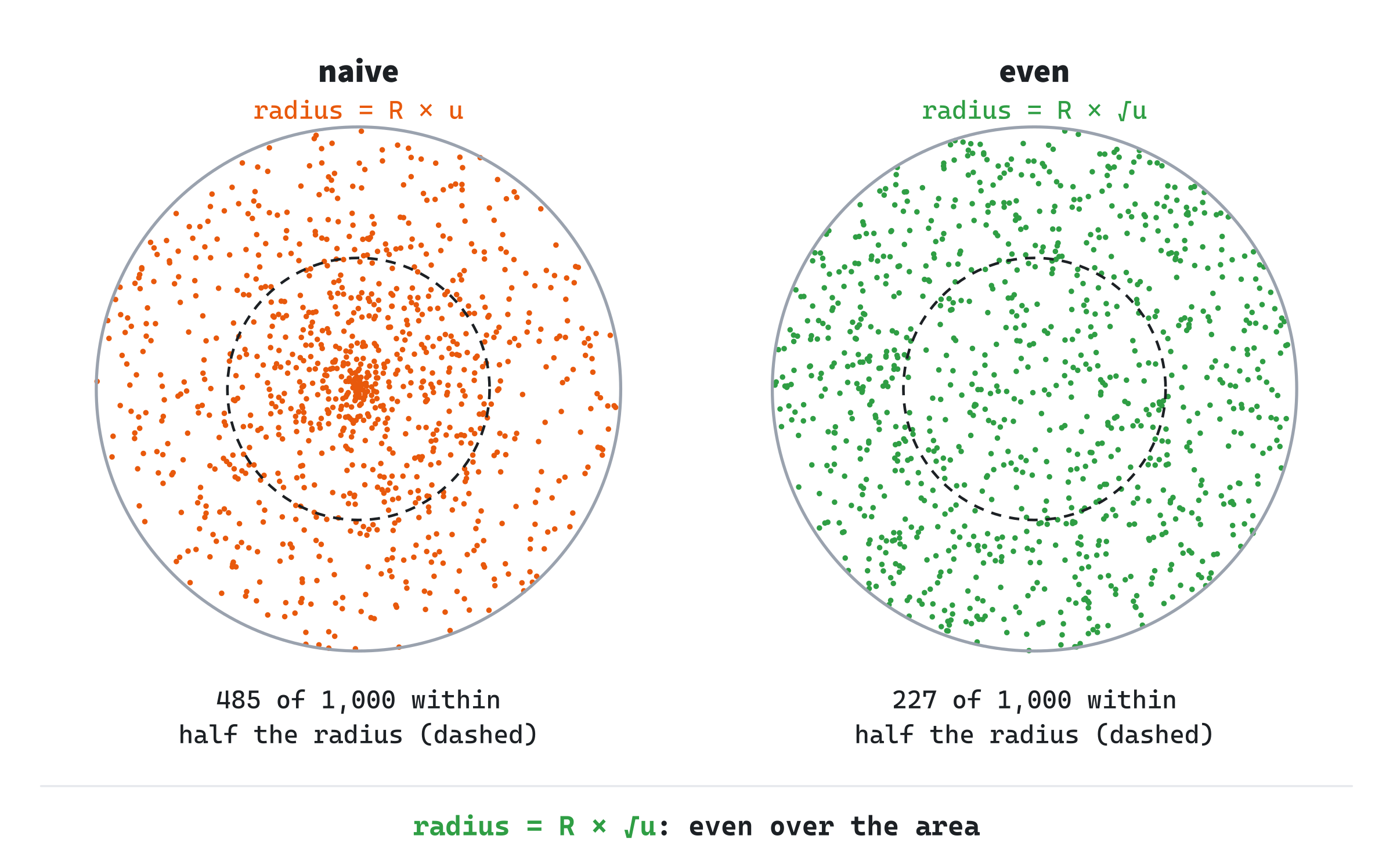
Noise Fields sprays particles in a circle when you click, and S switches between the two ways, so that you can see the difference. Here's its scatter:
// A random point in a circle. An even scatter takes the square root of a
// uniform number for the radius, since the area within a radius grows as
// its square. The naive one takes the number as it is, which crowds the
// points toward the middle.
Vec2 randomInCircle(Vec2 center, float radius, bool even)
{
    float angle = randRange(0.0f, 2.0f * PI);
    float u = randRange(0.0f, 1.0f);
    float r = even ? radius * std::sqrt(u) : radius * u;
    return center + Vec2::fromAngle(angle, r);
}
The angle is any direction, as before, and the radius is the square root of u times radius, unless even is false. The point is the center plus a vector of that length at that angle, by fromAngle with its second parameter, the length.
Coherence
Now for the turn. Suppose a landscape's heights come from random numbers, one for every point. You'd hope for rolling hills, and you'd get static.
White Noise
Each random number has nothing to do with the one beside it, so the heights jump from high to low between neighbors, like the snow on an untuned television. That's white noise. Nature doesn't look like that. On a real hill, a point next to a high point is usually high too, and the ground changes smoothly. What's missing is coherence: nearby points should have nearby values. Randomness with coherence is noise, and building it is the heart of this chapter. The next image shows white noise and the noise that this chapter builds, both in one dimension, along a line.
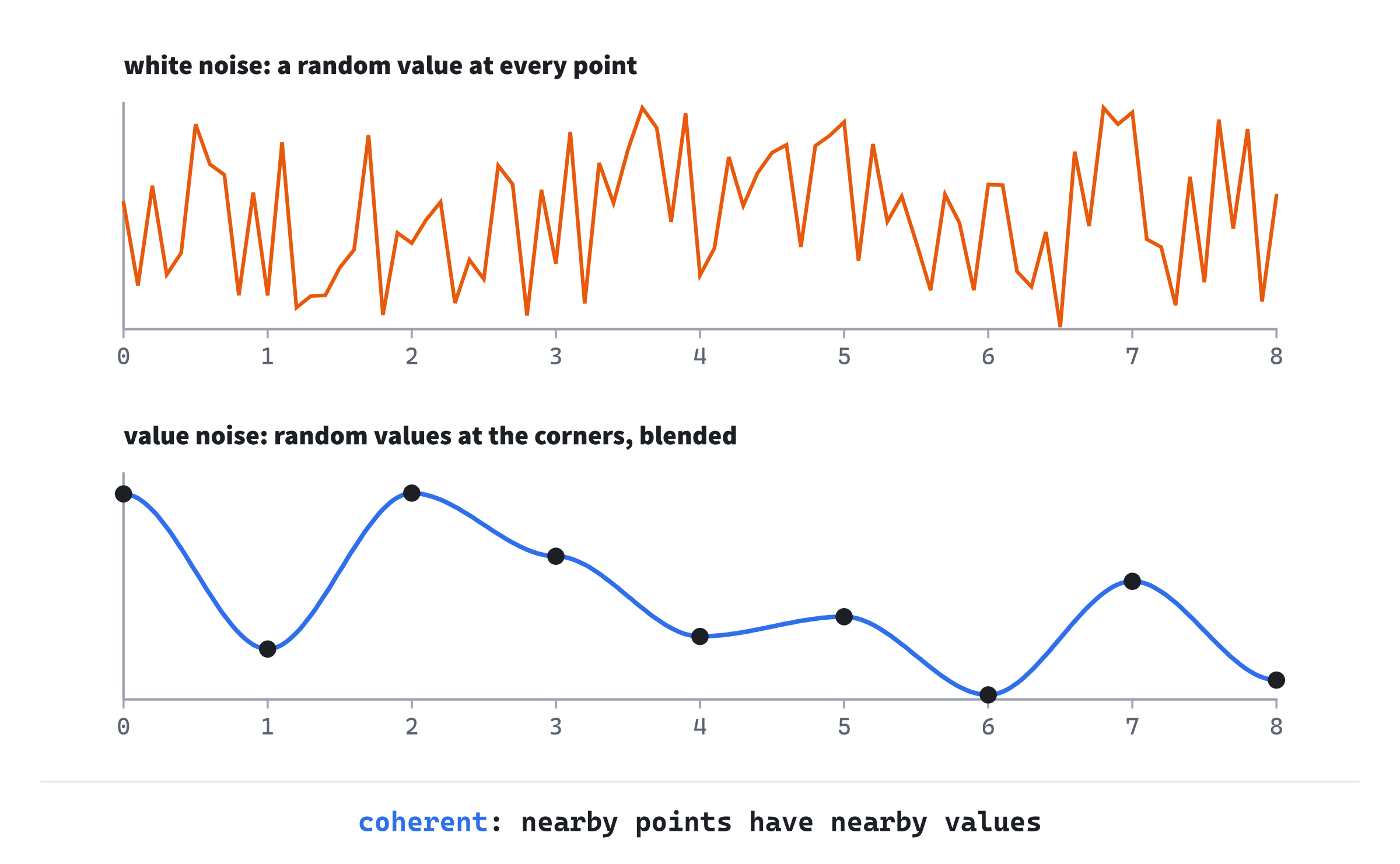
The lower line is value noise. It has random values at the whole numbers, marked with dots, and a smooth blend between them. Anywhere you look, a step to the side changes the value only a little.
A Random Value for Any Point
Value noise needs a random value at every corner of a grid, the whole-number points. And it needs the same value every time it asks for the same corner, in any order, anywhere, even at negative or enormous coordinates. A generator can't do that. It hands out values in a sequence. Reaching corner 1,000,000 would mean making every value before it, or storing them all in a table.
What noise needs is a hash: a function that turns its inputs straight into a number that looks random. Chapter 19's spatial hash used one, inside std::unordered_map, to file cells. Here, the hash's number is the point:
// A value from 0 up to 1, made from a corner (xi, yi) and a seed. It's the
// same every time for the same three, but with no pattern from one corner
// to the next. Multiplying by large odd numbers, and folding the high bits
// down onto the low ones, mixes every bit of the inputs into the result.
// The low 24 bits are kept, since a float holds every 24-bit whole number
// exactly.
float hash01(int xi, int yi, uint32_t seed)
{
    uint32_t n = (uint32_t)xi * 374761393u + (uint32_t)yi * 668265263u +
                 seed * 2246822519u;
    n = (n ^ (n >> 13)) * 1274126177u;
    n ^= n >> 16;
    return (float)(n & 0x00ffffffu) / 16777216.0f;
}
The casts to uint32_t matter. Unsigned arithmetic in C++ wraps around when it overflows, keeping the low 32 bits, while overflowing a signed int is undefined behavior. Each coordinate is multiplied by a large odd number, which spreads its bits upward, and the seed is mixed in the same way. Multiplying by an odd number, with wrapping, never sends two different numbers to the same one, so nothing is lost. The fold, n ^ (n >> 13), brings the high bits down onto the low ones, so that every bit of the result depends on every bit of the inputs. Then the function multiplies and folds once more. Any large odd numbers with their bits well mixed would do.
The last line keeps the low 24 bits, a whole number from 0 to 16,777,215. A float holds every whole number up to 2 to the 24th exactly. So dividing by 16,777,216 gives evenly spaced values from 0 up to just under 1, with nothing rounded. Over 100,000 corners in a row, the values average 0.499, with the spread that evenly spread numbers have.
The seed changes every corner's value, so two seeds give two unrelated fields, even 1234 and 1235. That's why a seed for a hash is a key, not the start of a sequence. Seed 1235 isn't "the next field" after 1234, but a different field altogether.
Value Noise
Value noise blends the corners' random values. It's easiest to see in one dimension first.
In One Dimension
Put a random value at each whole number. Between two of them, blend: Chapter 8's lerp, by how far between them the point is. A straight blend joins the values with straight lines, and leaves a kink at every corner, where one line's slope suddenly becomes the next one's. A kink is easy to see in a landscape, as a crease.
So value noise blends by Chapter 8's smoothstep of the fraction instead. Smoothstep was built to be flat at both ends, so the blend arrives at every corner flat, and leaves it flat, with no kink. Noise Fields has it unchanged:
// Slow at both ends: the cubic 3t^2 - 2t^3, with t^2 taken out.
float smoothstep(float t) { return t * t * (3.0f - 2.0f * t); }
It's the cubic 3t² − 2t³, which Chapter 8 found from four conditions: 0 at the start, 1 at the end, and flat at both.
A worked example: the corners at 0 and 1 have the values 0.2 and 0.8, and the point is at x = 0.25. A straight blend gives 0.2 + 0.6 × 0.25, which is 0.35. Smoothstep of 0.25 is 0.25 squared times (3 − 2 × 0.25), which is 0.0625 × 2.5, or 0.15625. So the smooth blend gives 0.2 + 0.6 × 0.15625, which is 0.294. Near a corner, it stays closer to the corner's value, since it leaves it flat. The next image shows both blends through five corners.
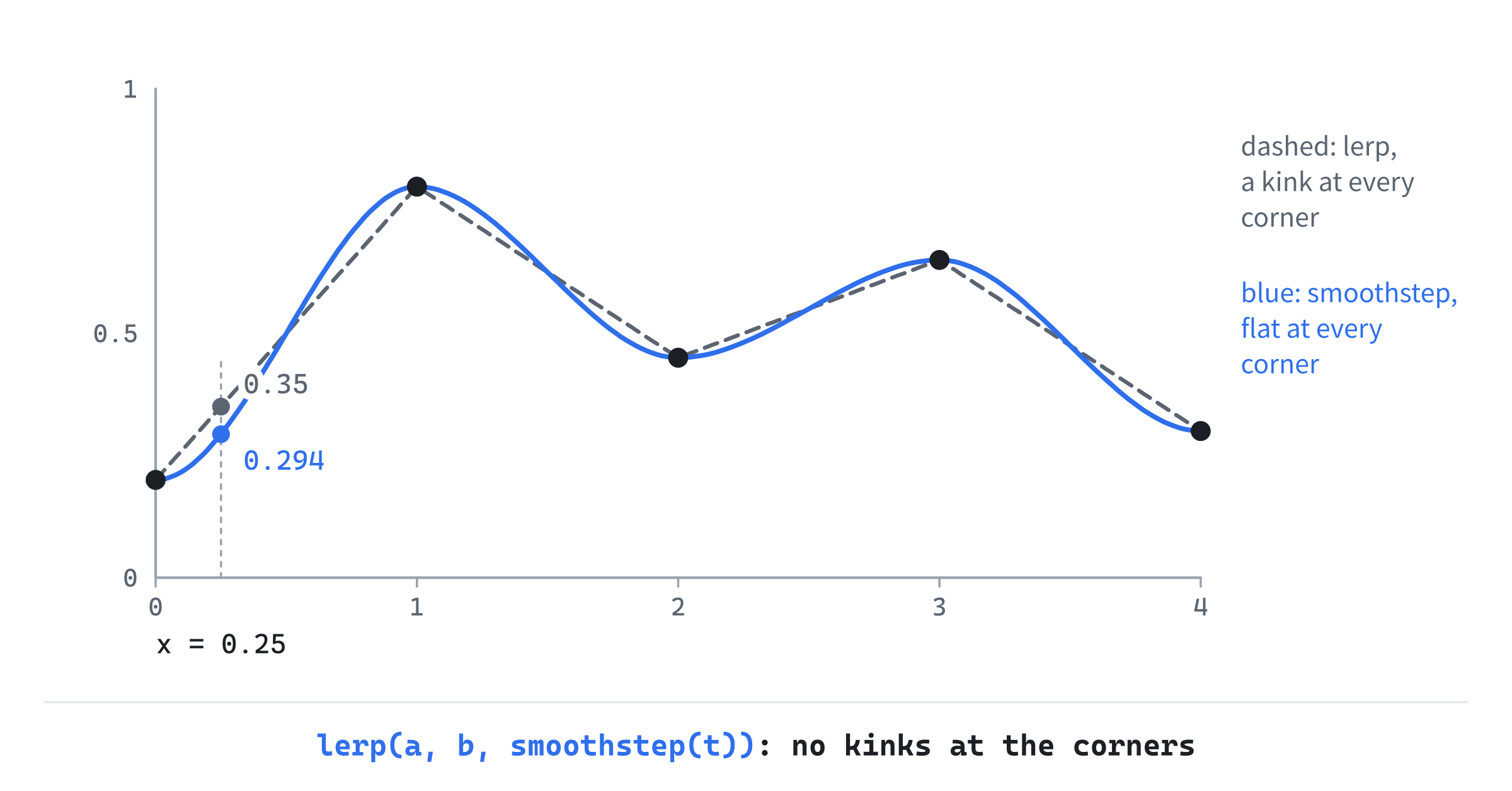
The straight blend is the dashed line, and the smooth one is the curve that arrives at every corner level.
In Two Dimensions
In two dimensions, a point lies in a square of the grid, with a corner at each of its four corners. The blend is Chapter 8's in two steps. First it blends along the square's top edge, and along its bottom edge, by how far across the point is. Then it blends between those two results, by how far down the point is. That's a bilinear blend, with smoothstep on both fractions:
// Value noise: a random value at each corner of a grid of squares, one unit
// across, and a smooth blend between the four corners around (x, y). The
// blend goes along the top and bottom edges first, then between those two.
float valueNoise(float x, float y, uint32_t seed)
{
    float fx = std::floor(x);
    float fy = std::floor(y);
    int xi = (int)fx;
    int yi = (int)fy;
    float u = smoothstep(x - fx);
    float v = smoothstep(y - fy);
    float top = lerp(hash01(xi, yi, seed), hash01(xi + 1, yi, seed), u);
    float bottom = lerp(hash01(xi, yi + 1, seed),
                        hash01(xi + 1, yi + 1, seed), u);
    return lerp(top, bottom, v);
}
The point's square is found with std::floor, as Chapter 19 found its cells, so that negative coordinates fall in the right square. The fractions x - fx and y - fy are how far across and down the square the point is, from 0 to 1. Smoothstep eases each one, and then lerp blends the four corners' values, top, bottom and between.
What Smoothstep Costs
Smoothstep makes every corner a flat spot, and that has a price. A flat spot is where a hill's top or a valley's bottom sits. So value noise's hills and valleys tend to sit right on the grid's corners, lined up in rows and columns, which an eye can pick out. Ken Perlin's gradient noise, from 1985, avoids it. Instead of a random value, each corner gets a value of 0 and a random slope. The curve then rises or falls through every corner, and its hills and valleys fall between the corners, at no fixed place. The next image shows both, in one dimension.
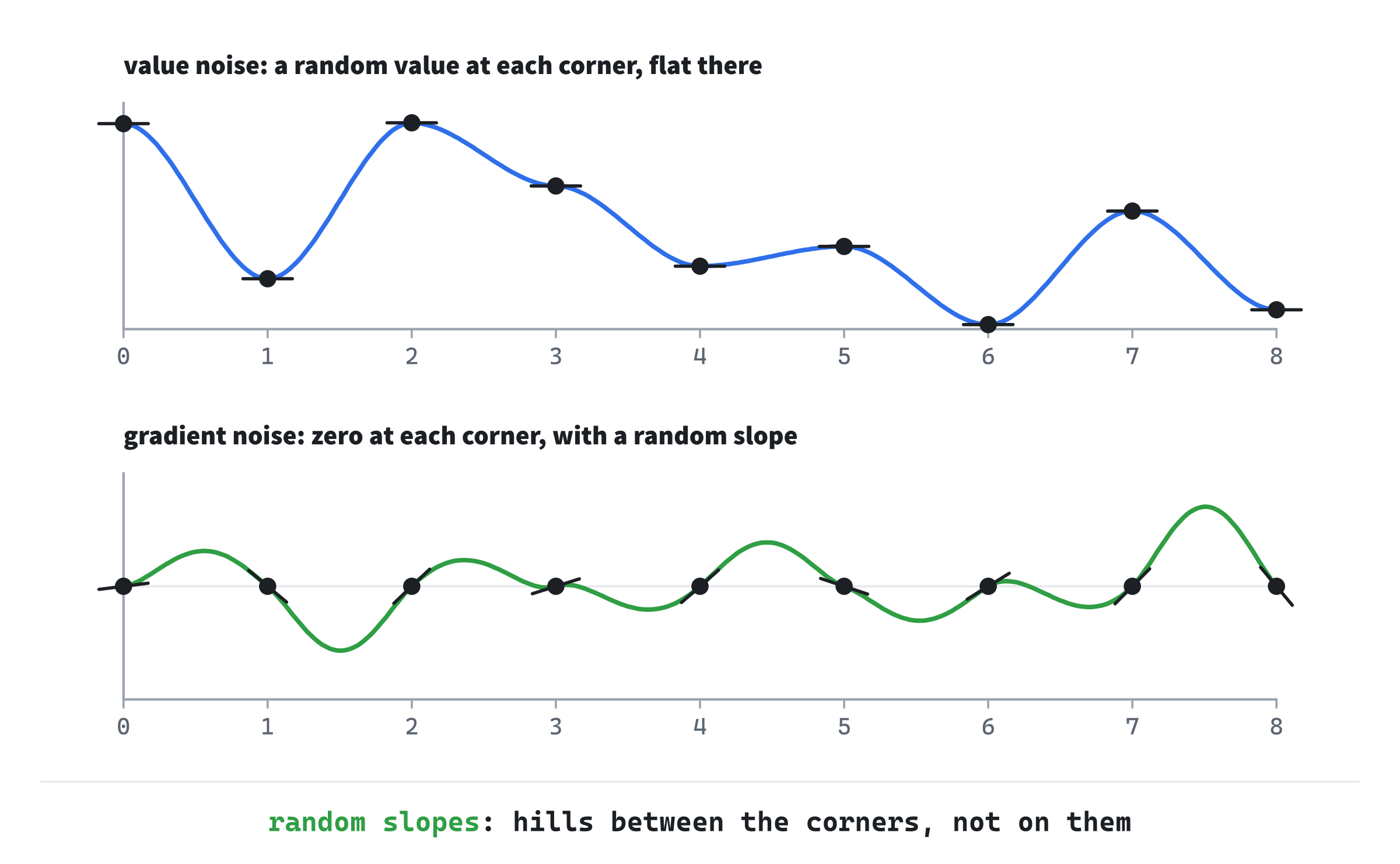
Gradient noise is a little more work for the same smoothness, and it's the better-known kind, as Perlin noise and its successor, simplex noise. Value noise is enough for this chapter, since layering it, as the next section does, hides most of the grid.
Fractal Noise
One layer of noise is smooth but plain: soft blobs, with no detail. Nature has detail at many sizes at once, such as mountains, hills on the mountains, and bumps on the hills.
Octaves
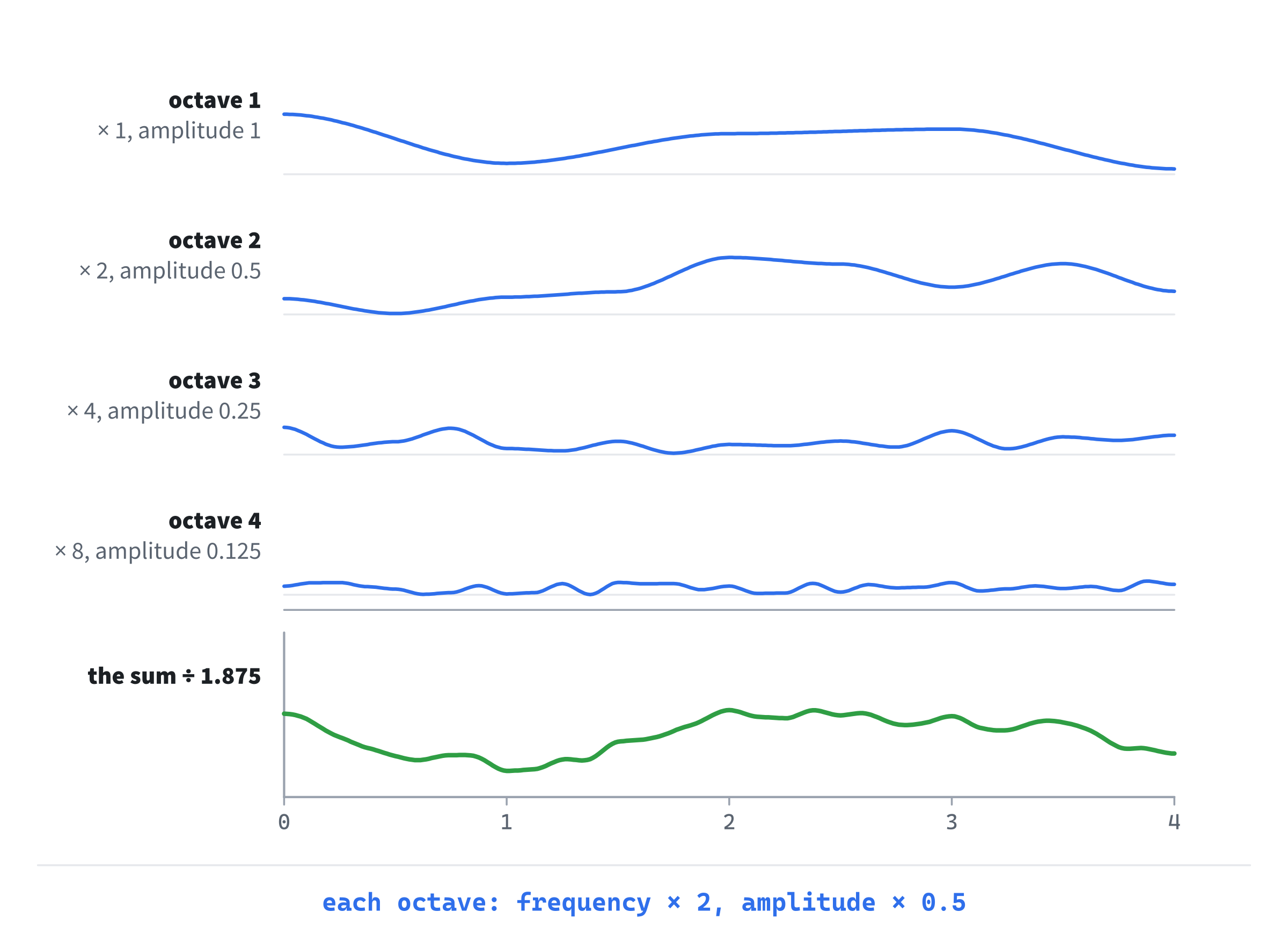
Fractal noise gets that detail by adding layers of noise, called octaves. Each octave has twice the frequency of the one before, so its blobs are half the size. And each has half the amplitude, so it adds half as much. The first octave gives the broad shape, and each finer one adds smaller detail on top. The next image shows four octaves, and their sum.
Here's Noise Fields' fractal noise:
// Fractal noise: octaves of value noise, each at twice the frequency and
// half the amplitude of the one before, and each with a seed of its own.
// Dividing by the amplitudes' total keeps the result from 0 up to 1.
float fractalNoise(float x, float y, int octaves, uint32_t seed)
{
    float sum = 0.0f;
    float total = 0.0f;
    float amplitude = 1.0f;
    float frequency = 1.0f;
    for (int i = 0; i < octaves; ++i)
    {
        sum += valueNoise(x * frequency, y * frequency, seed + i) * amplitude;
        total += amplitude;
        amplitude *= 0.5f;
        frequency *= 2.0f;
    }
    return sum / total;
}
Each pass adds an octave, then doubles the frequency and halves the amplitude for the next. Each octave has a seed of its own, seed + i, so that its corners' values have nothing to do with the octave before's. Four octaves have amplitudes of 1, 0.5, 0.25 and 0.125, which add up to 1.875. Dividing the sum by that total keeps the result from 0 up to 1, whatever the number of octaves. This layering is also called fractional Brownian motion, and it's the standard recipe for natural-looking noise.
Where the Values Fall
Adding layers has a side effect: the result clusters around the middle. One octave of value noise, measured over a wide area, spreads its values from 0 to 1. Four octaves rarely reach the ends: 87% of their values fall between 0.3 and 0.7. Each octave's highs tend to land on another's lows, and averaging pulls the sum toward 0.5. In Noise Fields' window, with the starting seed, the values run only from 0.20 to 0.79.
That matters whenever noise becomes something you can see. As terrain heights, four octaves would give mostly middling ground, with very few peaks or deep valleys. The cure is to stretch the values you actually get across the range you want, with Chapter 8's remap.
Flow Fields
Noise can drive motion as well as shape. A flow field gives every point a direction, and things placed in it drift along those directions, like leaves on a stream.
From Values to Directions
The directions come from the noise. Noise Fields first finds the field's value at a point:
// The field's value at a point, from 0 up to 1: fractal noise, or, for
// white noise, the hash of the pixel the point is in, so that every pixel
// has a value of its own.
float fieldAt(Vec2 p, int octaves, bool white, uint32_t seed)
{
    if (white) return hash01((int)p.x, (int)p.y, seed);
    return fractalNoise(p.x * SCALE, p.y * SCALE, octaves, seed);
}
The point is scaled by SCALE first, from pixels to the noise's units. Then the value becomes an angle:
// The way the field points at a point: its value as an angle, where 0 to 1
// makes two whole turns.
Vec2 flowAt(Vec2 p, int octaves, bool white, uint32_t seed)
{
    return Vec2::fromAngle(fieldAt(p, octaves, white, seed) * 4.0f * PI);
}
Since the noise is coherent, particles near each other get nearly the same direction, and travel together. That's the whole trick. There's no fluid in the program, only smooth noise read as directions.
The angle is the value times 4π, two whole turns, and Where the Values Fall is the reason. Read as one turn, the middle value, 0.5, points left. And most values are near the middle. So most particles would drift left. For the starting seed, 98% of the window's directions would point somewhere to the left. A good measure of such a drift is the length of the average of every direction in the window: 1 when they all point the same way, and near 0 when they point every way equally. Over five seeds, one turn gives 0.68 to 0.84. Two turns spread the same values over twice the angle, so that the common middle values cover the whole circle, and give 0.17 to 0.55.
Without Coherence
The W key swaps the noise for white noise: the hash of each pixel, so every pixel has a direction of its own. Coherence is gone, and so is the flow. A particle's direction changes at random every time it crosses into a new pixel. In three seconds at 65 pixels a second, a particle in four octaves of value noise ends up about 180 pixels from where it started, nearly the whole 195 it traveled. In white noise, it ends up 2 to 5 pixels away. It travels just as far, but back and forth.
Building Noise Fields
Noise Fields turns fractal value noise into a flow field. Thousands of particles drift along it, each drawn as a short streak, and gather into streams. N shows the noise itself, in greys, O steps through one to four octaves, and W swaps in white noise. Space picks a new seed, and Left and Right step it. A click sprays particles from the mouse, and S switches the spray between the even scatter and the naive one.
Get the code. The complete project is in the
Noise Fieldsfolder of the book's repository.
Noise Fields starts from the skeleton, with its timing. It reads the mouse only when it's clicked, from the click itself, so it leaves out the skeleton's mouse lines. It reuses setColor and smoothstep from Chapter 8, and Chapter 9's generator and randRange. Its Vec2.h is Impulse's, since this chapter adds nothing to it. Here are its includes and its colors:
#include <algorithm>
#include <cmath>
#include <cstdint>
#include <random>
#include <string>
#include <vector>
#include "Vec2.h"

constexpr int WINDOW_WIDTH  = 1000;
constexpr int WINDOW_HEIGHT = 700;

constexpr SDL_Color TEXT = { 235, 238, 242, 255 };
constexpr SDL_Color GREY = { 90, 100, 112, 255 };
constexpr SDL_Color AMBER = { 232, 89, 12, 255 };
constexpr SDL_Color STREAK = { 150, 200, 240, 255 };
constexpr SDL_Color PANEL = { 24, 26, 30, 220 };
The streaks are a pale blue, the sprayed particles are amber, and the panel color is the background, nearly opaque. Then come the constants:
// The noise's scale: its units for each pixel. At 0.0035, a square of its
// grid, one unit across, is about 286 pixels wide.
constexpr float SCALE = 0.0035f;

// The particles: how many, their speed in pixels a second, and the length
// of each one's streak.
constexpr int PARTICLE_COUNT = 2500;
constexpr float SPEED = 65.0f;
constexpr float TAIL = 8.0f;

// A click's spray: how many particles, and the radius of its circle.
constexpr int SPRAY_COUNT = 300;
constexpr float SPRAY_RADIUS = 60.0f;

// The noise drawn in greys: how many shades, and the size of each block.
constexpr int SHADES = 64;
constexpr float BLOCK = 5.0f;
At a scale of 0.0035, the window is about 3.5 squares of the first octave's grid across, and 2.45 down. The fourth octave's squares are an eighth of that, about 36 pixels across. Each particle's streak is 8 pixels long, a little more than a tenth of a second of its travel. A spray sends out 300 particles, and the greys are drawn as blocks 5 pixels square, in 64 shades.
A particle is a place, a direction, an age and a life:
// A particle: where it is, the way it's heading, its age and how long it
// lives, both in seconds, and whether it came from a spray.
struct Particle
{
    Vec2 pos;
    Vec2 dir;
    float age;
    float life;
    bool sprayed;
};
After the helpers, and the noise functions that the chapter has shown, come two more. The first starts a particle again:
// A particle starts again at a random place in the window, with a life of
// 2 to 6 seconds.
void respawn(Particle& p)
{
    p.pos = { randRange(0.0f, (float)WINDOW_WIDTH),
              randRange(0.0f, (float)WINDOW_HEIGHT) };
    p.dir = { 1.0f, 0.0f };
    p.age = 0.0f;
    p.life = randRange(2.0f, 6.0f);
    p.sprayed = false;
}
Its place is a random point in the window, and its life is 2 to 6 seconds, so that particles start again at different times, rather than all at once. The second works out the greys that show the noise:
// The noise in greys, as blocks BLOCK pixels square, each the field's value
// at its middle. The blocks are sorted by shade, so that each shade can be
// drawn in one call.
void shadeField(std::vector<std::vector<SDL_FRect>>& shades, int octaves,
                bool white, uint32_t seed)
{
    for (std::vector<SDL_FRect>& shade : shades) shade.clear();
    for (float y = 0.0f; y < WINDOW_HEIGHT; y += BLOCK)
        for (float x = 0.0f; x < WINDOW_WIDTH; x += BLOCK)
        {
            Vec2 middle = { x + BLOCK / 2.0f, y + BLOCK / 2.0f };
            float n = fieldAt(middle, octaves, white, seed);
            int s = std::min((int)(n * SHADES), SHADES - 1);
            shades[s].push_back({ x, y, BLOCK, BLOCK });
        }
}
The window is covered in blocks, 200 across and 140 down. Each block's shade is its value times 64, which gives a whole number from 0 to 63, and it joins that shade's list. A value of exactly 1, which rounding could make, would give 64, so std::min keeps it in the last shade. Sorting the blocks by shade lets each shade be drawn in one call, as 10000 Balls drew all its balls in one.
The State
The state goes after the font is loaded:
// The particles, scattered over the window. Then the noise: its seed,
// fixed so that the field is the same at every launch, its octaves, and
// whether it's white noise. Then whether the noise is shown, whether
// the spray is even, the next particle a spray takes, and the noise's
// blocks, sorted by shade, with a flag for when they're out of date.
// The panels behind the readout are see-through, so the renderer blends.
std::vector<Particle> particles(PARTICLE_COUNT);
for (Particle& p : particles) respawn(p);
uint32_t seed = 1234;
int octaves = 4;
bool white = false;
bool showNoise = false;
bool evenSpray = true;
int nextSpray = 0;
std::vector<std::vector<SDL_FRect>> shades(SHADES);
bool reshade = true;
SDL_SetRenderDrawBlendMode(renderer, SDL_BLENDMODE_BLEND);
The particles are made 2,500 at once by the vector's constructor, then each is started by respawn. The noise's seed is a uint32_t, as the hash wants, and starts at 1234. The flag reshade says the greys are out of date, so it starts true. The panels behind the readout are see-through, so the renderer blends, as in 10000 Balls.
The Events
The keys change the settings, and a click sprays:
// Events: quitting, and the keys and clicks that happen once.
SDL_Event event;
while (SDL_PollEvent(&event))
{
    if (event.type == SDL_EVENT_QUIT) running = false;
    else if (event.type == SDL_EVENT_KEY_DOWN)
    {
        if (event.key.key == SDLK_ESCAPE) running = false;
        else if (event.key.key == SDLK_SPACE) seed = (uint32_t)rng();
        else if (event.key.key == SDLK_RIGHT) ++seed;
        else if (event.key.key == SDLK_LEFT) --seed;
        else if (event.key.key == SDLK_O) octaves = octaves % 4 + 1;
        else if (event.key.key == SDLK_W) white = !white;
        else if (event.key.key == SDLK_N) showNoise = !showNoise;
        else if (event.key.key == SDLK_S) evenSpray = !evenSpray;
        reshade = true;   // A key may have changed the field.
    }
    else if (event.type == SDL_EVENT_MOUSE_BUTTON_DOWN &&
             event.button.button == SDL_BUTTON_LEFT)
    {
        // A spray: the next particles in the list start again in a
        // circle around the mouse, in amber.
        Vec2 at = { event.button.x, event.button.y };
        for (int i = 0; i < SPRAY_COUNT; ++i)
        {
            Particle& p = particles[nextSpray];
            respawn(p);
            p.pos = randomInCircle(at, SPRAY_RADIUS, evenSpray);
            p.sprayed = true;
            nextSpray = (nextSpray + 1) % PARTICLE_COUNT;
        }
    }
}
In the preceding code, Space takes the next number from the generator as the new seed. Left and Right step the seed by one, and wrap around from 0 to the largest uint32_t, since it's unsigned. O steps the octaves from 1 to 4 and back to 1. Any key marks the greys as out of date, since it may have changed the field. A click starts the next 300 particles in the list again, in a circle around the mouse. The list is used in turn, so that each spray takes the particles that the spray before it didn't.
Each Frame's Work
Each frame, every particle moves:
// Each particle heads the way the field points where it is, and
// starts again somewhere new when it's too old or leaves the window.
for (Particle& p : particles)
{
    p.dir = flowAt(p.pos, octaves, white, seed);
    p.pos += p.dir * (SPEED * dt);
    p.age += dt;
    bool outside = p.pos.x < 0.0f || p.pos.x > WINDOW_WIDTH ||
                   p.pos.y < 0.0f || p.pos.y > WINDOW_HEIGHT;
    if (p.age > p.life || outside) respawn(p);
}
A particle takes the field's direction at its place, and moves along it at 65 pixels a second, scaled by dt, as everything has since Chapter 7. When it's lived its life or left the window, it starts again. Then the greys are worked out again, if they're shown and out of date:
// The noise's greys are worked out again only when they're shown,
// and something has changed.
if (showNoise && reshade)
{
    shadeField(shades, octaves, white, seed);
    reshade = false;
}
That's 28,000 blocks, each a call of the noise. So it's done only when it's needed, not every frame.
Drawing
After the skeleton clears the screen, the noise comes first, if it's shown:
// The noise, if it's shown: each shade's blocks in one call.
if (showNoise)
{
    for (int s = 0; s < SHADES; ++s)
    {
        if (shades[s].empty()) continue;
        Uint8 g = (Uint8)(20 + 2 * s);
        SDL_SetRenderDrawColor(renderer, g, g, g, 255);
        SDL_RenderFillRects(renderer, shades[s].data(),
                            (int)shades[s].size());
    }
}
Shade s is drawn in the grey 20 + 2 × s, from 20 to 146, dark enough for the streaks to show on top. An empty shade is skipped, since there's nothing to draw. Then come the particles:
// Each particle is a streak, from TAIL pixels behind it to where
// it is.
for (const Particle& p : particles)
{
    setColor(renderer, p.sprayed ? AMBER : STREAK);
    Vec2 tail = p.pos - p.dir * TAIL;
    SDL_RenderLine(renderer, tail.x, tail.y, p.pos.x, p.pos.y);
}
Each streak runs from 8 pixels behind the particle, against its direction, to the particle itself, so it shows which way the particle is going. Last come the readout and the controls:
// The readout and the controls, on panels the field shows faintly
// through. The readout gives the seed, the noise and the spray.
setColor(renderer, PANEL);
SDL_FRect top = { 0, 0, WINDOW_WIDTH, 34 };
SDL_FRect bottom = { 0, WINDOW_HEIGHT - 52, WINDOW_WIDTH, 52 };
SDL_RenderFillRect(renderer, &top);
SDL_RenderFillRect(renderer, &bottom);
std::string noise = "white noise";
if (!white)
    noise = std::to_string(octaves) +
            (octaves == 1 ? " octave" : " octaves") + " of value noise";
drawText(renderer, font, "seed " + std::to_string(seed) + "   " +
         noise + "   " + (evenSpray ? "even" : "naive") + " spray",
         12, 10, TEXT);
drawText(renderer, font,
         "[Space] new seed   [Left] [Right] seed down or up   "
         "[O] octaves   [W] white noise", 12, WINDOW_HEIGHT - 46, GREY);
drawText(renderer, font,
         "[N] show the noise   [Click] spray   [S] even or naive "
         "spray   [Esc] quit", 12, WINDOW_HEIGHT - 26, GREY);
In the preceding code, the panels go down first, then the text on them. The readout gives the seed, the kind of noise, with its octaves, and the kind of spray.
Trying It Out
Run the demo. Streaks drift across the window, and within a few seconds they gather into streams. Press N to see the noise that's steering them. The next image shows the demo six seconds in, with the noise shown.
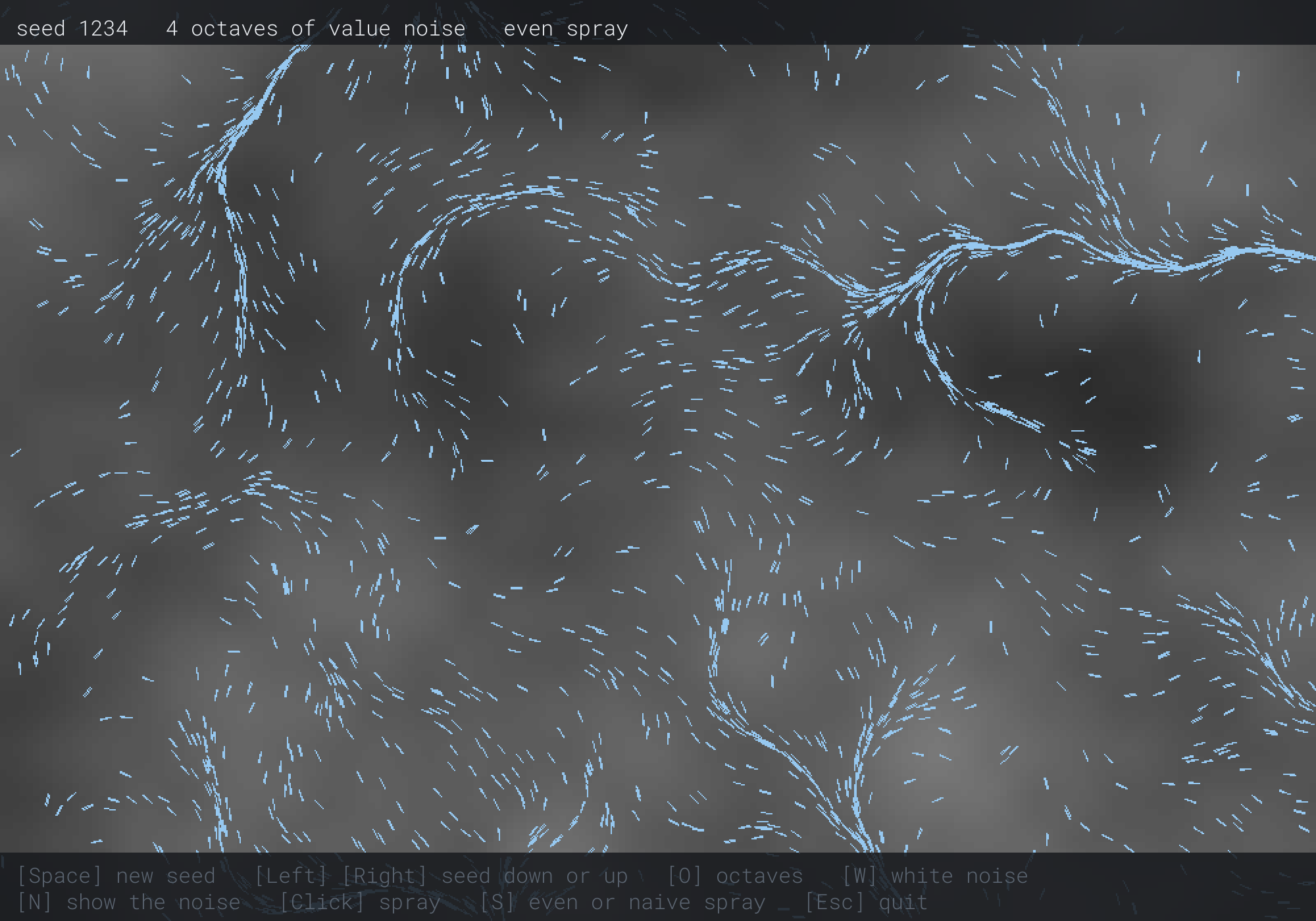
The streams follow the noise. Where its greys change slowly, the particles flow in broad sheets. Where neighboring greys point them toward each other, they bunch into rivers. Then try it, step by step:
- Take away octaves. Press O. With one octave, the field is a few big, soft blobs, and the streams sweep in wide curves. Look for the blobs' brightest and darkest spots: they sit on the grid's corners, 286 pixels apart, as What Smoothstep Costs said.
- Add them back. Press O three more times, to step through two and three octaves back to four. Each octave adds smaller turns to the streams.
- Change the seed. Press Right, then Left. Seed 1235's field has nothing in common with 1234's, and Left brings 1234's back exactly. Press Space for a seed at random.
- Spray. Click anywhere. Three hundred amber particles appear in a circle, and the flow pulls them out into streaks. Press S for the naive spray, and click again. The new circle has a dense core, which the flow drags out with it.
- Take away coherence. Press W. The noise becomes static, and every particle jitters in place.
The next image shows step 1, with one octave.
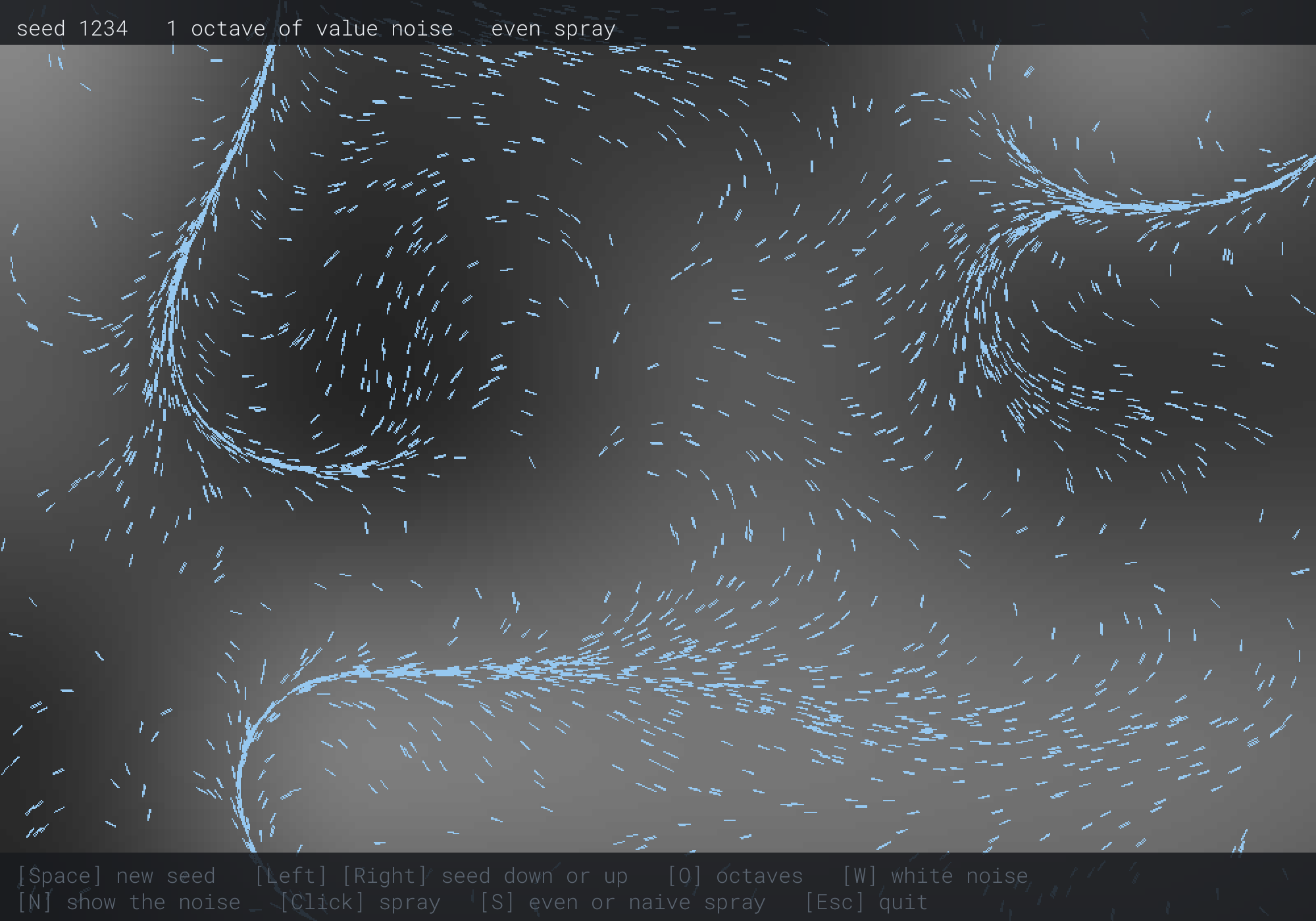
The bright corner at the top left, and the dark blob below and to the right of it, are on the grid's corners. The streams sweep around the blobs. The next image shows step 5, with white noise.
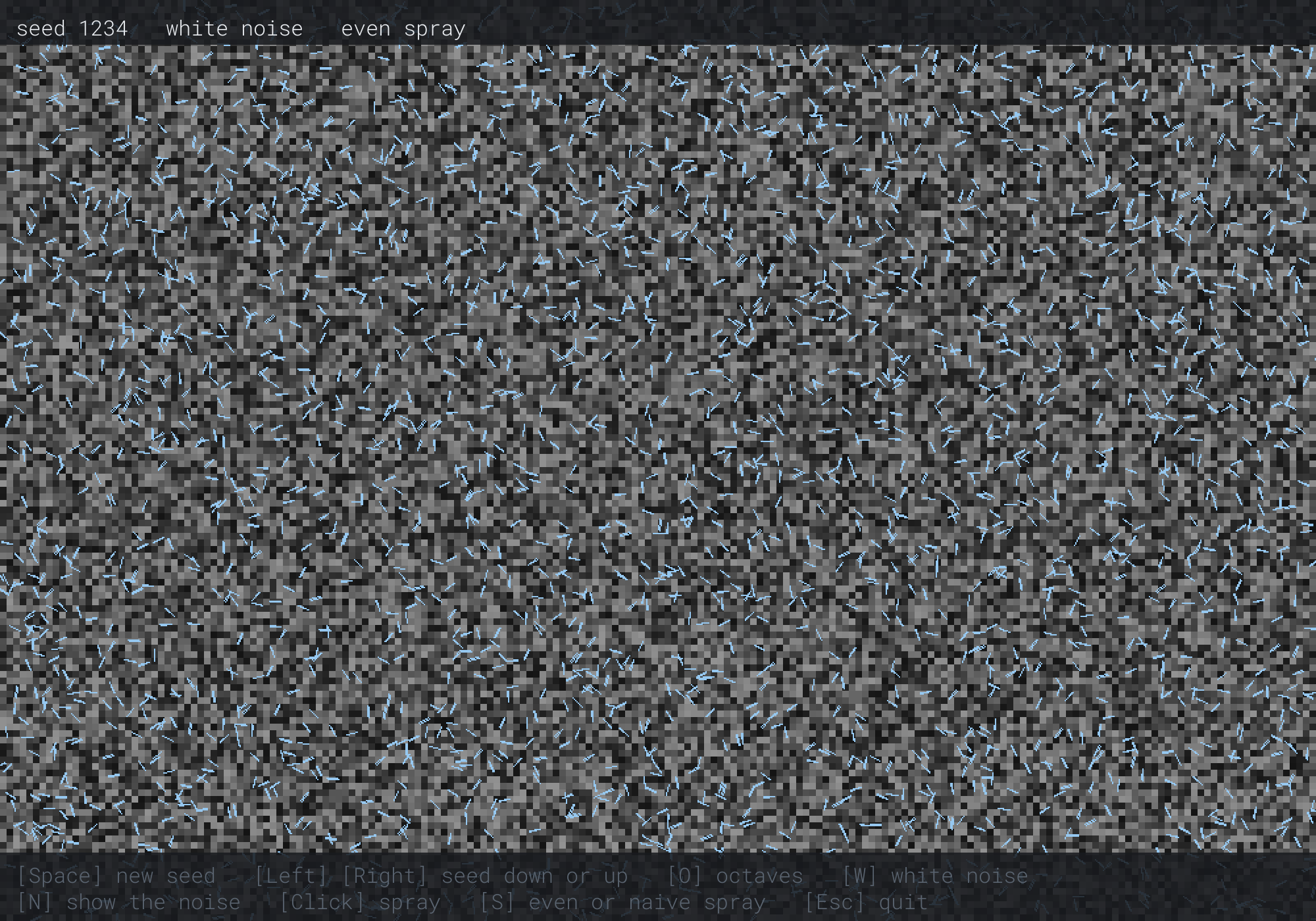
The noise is static, and the streaks point every way at once. Nothing flows, since no particle's direction has anything to do with its neighbor's. That's the whole difference between randomness and noise, in one picture.
FAQ
Q) Why do I get the same numbers every run, or every call?
A) Every run means a fixed seed. Seed from std::random_device, as Chapter 9 did, for numbers that differ every run. Every call means the generator is being made afresh each time, with the same seed, so it starts its sequence over. Make one generator, and keep it.
Q) Will a seed give the same world on another compiler?
A) Not always. The standard fixes the Mersenne Twister's raw numbers exactly, so the same seed gives the same raw numbers everywhere. But it doesn't fix how a distribution turns them into floats or ranges, and the standard libraries that come with Visual Studio, GCC and Clang don't all do it the same way. A world that must be the same everywhere, such as one shared by its seed, needs its own mapping from raw numbers to values, as hash01 is.
Q) Can noise change over time, rather than stay put?
A) Yes, by adding a dimension. Value noise in three dimensions blends the eight corners of a cube, with one more lerp. Reading it at (x, y, time) makes a field whose shape changes as time goes by. Adding time to x instead only slides the same field sideways.
Exercises
The first three exercises need only a pencil. The others change Noise Fields.
- Modulo bias (paper). With
RAND_MAXat 32,767, which values ofrand() % 100come up more often than the others, and how much more often? - Value noise by hand (paper). The corners at 3 and 4 have the values 0.6 and 0.1. What's the smooth blend at x = 3.5, and at x = 3.75? What would a straight blend give at 3.75?
- Even scatter (paper). With the even scatter, what share of the points fall within half the radius, and within 90% of it? What are the shares for the naive scatter?
- Terrain (code). Add a key that colors the noise's blocks as terrain, by height, instead of grey. Use six colors, from deep water up to snow. First stretch the values, with
remap, from the lowest and highest that the window actually has. What happens without the stretch? - A field that changes (code). Write value noise in three dimensions, and read the flow at (x, y, time × 0.2). How does the flow change as time goes by?
For the code exercises, work on a copy of the demo's folder, so that the original stays as the chapter describes it.
AI Exercise (Optional)
Noise makes worlds as well as currents. With an AI's help, you can turn this chapter's noise into a small island generator, which makes a new island for every seed. Open your AI chatbot of choice, and try a prompt like this:
"I have a C++ demo using SDL3, with a Vec2 struct and these noise functions: hash01(xi, yi, seed), which gives a repeatable value from 0 to 1 for a whole-number corner, valueNoise(x, y, seed), and fractalNoise(x, y, octaves, seed), which returns 0 to 1. Please draw a 200 by 140 tile map of an island in a 1000 by 700 window, with each tile 5 pixels square. Take each tile's height from fractalNoise with 5 octaves, minus a falloff that grows with the distance from the window's middle, so that the edges are sea. Color the tiles as deep water, shallow water, sand, grass, forest, rock and snow, by height. Then place trees on forest tiles, using hash01 of the tile with another seed, so that a tree grows where the hash is above 0.8. Show the seed, and step it with the Left and Right keys. Explain why the trees use a hash rather than more noise."
That prompt describes your noise functions, so the AI builds on them, rather than writing noise of its own. The falloff shapes the noise into an island without changing it. And the trees use white noise on purpose, which is this chapter's lesson turned around: some things in a world should be coherent, and some shouldn't.
Then try fewer octaves, and a steeper falloff, and see how the coast changes. Then step through a few seeds, and keep one you like.
Summary
C++'s <random> splits randomness in two: a generator such as std::mt19937 makes raw numbers, and a distribution shapes them, with a real range that leaves out its top and a whole-number range that includes both ends. The old rand() % n is biased, since the remainder doesn't divide rand()'s values evenly: with Visual Studio, rand() % 1000 favors the low numbers by about 3%. The same seed always gives the same sequence, so a fixed seed makes a repeatable world, and std::random_device a different one every run. A circle is scattered evenly with a radius of R times the square root of a uniform number, since its area grows as the square of the radius. White noise, a random value at every point, looks like static, since it has no coherence. Value noise has random values at a grid's corners, from a hash that gives any corner its value directly, and blends them with smoothstep, which leaves no kinks but sits its hills on the corners. Gradient noise, Perlin's, puts random slopes at the corners instead. Octaves of value noise, each at twice the frequency and half the amplitude, make fractal noise, whose values cluster around the middle and need stretching before they become heights. Read as angles of two turns, noise makes a flow field, and particles in it gather into streams, which white noise can't make. Chapter 22 turns from making worlds to moving through them, with the searches that find the shortest way across a grid.