
Part 1 gave us a dungeon and a renderer that draws it in crisp ASCII. Part 2 puts something in it. By the end of this short tutorial you will have an @ walking through the dungeon, blocked by walls, starting in the centre of a room every run, and moving one tile per keypress in a proper turn-based loop.
This is a deliberately small step, and that is the point: because Part 1 built the real renderer, adding the player costs almost nothing. We add one tiny header for the player, draw the @ with the GlyphCache we already have, and teach the existing event loop to move it. The map generator and the renderer don't change at all.
Files this part: the Part 2 folder has all six files ready to build.Map.h,Map.cpp,GlyphCache.handGlyphCache.cppare identical to Part 1; onlymain.cppchanges, andPlayer.his new.
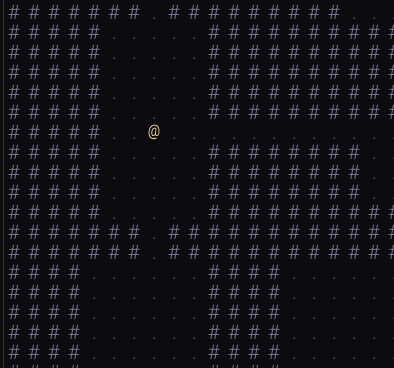
@ in gold, standing in the first room. Arrow keys or WASD move; Space generates a new dungeon.What's New in Part 2
| File | Status | What it does |
|---|---|---|
Player.h | New | Player position, HP, and tryMove |
main.cpp | Updated | Player start, movement, drawing the @ |
Map.h / .cpp | Unchanged | BSP generator from Part 1 |
GlyphCache.h / .cpp | Unchanged | The ASCII renderer from Part 1 |
The Player — Player.h
#pragma once
#include "Map.h"

struct Player
{
    int x     = 0;
    int y     = 0;
    int hp    = 30;
    int maxHp = 30;

    bool tryMove(int dx, int dy, const Map& map)
    {
        int nx = x + dx;
        int ny = y + dy;

        if (nx < 0 || nx >= MAP_WIDTH)  return false;
        if (ny < 0 || ny >= MAP_HEIGHT) return false;          // bounds first...
        if (map.tiles[ny][nx].type != TileType::Floor) return false;  // ...then the tile

        x = nx;
        y = ny;
        return true;
    }
};
Player is a plain struct for now — no base class, no virtual functions. The entity hierarchy that Player and Monster will share arrives in Part 4, when monsters need the same movement and combat logic. Until then a struct is the clearest thing to read.
tryMove does two checks in a specific order. Bounds first: if nx or ny falls outside the grid we return immediately, because evaluating map.tiles[ny][nx] with an out-of-range index is undefined behaviour — a subtle crash rather than a clean rejection. Then the tile: only floors are walkable. The return value is the key design choice — true means the move happened, which the caller treats as the signal that a turn was taken. Bumping a wall returns false and the player stays put.
The Updated main.cpp
Everything new lives in main.cpp, and most of it you already wrote in Part 1. Here are the three additions.
A start position
Map    map;
Player player;

auto newGame = [&]()
{
    map.generate();
    player.x  = map.rooms[0].centreX();
    player.y  = map.rooms[0].centreY();
    player.hp = player.maxHp;
};
Wrapping new-game setup in a lambda keeps the logic in one place — we call it once at startup and again whenever Space is pressed. map.rooms[0] is the first room the BSP generator carved. Because the tree is always walked in the same order, room 0 is a real, walkable room on every seed, so its centre is a safe spawn. Part 4 will choose a smarter start (the room furthest from the stairs); room 0 is reliable and fine for now.
Drawing the player
static const SDL_Color PLAYER = { 255, 230, 150, 255 };   // bright gold @

auto draw = [&]()
{
    SDL_SetRenderDrawColor(sdl, BG.r, BG.g, BG.b, BG.a);
    SDL_RenderClear(sdl);

    for (int row = 0; row < MAP_HEIGHT; ++row)
        for (int col = 0; col < MAP_WIDTH; ++col)
        {
            if (map.tiles[row][col].type == TileType::Floor)
                glyphs.drawGlyph(col, row, '.', FLOOR);
            else
                glyphs.drawGlyph(col, row, '#', WALL);
        }

    // Player is drawn last so the @ always sits on top of its tile.
    glyphs.drawGlyph(player.x, player.y, '@', PLAYER);

    SDL_RenderPresent(sdl);
};
One new line in the draw routine: after the tile loop, draw the @ at the player's position in bright gold. Drawing it last guarantees it sits on top of the floor tile beneath it. That gold against the dim floors and lilac walls is the deliberate readability choice from Part 1 paying off — the player is instantly findable.
Moving on each keypress
case SDL_EVENT_KEY_DOWN:
{
    int dx = 0, dy = 0;

    switch (event.key.scancode)
    {
        case SDL_SCANCODE_UP:    case SDL_SCANCODE_W: dy = -1; break;
        case SDL_SCANCODE_DOWN:  case SDL_SCANCODE_S: dy = +1; break;
        case SDL_SCANCODE_LEFT:  case SDL_SCANCODE_A: dx = -1; break;
        case SDL_SCANCODE_RIGHT: case SDL_SCANCODE_D: dx = +1; break;
        case SDL_SCANCODE_SPACE:  newGame(); dirty = true; break;
        case SDL_SCANCODE_ESCAPE: running = false;         break;
        default: break;
    }

    if (dx != 0 || dy != 0)
        dirty = player.tryMove(dx, dy, map);   // false if blocked → no repaint
    break;
}
The turn-based SDL_WaitEvent loop and the dirty flag came from Part 1 — we are just giving them more to do. Two things are worth calling out.
Scancodes, not key symbols. We read event.key.scancode rather than event.key.key. A scancode is the physical position of a key; a key symbol is the character that position produces under the current layout. On a French AZERTY keyboard the symbol W sits where English Z is, so symbol-based WASD would be scrambled. SDL_SCANCODE_W always means "the key in the W position." Use scancodes for movement, key symbols only for typed text.
The move result drives the repaint. player.tryMove returns false when the player walks into a wall — nothing moved, so dirty stays false and we skip the redraw entirely. A turn-based roguelike should only do work when the world actually changes, and that one assignment is the whole mechanism: bumping a wall is free.
Try It
Build and run. The dungeon appears exactly as in Part 1, now with a gold @ in the first room. Arrow keys and WASD move one tile per press; walking into a wall does nothing. Press Space to generate a fresh dungeon and respawn. The window is a clean 1280×720 — the same landscape shape as Part 1, because the window size comes straight from the map constants and has nothing to do with the font.
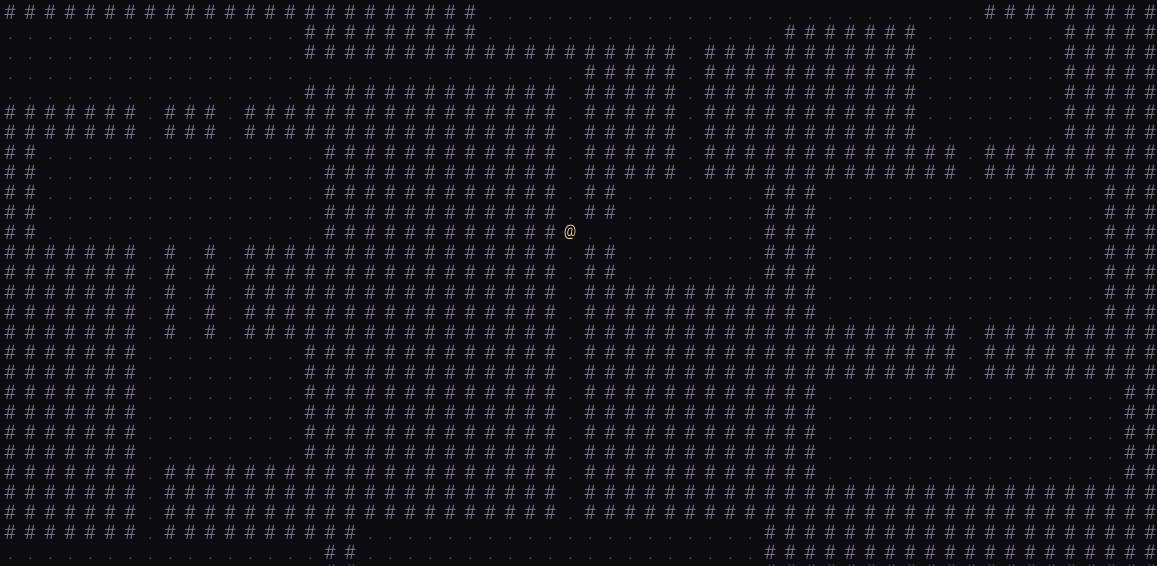
Notice what didn't change: Map.h, Map.cpp, GlyphCache.h and GlyphCache.cpp are byte-for-byte identical to Part 1. The whole tutorial was one new header and a handful of lines in main.cpp. Systems that own their own complexity don't force changes everywhere else.
Complete Code
Only the two files that changed are listed here. Map.h, Map.cpp, GlyphCache.h and GlyphCache.cpp are unchanged from Part 1.
Player.h
#pragma once
#include "Map.h"

struct Player
{
    int x     = 0;
    int y     = 0;
    int hp    = 30;
    int maxHp = 30;

    bool tryMove(int dx, int dy, const Map& map)
    {
        int nx = x + dx;
        int ny = y + dy;

        if (nx < 0 || nx >= MAP_WIDTH)  return false;
        if (ny < 0 || ny >= MAP_HEIGHT) return false;
        if (map.tiles[ny][nx].type != TileType::Floor) return false;

        x = nx;
        y = ny;
        return true;
    }
};
main.cpp
#include <SDL3/SDL.h>
#include <SDL3_ttf/SDL_ttf.h>
#include "Map.h"
#include "GlyphCache.h"
#include "Player.h"

static const char* FONT_PATH = "RobotoMono-Light.ttf";
static const float FONT_PT   = 20.0f;

static const SDL_Color BG     = {  12,  12,  16, 255 };
static const SDL_Color WALL   = { 130, 120, 150, 255 };
static const SDL_Color FLOOR  = {  72,  66,  60, 255 };
static const SDL_Color PLAYER = { 255, 230, 150, 255 };

int main(int argc, char* argv[])
{
    if (!SDL_Init(SDL_INIT_VIDEO)) { SDL_Log("SDL_Init: %s", SDL_GetError()); return 1; }
    if (!TTF_Init())               { SDL_Log("TTF_Init: %s", SDL_GetError()); SDL_Quit(); return 1; }

    SDL_Window*   window = nullptr;
    SDL_Renderer* sdl    = nullptr;
    if (!SDL_CreateWindowAndRenderer(
            "Roguelike - Part 2: Player & Movement",
            MAP_WIDTH * TILE_SIZE, MAP_HEIGHT * TILE_SIZE, 0,
            &window, &sdl))
    {
        SDL_Log("CreateWindowAndRenderer: %s", SDL_GetError());
        TTF_Quit(); SDL_Quit();
        return 1;
    }

    GlyphCache glyphs(sdl, FONT_PATH, FONT_PT);
    if (!glyphs.ok())
    {
        SDL_DestroyRenderer(sdl); SDL_DestroyWindow(window);
        TTF_Quit(); SDL_Quit();
        return 1;
    }

    Map    map;
    Player player;

    auto newGame = [&]()
    {
        map.generate();
        player.x  = map.rooms[0].centreX();
        player.y  = map.rooms[0].centreY();
        player.hp = player.maxHp;
    };

    auto draw = [&]()
    {
        SDL_SetRenderDrawColor(sdl, BG.r, BG.g, BG.b, BG.a);
        SDL_RenderClear(sdl);

        for (int row = 0; row < MAP_HEIGHT; ++row)
            for (int col = 0; col < MAP_WIDTH; ++col)
            {
                if (map.tiles[row][col].type == TileType::Floor)
                    glyphs.drawGlyph(col, row, '.', FLOOR);
                else
                    glyphs.drawGlyph(col, row, '#', WALL);
            }

        glyphs.drawGlyph(player.x, player.y, '@', PLAYER);

        SDL_RenderPresent(sdl);
    };

    newGame();
    draw();

    bool running = true;
    SDL_Event event;

    while (running)
    {
        SDL_WaitEvent(&event);
        bool dirty = false;

        switch (event.type)
        {
            case SDL_EVENT_QUIT:
                running = false;
                break;

            case SDL_EVENT_WINDOW_EXPOSED:
                dirty = true;
                break;

            case SDL_EVENT_KEY_DOWN:
            {
                int dx = 0, dy = 0;
                switch (event.key.scancode)
                {
                    case SDL_SCANCODE_UP:    case SDL_SCANCODE_W: dy = -1; break;
                    case SDL_SCANCODE_DOWN:  case SDL_SCANCODE_S: dy = +1; break;
                    case SDL_SCANCODE_LEFT:  case SDL_SCANCODE_A: dx = -1; break;
                    case SDL_SCANCODE_RIGHT: case SDL_SCANCODE_D: dx = +1; break;
                    case SDL_SCANCODE_SPACE:  newGame(); dirty = true; break;
                    case SDL_SCANCODE_ESCAPE: running = false;         break;
                    default: break;
                }

                if (dx != 0 || dy != 0)
                    dirty = player.tryMove(dx, dy, map);
                break;
            }
        }

        if (dirty) draw();
    }

    SDL_DestroyRenderer(sdl);
    SDL_DestroyWindow(window);
    TTF_Quit();
    SDL_Quit();
    return 0;
}
Common Errors
Player starts at (0, 0) — top-left corner, stuck in rock. map.rooms was empty when newGame read rooms[0], so the position stayed at its default. Confirm map.generate() runs before you read rooms[0] and that the generator is actually producing rooms (you saw them in Part 1).
Player walks through walls. The tile lookup in tryMove is transposed. It must be map.tiles[ny][nx] — row (Y) outer, column (X) inner. A swapped index reads a real but wrong tile and lets the player pass.
WASD doesn't work on a non-English keyboard. You're reading event.key.key (the layout-dependent symbol) instead of event.key.scancode (the physical position). Switch to scancodes as shown.
The @ is hidden behind its tile. The player is being drawn before the tile loop, so the floor . paints over it. Draw the player after the loop.
Holding a key feels sticky or skips. That's key-repeat from the OS, which is fine for a turn-based game. If you want one move per physical press only, ignore repeated events by checking event.key.repeat == false before moving.
What's Next
Part 3 adds field of view and fog of war — the features that make a dungeon feel like a dungeon. After every move we compute which tiles the player can actually see using recursive shadowcasting, draw those at full brightness, draw previously-seen tiles in dim memory colours, and leave the rest in darkness. The Tile struct gains the visible and explored flags we set up for in Part 1, and the renderer learns three colour states — but the GlyphCache itself, again, doesn't change.