
Part 15 lets a run survive being closed. We serialise the entire game — the chosen class, the player and their statuses, inventory and equipment, what's been identified, and every floor's map and inhabitants — to a plain-text file, and read it all back. It's the most mechanical tutorial in the series, and a clean lesson in turning a living object graph into bytes and back without losing anything.
The Guiding Idea: Store Numbers, Rebuild the Rest
The trick that keeps the serialiser small is to save only what you can't recompute, and reconstruct everything else on load:
- A weapon's name follows from its bonus (a +4 weapon is a sword), so we save the bonus and rebuild the name. Same for armour.
- A monster's colour, name and venom follow from its glyph, so we save the glyph (plus its current HP and statuses) and look the rest up.
- A potion's random appearance is just an index into the colour pool — so we store the index, not the word.
That last point needed one small change: the appearance tables became int indices instead of const char*, which is both easier to serialise and avoids any question of who owns the string:
int  m_potionAppearIdx[(int)PotionType::Count] = {};   // index into COLOURS[]
bool m_potionIdent     [(int)PotionType::Count] = {};
Writing the Save
save opens an std::ofstream and writes a version header, the run-wide state, then loops over the levels. The map is the bulkiest piece, so we encode each tile as a single digit — 0..3 packing type and explored together (visibility is recomputed on load, so it isn't stored):
f << "RLSAVE 2\n";
f << (int)m_class << ' ' << m_depth << '\n';
// ...player line, equipment, identification, inventory...

f << m_levels.size() << '\n';
for (const Level& L : m_levels)
{
    f << L.stairsX << ' ' << L.stairsY << '\n';
    for (int y = 0; y < MAP_HEIGHT; ++y)
    {
        for (int x = 0; x < MAP_WIDTH; ++x)
        {
            const Tile& t = L.map.tiles[y][x];
            int code = (t.type == TileType::Floor ? 2 : 0) + (t.explored ? 1 : 0);
            f << (char)('0' + code);
        }
        f << '\n';
    }
    // ...then monster and item counts followed by one line each...
}
Each monster line is glyph x y hp maxHp power poison regen venom alive; each item is category potion scroll bonus (x y). No strings, no colours — all of that comes back from the glyph or the category.
Reading It Back
load mirrors save with an std::ifstream, checking the version header first so a malformed or future file fails cleanly instead of reading garbage. A tiny buildItem lambda turns the saved numbers back into a fully-formed Item — reusing the same makeWeapon/makePotion helpers the live game uses — and monsters are rebuilt by looking their glyph up in a small kindByGlyph table:
auto buildItem = [&](int cat, int pot, int scr, int bonus) -> Item
{
    switch ((ItemCategory)cat)
    {
        case ItemCategory::Potion: return makePotion((PotionType)pot);
        case ItemCategory::Scroll: return makeScroll((ScrollType)scr);
        case ItemCategory::Weapon: return makeWeapon(weaponNameFor(bonus), bonus);
        default:                   return makeArmour(armourNameFor(bonus), bonus);
    }
};
After the whole graph is rebuilt, we drop straight into Playing, recompute field of view for the current floor (we deliberately didn't save the transient visible flags), and the run continues exactly where it left off — on the right floor, with the monsters where you left them and the same fizzy potion still unidentified.
Hooking It Up
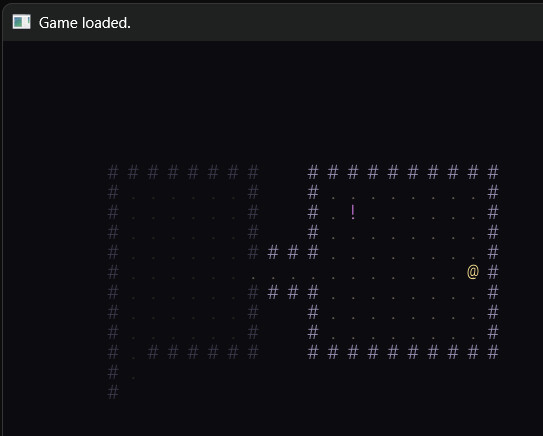
F5 saves, F9 loads — and loading works from the class-select screen too, so "continue" is just F9 at the title. Neither costs a turn. A short confirmation flashes in the title bar via a one-line flash helper.
Try It
Build and run, descend a couple of floors, grab some loot, then press F5. Quit the program entirely, relaunch, and at the hero menu press F9 — you're back exactly where you were: same depth, same HP and gear, the floors above still explored and still holding the monsters you didn't kill. Open the save file in a text editor too; it's readable, and you can see the map rows as grids of digits.
Notes on the Code
Changed: Game.h / Game.cpp only — the index-based appearance tables, save/load, and the F5/F9 handling. Full Game.cpp in the repo. The save lands in savegame.txt beside the executable.
Common Errors
Load reads garbage or crashes. The read order must exactly mirror the write order. Keep save and load physically next to each other and change them together; a version string at the top lets you reject mismatches early.
The map rows come back scrambled. A tile row is one whitespace-free token of digits, read with in >> rowString. If you wrote spaces between tiles, >> will stop at the first one.
Everything's black after loading. You restored the explored flags but not visible — which is correct, but you must then call FOV::compute for the current floor so the area around the player lights up again.
Loaded monsters are all grey "things". kindByGlyph doesn't recognise the saved glyph, or the glyph was read with >> into the wrong type. Read it as a short token and use its first character.
What's Next
The finale of the build: Part 16 — UI Polish & Sound. We give the cramped title-bar HUD a real home — an on-screen status panel and a scrolling message log (the small MessageLog extraction we earmarked at the Interlude) so the combat narration finally appears in the window — and we add sound with SDL3's audio: short synthesised blips for hits, pickups and descents, no asset files required. Then Part 17 crowns it with the win condition.