
Our game works. It has a menu, escalating waves, varied enemies, scoring, and lives. By every mechanical measure, it is complete. And yet, played side by side with a game you would actually download, it feels a little flat. Enemies blink out of existence when shot. The screen never flinches when you are hit. Every explosion sounds identical. And the moment you close the app, your hard-won high score is gone forever.
The difference between "works" and "feels good" is polish — what game developers affectionately call juice. Juice is all the small, non-essential feedback that makes a game satisfying to the senses: the burst of sparks, the jolt of the screen, the subtle variation in a sound. None of it changes the rules. All of it changes how the game feels. In this final chapter of the build, we add the juice, make the high score permanent, and then step back to look at the whole journey.
In this chapter, we will:
- Add particle explosions when enemies are destroyed.
- Make the screen shake on impact.
- Vary the pitch of the explosion sound so it never gets stale.
- Save the high score with
SharedPreferencesso it survives closing the app. - Reflect on everything you have learned.
Let's make it shine.
Particle Explosions
An enemy vanishing instantly is unsatisfying. An enemy bursting into a shower of sparks is a tiny hit of delight, every single time. We have built particles before — in Chapter 11, in Chapter 17, and with AI help in Chapter 26 — so this is familiar ground. Create a Particle.kt suited to space (no gravity; the sparks just fly outward and fade):
package com.example.stardefender

import android.graphics.Canvas
import android.graphics.Color
import android.graphics.Paint

// A spark from an explosion. Flies outward and fades. No gravity — we're in space.
class Particle(var x: Float, var y: Float, private val velX: Float, private val velY: Float) {

    private val maxLife = 0.6f
    private var life = maxLife
    private val radius = 10f

    fun update(deltaSeconds: Float) {
        x += velX * deltaSeconds
        y += velY * deltaSeconds
        life -= deltaSeconds
    }

    fun isDead(): Boolean = life <= 0f

    fun draw(canvas: Canvas, paint: Paint) {
        val alpha = ((life / maxLife) * 255).toInt().coerceIn(0, 255)
        paint.color = Color.rgb(255, 200, 80)
        paint.alpha = alpha
        canvas.drawCircle(x, y, radius, paint)
    }
}
Nothing here is new — it is the particle pattern you know, fading via alpha as its life runs down. In GameView, we hold a MutableList<Particle> and a single explode helper that spawns a ring of sparks. This is also where we will hang the screen shake and the sound, so the whole "something just got destroyed" feeling lives in one place:
    private fun explode(cx: Float, cy: Float) {
        for (i in 0 until 18) {
            val angle = Math.random() * 2.0 * Math.PI
            val speed = (Math.random() * 500 + 200).toFloat()
            val vx = (Math.cos(angle) * speed).toFloat()
            val vy = (Math.sin(angle) * speed).toFloat()
            particles.add(Particle(cx, cy, vx, vy))
        }
        if (shakeTimer < 0.15f) shakeTimer = 0.15f
        val rate = (Math.random() * 0.3 + 0.85).toFloat()   // vary the pitch 0.85..1.15
        soundPool.play(explosionSound, 1f, 1f, 1, 0, rate)
    }
The loop spawns eighteen sparks flying out in all directions. To send them outward evenly, we pick a random angle around a full circle (Math.random() * 2 * PI) and a random speed, then use a touch of trigonometry — cos for the horizontal part, sin for the vertical — to turn that angle and speed into a velocity. (You do not need to have met trigonometry before; the one-line takeaway is that cos and sin turn an angle into x and y movement, which is how you make things radiate out from a point.) Then we trigger a little screen shake and play the explosion — and we will get to both of those next.
We call explode wherever an enemy is destroyed — both when a laser hits one and when one crashes into the ship — passing the enemy's center. And we update the particle list every frame, in every state, so an explosion finishes playing out even on the frame the game ends. Now shooting an enemy feels like an event.
Screen Shake
When the player takes a hit, the screen should react. A brief, sharp shake of the whole view sells the impact better than any amount of text. The trick is wonderfully simple: for a fraction of a second after an impact, we nudge everything we draw by a few random pixels each frame.
We already set a shakeTimer in explode (and a bigger one when the ship is hit). It counts down every frame. All that remains is to use it when drawing. In drawPlaying, we wrap the game world in canvas.save() and canvas.restore(), and translate by a small random offset while the timer is running:
    private fun drawPlaying(canvas: Canvas) {
        drawSpace(canvas)

        // The shaking "world" is drawn between save() and restore() so the HUD stays still
        canvas.save()
        if (shakeTimer > 0f) {
            val dx = (Math.random() * 40 - 20).toFloat()
            val dy = (Math.random() * 40 - 20).toFloat()
            canvas.translate(dx, dy)
        }
        for (enemy in enemies) enemy.draw(canvas, paint, atlas)
        for (laser in lasers) laser.draw(canvas, paint)
        ship.draw(canvas, paint, atlas)
        paint.alpha = 255
        for (particle in particles) particle.draw(canvas, paint)
        canvas.restore()

        // ...HUD drawn here, after restore(), so it doesn't shake...
    }
canvas.save() remembers the current drawing position; canvas.translate(dx, dy) shifts everything drawn after it by a random offset of up to twenty pixels in any direction; and canvas.restore() puts the position back so the HUD, drawn afterward, stays rock-steady. Because we pick a fresh random offset every frame while shakeTimer is positive, the world judders for a moment and then snaps still. It is a handful of lines, and it transforms the feel of every hit. That is juice.
Varied Sound
One more small thing that makes a surprisingly big difference. A sound effect that plays identically every time quickly becomes grating — your ear notices the repetition. The fix is to vary it slightly each time, and SoundPool makes this trivial: its last argument is the playback rate, which changes the pitch. You may have already spotted it in explode:
val rate = (Math.random() * 0.3 + 0.85).toFloat()   // 0.85 to 1.15
soundPool.play(explosionSound, 1f, 1f, 1, 0, rate)
Each explosion now plays at a slightly random pitch — a touch lower, a touch higher — so a string of them sounds like a chaotic battle rather than a stuck record. One random number, and the audio comes alive. (We leave the laser at a steady pitch, since its rapid, regular rhythm is part of its character.)
Saving the High Score
Everything so far has been about feel. This last addition is about permanence. Right now, the high score lives in a variable, which means it evaporates the instant the app closes. A real game remembers. Android's simplest tool for saving small pieces of data — a setting, a high score, a player's name — is SharedPreferences: a tiny key-value store, much like the maps from Chapter 12, that persists to the device.
Using it takes three touches. First, we open it and load the saved high score when the game is created (defaulting to 0 the very first time, when nothing is saved yet):
private val prefs = context.getSharedPreferences("stardefender", Context.MODE_PRIVATE)
private var highScore = prefs.getInt("highScore", 0)
getSharedPreferences("stardefender", ...) opens a private store named for our game, and prefs.getInt("highScore", 0) reads the value stored under the key "highScore", or 0 if there isn't one. Then, when the game ends, we check whether the player beat the record and, if so, save the new value:
    private fun loseLife() {
        lives -= 1
        if (lives <= 0) {
            if (score > highScore) {
                highScore = score
                prefs.edit().putInt("highScore", highScore).apply()
            }
            state = GameState.GAME_OVER
        }
    }
prefs.edit().putInt("highScore", highScore).apply() writes the new high score to the device. apply() saves it in the background, and — this is the magic — it is still there the next time the app launches, because getInt will read it back. Finally, we show the high score on the menu and the game over screen (with a little "NEW BEST!" when the player has just set it). Now your best run matters: it is recorded, displayed, and waiting to be beaten. Close the app, reopen it tomorrow, and your high score is still there.
Running the Finished Game
Add the Particle class and the updated GameView, and run the complete Star Defender.
It is a different experience. Enemies erupt into sparks as your lasers find them. Getting hit jolts the whole screen. The explosions crackle at varying pitches, like a real firefight. The menu greets you with your best score, daring you to beat it — and when you do, "NEW BEST!" flashes, and that number is yours to keep. The bones from Part 1, the muscle from Part 2, and now the polish from Part 3 add up to a game that genuinely feels finished.
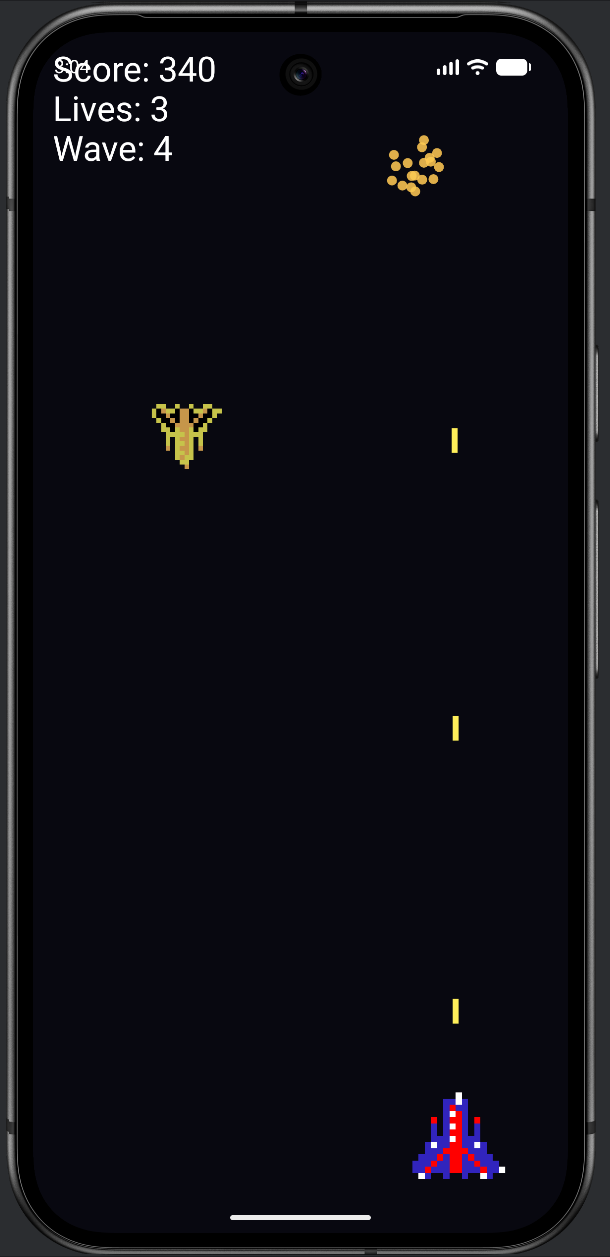
Play it for a while. You have earned it. And take a moment to appreciate what it is: a complete, polished, persistent arcade game, running on an engine you built by hand, with art and sound you wired in yourself, structured with clean object-oriented code, and finished with the kind of juice that real games ship with. You made that.
Experimenting
The game is yours to keep tuning — and with your AI partner, to expand as far as you like. Some ideas:
- More juice. Add a brief white flash when the player is hit, or make destroyed enemies leave a fading scorch mark.
- A score multiplier for clearing a wave without taking damage.
- A boss enemy every fifth wave — a new
Enemysubclass with more health (giveEnemyahealthand require several hits). - Power-ups that drift down: a faster fire rate, a spread shot, a shield.
- Starfield background — a parallax scroll of stars, like the one you built in Chapter 26.
Every one of these is within your reach now. You have the fundamentals to build them yourself and the judgment to direct an AI to help. That combination — understanding and acceleration — is exactly what this book set out to give you.
The Journey
Cast your mind back to Chapter 1. You opened Android Studio for perhaps the first time, deleted some code you did not understand, and drew a single red square on the screen. That was the whole achievement of the day: one square.
Look at what that square became. You learned variables, and made a ball move. You learned decisions, and made a game respond to your touch. You learned loops, and filled the screen. You learned functions, and built a real little game from them. You learned collections, and commanded swarms of particles and grids of tiles. You learned object-oriented programming — classes, inheritance, interfaces — and your games stopped being piles of variables and became clean architectures of cooperating objects. You learned threads, and built a real game engine. You learned graphics and sound, and your games came alive. And finally you brought an AI partner alongside, and learned to direct it as the senior partner — building bigger and faster while still understanding every line.
That last part is the quiet triumph of the whole book. There are plenty of people who can paste an AI's code into a project and hope. You are not one of them. You can read what the AI writes, judge it, fix it, and bend it to your design — because you did the work to understand how all of it actually functions, from the pixel up. That understanding is the thing no tool can hand you and no tool can take away. It is what makes you a programmer, rather than a passenger.
Where you go from here is up to you. Maybe you will polish Star Defender into something you put on the Play Store. Maybe you will build the game you have always wanted to make. Maybe you will take these foundations — Kotlin, objects, game loops, and the confidence to learn whatever you do not yet know — into a whole career. The wilderness chapter pointed at the territory beyond; you now have everything you need to explore it.
You started by drawing a square. You are ending by shipping a game. That is a real journey, and you walked every step of it yourself.
Summary
You finished the game, and the book. In this final chapter you added the polish that separates a working game from a satisfying one: particle explosions radiating from every kill, a screen that shakes on impact, explosion sounds that vary in pitch, and — through SharedPreferences — a high score that survives closing the app. Across the three parts of the final project you built a complete arcade game from a clean state machine, a polymorphic enemy hierarchy, a wave system, and a layer of juice, all on the engine and skills you assembled over thirty chapters.
There is no "next chapter" this time. There is only what you build next. Thank you for coming on this journey — now go and make something. The appendices that follow are reference material for whenever you need a quick reminder: a Kotlin syntax lookup, a guide to the drawing and game-loop APIs we used, and a glossary of every key term. Keep them close, and keep building.