
This is the finale. Over the next three chapters we build the most complete game in the book — Star Defender, a wave-based space shooter with a proper menu, escalating waves of enemies that behave in different ways, real polish, and a high score that survives closing the app. It is everything you have learned, assembled into one ambitious whole, built the way a real game is built — and built with your AI partner, the way Act 4 has taught.
We will build it in three parts, exactly as you would tackle a real project: structure first, then mechanics, then polish. This chapter, Part 1, is about architecture — the bones of the game. Specifically, the thing every real game needs and our earlier projects only faked with a Boolean: a proper state machine that moves cleanly between a menu, the gameplay, and a game over screen. Get the skeleton right, and Parts 2 and 3 hang off it easily.
A note on how these chapters work. Unlike the pure commentary tracks of Chapters 26 and 27, this is a real, built project whose code I will explain — it is your capstone, and you should own every line. But I built it with an AI partner, and I will point out where that helped, so you see how the senior-partner workflow looks on a project of real size.
Code for this chapter: the complete Star Defender project is in the
Chapter 28(Part 1),Chapter 29(Part 2), andChapter 30(Part 3) folders at github.com/EliteIntegrity/Learning-Kotlin-by-Building-Android-Games.
In this chapter, we will:
- Plan the architecture of the whole game before coding.
- Build a
GameStatemachine for the menu, gameplay, and game over screens. - Reuse the ship, lasers, and enemy hierarchy you already know.
- Get a fully playable shell running: menu, play, game over, repeat.
- Set the stage for waves (Part 2) and polish (Part 3).
Let's lay the foundation.
Planning the Architecture
Before a line of code, I did what Chapter 25 preached and Chapter 27 practiced: I planned the shape, with the AI as a sounding board. My opening prompt sketched the whole game and asked the AI to sanity-check the structure:
"I'm building a wave-based vertical space shooter in Kotlin on Android — custom SurfaceView, threaded game loop, Canvas, no engine, no Compose. I already have reusable classes from earlier projects: an Atlas, a PlayerShip, a Laser, and an abstract Enemy with subclasses. I want a proper game with three screens: a main menu, the gameplay, and a game over screen. How should I manage moving between those screens cleanly? And give me a file-by-file plan for the whole project. Keep it simple — small classes, one job each."
The AI suggested exactly what I had in mind: a GameState enum with three values, and a GameView that checks the current state each frame to decide what to update and draw. It laid out a sensible file list. We had a blueprint, and — crucially — it was a blueprint I understood and agreed with, not one the AI imposed. From here, the build is filling in pieces I can read.
The big new idea is that state machine, so let's start there.
The GameState Machine
In every earlier game, we tracked "are we playing or finished?" with a single Boolean, isGameOver. That was fine for one decision. But now we have three screens — menu, playing, game over — and a Boolean only has two values. We could bolt on more flags (isMenu, isGameOver...) but that way lies a tangle of contradictory states. The clean answer is an enum, which we met in the wilderness tour of Chapter 24. Here is where it earns its place. Create GameState.kt:
package com.example.stardefender

// The three screens the game can be in. Using an enum (Chapter 24) lets `when`
// check we have handled every state.
enum class GameState {
    MENU,
    PLAYING,
    GAME_OVER
}
GameState is a type with exactly three possible values. A single variable of this type captures which screen we are on, unambiguously — it cannot be both MENU and PLAYING, the way two separate booleans could accidentally both be true. And because it pairs with the when expression (Chapter 4), our code can branch on the state cleanly and completely. This little enum is the spine of the whole game.
Reusing What We Know
Star Defender stands on the shoulders of everything before it. The Atlas is the exact class from Chapter 22. PlayerShip and Laser are essentially the ones from the Vibe Space Shooter in Chapter 27 — the ship follows your finger and reports a hit box; the laser flies up and reports a hit box. And the enemies use the abstract-base-plus-subclasses pattern from Chapter 19. Create Enemy.kt:
package com.example.stardefender

import android.graphics.Canvas
import android.graphics.Paint
import android.graphics.RectF

// The abstract base for every enemy. Each subclass moves its own way.
abstract class Enemy(var x: Float, var y: Float, val size: Float) {

    // playerX is passed in so chasing enemies can home toward the ship.
    // Enemies that don't need it simply ignore it.
    abstract fun update(deltaSeconds: Float, playerX: Float)

    fun draw(canvas: Canvas, paint: Paint, atlas: Atlas) {
        atlas.draw(canvas, paint, "alienship", x, y, size, size)
    }

    fun hitBox(): RectF = RectF(x, y, x + size, y + size)

    fun isOffScreen(screenHeight: Int): Boolean = y > screenHeight
}
This is the Chapter 19 idea, refined. Every enemy shares position, size, drawing, a hit box, and an off-screen test, but each must supply its own update. Notice the one piece of foresight: update takes a playerX parameter. Our first enemy type will ignore it — but a chasing enemy in Part 2 will need to know where the player is, and by putting that parameter in the base now, all enemies share one update signature and the game loop can treat them identically through polymorphism. Designing the contract with the future in mind is exactly the architectural thinking this chapter is about.
For Part 1 we add a single, simple enemy. Create StraightEnemy.kt:
package com.example.stardefender

// The simplest enemy: drifts straight down at its own speed.
class StraightEnemy(x: Float, y: Float, size: Float) : Enemy(x, y, size) {

    private val speed = (Math.random() * 120 + 180).toFloat()   // 180..300 px/sec

    override fun update(deltaSeconds: Float, playerX: Float) {
        y += speed * deltaSeconds
    }
}
It drifts straight down and ignores playerX. Part 2 will add weaving and chasing enemies as new subclasses, and — because of the hierarchy — the rest of the game will not need to change to accommodate them. (The full Atlas, PlayerShip, and Laser files are in the code folder; they are the familiar versions, so we will not reprint them here.)
The GameView: A State Machine in the Loop
Now the heart of Part 1: a GameView whose loop is driven by the state. The key insight is that the game loop's two jobs — update and draw — both ask "what state are we in?" and act accordingly. Create GameView.kt. Here is the top:
class GameView(context: Context) : SurfaceView(context), Runnable {

    private var gameThread: Thread? = null
    @Volatile private var playing = false
    private var deltaTime = 0f
    private val targetFrameMs = 16L

    private val paint = Paint()
    private val atlas = Atlas(context)

    private val shipSize = 200f
    private val enemySize = 150f
    private val ship = PlayerShip(0f, 0f, shipSize)
    private val lasers = mutableListOf<Laser>()
    private val enemies = mutableListOf<Enemy>()

    private val soundPool = SoundPool.Builder().setMaxStreams(8).build()
    private val laserSound = soundPool.load(context, R.raw.sfx_laser, 1)
    private val explosionSound = soundPool.load(context, R.raw.sfx_explosion, 1)

    private var fireTimer = 0f
    private val fireInterval = 0.35f
    private var spawnTimer = 0f
    private val spawnInterval = 0.9f

    private var state = GameState.MENU
    private var score = 0
    private var lives = 3

    init {
        paint.isFilterBitmap = false
        paint.isAntiAlias = true
    }
This is the Chapter 21 engine setup plus the game's state: the ship, the lists of lasers and enemies (a MutableList<Enemy> holding any enemy type, polymorphism-style), two sounds, the firing and spawning timers, and — the new star — state, which starts at GameState.MENU. The game opens on the menu, exactly as it should.
The loop itself (run) is the unchanged Chapter 21 loop, so I will skip it here. What is new is how update and draw consult the state:
    private fun update() {
        when (state) {
            GameState.PLAYING -> updatePlaying()
            else -> { /* MENU and GAME_OVER are still screens */ }
        }
    }
That is the whole idea, in five lines. Each frame, update asks the state what to do. When we are PLAYING, it runs the actual game via updatePlaying. When we are on the MENU or GAME_OVER screen, nothing moves — those are still pictures waiting for a tap. The same pattern governs drawing, which we will see in a moment.
updatePlaying is the gameplay you already understand from the Vibe Space Shooter — auto-fire on a timer, spawn enemies on a timer, move the lasers and enemies, and check collisions:
    private fun updatePlaying() {
        // Auto-fire
        fireTimer += deltaTime
        if (fireTimer >= fireInterval) {
            fireTimer = 0f
            lasers.add(Laser(ship.centerX(), ship.y))
            soundPool.play(laserSound, 0.6f, 0.6f, 1, 0, 1f)
        }

        // Spawn enemies
        spawnTimer += deltaTime
        if (spawnTimer >= spawnInterval) {
            spawnTimer = 0f
            val ex = (Math.random() * (width - enemySize)).toFloat()
            enemies.add(StraightEnemy(ex, -enemySize, enemySize))
        }

        // Move lasers
        for (i in lasers.indices.reversed()) {
            lasers[i].update(deltaTime)
            if (lasers[i].isOffScreen()) lasers.removeAt(i)
        }

        // Move enemies, handle hits / escapes / collisions
        for (e in enemies.indices.reversed()) {
            enemies[e].update(deltaTime, ship.centerX())
            val enemyBox = enemies[e].hitBox()

            var destroyed = false
            for (l in lasers.indices.reversed()) {
                if (RectF.intersects(enemyBox, lasers[l].hitBox())) {
                    lasers.removeAt(l)
                    destroyed = true
                    break
                }
            }
            if (destroyed) {
                enemies.removeAt(e)
                score += 1
                soundPool.play(explosionSound, 1f, 1f, 1, 0, 1f)
                continue
            }

            if (enemies[e].isOffScreen(height)) {
                enemies.removeAt(e)
                loseLife()
                continue
            }

            if (RectF.intersects(enemyBox, ship.hitBox())) {
                enemies.removeAt(e)
                soundPool.play(explosionSound, 1f, 1f, 1, 0, 1f)
                loseLife()
            }
        }
    }

    private fun loseLife() {
        lives -= 1
        if (lives <= 0) {
            state = GameState.GAME_OVER
        }
    }
Every piece of this is something you have built before — the backwards-safe removal, the nested laser-versus-enemy collision check, the polymorphic enemies[e].update(...) that calls each enemy's own movement. The one difference from Chapter 27 is the last line of loseLife: instead of setting an isGameOver boolean, we transition the state machine — state = GameState.GAME_OVER. The game does not just "end"; it moves to another screen. That is the power of states.
Starting and drawing follow the same shape. startGame resets everything and flips the state to PLAYING:
    private fun startGame() {
        lasers.clear()
        enemies.clear()
        score = 0
        lives = 3
        fireTimer = 0f
        spawnTimer = 0f
        ship.x = width / 2f - shipSize / 2f
        ship.y = height - shipSize - 80f
        state = GameState.PLAYING
    }
And draw uses a when over the state to pick which screen to paint — and because state is an enum, when covers all three cases exhaustively, with no risk of forgetting one:
    private fun draw() {
        val canvas = holder.lockCanvas()
        when (state) {
            GameState.MENU -> drawMenu(canvas)
            GameState.PLAYING -> drawPlaying(canvas)
            GameState.GAME_OVER -> drawGameOver(canvas)
        }
        holder.unlockCanvasAndPost(canvas)
    }
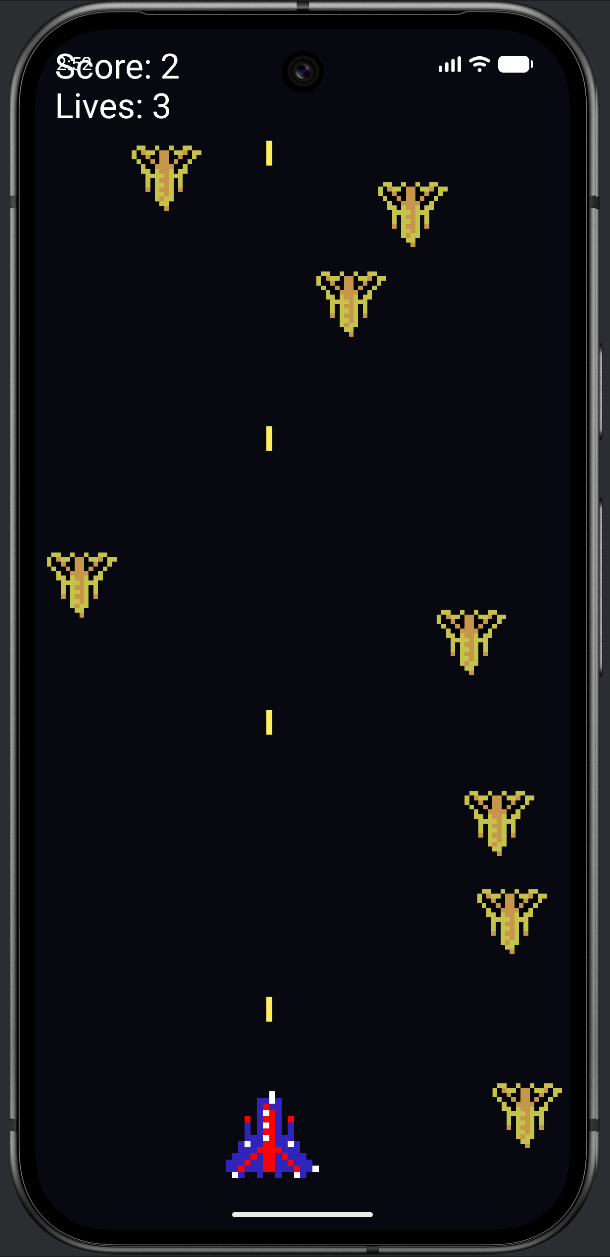
The three draw... methods each paint their screen — drawPlaying draws the ship, lasers, enemies, and the score and lives; drawMenu shows the title and "Tap to start"; drawGameOver shows the final score and "Tap to continue." They are short and unsurprising, and they are in the code folder.
Finally, touch handling — which, fittingly, also branches on the state, because a tap means different things on different screens:
    override fun onTouchEvent(event: MotionEvent): Boolean {
        val action = event.action
        when (state) {
            GameState.MENU -> if (action == MotionEvent.ACTION_DOWN) startGame()
            GameState.PLAYING ->
                if (action == MotionEvent.ACTION_DOWN || action == MotionEvent.ACTION_MOVE) {
                    ship.moveTo(event.x, width)
                }
            GameState.GAME_OVER -> if (action == MotionEvent.ACTION_DOWN) state = GameState.MENU
        }
        return true
    }
On the menu, a tap starts the game. During play, a touch moves the ship. On the game over screen, a tap returns to the menu. One input, three meanings, cleanly separated by the state. This is exactly why state machines exist: they let the same code (the loop, the touch handler) behave correctly in completely different situations, just by knowing which state it is in. MainActivity is the same lifecycle wiring as always, in the code folder.
Running It
Add the assets (the texture, atlas, and the sfx_laser/sfx_explosion sounds from Chapter 27), type in the files, and run.
The game opens on a "STAR DEFENDER" title screen. Tap, and you drop into the action — your ship slides under your finger, lasers stream up, enemies fall and explode. Lose three lives and you land on the game over screen with your score; tap, and you are back at the menu, ready to go again.
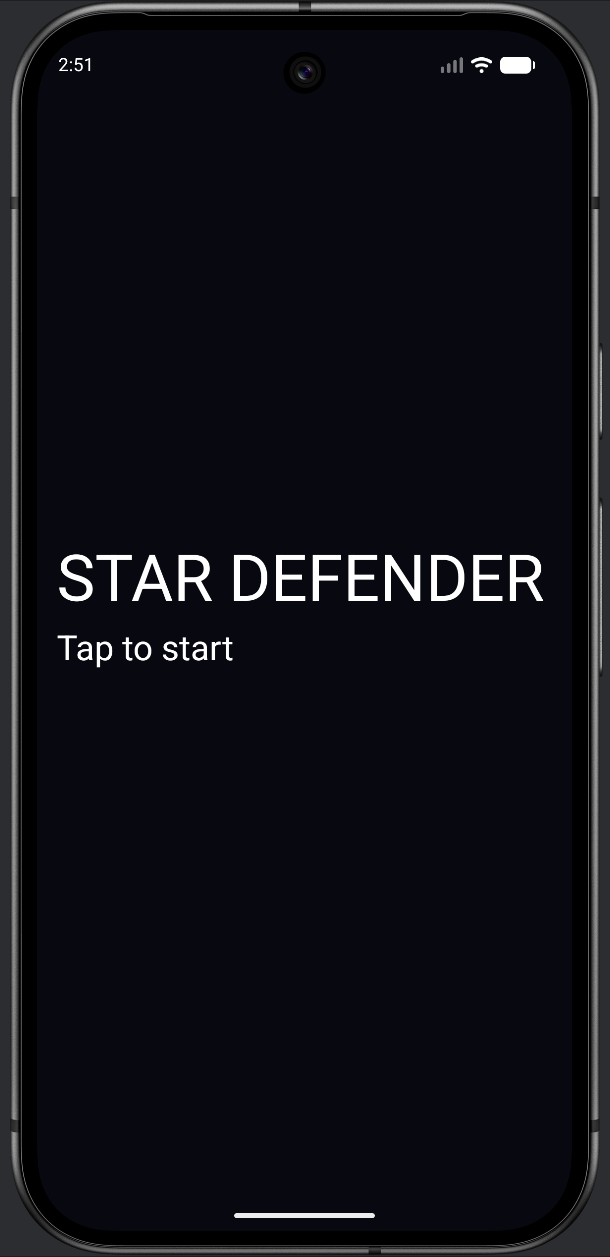
PLAYING.It is a small game so far — one enemy type, no waves — but it is a complete loop, with a real beginning, middle, and end.
Understanding the Code
The lesson of Part 1 is structural. A real game is not just "the gameplay" — it is a set of screens the player moves between, and managing that cleanly is what separates a toy from a finished product. The GameState enum gave us a single source of truth for which screen we are on, and the when expressions in update, draw, and onTouchEvent let every part of the game behave correctly for the current state. Add a "paused" screen later? You add one enum value and one branch in each when — and the compiler will even remind you where, because when over an enum wants every case covered.
Notice, too, how much we reused. The engine is Chapter 21. The atlas is Chapter 22. The ship and laser are Chapter 27. The enemy hierarchy is Chapter 19. We wrote almost no genuinely new code — we architected existing pieces into a larger whole, and added a state machine to tie them together. That is what building a real game looks like: not heroic invention, but thoughtful assembly on a solid structure.
Over to You (Optional)
The state machine makes this a great moment for a small AI-assisted addition. Brief your AI with the project's constraints, the way Chapter 25 taught, then try one:
- "Add a PAUSED state to my GameState enum, entered by a tap during play and left by another tap, that freezes the game and shows the word 'Paused'. Show the enum change and the branches I add to update, draw, and onTouchEvent."
- "Add a slow starfield to the menu: a few dozen white dots that drift downward behind the title, without touching any of the gameplay states."
Read the result and notice how adding a whole new screen costs just one enum value and one new branch in each when. That is the state machine paying you back — exactly the property this chapter was about.
Summary
You built the skeleton of the book's biggest game. The centerpiece was a state machine — a GameState enum, consulted by update, draw, and onTouchEvent through when — that cleanly manages the menu, gameplay, and game over screens. Around it you assembled familiar parts: the threaded engine, the atlas, the ship and lasers, and an abstract Enemy whose update signature you designed with future enemy types in mind. The result is a complete play loop you can start, lose, and restart.
In Part 2, we give the game depth. We add weaving and chasing enemy types as new Enemy subclasses — watching polymorphism let them slot into the existing loop untouched — and we replace the steady trickle of enemies with proper waves that grow harder as you survive. The bones are in place; next we add the muscle.