
Now we make inheritance and polymorphism do real work. We are going to build a small defense game. Enemies stream down from the top of the screen, and your job is to tap them before they reach the bottom. Let one through and you lose a life; lose all five and it is game over.
The twist—and the whole point of the chapter—is that there are two kinds of enemy, and they behave completely differently. Chasers are red circles that home in on the bottom-center of the screen, making a beeline for your base. Wanderers are blue squares that drift down while weaving unpredictably from side to side. Yet despite their different shapes and movement, they will live together in a single MutableList<Enemy>, and a single update loop and a single draw loop will handle them both. That is polymorphism, running on screen at last.
This project also reaches a milestone of a different kind. With an abstract base class, two subclasses, a view, and the activity, we now have five classes—more than any project so far. That is the natural moment to stop piling everything into one file and start giving each class its own.
Code for this chapter: all five files are in the
Chapter 19folder of the accompanying repository at github.com/EliteIntegrity/Learning-Kotlin-by-Building-Android-Games.
In this chapter, we will:
- Set up a new project called Varied Enemies.
- Learn to split our classes across multiple files, the way real projects do.
- Write an abstract
Enemybase class with shared data and behavior. - Write two subclasses,
ChaserEnemyandWanderEnemy, each with its own movement and look. - Store every enemy in one list of the base type.
- Update and draw the whole mixed swarm with single polymorphic loops.
- Add scoring, lives, and a game over screen.
- Run it, play it, and try an optional AI exercise.
Let's build the family.
Setting Up the Project
The usual steps:
- Create a New Project, choosing Empty Views Activity.
- Name the application VariedEnemies.
- Make sure the Language is Kotlin, and click Finish.
- Open
app > java > com.example.variedenemies > MainActivity.ktand delete the generated code.
Organizing Our Code Into Files
Up to now, every project has lived in a single MainActivity.kt file. That was fine when we had one or two small classes. But this project has five, and cramming five classes into one file would make it a long scroll where nothing is easy to find. Real Android projects almost never do that. The convention is simple and worth adopting now: one class per file, and the file is named after the class. Our Enemy class will live in Enemy.kt, ChaserEnemy in ChaserEnemy.kt, and so on.
If you have come from a language like C++, you might be bracing yourself for header files and #include statements to wire all these files together. Good news: Kotlin has none of that. The rule is far simpler. Every class in the same package can see every other one automatically, with no import at all. You only ever write an import when you reach across packages—which is why we import things like android.graphics.Canvas (a different package) but never import our own classes. Put a class in a file in our package, and the rest of our code can use it immediately.
Creating a new file in Android Studio is quick:
- In the Project window on the left, right-click on our package,
com.example.variedenemies(the folder that containsMainActivity.kt). - Choose New > Kotlin Class/File.
- Type the name—for our first one,
Enemy—and pick Class from the list. - Press Enter.
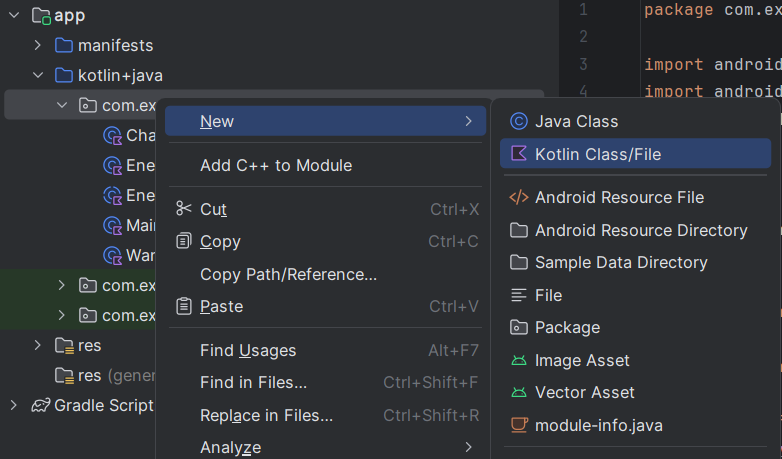
package line automatically.Android Studio creates Enemy.kt, already containing the package com.example.variedenemies line at the top and an empty class Enemy { } for you to fill in. Notice it puts the package line in automatically—that line is what tells Kotlin which package the file belongs to, and it is what lets all our files find each other.
We will create one file per class as we go. Don't worry about getting every import exactly right by hand—when you use a class from another package, Android Studio offers to add the import for you automatically (a little pop-up, or press Alt+Enter on the red text). Let it. The code blocks below show the imports each file needs so you can check against them.
Coding the Game
We will write the class hierarchy first—the base class and its two subclasses, each in its own file—then the view, then trim down MainActivity.
The Activity
Start with MainActivity.kt, which you already have open. After deleting the generated code, it becomes tiny—its only job is to hand the screen to our view:
package com.example.variedenemies

import android.os.Bundle
import androidx.appcompat.app.AppCompatActivity

class MainActivity : AppCompatActivity() {
    override fun onCreate(savedInstanceState: Bundle?) {
        super.onCreate(savedInstanceState)
        // EnemiesView lives in its own file, but because it's in the same
        // package we can use it here with no import at all.
        setContentView(EnemiesView(this))
    }
}
Look at what is not here. MainActivity uses EnemiesView, a class we have not even written yet, which will live in a completely different file—and there is no import for it. That is the same-package rule in action. As long as EnemiesView.kt declares the same package com.example.variedenemies, this just works.
The Abstract Base Class
Now create a new file called Enemy (right-click the package, New > Kotlin Class/File, type Enemy, choose Class). Fill it in like this:
package com.example.variedenemies

import android.graphics.Canvas
import android.graphics.Paint

// The abstract base. Every enemy has a position and a radius, can be tested for a
// hit, but MUST supply its own move() and draw().
abstract class Enemy(var x: Float, var y: Float) {

    val radius = 55f

    abstract fun move()
    abstract fun draw(canvas: Canvas, paint: Paint)

    // Shared by all enemies: was this tap close enough to count as a hit?
    fun isHit(touchX: Float, touchY: Float): Boolean {
        val dx = touchX - x
        val dy = touchY - y
        return dx * dx + dy * dy < radius * radius
    }
}
This is the abstract base class from Chapter 18, made concrete for our game. Notice the file starts with the package line (Android Studio added it) and then imports only what this class needs—Canvas and Paint, for the draw signature. Each file imports its own dependencies.
Every enemy, whatever its type, has a position (x, y) and a radius. Every enemy can be tested against a tap with isHit, which is shared by all of them and so gets a real body here. But move and draw are abstract—declared, but with no body—because there is no sensible "default" way for a generic enemy to move or look. Each subclass must supply its own.
The isHit method does a tidy bit of collision math. Given a tap at (touchX, touchY), it works out the horizontal and vertical distances to the enemy's center (dx and dy), and checks whether the tap falls within the enemy's circular radius. It uses dx * dx + dy * dy < radius * radius—comparing squared distances rather than taking a square root—which is a common little game-dev trick: squaring the radius is cheaper than rooting the distance, and the comparison works out the same. Because isHit lives in the base class, every enemy type gets this hit-testing for free.
The ChaserEnemy
Create another file, ChaserEnemy, and add:
package com.example.variedenemies

import android.graphics.Canvas
import android.graphics.Color
import android.graphics.Paint

// A chaser homes straight toward a fixed target point.
class ChaserEnemy(x: Float, y: Float, private val targetX: Float, private val targetY: Float) : Enemy(x, y) {

    private val speed = 6f

    override fun move() {
        val dx = targetX - x
        val dy = targetY - y
        val dist = Math.sqrt((dx * dx + dy * dy).toDouble()).toFloat()
        if (dist > 1f) {
            // Step 'speed' pixels along the direction toward the target
            x += dx / dist * speed
            y += dy / dist * speed
        }
    }

    override fun draw(canvas: Canvas, paint: Paint) {
        paint.color = Color.rgb(230, 70, 70)
        canvas.drawCircle(x, y, radius, paint)
        // A dark "eye" so chasers are easy to tell apart from wanderers
        paint.color = Color.rgb(80, 20, 20)
        canvas.drawCircle(x, y, radius / 3f, paint)
    }
}
ChaserEnemy is in its own file, but its very first meaningful line refers to Enemy—: Enemy(x, y)—with no import needed, because Enemy is in the same package. That is the whole convenience we set up. The : Enemy(x, y) is the inheritance, passing the starting position up to the base constructor. Its constructor takes two extra values, targetX and targetY—the point it should chase—stored as private properties.
Its override fun move() implements homing, a classic game behavior worth understanding. It finds the direction to the target as a horizontal and vertical distance (dx, dy), then computes the straight-line distance with Math.sqrt. Dividing dx and dy by that distance turns them into a direction of length one—a unit step pointing at the target—and multiplying by speed makes the enemy step exactly speed pixels along that line each frame. The result is an enemy that glides smoothly straight toward its goal, no matter where it starts. The if (dist > 1f) guard avoids dividing by zero in the rare moment it lands exactly on target.
Its override fun draw() paints a red circle with a dark inner circle—a little "eye" that makes chasers instantly recognizable.
The WanderEnemy
Create a file WanderEnemy for our second kind of enemy:
package com.example.variedenemies

import android.graphics.Canvas
import android.graphics.Color
import android.graphics.Paint

// A wanderer drifts downward while weaving from side to side.
class WanderEnemy(x: Float, y: Float) : Enemy(x, y) {

    private var velX = (Math.random() * 10 - 5).toFloat()
    private val velY = (Math.random() * 3 + 3).toFloat()

    override fun move() {
        x += velX
        y += velY
        // Occasionally change horizontal direction, to wander
        if (Math.random() < 0.03) {
            velX = -velX
        }
    }

    override fun draw(canvas: Canvas, paint: Paint) {
        paint.color = Color.rgb(80, 170, 230)
        canvas.drawRect(x - radius, y - radius, x + radius, y + radius, paint)
    }
}
WanderEnemy also inherits from Enemy, but it needs no target—it gives itself a random horizontal and vertical velocity when it is created. Its move() drifts it down and across, and on about three percent of frames it flips its horizontal direction (velX = -velX), producing an aimless, weaving descent. Its draw() paints a blue square with drawRect, so it looks nothing like a chaser.
Here is the crucial thing to notice across these two files: ChaserEnemy and WanderEnemy have the same two methods, move and draw, with the same signatures—but utterly different bodies. They fulfill the contract the abstract Enemy laid down, each in its own way. That is the setup polymorphism needs.
The View
Finally, create one more file, EnemiesView, for the class that runs the game:
package com.example.variedenemies

import android.content.Context
import android.graphics.Canvas
import android.graphics.Color
import android.graphics.Paint
import android.view.MotionEvent
import android.view.View

class EnemiesView(context: Context) : View(context) {

    private val paint = Paint()

    // One list holds EVERY kind of enemy, thanks to polymorphism.
    // Enemy, ChaserEnemy, and WanderEnemy live in their own files, but we need
    // no imports for them because they share this package.
    private val enemies = mutableListOf<Enemy>()

    private var score = 0
    private var lives = 5
    private var isGameOver = false

    private var spawnTimer = 0
    private val spawnEvery = 40       // spawn a new enemy every 40 frames

    init {
        paint.isAntiAlias = true
    }

    fun spawnEnemy() {
        val startX = (Math.random() * width).toFloat()
        val startY = -60f
        if (Math.random() < 0.5) {
            enemies.add(WanderEnemy(startX, startY))
        } else {
            // Chasers aim for a point just below the bottom-center "base"
            enemies.add(ChaserEnemy(startX, startY, width / 2f, height.toFloat() + 300f))
        }
    }
The single most important line is this:
private val enemies = mutableListOf<Enemy>()A list of Enemy—the base type. Because a ChaserEnemy is an Enemy and a WanderEnemy is an Enemy, both can live in this one list, side by side. And though those classes now live in three separate files, this view uses all of them without a single import, because they share its package. spawnEnemy proves it: it flips a coin with Math.random() and adds either a WanderEnemy or a ChaserEnemy to the very same list.
Now the game loop. Continue adding to EnemiesView:
    override fun onDraw(canvas: Canvas) {
        super.onDraw(canvas)
        canvas.drawColor(Color.rgb(18, 20, 28))

        if (!isGameOver) {
            updateEnemies()
            drawEnemies(canvas)
            drawHud(canvas)
        } else {
            drawGameOver(canvas)
        }

        invalidate()
    }

    fun updateEnemies() {
        // Spawn new enemies on a timer
        spawnTimer += 1
        if (spawnTimer >= spawnEvery) {
            spawnTimer = 0
            spawnEnemy()
        }

        // Move every enemy (polymorphism: each runs its own move), removing escapees
        for (i in enemies.indices.reversed()) {
            enemies[i].move()
            if (enemies[i].y > height) {
                // This enemy got past us
                enemies.removeAt(i)
                lives -= 1
                if (lives <= 0) {
                    isGameOver = true
                }
            }
        }
    }

    fun drawEnemies(canvas: Canvas) {
        // One loop draws every type — each enemy draws itself
        for (enemy in enemies) {
            enemy.draw(canvas, paint)
        }
    }
Here is the payoff, and it is worth pausing on. Look at the update loop. It calls enemies[i].move()—and that single call does something different depending on what each enemy actually is. The chasers home toward the base; the wanderers weave downward. We never check the type. There is no if (enemy is ChaserEnemy). We simply ask each enemy to move, and polymorphism makes each one move as itself.
The draw loop is even more striking:
for (enemy in enemies) {
    enemy.draw(canvas, paint)
}
One line draws red circles with eyes and blue squares, because each object runs its own draw. This is the moment all the theory from Chapter 18 becomes real: a mixed crowd of different types, handled by code that does not know or care which is which.
The HUD, Game Over, and Touch
Finish the EnemiesView file with the remaining methods, which are familiar from the Fruit Catcher in Chapter 9:
    fun drawHud(canvas: Canvas) {
        paint.color = Color.WHITE
        paint.textSize = 70f
        canvas.drawText("Score: $score", 40f, 90f, paint)
        canvas.drawText("Lives: $lives", 40f, 170f, paint)
        paint.textSize = 45f
        canvas.drawText("Tap the enemies before they reach the bottom!", 40f, height - 50f, paint)
    }

    fun drawGameOver(canvas: Canvas) {
        paint.color = Color.WHITE
        paint.textSize = 120f
        canvas.drawText("Game Over", 40f, height / 2f - 100f, paint)
        paint.textSize = 70f
        canvas.drawText("Final score: $score", 40f, height / 2f, paint)
        canvas.drawText("Tap to play again", 40f, height / 2f + 100f, paint)
    }

    override fun onTouchEvent(event: MotionEvent): Boolean {
        if (event.action == MotionEvent.ACTION_DOWN) {
            if (isGameOver) {
                restartGame()
                return true
            }

            // Check the enemies for a hit. Walk backwards so removal is safe.
            for (i in enemies.indices.reversed()) {
                if (enemies[i].isHit(event.x, event.y)) {
                    enemies.removeAt(i)
                    score += 1
                    break          // one tap destroys at most one enemy
                }
            }
        }
        return true
    }

    fun restartGame() {
        enemies.clear()
        score = 0
        lives = 5
        isGameOver = false
        spawnTimer = 0
    }
}
onTouchEvent does the shooting. On a tap, if the game is over, it restarts. Otherwise, it walks the enemies (backwards, for safe removal) and calls enemies[i].isHit(event.x, event.y)—the shared method from the base class—on each. The first enemy the tap lands on is destroyed and scores a point, and break stops the search so a single tap pops at most one enemy. Notice that isHit works on any enemy, chaser or wanderer, because it is defined once in the base class. restartGame clears the list (enemies.clear() empties a MutableList in one call) and resets everything.
You should now have five files in your package: MainActivity.kt, Enemy.kt, ChaserEnemy.kt, WanderEnemy.kt, and EnemiesView.kt. The complete set is in this chapter's code folder.
Playing the Game
Hit the green Play button.
Enemies begin streaming down from the top. Red circles with dark eyes curve purposefully toward the bottom-center; blue squares weave down erratically. Tap them to pop them and score. Miss too many and they slip past the bottom, draining your lives toward the inevitable Game Over—after which a tap throws you back in.
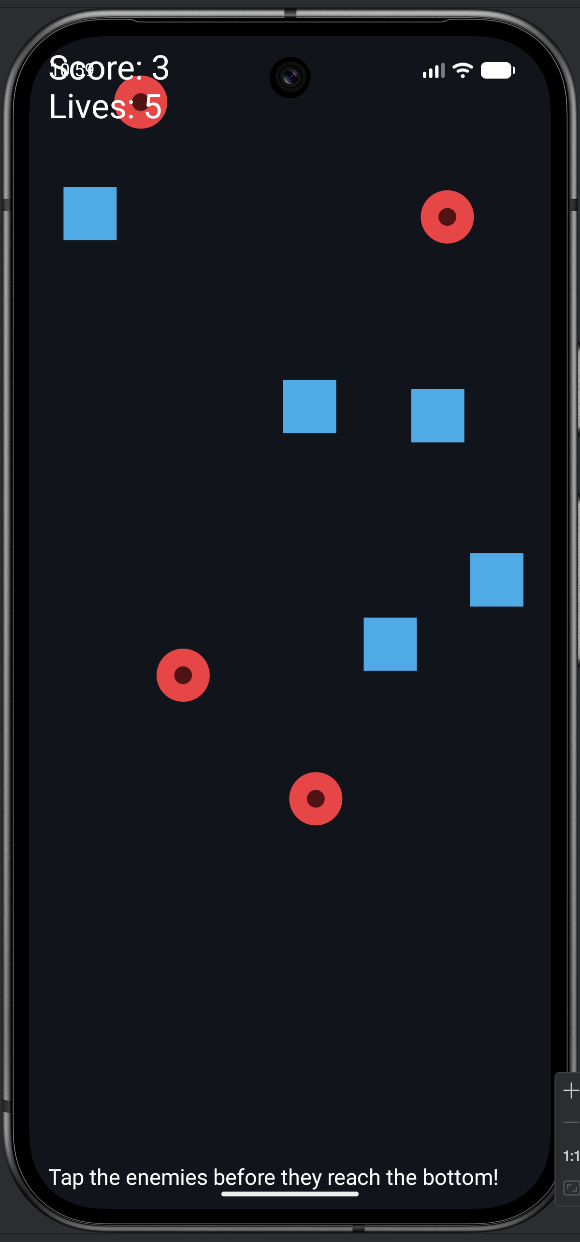
It is a genuine little arcade game, and underneath, it is a clean class hierarchy—spread across tidy, separate files—doing exactly what Chapter 18 promised.
Understanding the Code
The architecture of this game is the lesson, and now it is mirrored in the architecture of the files. Each class is its own file: Enemy.kt holds what all enemies share, ChaserEnemy.kt and WanderEnemy.kt hold what makes each kind distinct, EnemiesView.kt runs the game, and MainActivity.kt is the tiny doorway in. Open any one of them and you see exactly one idea, with nothing else in the way. That is what real Android codebases look like, and you can already feel why: finding the chaser's behavior means opening ChaserEnemy.kt, not scrolling through a four-hundred-line monster file.
The behavior split is just as clean. Three classes describe what enemies are: an abstract Enemy holding everything they share, and two subclasses adding what makes each kind distinct. The view describes how the game runs: it keeps one list of enemies, spawns them, and—through two short polymorphic loops—moves and draws them all without ever knowing which type is which.
That separation is what makes the design so strong. Picture adding a third enemy—say, a SplitterEnemy that breaks into two wanderers when tapped. You would create one new file, SplitterEnemy.kt, with a class extending Enemy, give it a move and a draw, and add one branch to spawnEnemy. The update loop, the draw loop, and the hit-testing would not change at all, because they only ever speak to enemies as Enemys. New behavior slots into a new file without disturbing the machinery that is already working.
Experimenting
Bend the game to your liking. Some of these touch a subclass; some touch the view. Notice that with separate files, you now know exactly which file to open for each change.
- Harder or easier. In
EnemiesView.kt, lowerspawnEveryfrom40to20for a frantic onslaught, or raise it to70for a gentle one. Change startinglives. - Faster chasers. In
ChaserEnemy.kt, changespeedfrom6fto10f. They become genuinely threatening. - Wilder wanderers. In
WanderEnemy.kt, change the0.03to0.1so they change direction far more often—jittery and hard to hit. - Add a third enemy type. This is the real challenge, and the real reward. Create a new file,
ZigZagEnemy.kt, with a class that extendsEnemyand overridesmoveanddrawwith new behavior and a new color or shape. Add one branch tospawnEnemyto spawn it sometimes. Notice that the update loop, draw loop, and tap handling need no changes at all. That is polymorphism paying you back.
That last experiment is the one to actually do. Adding a whole new kind of enemy by writing a single self-contained file, and changing nothing else, is the moment object-oriented design clicks for good.
Summary
You built a defense game powered entirely by inheritance and polymorphism. An abstract Enemy base class defined what all enemies share—position, radius, hit-testing—and demanded that each provide its own move and draw. Two subclasses, ChaserEnemy and WanderEnemy, fulfilled that contract with completely different behavior and appearance. And one list of the base type, swept by one update loop and one draw loop, handled the whole mixed crowd without ever checking a single type. Along the way you picked up real game techniques: homing movement and cheap squared-distance hit-testing.
You also took an important step in how you organize code: one class per file, named after the class, relying on Kotlin's rule that classes in the same package see each other with no imports at all. That is how real Android projects are structured, and from here on—as our projects grow—we will keep working this way.
This is how grown-up games are structured, and you now have the core of object-oriented programming firmly in hand: classes, inheritance, polymorphism, and abstract base classes. There is one more piece of OOP to meet, and it is the one that finally unlocks real-time games: interfaces, and the threading they enable. So far Android has been driving our game loop for us through invalidate(). In the next chapter we learn why that is not good enough for a serious game, and we take control of the loop ourselves.
AI Exercise (Optional)
Extending a class hierarchy is the perfect vibe-coding challenge, because a good hierarchy makes new additions almost effortless. Optional as always.
Open your AI chatbot and try a prompt like this:
"I have a Kotlin Android defense game built with a custom Canvas View (no game engine), with each class in its own file in the same package. There is an abstract class Enemy(var x, var y) with a radius, a concrete isHit(touchX, touchY) method, and abstract methods move() and draw(canvas, paint). Two subclasses exist: ChaserEnemy (homes toward a target point) and WanderEnemy (drifts down while weaving). All enemies live in one MutableList<Enemy>; the view moves them all with enemies[i].move() and draws them with enemy.draw(canvas, paint) in single loops, never checking the type. I understand classes, inheritance with open/abstract, overriding, super, and polymorphism. Write me a THIRD enemy type, ZigZagEnemy, that marches down the screen in a sharp zig-zag pattern and draws as a triangle (or a distinct color), as a new subclass of Enemy in its own file. Show only the new file and the one line I add to spawnEnemy, and confirm that the update and draw loops do not need to change. Explain why they don't."
The heart of this exercise is that final request: confirm the existing loops do not change, and explain why. If the hierarchy is well designed, a brand-new enemy should drop in by adding one file and one spawn branch, touching nothing else. Asking the AI to articulate why is a test of whether you understand polymorphism, not just whether the AI does.