
We promised this moment back in Chapter 11, and again in Chapter 14, and one more time in Chapter 16. Now we deliver. We are going to take the particle swarm—the one held together with five fragile parallel lists—and rebuild it using a single Particle class. The result does exactly the same thing on screen, but the code is transformed. This is the shortest project chapter in the book, and that is the whole point: good design makes things smaller.
There is no new visual effect to learn here. The reward is entirely in the structure. By the end you will have felt, directly, why object-oriented programming exists, because you will have seen the same program written both ways.
Code for this chapter: the complete project is in the
Chapter 17folder of the accompanying repository at github.com/EliteIntegrity/Learning-Kotlin-by-Building-Android-Games.
In this chapter, we will:
- Set up a new project called Particle Class.
- Write a
Particleclass that owns its own data and behavior. - Replace five parallel lists with one list of objects.
- Let each particle update, test, and draw itself.
- Compare the result, side by side, with Chapter 11.
- Try an optional AI exercise to grow the class.
Let's do the refactor.
Setting Up the Project
The usual steps:
- Create a New Project, choosing Empty Views Activity.
- Name the application ParticleClass.
- Make sure the Language is Kotlin, and click Finish.
- Open
app > java > com.example.particleclass > MainActivity.ktand delete the generated code.
Coding the Game
We will write the Particle class first, then a view that uses it.
The Particle Class
Type in the imports, MainActivity, and then—before the view—our new class:
package com.example.particleclass

import android.content.Context
import android.graphics.Canvas
import android.graphics.Color
import android.graphics.Paint
import android.os.Bundle
import android.view.MotionEvent
import android.view.View
import androidx.appcompat.app.AppCompatActivity

class MainActivity : AppCompatActivity() {
    override fun onCreate(savedInstanceState: Bundle?) {
        super.onCreate(savedInstanceState)
        setContentView(ParticleClassView(this))
    }
}

// One particle, as a single self-contained object: its own data AND its own behavior.
class Particle(var x: Float, var y: Float, var velX: Float, var velY: Float) {

    private val maxLife = 120
    var life = maxLife

    fun update() {
        velY += 0.3f       // gravity
        x += velX
        y += velY
        life -= 1
    }

    fun isDead(): Boolean {
        return life <= 0
    }

    fun draw(canvas: Canvas, paint: Paint) {
        // Fade out as life runs down
        paint.color = Color.rgb(255, 180, 40)
        paint.alpha = life * 255 / maxLife
        canvas.drawCircle(x, y, 12f, paint)
    }
}
This is the class we sketched at the end of Chapter 16, now complete. Read it and notice how everything about a particle lives in one place.
The constructor (var x: Float, var y: Float, var velX: Float, var velY: Float) takes the starting position and velocity, and—thanks to the var shorthand from Chapter 16—turns each one straight into a property. So every Particle carries its own x, y, velX, and velY. We also give it a life property, starting at maxLife, which is a private val because nothing outside the particle ever needs to change the maximum.
Then the three methods, the things a particle can do to itself. update() applies gravity, moves the particle by its velocity, and ages it—the exact physics from Chapter 11, but now the particle performs it on its own data. isDead() returns a Boolean saying whether its life has run out. And draw() takes a canvas and a paint and renders the particle as a fading circle, working out its own alpha from its own remaining life.
That is a particle: a complete, self-contained thing that knows its own state and how to move, test, and draw itself. Hold this in your mind as we write the view, because the view is about to get remarkably simple.
The View
Now the view that manages the swarm. Add it below the Particle class:
class ParticleClassView(context: Context) : View(context) {

    private val paint = Paint()

    // The entire swarm is now ONE list of Particle objects
    private val particles = mutableListOf<Particle>()

    private var setupDone = false

    init {
        paint.isAntiAlias = true
    }

    fun spawnBurst(x: Float, y: Float, count: Int) {
        for (i in 0 until count) {
            val velX = (Math.random() * 30 - 15).toFloat()
            val velY = (Math.random() * 30 - 20).toFloat()
            particles.add(Particle(x, y, velX, velY))
        }
    }
There it is—the line this whole chapter is about:
private val particles = mutableListOf<Particle>()One list. Not five. A MutableList<Particle> holds whole particle objects, each carrying all of its own data. The five parallel lists from Chapter 11—particleX, particleY, particleVelX, particleVelY, particleLife—have collapsed into this single, honest list of things.
Look at spawnBurst, too. To create a particle now, we build one Particle object with its starting values and add it to the list—a single .add() call, not five. We compute a random velocity, construct a Particle(x, y, velX, velY), and drop it in. Creating an object is just calling the class name like a function, exactly as we learned in Chapter 16.
Now the game loop:
    override fun onDraw(canvas: Canvas) {
        super.onDraw(canvas)

        if (!setupDone) {
            spawnBurst(width / 2f, height / 2f, 40)
            setupDone = true
        }

        canvas.drawColor(Color.rgb(10, 10, 20))

        // Update every particle, removing the dead. Each one updates itself.
        for (i in particles.indices.reversed()) {
            particles[i].update()
            if (particles[i].isDead()) {
                particles.removeAt(i)
            }
        }

        // Draw every particle. Each one draws itself.
        for (particle in particles) {
            particle.draw(canvas, paint)
        }

        drawCount(canvas)

        invalidate()
    }

    fun drawCount(canvas: Canvas) {
        paint.alpha = 255
        paint.color = Color.WHITE
        paint.textSize = 60f
        canvas.drawText("Particles: ${particles.size}", 40f, 90f, paint)
    }

    override fun onTouchEvent(event: MotionEvent): Boolean {
        if (event.action == MotionEvent.ACTION_DOWN || event.action == MotionEvent.ACTION_MOVE) {
            spawnBurst(event.x, event.y, 8)
        }
        return true
    }
}
This is where the payoff really lands. Compare the update loop to Chapter 11's. There, updating a particle meant reaching into five lists at the same index and nudging each value, and removing one meant five removeAt calls. Here, it is:
particles[i].update()
if (particles[i].isDead()) {
    particles.removeAt(i)
}
We ask each particle to update itself—particles[i].update()—and the particle handles its own position, velocity, and aging internally. We ask it whether it has died, and if so, we remove the one object from the one list. The drawing loop is even prettier:
for (particle in particles) {
    particle.draw(canvas, paint)
}
"For each particle, draw yourself." That single line replaces Chapter 11's whole index-walking, alpha-calculating draw loop, because each particle now knows how to draw itself. The complete file is in this chapter's code folder.
Playing the Game
Hit the green Play button.
Forty sparks burst from the center, arc, and fade—then tap and drag to spray more. It looks identical to the Particle Swarm from Chapter 11, because it does exactly the same thing.
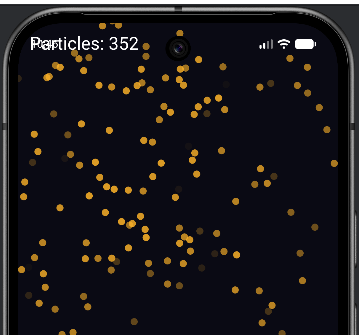
The magic this time is not on the screen. It is in the file you just wrote.
Understanding the Code
Put this chapter's code next to Chapter 11's and the difference is stark. Chapter 11 had five parallel lists that had to be kept in perfect alignment, with every spawn and every removal touching all five. This version has one list of Particle objects. The data for a single particle is no longer smeared across five places—it lives together, inside one object, exactly where it belongs.
But the deeper win is behavior. In Chapter 11, the knowledge of how a particle moves and how it fades lived in the view's update and draw loops, mixed in with the list-juggling. Here, that knowledge lives inside the Particle class itself. The particle knows how to update itself and draw itself. The view's only job is to keep a list of particles and tell them, as a group, to do their thing. Responsibilities are cleanly divided: the particle minds its own state; the view minds the collection.
This is what people mean when they say object-oriented code "scales." Suppose we now want each particle to also have a size, a color, and a spin. In the Chapter 11 version, that is three new parallel lists and three more things to keep in lockstep everywhere. In this version, it is three new properties inside the Particle class and a couple of lines in its update and draw—and the view does not change at all. The class absorbs the complexity, and the rest of the program stays calm.
You have now felt the core lesson of Act 3 firsthand: bundling data with the behavior that acts on it makes programs smaller, clearer, and far easier to grow. Every game from here on will be built this way.
Experimenting
Because the design is clean, extending it is easy. Each of these changes lives almost entirely inside the Particle class.
- Give particles a random size. Add a
radiusproperty to the constructor, pass a random value when spawning, and use it indrawinstead of the fixed12f. - Give particles a random color. Add three
Intproperties—red,green,blue—set them randomly when spawning, and useColor.rgb(red, green, blue)indraw. Notice how the view is untouched. - Make them bounce off the bottom. In
update, you would need the screen height—try passing it in as a parameter:fun update(screenHeight: Int), and reversevelYwhen the particle hits the floor. (A small hint of where the next chapters go.) - Longer life. Change
maxLifeto300. One number, one place.
Notice the theme: every change is small and local, because each concern lives in exactly one spot. That is the dividend a well-designed class pays, again and again.
Summary
You rebuilt the particle swarm using a single Particle class, and watched five parallel lists collapse into one list of self-contained objects. Each particle now owns its own data (position, velocity, life) and its own behavior (update, isDead, draw), and the view simply keeps a list of them and asks them, as a group, to act. The program does exactly what Chapter 11's did, in less code that is far easier to read and extend.
This is the simplest possible win from object-oriented programming: one kind of thing, one class. But games are full of different kinds of things that are nonetheless related—enemies that all move and draw, but each in their own way. Handling that gracefully is the next big idea: inheritance and polymorphism. In the next chapter we learn how one class can build on another, so that a whole family of game objects can share what they have in common while each keeps what makes it special.
AI Exercise (Optional)
Now that you have a clean class, growing it with an AI is a pleasure—and a good test of whether the class really is as flexible as it looks. Optional as always.
Open your AI chatbot and try a prompt like this:
"I have a Kotlin Android particle system built with a custom Canvas View (no game engine). Each particle is an instance of a Particle class with properties x, y, velX, velY, and life, and methods update(), isDead(), and draw(canvas, paint). The view holds a single MutableList<Particle>, updates each with particles[i].update(), removes dead ones, and draws each with particle.draw(canvas, paint). I understand classes, properties, methods, constructors, and private. I have NOT learned inheritance yet. Without using inheritance, show me how to add a 'sparkle' effect: give each particle its own random color and a slowly shrinking radius, changing ONLY the Particle class and the spawn function, and leaving the update and draw loops in the view untouched. Paste the full Particle class and explain what changed."
The key constraint here is "leave the view's loops untouched." If the class is well designed, adding color and shrinking should be possible entirely inside Particle and the spawner—the view should not need to know or care. That is the real test of good encapsulation, and asking the AI to honor it sharpens your eye for it.
When the answer comes back, check that promise: did the view's update and draw loops genuinely stay the same? If the AI changed them, ask why, and whether it could have kept the change inside the class instead. Then read the new Particle and confirm you understand where the color and shrinking live. You are looking for the satisfying property of good OOP: that a new feature touches one class and nothing else.