
This is the last project of Act 2, and it puts the two newest tools from Chapter 14 — lambdas and nullability — to work in a single satisfying effect. Tap the screen and a glowing shockwave ring expands outward and fades. When it finishes expanding, it bursts into a shower of sparks. Meanwhile, faint ambient rings pulse here and there on their own.
The interesting part is how the burst is triggered. We are not going to write "when a ring ends, make particles" as a fixed rule buried in the update code. Instead, when we spawn a ring, we will hand it a little parcel of code — a lambda — that says "run this when you finish." The ring carries its own instructions. This is the callback pattern, and it is one of the most important uses of lambdas in all of programming: giving an object a piece of code to run later, when something happens.
We will also meet a genuinely nullable situation. Some rings (the ones you tap) carry a callback; others (the ambient ones) carry nothing — null. The code has to handle both gracefully, which is exactly what the safe call ?. from Chapter 14 is for.
In this chapter, we will:
- Set up a new project called Advanced Spawner.
- Spawn expanding, fading shockwave rings on touch.
- Hand each ring a callback lambda to run when it completes.
- Store callbacks that might be
null, and call them safely. - Trigger a particle burst from a ring's completion callback.
- See how a lambda "remembers" the values it was created with.
- Run it, experiment, and try an optional AI exercise.
Let's build it.
Code for this chapter: the complete project lives in the
Chapter 15folder of the accompanying code at github.com/EliteIntegrity/Learning-Kotlin-by-Building-Android-Games.
Setting Up the Project
The usual steps:
- Create a New Project, choosing Empty Views Activity.
- Name the application AdvancedSpawner.
- Make sure the Language is Kotlin, and click Finish.
- Open
app > java > com.example.advancedspawner > MainActivity.ktand delete the generated code.
Coding the Game
There are two systems here — rings and particles — each held in its own set of parallel lists. We will build the state, the spawners, the loop, and finally the touch handling.
The State
Type in the imports, MainActivity, and the top of the view:
package com.example.advancedspawner

import android.content.Context
import android.graphics.Canvas
import android.graphics.Color
import android.graphics.Paint
import android.os.Bundle
import android.view.MotionEvent
import android.view.View
import androidx.appcompat.app.AppCompatActivity

class MainActivity : AppCompatActivity() {
    override fun onCreate(savedInstanceState: Bundle?) {
        super.onCreate(savedInstanceState)
        setContentView(SpawnerView(this))
    }
}

class SpawnerView(context: Context) : View(context) {

    private val paint = Paint()

    // --- Expanding rings (shockwaves) ---
    private val ringX = mutableListOf<Float>()
    private val ringY = mutableListOf<Float>()
    private val ringRadius = mutableListOf<Float>()
    private val ringLife = mutableListOf<Int>()
    // A parallel list of callbacks. Each entry MAY be null (some rings do nothing on completion).
    private val ringOnComplete = mutableListOf<(() -> Unit)?>()

    // --- Particles (spawned when a tapped ring finishes) ---
    private val particleX = mutableListOf<Float>()
    private val particleY = mutableListOf<Float>()
    private val particleVelX = mutableListOf<Float>()
    private val particleVelY = mutableListOf<Float>()
    private val particleLife = mutableListOf<Int>()

    private val ringStartLife = 40
    private val ringGrowth = 9f
    private val particleStartLife = 60

    init {
        paint.isAntiAlias = true
    }
The rings use the now-familiar parallel-list approach: a list for x, for y, for the current radius, and for remaining life. But look at the fifth list, ringOnComplete. Its type is MutableList<(() -> Unit)?>, which is a mouthful, so let's take it apart. From Chapter 14, () -> Unit is the type of "a function that takes nothing and returns nothing" — in other words, a lambda we can run for its effect. The ? on the end makes it nullable: each entry is either such a lambda, or null. So ringOnComplete is a list where every ring stores either a piece of code to run when it finishes, or nothing at all.
The particles are the same five-list system we built in Chapter 11. The constants set the feel: how long a ring lives, how fast it grows, and how long a particle lives.
The Spawners
Now the two functions that create things. Add them below init:
    // Spawn a ring. The optional onComplete lambda runs once, when the ring finishes.
    fun spawnRing(x: Float, y: Float, onComplete: (() -> Unit)? = null) {
        ringX.add(x)
        ringY.add(y)
        ringRadius.add(0f)
        ringLife.add(ringStartLife)
        ringOnComplete.add(onComplete)
    }

    fun spawnParticleBurst(x: Float, y: Float, count: Int) {
        for (i in 0 until count) {
            particleX.add(x)
            particleY.add(y)
            particleVelX.add((Math.random() * 24 - 12).toFloat())
            particleVelY.add((Math.random() * 24 - 12).toFloat())
            particleLife.add(particleStartLife)
        }
    }
spawnRing is the star. Its third parameter, onComplete: (() -> Unit)? = null, is a nullable lambda with a default value of null (defaults come from Chapter 8). That means we can call spawnRing(x, y) with no callback at all — onComplete quietly becomes null — or spawnRing(x, y) { ... } to hand it a real one. Whatever we pass gets stored in the ringOnComplete list alongside the ring's other data.
spawnParticleBurst is exactly the burst spawner from Chapter 11: it adds a handful of particles with random velocities. Nothing new here.
The Game Loop
Now onDraw, kept tidy by delegating to functions:
    override fun onDraw(canvas: Canvas) {
        super.onDraw(canvas)
        canvas.drawColor(Color.rgb(12, 14, 22))

        // Occasionally spawn a faint ambient ring with NO callback (onComplete stays null)
        if (Math.random() < 0.02) {
            spawnRing((Math.random() * width).toFloat(), (Math.random() * height).toFloat())
        }

        updateRings()
        updateParticles()
        drawRings(canvas)
        drawParticles(canvas)
        drawHud(canvas)

        invalidate()
    }
Each frame we clear the screen, then — about two percent of frames — spawn an ambient ring somewhere random. Crucially, that ambient spawnRing call passes no lambda, so its callback is null. These ambient rings expand and fade but do nothing when they finish. The tapped rings, as we will see, are different. Then we update and draw both systems and loop.
Updating the Rings — and Firing the Callback
Here is where the callback actually runs. Add updateRings:
    fun updateRings() {
        for (i in ringX.indices.reversed()) {
            ringRadius[i] += ringGrowth
            ringLife[i] -= 1

            if (ringLife[i] <= 0) {
                // The ring has finished. Run its callback IF it has one.
                ringOnComplete[i]?.invoke()

                ringX.removeAt(i)
                ringY.removeAt(i)
                ringRadius.removeAt(i)
                ringLife.removeAt(i)
                ringOnComplete.removeAt(i)
            }
        }
    }
We walk the rings backwards (the safe-removal trick from Chapter 11), growing each one's radius and ticking down its life. When a ring's life hits zero, this line does the magic:
ringOnComplete[i]?.invoke()ringOnComplete[i] is this ring's stored callback — either a lambda or null. To run a lambda you have stored in a variable, you call .invoke() on it. But it might be null, and calling .invoke() on nothing would crash. So we use the safe call ?. from Chapter 14: ringOnComplete[i]?.invoke() means "if this ring has a callback, run it; if it is null, do nothing." A tapped ring fires its particle burst; an ambient ring, whose callback is null, simply finishes quietly. One short line handles both cases perfectly — and that is exactly the kind of situation Kotlin's null safety was built for.
After firing the callback, we remove the ring from all five lists, keeping them aligned.
Updating and Drawing
The rest is familiar. updateParticles is the Chapter 11 particle update, and the three drawing functions paint everything:
    fun updateParticles() {
        for (i in particleX.indices.reversed()) {
            particleX[i] += particleVelX[i]
            particleY[i] += particleVelY[i]
            particleLife[i] -= 1

            if (particleLife[i] <= 0) {
                particleX.removeAt(i)
                particleY.removeAt(i)
                particleVelX.removeAt(i)
                particleVelY.removeAt(i)
                particleLife.removeAt(i)
            }
        }
    }

    fun drawRings(canvas: Canvas) {
        paint.style = Paint.Style.STROKE
        paint.strokeWidth = 8f
        for (i in ringX.indices) {
            val alpha = ringLife[i] * 255 / ringStartLife
            paint.color = Color.rgb(80, 200, 255)
            paint.alpha = alpha
            canvas.drawCircle(ringX[i], ringY[i], ringRadius[i], paint)
        }
        paint.style = Paint.Style.FILL
    }

    fun drawParticles(canvas: Canvas) {
        for (i in particleX.indices) {
            val alpha = particleLife[i] * 255 / particleStartLife
            paint.color = Color.rgb(255, 220, 120)
            paint.alpha = alpha
            canvas.drawCircle(particleX[i], particleY[i], 8f, paint)
        }
    }

    fun drawHud(canvas: Canvas) {
        paint.alpha = 255
        paint.color = Color.WHITE
        paint.textSize = 55f
        canvas.drawText("Rings: ${ringX.size}   Particles: ${particleX.size}", 30f, 80f, paint)
        canvas.drawText("Tap to spawn a shockwave", 30f, height - 50f, paint)
    }
The one new detail is in drawRings: we set paint.style to STROKE so the rings are drawn as outlines (hollow circles) rather than filled discs, with a stroke width of 8 pixels. We set it back to FILL afterward so the particles draw solid. As with alpha in Chapter 11, sharing one Paint means resetting settings you changed.
Handling Touch — and the Callback Lambda
Finally, the touch handler, where we create a ring and its callback together:
    override fun onTouchEvent(event: MotionEvent): Boolean {
        if (event.action == MotionEvent.ACTION_DOWN) {
            // Capture the tap position into stable local values. The lambda will run
            // LATER (when the ring finishes), so it must not read the reused event object.
            val x = event.x
            val y = event.y

            // Spawn a ring and hand it a callback: when it finishes, burst particles here.
            spawnRing(x, y) {
                spawnParticleBurst(x, y, 24)
            }
        }
        return true
    }
}
When you tap, we call spawnRing and pass it a trailing lambda (Chapter 14): { spawnParticleBurst(x, y, 24) }. That lambda is not run now. It is stored in the ring's ringOnComplete slot and held until, frames later, the ring finishes expanding — at which point updateRings invokes it and the sparks burst out at the right spot.
There is a subtle and important detail in those first two lines. We copy event.x and event.y into local vals, x and y, before building the lambda. Why not just write spawnParticleBurst(event.x, event.y, 24) inside the lambda? Because the lambda runs later, and by then Android may have reused that event object for a different touch — its x and y could be anything. By capturing the values into our own x and y first, the lambda safely remembers the exact spot where this tap happened. A lambda "closes over" the variables it can see when it is created and carries them with it; this is called a closure, and capturing stable values is the safe way to use one. The complete file is in this chapter's code folder.
Playing the Game
Hit the green Play button.
Faint blue rings begin pulsing softly around the screen on their own. Now tap. A bright ring leaps out from your finger, expands, fades — and then pops into a shower of golden sparks that drift away. Tap rapidly in different spots and the screen fills with expanding rings, each one promising a burst when it completes. The counter at the top shows both populations rising and falling.
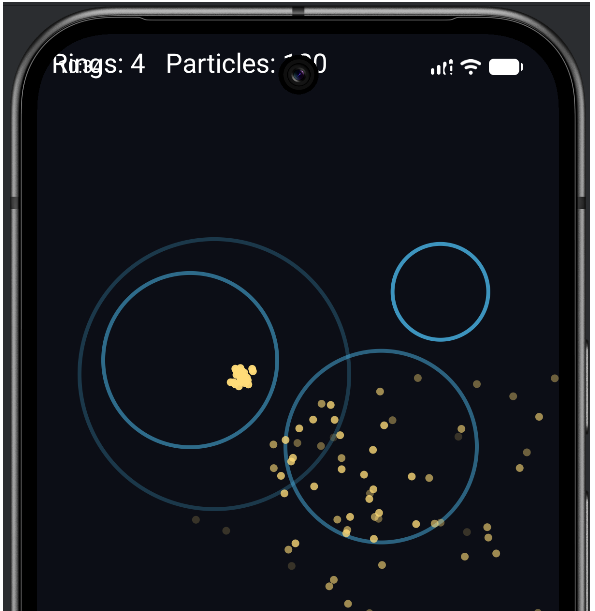
Understanding the Code
This project is small but it demonstrates a genuinely powerful idea. The behavior "burst into particles" is not hard-coded into the ring system at all. The ring system knows only how to expand, fade, and — when it finishes — run whatever callback it was given, if any. What that callback does is decided elsewhere, by whoever spawned the ring. The tap handler decides "this ring should burst." The ambient spawner decides "this ring should do nothing." The ring system itself stays simple and general.
That separation — an object carrying a piece of code to run when something happens to it — is the callback pattern, and it is everywhere: button clicks, animations finishing, downloads completing, timers firing. You just built one from scratch, and you now understand what is happening when a library asks you for a lambda "to run when X happens."
Two pieces of Chapter 14 made it work. The nullable lambda type (() -> Unit)? let some rings carry a callback and others carry nothing, and the safe call ?.invoke() ran the callback only when it actually existed. And the closure captured the tap location so the burst appeared in the right place, frames after the tap.
And once again, notice the cost: rings now span five parallel lists, particles span another five, and every spawn and removal has to touch every list in lockstep. Two whole systems, ten lists, all kept manually in step. It works, but it is past the point of comfort. This is the loudest the book has shouted that there must be a better way to say "all the data and behavior for one ring belongs together." That better way is the subject of the entire next act.
Experimenting
Tweak and see:
- Slower, bigger rings. Raise
ringStartLifeto90and lowerringGrowthto5f. The shockwaves become grand and stately. - Bigger bursts. Change the
24in the touch handler to80for an explosion of sparks on every tap. - Calmer or busier ambience. Change the
0.02inonDrawto0.005for rare ambient rings, or0.1for a constantly pulsing screen. - A different completion effect. Inside the tap lambda, try spawning another, smaller ring instead of (or as well as) particles:
spawnRing(x, y). Now a ring completes into a second ring — a callback that triggers more of the very thing it came from.
That last one is worth doing, because it shows how flexible callbacks are: the ring system did not change at all, yet you completely changed what happens when a ring ends, just by passing different code.
Summary
You closed out Act 2 by building a shockwave spawner driven by callbacks. You stored a piece of code — a lambda — inside each ring, to be run when the ring finished, and you used a nullable lambda type so that some rings carried a callback and others carried null. The safe call ?.invoke() ran each callback only when it truly existed, and a closure let the callback remember exactly where its tap happened. That is lambdas and nullability, the two ideas from Chapter 14, working together in a real effect.
You have now completed the entire core of Kotlin and built nine games and demos with it. But you have also felt, more sharply with every project, the strain of managing game objects as piles of parallel lists. That strain is not a failing of your code — it is the precise problem that object-oriented programming was invented to solve. Act 3 begins now, and its very first payoff will be rebuilding a particle swarm with a single, clean class instead of five lists. Turn the page.
AI Exercise (Optional)
Callbacks are a great thing to explore with an AI, because they unlock a flexible way of thinking that takes a moment to click. Optional as always.
Open your AI chatbot and paste in this prompt:
"I am learning Kotlin and building Android games with a custom Canvas View (no game engine). I have a function spawnRing(x: Float, y: Float, onComplete: (() -> Unit)? = null) that stores a ring and an optional callback lambda in parallel MutableLists. When a ring's life reaches zero I call ringOnComplete[i]?.invoke() and then remove it. I understand lambdas, the nullable type (() -> Unit)?, the safe call ?., default arguments, and closures. I have NOT learned about classes of my own yet. Explain, in plain language, exactly why I capture event.x and event.y into local variables before using them inside the callback lambda, instead of reading event.x directly inside the lambda. Then give me one more example of a callback being genuinely useful in a game, written with this same spawnRing-style approach."
This prompt zeroes in on the trickiest line in the whole project — the closure capturing the tap position — and asks the AI to explain why it matters. That "why" is the real test of whether you have understood closures.
When the answer comes back, check whether the AI correctly explains that the lambda runs later, when the event object may have changed, so we must capture the values at tap time. If its explanation is vague or it claims it makes no difference, push back — it does matter, and a confident wrong answer here is exactly the kind of thing you must learn to catch. Then look at its second callback example and ask yourself: could you have written that yourself? If not, ask it to walk through the example line by line.