
In the last chapter we learned to hold many values under one name. Now we are going to feel why that matters. We are going to fill the screen with particles — dozens, then hundreds of little glowing dots, each drifting under gravity, each fading away, each living and dying independently. And we are going to manage the whole swarm with lists and a single loop.
A particle system is one of the most satisfying things you can build, and it is everywhere in games: explosions, sparks, smoke, magic, dust, fire. The trick is always the same. Each particle is simple — a position, a velocity, a lifespan. The magic comes from having lots of them, all running the same simple rules at once. That is exactly the "many of the same thing" problem lists were made for.
There is one more thing this chapter quietly does, and it is deliberate. We are going to manage each particle's data using several lists side by side — one for x, one for y, one for velocity, and so on. It works beautifully, but by the end you may notice it feels a little unwieldy to keep five lists marching in step. Hold on to that feeling. In Act 3, when we learn about classes, we will look back at this exact code and clean it up dramatically. For now, lists are the perfect tool, and this is the perfect job for them.
In this chapter, we will:
- Set up a new project called Particle Swarm.
- Store every particle's state across a set of parallel lists.
- Spawn bursts of particles with random velocities.
- Update and draw the whole swarm in single loops.
- Safely remove particles once their life runs out.
- Make particles fade as they age.
- Run it, play with it, and break it on purpose to see the frame budget in action.
- Try an optional AI exercise to extend the swarm.
Let's make some sparks.
Code for this chapter: the complete project lives in the
Chapter 11folder of the accompanying code at github.com/EliteIntegrity/Learning-Kotlin-by-Building-Android-Games.
Setting Up the Project
The usual steps:
- Create a New Project, choosing Empty Views Activity.
- Name the application ParticleSwarm.
- Make sure the Language is Kotlin, and click Finish.
- Open
app > java > com.example.particleswarm > MainActivity.ktand delete the generated code.
Coding the Game
We will build this up in our usual order: the state, the spawning, the game loop, then touch.
The State: Parallel Lists
Type in the imports, the MainActivity, and the top of our view, where we declare the lists that hold the swarm:
package com.example.particleswarm

import android.content.Context
import android.graphics.Canvas
import android.graphics.Color
import android.graphics.Paint
import android.os.Bundle
import android.view.MotionEvent
import android.view.View
import androidx.appcompat.app.AppCompatActivity

class MainActivity : AppCompatActivity() {
    override fun onCreate(savedInstanceState: Bundle?) {
        super.onCreate(savedInstanceState)
        setContentView(ParticleSwarmView(this))
    }
}

class ParticleSwarmView(context: Context) : View(context) {

    private val paint = Paint()

    // Parallel lists: the data for particle number i is spread across all five.
    // particleX[i], particleY[i], particleVelX[i]... all describe the same particle.
    private val particleX = mutableListOf<Float>()
    private val particleY = mutableListOf<Float>()
    private val particleVelX = mutableListOf<Float>()
    private val particleVelY = mutableListOf<Float>()
    private val particleLife = mutableListOf<Int>()

    private val gravity = 0.3f
    private val startingLife = 120     // about two seconds at 60 frames per second

    // Position the first burst only once the screen size is known
    private var setupDone = false

    init {
        paint.isAntiAlias = true
    }
Here is the idea at the heart of this project. We have five MutableLists, and they work together as a team. There is no single "particle" object yet — instead, particle number i is described by reading the same index out of every list. Particle 0 is at particleX[0], particleY[0], moving at particleVelX[0], particleVelY[0], with particleLife[0] frames left to live. These are called parallel lists, because they all run in parallel, lined up index for index.
We start every list empty — mutableListOf<Float>() with nothing in it — and fill them as particles are born. The <Float> says each list holds decimal numbers (positions and velocities), except particleLife, which counts down whole frames and so holds Ints.
The two constants set the feel of the swarm. gravity is how much downward speed each particle gains every frame. startingLife is how many frames a new particle lives — 120 frames is about two seconds. And setupDone, as in our last few projects, lets us drop an opening burst exactly once, the first time we know the screen's size.
Spawning a Burst
Now the function that creates particles. Add it below the init block:
    // Add 'count' new particles, all starting at (x, y) with random velocities
    fun spawnBurst(x: Float, y: Float, count: Int) {
        for (i in 0 until count) {
            particleX.add(x)
            particleY.add(y)
            particleVelX.add((Math.random() * 30 - 15).toFloat())   // -15 to +15
            particleVelY.add((Math.random() * 30 - 20).toFloat())   // -20 to +10 (mostly upward)
            particleLife.add(startingLife)
        }
    }
spawnBurst takes three parameters: a position and how many particles to make. It runs a for loop count times, and on each pass it adds one new particle by appending a value to every list at once. This is the discipline parallel lists demand — whenever you add a particle, you must add to all five lists, or they fall out of step.
Every particle starts at the same spot (x, y), but with a random velocity, which is what makes a burst spray outward instead of moving as one blob. Look at Math.random() * 30 - 15. Math.random() gives a number from 0 up to 1. Multiply by 30 and you get 0 to 30. Subtract 15 and you get -15 to +15 — a random horizontal speed in either direction. The vertical version is shifted to favor upward motion (remember from Chapter 1 that negative Y is up), so the burst leaps up before gravity drags it back down.
The Game Loop
Now the familiar onDraw, kept slim by handing the real work to functions, just as we learned in Chapter 8:
    override fun onDraw(canvas: Canvas) {
        super.onDraw(canvas)

        if (!setupDone) {
            spawnBurst(width / 2f, height / 2f, 40)
            setupDone = true
        }

        // A near-black night sky
        canvas.drawColor(Color.rgb(10, 10, 20))

        update()
        drawParticles(canvas)
        drawCount(canvas)

        invalidate()
    }
The first time through, we spawn an opening burst of 40 particles in the center of the screen, so there is something to see the moment the app launches. After that, each frame clears to a near-black sky, updates the swarm, draws it, draws a particle counter, and loops.
Updating the Swarm — and Removing the Dead
Here is the most important function in the project, and the one with a genuinely new idea in it. Add update:
    fun update() {
        // Walk the lists BACKWARDS so removing a dead particle doesn't disturb
        // the indices we have not visited yet.
        for (i in particleX.indices.reversed()) {
            // Gravity pulls the particle down a little more each frame
            particleVelY[i] += gravity

            // Move the particle by its velocity
            particleX[i] += particleVelX[i]
            particleY[i] += particleVelY[i]

            // Age the particle
            particleLife[i] -= 1

            // When a particle's life runs out, remove it from every list
            if (particleLife[i] <= 0) {
                particleX.removeAt(i)
                particleY.removeAt(i)
                particleVelX.removeAt(i)
                particleVelY.removeAt(i)
                particleLife.removeAt(i)
            }
        }
    }
Most of this is the physics you already know. For each particle, gravity adds to its downward velocity, the velocity moves its position (the += from Chapter 2), and its life ticks down by one. When a particle's life reaches zero, we remove it — from all five lists, to keep them aligned.
But look closely at the loop itself: for (i in particleX.indices.reversed()). We are walking the lists backwards, from the last index down to the first. The .reversed() flips the range of indices around. Why on earth would we do that?
Because we are removing items while we loop. Picture walking forwards and removing the particle at index 3. Everything after it shifts down to fill the gap — what was at index 4 is now at index 3. But the loop has already moved on to index 4, so it skips the particle that just slid into 3. Removing while looping forwards makes you miss elements. Walking backwards sidesteps the problem entirely: when you remove the particle at index 3, only the indices above 3 shift, and you have already visited those. The indices still ahead of you — 2, 1, 0 — are undisturbed.
This "loop backwards when you might remove things" trick is one of the most useful patterns in all of game programming. You will reach for it any time you have a list of game objects that come and go — bullets, enemies, particles — and it is worth filing away firmly.
Drawing the Swarm
Two drawing functions remain. First the particles themselves:
    fun drawParticles(canvas: Canvas) {
        for (i in particleX.indices) {
            // Fade out as life runs down: alpha goes from 255 toward 0
            val alpha = particleLife[i] * 255 / startingLife
            paint.color = Color.rgb(255, 180, 40)
            paint.alpha = alpha
            canvas.drawCircle(particleX[i], particleY[i], 12f, paint)
        }
    }

    fun drawCount(canvas: Canvas) {
        paint.alpha = 255
        paint.color = Color.WHITE
        paint.textSize = 60f
        canvas.drawText("Particles: ${particleX.size}", 40f, 90f, paint)
    }
drawParticles walks the lists forwards this time — we are only reading, not removing, so a normal forward loop is fine. For each particle it works out an alpha (opacity) value from its remaining life. particleLife[i] * 255 / startingLife maps a full life (120) to fully opaque (255) and a spent life (0) to fully transparent (0), so each particle gently fades as it ages. We set the paint to a warm spark-orange, apply the fading alpha, and draw a small circle at the particle's position.
drawCount simply prints how many particles are currently alive, by reading particleX.size. Notice it resets paint.alpha back to 255 first — otherwise the text would inherit the faded alpha left over from the last particle we drew. Sharing one Paint object is efficient, but it does mean you occasionally have to reset a setting you changed earlier.
Handling Touch
Finally, let the player add to the swarm by touching the screen:
    override fun onTouchEvent(event: MotionEvent): Boolean {
        if (event.action == MotionEvent.ACTION_DOWN || event.action == MotionEvent.ACTION_MOVE) {
            spawnBurst(event.x, event.y, 8)
        }
        return true
    }
}
We spawn a small burst of 8 particles wherever the finger touches, on both the initial press (ACTION_DOWN) and as it drags (ACTION_MOVE). Because dragging fires ACTION_MOVE many times a second, sweeping your finger across the screen paints a continuous trail of sparks. The complete file is in this chapter's code folder.
Playing the Game
Hit the green Play button.
The moment the app launches, forty sparks burst from the center, arc upward, slow, and rain back down, fading as they fall. Then touch the screen. Tap anywhere for a little burst. Drag your finger and trail sparks behind it like a sparkler. Watch the particle counter at the top climb as you add more, and fall as the old ones fade away.
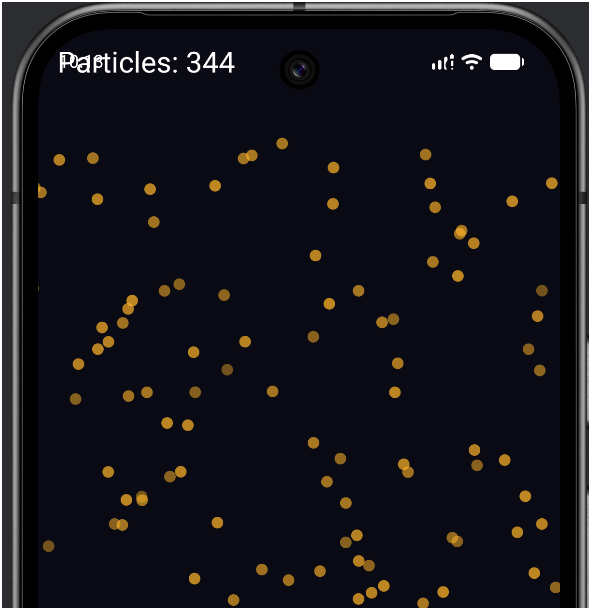
It is genuinely mesmerizing, and every single spark is just five numbers in five lists, updated by one loop.
Understanding the Code
The shape of this program is worth appreciating. There is no limit, anywhere, on how many particles we can have. The lists grow when we spawn and shrink when particles die, and the same two loops — one to update, one to draw — handle a swarm of five or five thousand without a single change. That is the entire promise of collections, delivered.
The new ideas were the parallel lists (each particle's data spread across several lists, kept in step by always adding to and removing from all of them together) and the backwards removal loop (walking from the last index to the first so that removing an element never makes us skip another). Everything else was a combination of things you already knew: the bouncing-ball physics from Chapter 3, the += math from Chapter 2, the functions from Chapter 8, and the list operations from Chapter 10.
And now, that promised honest moment. Notice how every time we touch a particle, we have to touch five lists. Spawn? Five .add() calls. Remove? Five .removeAt() calls. Forget one and the lists drift out of alignment and the whole thing breaks. It works, and for a swarm of identical sparks it is perfectly fine — but you can imagine how this would become a nightmare if each particle also had a size, a color, a spin, and a type. There is clearly a better way to say "all the data for one particle belongs together." That better way is a class, and it is the centerpiece of Act 3. When we get there, we will rebuild this very swarm and you will see the improvement for yourself.
Experimenting
Tweak and see. Each of these is a small change.
- More gravity, less gravity. Change
gravityfrom0.3fto1.0ffor heavy sparks that fall fast, or0.05ffor a slow, floaty swarm. - Longer-lived particles. Bump
startingLifeto300. The sparks linger for five seconds, and the screen fills up. - Bigger bursts. Change the touch burst from
8to40. Dragging now throws out huge showers. - Different colors. Change
Color.rgb(255, 180, 40)toColor.rgb(120, 200, 255)for icy blue sparks. - Break it on purpose. Crank the touch burst up to
200and drag your finger all over the screen. Watch the particle counter rocket into the thousands — and watch the animation start to stutter. That stutter is the sixteen-millisecond frame budget from Chapter 6, hit at last. There is a real limit to how many circles a phone can draw per frame, and you have just found it. This is not a bug; it is a fundamental constraint of games, and seeing it firsthand is worth more than any amount of warning.
Summary
You have built a particle system — a living swarm of independent objects, spawned, updated, faded, and removed entirely through lists. You used parallel lists to hold each particle's state, a single loop to update them all, the backwards-removal trick to delete the dead safely, and alpha to make them fade. You also watched, with your own eyes, the frame budget push back when the swarm got too large.
Most importantly, you have felt both the power and the awkwardness of parallel lists: the power to manage hundreds of things at once, and the nagging awkwardness of keeping five lists perfectly in step. That tension is not a flaw in your code — it is the exact problem that object-oriented programming was invented to solve, and remembering it now will make Act 3 click into place.
In the next chapter we add two more collections to our toolkit: sets, which enforce uniqueness, and maps, which pair keys with values. With maps in hand, we will be ready to build the Level Grid — a real tile-based game world.
AI Exercise (Optional)
A particle system is a wonderful playground for a vibe-coding experiment. The rules are relaxed: if your idea works, brilliant; if not, you have lost nothing. The author's own version lives in the code repository for the curious, but yours will differ — that is the whole point.
Open your AI chatbot and try a prompt like this:
"I have a Kotlin Android particle system built with a custom Canvas View (no game engine). Each particle's state lives across five parallel MutableLists: particleX, particleY, particleVelX, particleVelY, and particleLife. I spawn bursts with random velocities, apply gravity, fade particles with alpha as their life runs down, and remove dead ones by looping backwards and calling removeAt on all five lists. I'm a beginner: I know variables, if/when, loops, functions, arrays, and lists, but I have NOT learned about classes of my own, lambdas, or maps yet. Without using any of those, show me how to make each particle bounce off the bottom of the screen instead of just falling away, losing a bit of speed with each bounce. Paste the full update() function so I can compare, and comment each new line."
Notice the constraint that forbids classes and lambdas — exactly the tools the AI would otherwise reach for, and exactly the tools you have not learned yet. Keeping the AI inside your current toolkit is what keeps its code readable to you.
When the answer comes back, find the bounce logic and trace it against the bouncing-ball code from Chapter 3 — it is the same idea (reverse the velocity at the edge), now applied to every particle in a list. Does the AI remember to reduce the speed on each bounce so the particles eventually settle? If a line confuses you, paste it back and ask for a plain-English explanation. You are the boss.