
This is the project Act 1 has been building toward. Everything from Chapters 2, 4, 6, and 8 — variables, flow control, loops, and functions — gets put to work in one small, complete game. A player ship that flies around the screen. A laser you can fire. A wave of incoming enemies you have to dodge or shoot. A score that ticks up. Three lives. A game-over screen with the option to restart. Nothing extravagant. Just a proper little game, written with a structure that won't fall apart when we add more features later.
The thing that's really new in this chapter is structure. Up until now, every project has piled all its code into main. That worked fine for a single bouncing ball or a single invader, but it stops being fun fast as the number of things on screen grows. This chapter is where we start writing code that's organized — every concern its own function, every function with a clear name and a tight job. The result is more code than we've written before, but somehow less to read at any given moment.
Project folder:
SDL3 Projects/Act 1 Capstone Shooter— the complete source for this chapter lives here. A richer asset-driven version of the same architecture (sprite textures, fonts, sound effects) sits in the siblingSDL3 Projects/Pre OOP Gamefolder for readers who want to see how the same code feels with real art. We'll cover the SDL add-on libraries it depends on later in the book.
In this chapter, we will:
- Set up the project as usual
- Define small
structs for the player, lasers, and aliens - Use fixed-size arrays to hold pools of lasers and aliens
- Write helper functions for collision detection, spawning, and updating
- Use reference parameters to let functions modify their callers' data
- Use a
resetGamefunction to wire up a "press R to play again" loop - Play the result, then try a couple of experiments
- Try an optional AI exercise
This is the longest project in the book so far. Take it in passes — read the whole chapter quickly, then come back and type it out section by section.
Setting Up the Project
You know the steps. Empty project, named ActOneShooter. Add a main.cpp. SDL include and library paths, SDL3.lib in the dependencies, Windows subsystem, SDL3.dll copied into x64\Debug. Chapter 1 has the full walkthrough if you need it.
The Shape of the Program
Before we start typing, let's sketch what we're building.
The game has three kinds of object: the player ship (one), a laser pool (up to three lasers in flight at a time), and an alien pool (up to twelve aliens on screen at a time). Each object is described by a struct — the simple data-bundling tool we met in Chapter 2.
The game also has a few game-wide variables that don't belong to any one object: the score, the high score, and a bool gameOver flag. Those live as plain variables inside main.
The game logic is split into functions. Each function does one well-named thing: spawn an alien, check whether two rectangles overlap, reset the game when the player presses R. The main function becomes a thin orchestrator — it sets up SDL, declares the data, then runs a loop that calls the right functions at the right time.
That's the whole architecture. Let's build it.
Coding the Game
Open main.cpp and start with the usual headers and constants.
Includes and Constants
#include <SDL3/SDL.h>
#include <SDL3/SDL_main.h>
#include <cstdlib>   // rand(), srand()
#include <ctime>     // time()

// Window
const int SCREEN_W = 1024;
const int SCREEN_H = 600;

// Speeds (pixels per frame)
const float PLAYER_SPEED   = 5.0f;
const float LASER_SPEED    = 12.0f;
const float ALIEN_MIN_SPD  = 2.0f;
const float ALIEN_MAX_SPD  = 5.0f;

// Pool sizes
const int MAX_LASERS = 3;
const int MAX_ALIENS = 12;

// Scoring
const int START_LIVES    = 3;
const int POINTS_PER_HIT = 10;
In the preceding code, the usual SDL includes plus two standard-library headers: <cstdlib> for the random number functions and <ctime> for the clock we'll use to seed the random number generator. The constants describe the window, the speeds in pixels per frame (we're using SDL_Delay(16) for a rough 60 FPS again, as in Chapter 5), the maximum number of lasers and aliens we'll allow on screen at once, and the scoring rules.
The Structs
struct Player
{
    float x, y;
    float w, h;
    int   lives;
};

struct Laser
{
    float x, y;
    bool  active;
};

struct Alien
{
    float x, y;
    float w, h;
    float speed;
    bool  active;
};
In the preceding code, three structs — one per kind of object. The player has a position, a size, and a lives counter. A laser has a position and an active flag (because we're using a fixed pool — some slots will be in use, some won't). An alien has a position, a size, a speed, and the same kind of active flag.
The active pattern is worth flagging. We met it briefly in Chapter 5 with the single bulletActive flag in Square Invader. Here we're scaling that idea up: instead of dynamically creating and destroying lasers and aliens (which would need pointers and dynamic memory — Chapter 10 onward), we declare a fixed pool and toggle active on and off as slots are used. When active is false, the slot is empty and available. When it's true, the slot is in use. This is called a pool or object pool and it's a perfectly good pattern for games where there's a sensible upper limit on the number of things on screen.
A Quick Word on the Arrays Coming Up
In a moment we're going to declare our laser and alien pools as C-style arrays:
Laser lasers[MAX_LASERS];
Alien aliens[MAX_ALIENS];
We'll cover arrays properly in Chapter 12. For now, treat Laser lasers[MAX_LASERS] as "give me a block of MAX_LASERS lasers under one name", with lasers[0], lasers[1], and lasers[2] as the individual ones. We met the bracket notation already in Chapter 7's color list — same idea, different scale.
You'll also see arrays as function parameters in a moment, written as Laser lasers[]. That syntax means "this function receives our array of lasers and can read or write any element of it." Functions and arrays interact in a slightly surprising way that Chapter 12 will explain — for now, just read Laser lasers[] as "the lasers array" and you'll be fine.
Our First Helper Functions
This is the first project where we get to write functions, not just call SDL's ones. We'll start with two small ones.
// Random float between lo and hi.
float randFloat(float lo, float hi)
{
    float t = (float)rand() / (float)RAND_MAX;
    return lo + t * (hi - lo);
}

// Do two axis-aligned rectangles overlap?
bool rectsOverlap(float ax, float ay, float aw, float ah,
                  float bx, float by, float bw, float bh)
{
    return ax < bx + bw && ax + aw > bx &&
           ay < by + bh && ay + ah > by;
}
In the preceding code, two small, pure utility functions. randFloat returns a random float between two bounds. The math takes rand() (which returns a whole number between 0 and RAND_MAX), divides it by RAND_MAX to get a value between 0.0 and 1.0, and then scales that into our chosen range. rectsOverlap takes the position and size of two rectangles and returns a bool saying whether they overlap, using the same axis-aligned-bounding-box logic we wrote inline in Chapter 5 — just lifted out into a function so we never have to write it twice.
Notice how readable the caller will be. Instead of half a screen of overlap math next to every collision check, we'll just write if (rectsOverlap(...)). The math is hidden behind a clear name. That's the entire point of functions.
Spawning an Alien
// Place an alien just off the right edge at a random height and speed.
void spawnAlien(Alien& a)
{
    a.w     = 48.0f;
    a.h     = 48.0f;
    a.x     = (float)SCREEN_W + randFloat(0.0f, 200.0f);  // stagger spawns
    a.y     = randFloat(0.0f, (float)SCREEN_H - a.h);
    a.speed = randFloat(ALIEN_MIN_SPD, ALIEN_MAX_SPD);
    a.active = true;
}
In the preceding code, spawnAlien is our first function with a reference parameter. We met references in Chapter 8 — the & after the type means "take the actual Alien the caller has, not a copy." If we'd written void spawnAlien(Alien a) without the &, the function would modify a local copy and the original would stay unchanged. With the &, every assignment inside the function reaches through to the caller's data.
The function picks random values for size, position, and speed. The X position is set just off the right edge plus a random extra offset, so all the aliens don't appear at exactly the same X coordinate. The Y position is random within the visible vertical space. The active flag gets flipped on, marking this slot as in use.
Resetting the Game
// Reset everything back to a fresh game.
void resetGame(Player& p, Laser lasers[], Alien aliens[], int& score)
{
    p.w     = 64.0f;
    p.h     = 48.0f;
    p.x     = 40.0f;
    p.y     = (SCREEN_H - p.h) * 0.5f;
    p.lives = START_LIVES;

    for (int i = 0; i < MAX_LASERS; ++i) lasers[i].active = false;
    for (int i = 0; i < MAX_ALIENS; ++i) aliens[i].active = false;

    score = 0;
}
In the preceding code, resetGame puts everything back to a starting state. The player is sized, centered vertically near the left edge, and given a fresh stash of lives. Every laser and every alien gets marked inactive — gone from play. The score is set back to zero.
A few new things to notice. The parameter list has four parameters: a reference to a Player, the lasers array, the aliens array, and a reference to an int for the score. The Player& and int& use references for the same reason spawnAlien did — we want the function to write through to the caller's data, not into a local copy.
The arrays are passed without &. That's because of an odd quirk of C++ that Chapter 12 will explain: when an array is passed to a function, it's already passed by reference effectively. Writing Laser lasers[] (or, equivalently, Laser* lasers) lets the function reach into the caller's array and modify it. So when the loop sets lasers[i].active = false, it's flipping flags on the caller's actual lasers, not on a copy.
Inside, two short for loops sweep through the pools and clear the active flags. We met for loops in Chapter 6. The loop reads as plain English: "for i from 0 up to MAX_LASERS, set lasers[i].active to false."
main and SDL Setup
Now into main. The setup is familiar:
int main(int argc, char* argv[])
{
    if (!SDL_Init(SDL_INIT_VIDEO))
    {
        SDL_Log("SDL_Init failed: %s", SDL_GetError());
        return 1;
    }

    SDL_Window* window = SDL_CreateWindow("Act 1 Shooter", SCREEN_W, SCREEN_H, 0);
    if (!window)
    {
        SDL_Log("SDL_CreateWindow failed: %s", SDL_GetError());
        SDL_Quit();
        return 1;
    }

    SDL_Renderer* renderer = SDL_CreateRenderer(window, nullptr);
    if (!renderer)
    {
        SDL_Log("SDL_CreateRenderer failed: %s", SDL_GetError());
        SDL_DestroyWindow(window);
        SDL_Quit();
        return 1;
    }

    srand((unsigned)time(nullptr));
In the preceding code, the standard SDL bring-up, plus one extra line: srand((unsigned)time(nullptr));. This seeds the random number generator. rand() doesn't actually produce random numbers — it produces a fixed sequence based on a starting "seed". Calling srand with the current time once at startup means we get a different sequence every run.
Declaring the Game's Data
    Player player;
    Laser  lasers[MAX_LASERS];
    Alien  aliens[MAX_ALIENS];
    int    score     = 0;
    int    highScore = 0;
    bool   gameOver  = false;

    resetGame(player, lasers, aliens, score);

    bool spaceWasDown = false;  // used to fire only on the rising edge
In the preceding code, we declare the player, the laser pool, the alien pool, and the three game-wide state variables. We then call our own resetGame function — our first call to a function we wrote ourselves — to put everything into a fresh starting state. The arrays are passed by name and the function reaches in and modifies them, exactly as the function definition promised.
The spaceWasDown bool is a small trick for "fire on rising edge". If we just checked keys[SDL_SCANCODE_SPACE] every frame, holding space would fire a new laser every single frame and instantly fill the pool. By remembering whether space was down on the previous frame, we can detect the moment it goes from up to down and fire exactly once.
The Game Loop
    bool running = true;

    while (running)
    {
        SDL_Event event;
        while (SDL_PollEvent(&event))
        {
            if (event.type == SDL_EVENT_QUIT)
                running = false;

            if (event.type == SDL_EVENT_KEY_DOWN)
            {
                if (event.key.key == SDLK_ESCAPE)
                    running = false;

                // Press R to restart when game is over
                if (gameOver && event.key.key == SDLK_R)
                {
                    resetGame(player, lasers, aliens, score);
                    gameOver = false;
                }
            }
        }
In the preceding code, the now-familiar event-poll loop. The only new thing is the restart key: when gameOver is true and the player presses R, we call resetGame again and clear the gameOver flag. The function we wrote earlier now does double duty — it's used both at startup and on every restart. That's reuse, and it's one of the main reasons we write functions in the first place.
Updating the Player and Firing
        const bool* keys = SDL_GetKeyboardState(nullptr);

        if (!gameOver)
        {
            // WASD movement
            if (keys[SDL_SCANCODE_W]) player.y -= PLAYER_SPEED;
            if (keys[SDL_SCANCODE_S]) player.y += PLAYER_SPEED;
            if (keys[SDL_SCANCODE_A]) player.x -= PLAYER_SPEED;
            if (keys[SDL_SCANCODE_D]) player.x += PLAYER_SPEED;

            // Clamp the player to the screen
            if (player.x < 0)                       player.x = 0;
            if (player.y < 0)                       player.y = 0;
            if (player.x + player.w > SCREEN_W)     player.x = SCREEN_W - player.w;
            if (player.y + player.h > SCREEN_H)     player.y = SCREEN_H - player.h;

            // Fire on the rising edge of SPACE
            bool spaceDown = keys[SDL_SCANCODE_SPACE];
            if (spaceDown && !spaceWasDown)
            {
                for (int i = 0; i < MAX_LASERS; ++i)
                {
                    if (!lasers[i].active)
                    {
                        lasers[i].active = true;
                        lasers[i].x = player.x + player.w;
                        lasers[i].y = player.y + player.h * 0.5f;
                        break;
                    }
                }
            }
            spaceWasDown = spaceDown;
In the preceding code, all of the player's per-frame work. WASD moves the ship. The four clamp ifs keep it on the screen. Then comes the firing logic.
The rising-edge pattern is in the line if (spaceDown && !spaceWasDown). That's "space is held down right now, and it wasn't down on the previous frame" — true for exactly one frame each time the player presses space. The && and ! are from Chapter 4.
Inside the firing block, a for loop hunts for the first inactive laser slot. As soon as it finds one, it activates it, positions it at the nose of the ship, and breaks out of the loop — we only want to fire one laser per press, not fill every empty slot at once. If all three slots are already in use, the loop runs through and the break never happens. That's fine — it means the player has fired three lasers in flight already, and the next one will have to wait.
The last line, spaceWasDown = spaceDown;, remembers the current state for next frame's edge check.
Updating the Lasers
            // Move every active laser
            for (int i = 0; i < MAX_LASERS; ++i)
            {
                if (!lasers[i].active) continue;

                lasers[i].x += LASER_SPEED;

                if (lasers[i].x > SCREEN_W)
                    lasers[i].active = false;
            }
In the preceding code, a single for loop sweeps through the laser pool. For each slot, if it's inactive, we skip ahead with continue (Chapter 6). For each active laser, we add LASER_SPEED to its X position, then check whether it has flown off the right edge — if so, mark it inactive so the slot becomes available again.
This is the pattern you'll write for every pool of objects in a game: iterate, skip the inactive, process the active, retire any that should disappear.
Spawning and Updating the Aliens
            // Each frame, try to top up the alien pool by spawning one
            // into the first inactive slot we can find.
            for (int i = 0; i < MAX_ALIENS; ++i)
            {
                if (!aliens[i].active)
                {
                    spawnAlien(aliens[i]);
                    break;
                }
            }

            // Move every active alien left
            for (int i = 0; i < MAX_ALIENS; ++i)
            {
                if (!aliens[i].active) continue;

                aliens[i].x -= aliens[i].speed;

                if (aliens[i].x + aliens[i].w < 0)
                    aliens[i].active = false;
            }
In the preceding code, the spawn loop hunts for the first inactive alien slot and calls spawnAlien on it, then breaks. Because we do this every frame, the pool quickly fills up and stays full — whenever an alien dies or wanders off the left edge, the next frame fills the slot again.
The movement loop is structurally identical to the laser one. Iterate, skip inactive, otherwise move and retire if off-screen.
Collision: Lasers vs Aliens
            // Check every active laser against every active alien
            for (int i = 0; i < MAX_LASERS; ++i)
            {
                if (!lasers[i].active) continue;

                float lw = 16.0f;   // visible length of the laser beam
                float lh = 2.0f;
                float lx = lasers[i].x - lw;
                float ly = lasers[i].y - 1.0f;

                for (int j = 0; j < MAX_ALIENS; ++j)
                {
                    if (!aliens[j].active) continue;

                    if (rectsOverlap(lx, ly, lw, lh,
                                     aliens[j].x, aliens[j].y,
                                     aliens[j].w, aliens[j].h))
                    {
                        aliens[j].active = false;
                        lasers[i].active = false;
                        score += POINTS_PER_HIT;
                        break;  // this laser is done; move to the next one
                    }
                }
            }
In the preceding code, our first nested loop. The outer loop walks the laser pool. For each active laser, the inner loop walks the alien pool. For each active alien, we call our rectsOverlap helper — and there it is, the payoff of writing that function: one line for a check that would otherwise be eight.
If there's a hit, we deactivate both the alien and the laser, add the points to the score, and break out of the inner loop (this laser is gone, no point checking it against the rest of the aliens). We covered nested loops briefly in Chapter 6's performance section — for our small pool sizes (three lasers, twelve aliens) we're doing at most 36 checks per frame, which is nothing.
Collision: Player vs Aliens
            // Check every active alien against the player
            for (int j = 0; j < MAX_ALIENS; ++j)
            {
                if (!aliens[j].active) continue;

                if (rectsOverlap(player.x, player.y, player.w, player.h,
                                 aliens[j].x, aliens[j].y,
                                 aliens[j].w, aliens[j].h))
                {
                    aliens[j].active = false;
                    player.lives -= 1;

                    if (player.lives <= 0)
                    {
                        gameOver = true;
                        if (score > highScore)
                            highScore = score;
                    }
                }
            }
        }   // end of   if (!gameOver)
In the preceding code, the second collision loop, this time player-vs-aliens. Same helper, same pattern. On a hit, the alien is deactivated and the player loses a life. If lives have run out, the game-over flag is set, and if the score beat the previous high score, we record it.
The closing } ends the big if (!gameOver) block from earlier. Everything from the player movement down to here only runs while the game is in play.
Rendering
        // Background — darker red when game is over
        if (gameOver)
            SDL_SetRenderDrawColor(renderer, 60, 0, 0, 255);
        else
            SDL_SetRenderDrawColor(renderer, 10, 10, 30, 255);
        SDL_RenderClear(renderer);

        // Player — green (dimmed when game over)
        int green = gameOver ? 80 : 200;
        SDL_SetRenderDrawColor(renderer, 0, green, 0, 255);
        SDL_FRect playerRect = { player.x, player.y, player.w, player.h };
        SDL_RenderFillRect(renderer, &playerRect);

        // Lasers — bright green lines
        SDL_SetRenderDrawColor(renderer, 80, 255, 80, 255);
        for (int i = 0; i < MAX_LASERS; ++i)
        {
            if (!lasers[i].active) continue;
            SDL_RenderLine(renderer,
                           lasers[i].x - 16.0f, lasers[i].y,
                           lasers[i].x,         lasers[i].y);
        }

        // Aliens — red rectangles
        SDL_SetRenderDrawColor(renderer, 220, 60, 60, 255);
        for (int i = 0; i < MAX_ALIENS; ++i)
        {
            if (!aliens[i].active) continue;
            SDL_FRect r = { aliens[i].x, aliens[i].y, aliens[i].w, aliens[i].h };
            SDL_RenderFillRect(renderer, &r);
        }

        SDL_RenderPresent(renderer);
        SDL_Delay(16);
    }   // end of main while loop
In the preceding code, the render pass. The background color flips between dark blue and dark red depending on whether the game is over (using the same screen-tinting trick from Chapter 5). The player is drawn as a green rectangle, dimmed when the game's over. Each laser is drawn as a short bright-green line using SDL_RenderLine, which is new to us — exactly what it sounds like, draws a line between two points. The aliens are red rectangles.
A for loop is doing the heavy lifting for each pool. By the time we render the aliens, we've used a for loop in seven different places in this program — collision checks, updates, spawns, draws. Loops aren't a feature anymore; they're scaffolding.
Logging the Final Score and Cleaning Up
    SDL_Log("Game ended. Score: %d  High score: %d", score, highScore);

    SDL_DestroyRenderer(renderer);
    SDL_DestroyWindow(window);
    SDL_Quit();
    return 0;
}
We log the final score so you can see it in Visual Studio's Output window, then tidy up SDL. Done.
The Whole Program
The full program is longer than anything we've written before — somewhere over 200 lines. Rather than printing it all here, I'll refer you to the book's code repository for a complete, ready-to-build copy. You should have everything you need from the walkthrough above to assemble your own. Make sure your file is laid out in this order:
#includes and constants- The three
structdefinitions - The four helper functions (
randFloat,rectsOverlap,spawnAlien,resetGame) main
That ordering matters. In C++, a function has to be declared (or fully defined) before any line of code that calls it. Putting all our helper functions above main means main can call any of them freely. There are ways to call a function defined below — using a forward declaration at the top of the file — but for a single-file project like this one, the simplest thing is to put the helpers first.
Playing the Game
Hit F5. The window opens. You're the green ship on the left. Aliens (red rectangles) come at you from the right at randomized speeds. Use WASD to dodge. Tap Space to fire a green laser beam. Each alien you shoot is worth ten points; each one that hits you costs a life.
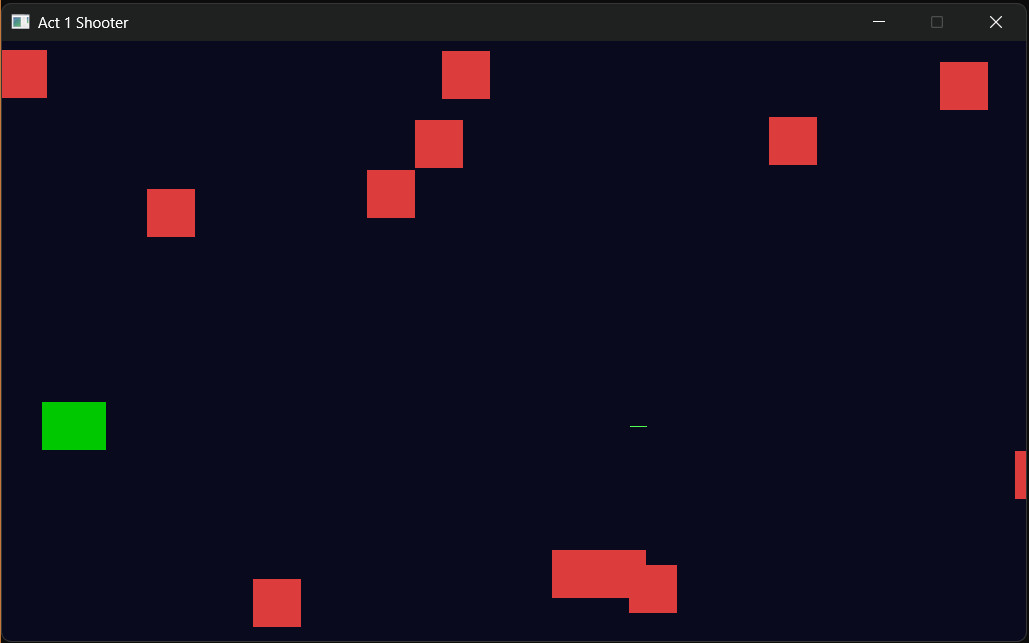
Three hits and it's game over — the screen tints red. Press R to restart with a fresh wave. Press Escape (or close the window) when you've had enough. The Output window in Visual Studio will report your final score and best score.
Understanding the Code
This is the first program in the book where the shape of the code is genuinely interesting, separate from what it does. Look at the file from a height.
The four helper functions at the top each do one well-named thing. randFloat produces a random number in a range. rectsOverlap answers a yes/no geometry question. spawnAlien resets one alien slot to a fresh starting state. resetGame resets everything back to a blank game. None of them know anything about SDL events or the game loop. They're little tools.
Then main is the conductor. It sets up SDL, declares the game's data, and runs a loop that uses the tools — calling rectsOverlap for collisions, calling spawnAlien to top up the pool, calling resetGame on startup and on restart. Without those functions, main would be twice as long and three times harder to read.
This is what good code organization looks like. Each function has a single, named job. The caller doesn't need to know how it works, only what it does. When you come back to this code in a month, you'll be able to skim main and see the game's whole structure at a glance, even if the math inside rectsOverlap has slipped your mind.
You can also see the pool pattern in action. Lasers and aliens both follow the same shape: a fixed-size pool, an active flag per slot, loops that skip inactive slots, and a spawn step that finds the first empty slot and uses it. That pattern repeats four times in the code (laser update, alien spawn, alien update, both collision checks) and the more you see it, the more obvious it becomes. Once we have vectors in Chapter 12 we'll be able to write this more flexibly, but the pool is a perfectly real technique that still gets used in real games where predictable memory usage matters.
The thing to take from this chapter is not the specific game. It's the experience of writing code in layers — small functions doing focused work, main calling them in the right order, and the whole thing being easier to read than it would have been all jammed together.
Experimenting
A few tweaks worth trying:
MAX_ALIENS = 30— the screen fills up much more aggressively.ALIEN_MIN_SPD = 1.0f,ALIEN_MAX_SPD = 2.0f— slower, easier waves.LASER_SPEED = 6.0f— slower lasers; aim becomes harder.MAX_LASERS = 1— single-shot only, like Square Invader. The game gets much harder.- Add a small function of your own — say,
bool playerIsAlive(const Player& p) { return p.lives > 0; }— and use it in place ofif (!gameOver). Practice the act of pulling a small idea out into its own named function.
Each of those tweaks teaches you something — either about gameplay or about the value of having every dial as a named constant.
Common Errors and Fixes
"undeclared identifier 'rectsOverlap'" — Your function is defined below main instead of above it. Either move the definition up, or add a forward declaration at the top of the file: bool rectsOverlap(float, float, float, float, float, float, float, float);.
Lasers fire continuously when you hold space — The rising-edge logic is broken. Check that spaceWasDown is being updated at the end of the firing block. Without the update, every frame thinks it's the first frame the space key was pressed.
Restart doesn't work — Probably the gameOver && event.key.key == SDLK_R condition is wrong, or resetGame is being called but gameOver is never set back to false. Step through with the debugger.
Aliens never spawn — Either resetGame isn't being called (so all 12 slots start as random rubbish — active could be true by coincidence on some compilers, false on others) or the spawn loop is wrong. Set a breakpoint at the top of spawnAlien and check it gets hit.
The game crashes after a while — Almost certainly an out-of-bounds array access. Look for any place you wrote lasers[3] (should be lasers[i] with i < MAX_LASERS) or any loop where i goes past MAX_LASERS - 1. The debugger will land you on the bad line.
AI Exercise (Optional)
If you want to take this further with AI help, here's a vibe-coding challenge that genuinely stretches what we've covered. Skip if you'd rather not.
Open your AI chatbot of choice and try a prompt like this:
"I have a small C++ SDL 3 game with a player, a pool of 3 lasers, and a pool of 12 aliens. The code uses structs and helper functions (no classes, no smart pointers, no STL containers beyond fixed-size arrays). I have learned: variables, flow control, loops, and functions. I have not learned classes, inheritance, vectors, or pointers. Add a new feature: when the player has shot 5 aliens in a row without being hit, the next alien they shoot should be worth 50 points instead of 10, and the message 'COMBO!' should print to the SDL log. Use only the C++ features I have. Paste the full program back so I can see every change in context."
Notice the structure of that prompt. It explains what you have, what you don't have, and what you want. It asks for the whole program back, not a snippet. And it picks a feature that's a real design exercise — you need a counter, you need to reset it on a hit, you need to detect the bonus moment.
When the AI replies, scan it for sneaky upgrades. Did it slip a std::vector into your nice fixed-size pool? Did it try to introduce a class? If yes: "Please stick to the constraints — I haven't learned that yet. Try again." Make the AI work within your bubble of understanding. That's the whole skill.
The book's repository has my version of this exercise if you want to compare, but yours will be different. As ever, that's the point.
Summary
You've built the most complete program in the book so far, and — more importantly — you've built it with the shape of a real program. Helper functions at the top. Structs to bundle data. A main that orchestrates the loop and calls into the helpers. This is what every real game's source code looks like, just with more of everything: more structs, more functions, more files, more loops. The pattern doesn't change.
This is the end of Act 1. From here on we move into Act 2, where we'll get serious about how data is stored and managed. The first chapter of Act 2 is pointers — the C++ feature that lets us reach into memory directly. With pointers, dynamic memory, and the standard library's collection types coming up shortly after, we'll finally be able to lift the lid on the artificial pool sizes in this chapter and let our games genuinely scale. Take a moment before turning the page. Act 1 was a lot, and you've made it through.