
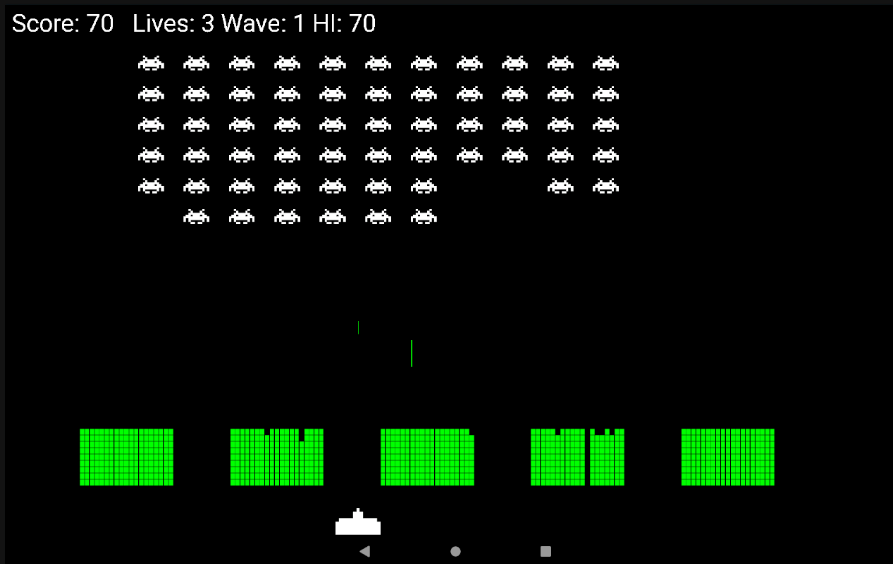
Space Invaders arrived in arcades in 1978 and changed everything. Before it, arcade games were single-screen diversions. Space Invaders was the first game where the enemies actively fought back, where the tension built as the invaders descended, and where destroying them all only meant a faster, angrier wave replaced them. It was the first game with a high score table that saved between plays. The queues outside arcades in Japan were long enough that the game briefly caused a national shortage of 100-yen coins.
It's also the perfect project for learning Android game development. The rules are clear, the objects are well-defined, and the code is big enough to teach real structure without being so big that it becomes overwhelming. By the time you finish this tutorial you'll have a working Space Invaders clone with sprite animation, destructible shelters, a wave-progression system, sound effects, and a persistent high score — all built on Android's SurfaceView and Canvas API in Kotlin.
The project is split across seven classes:
- KotlinInvadersActivity — entry point, screen measurement, lifecycle management
- KotlinInvadersView — the game engine: loop, update, draw, input
- PlayerShip — the player's vessel, its bitmap, and its movement
- Invader — one enemy unit, its two animation frames, movement, and AI firing
- DefenceBrick — a single brick in a destructible shelter
- Bullet — a projectile, used for both the player's shot and the invader swarm's shots
- SoundPlayer — loads and plays all six sound effects
Project Assets
The game needs three PNG images — the player's ship and two animation frames for the invaders. Right-click each image below and save it, then drop them into app/src/main/res/drawable in your project.

playership.png

invader1.png

invader2.png
For sound effects you'll need six .ogg files: shoot.ogg, invaderexplode.ogg, playerexplode.ogg, damageshelter.ogg, uh.ogg, and oh.ogg. Short, punchy sounds work best — freesound.org has plenty of royalty-free options. Place them in app/src/main/assets.
Project Setup
Creating the Project
Open Android Studio and choose New Project → Empty Views Activity. Set the language to Kotlin and the minimum SDK to API 21 (Android 5.0). Rename the generated MainActivity to KotlinInvadersActivity via Refactor → Rename — Android Studio updates the manifest entry automatically.
Adding the Drawable Assets
The game uses three bitmap images for the player ship and the two invader animation frames. Place these PNG files into app/src/main/res/drawable:
playership.png— the player's spaceshipinvader1.png— first animation frame of the invaderinvader2.png— second animation frame of the invader

Adding the Sound Assets
Right-click the main folder in the Project pane and choose New → Folder → Assets Folder. Add these six .ogg files into app/src/main/assets:
shoot.ogg— player firesinvaderexplode.ogg— invader destroyedplayerexplode.ogg— player hitdamageshelter.ogg— shelter brick destroyeduh.ogg— first beat of the menace rhythmoh.ogg— second beat of the menace rhythm
Configuring the Manifest
Open AndroidManifest.xml and add two attributes to the <activity> element:
<activity
    android:name=".KotlinInvadersActivity"
    android:theme="@android:style/Theme.NoTitleBar.Fullscreen"
    android:screenOrientation="landscape"
    android:exported="true">
    ...
</activity>
Note:
Theme.NoTitleBar.Fullscreenrequires the activity to extendandroid.app.Activity, notAppCompatActivity. Check your class declaration if you get a theme-related crash at startup.
KotlinInvadersActivity
The activity is deliberately thin. It measures the display, creates the game view, and handles the two lifecycle events that matter:
package com.gamecodeschool.kotlininvaders

import android.app.Activity
import android.graphics.Point
import android.os.Bundle

class KotlinInvadersActivity : Activity() {

    private var kotlinInvadersView: KotlinInvadersView? = null

    override fun onCreate(savedInstanceState: Bundle?) {
        super.onCreate(savedInstanceState)

        val display = windowManager.defaultDisplay
        val size = Point()
        display.getSize(size)

        kotlinInvadersView = KotlinInvadersView(this, size)
        setContentView(kotlinInvadersView)
    }

    override fun onResume() {
        super.onResume()
        kotlinInvadersView?.resume()
    }

    override fun onPause() {
        super.onPause()
        kotlinInvadersView?.pause()
    }
}
onCreate reads the display resolution into a Point and hands it to KotlinInvadersView. Because KotlinInvadersView extends SurfaceView, it can be passed directly to setContentView to fill the screen. onResume and onPause delegate straight to the view — they start and stop the game thread in step with the activity lifecycle.
PlayerShip
The player's ship manages its own bitmap, dimensions, position, and movement state:
package com.gamecodeschool.kotlininvaders

import android.content.Context
import android.graphics.Bitmap
import android.graphics.BitmapFactory
import android.graphics.RectF

class PlayerShip(context: Context,
                 private val screenX: Int,
                 screenY: Int) {

    var bitmap: Bitmap = BitmapFactory.decodeResource(
            context.resources, R.drawable.playership)

    val width = screenX / 20f
    private val height = screenY / 20f

    val position = RectF(
            screenX / 2f,
            screenY - height,
            screenX / 2f + width,
            screenY.toFloat())

    private val speed = 450f

    companion object {
        const val stopped = 0
        const val left    = 1
        const val right   = 2
    }

    var moving = stopped

    init {
        bitmap = Bitmap.createScaledBitmap(bitmap,
                width.toInt(), height.toInt(), false)
    }

    fun update(fps: Long) {
        if (moving == left && position.left > 0) {
            position.left -= speed / fps
        } else if (moving == right && position.left < screenX - width) {
            position.left += speed / fps
        }
        position.right = position.left + width
    }
}
The ship starts at the horizontal centre of the screen, one ship-height up from the bottom. Width and height are fractions of the screen resolution so the ship scales to any device.
The companion object defines three direction constants — stopped, left, right — accessible as PlayerShip.left etc. from anywhere. The moving property is set by the touch handler in KotlinInvadersView and read here in update().
update(fps) moves the ship left or right by speed / fps pixels per call. Dividing by the current frame rate gives frame-rate-independent movement — the ship covers the same distance per second regardless of whether the device runs at 30 or 60 FPS. The boundary checks keep it on screen.
Invader
Each invader instance manages its own position and movement. The two animation bitmaps and the live count are shared across all instances via a companion object:
package com.gamecodeschool.kotlininvaders

import android.content.Context
import android.graphics.Bitmap
import android.graphics.BitmapFactory
import android.graphics.RectF
import java.util.Random

class Invader(context: Context, row: Int, column: Int,
              screenX: Int, screenY: Int) {

    var width   = screenX / 35f
    private var height  = screenY / 35f
    private val padding = screenX / 45

    var position = RectF(
            column * (width + padding),
            100 + row * (width + padding / 4),
            column * (width + padding) + width,
            100 + row * (width + padding / 4) + height)

    private var speed = 40f

    private val left  = 1
    private val right = 2
    private var shipMoving = right

    var isVisible = true

    companion object {
        lateinit var bitmap1: Bitmap
        lateinit var bitmap2: Bitmap
        var numberOfInvaders = 0
    }

    init {
        bitmap1 = BitmapFactory.decodeResource(context.resources, R.drawable.invader1)
        bitmap2 = BitmapFactory.decodeResource(context.resources, R.drawable.invader2)

        bitmap1 = Bitmap.createScaledBitmap(bitmap1, width.toInt(), height.toInt(), false)
        bitmap2 = Bitmap.createScaledBitmap(bitmap2, width.toInt(), height.toInt(), false)

        numberOfInvaders++
    }

    fun update(fps: Long) {
        if (shipMoving == left)  position.left -= speed / fps
        if (shipMoving == right) position.left += speed / fps
        position.right = position.left + width
    }

    fun dropDownAndReverse(waveNumber: Int) {
        shipMoving = if (shipMoving == left) right else left
        position.top    += height
        position.bottom += height
        speed *= (1.1f + (waveNumber.toFloat() / 20))
    }

    fun takeAim(playerShipX: Float, playerShipLength: Float, waves: Int): Boolean {
        val generator = Random()

        // Is the player anywhere under this invader?
        if (playerShipX + playerShipLength > position.left &&
                playerShipX + playerShipLength < position.left + width ||
                playerShipX > position.left && playerShipX < position.left + width) {

            // Fewer invaders alive = each one fires more often
            // Higher wave number = each one fires more often
            if (generator.nextInt((100 * numberOfInvaders) / waves) == 0) {
                return true
            }
        }

        // Random fire regardless of player position
        return generator.nextInt(150 * numberOfInvaders) == 0
    }
}
Each invader is placed in a grid by its row and column constructor arguments. All 66 invaders (11 columns × 6 rows) share bitmap1 and bitmap2 — they're stored once in the companion object rather than duplicated per instance.
dropDownAndReverse() is called when any invader touches a screen edge. Every visible invader drops one row and flips direction. The speed multiplier — 1.1 + waveNumber / 20 — ensures each subsequent wave is noticeably faster.
takeAim() implements the invader AI. If the player is directly below an invader, the firing probability increases (the random range narrows). As the number of surviving invaders shrinks, each remaining one fires proportionally more often. Both factors scale with the wave number — later waves are more aggressive even at full strength.
DefenceBrick
Each shelter is composed of a grid of individual bricks. A brick is nothing more than a rectangle and a visibility flag:
package com.gamecodeschool.kotlininvaders

import android.graphics.RectF

class DefenceBrick(row: Int, column: Int, shelterNumber: Int,
                   screenX: Int, screenY: Int) {

    var isVisible = true

    private val width  = screenX / 180
    private val height = screenY / 80
    private val brickPadding   = 1

    private val shelterPadding = screenX / 12f
    private val startHeight    = screenY - screenY / 10f * 2f

    val position = RectF(
            column * width + brickPadding +
                    shelterPadding * shelterNumber +
                    shelterPadding + shelterPadding * shelterNumber,
            row * height + brickPadding + startHeight,
            column * width + width - brickPadding +
                    shelterPadding * shelterNumber +
                    shelterPadding + shelterPadding * shelterNumber,
            row * height + height - brickPadding + startHeight)
}
Five shelters are built, each 19 columns × 9 rows of bricks, giving 855 bricks in total. The position arithmetic spaces them evenly across the lower portion of the screen. When a bullet hits a brick, isVisible is set to false — both the drawing code and collision detection skip invisible bricks, so shelter damage is permanent within a wave.
Bullet
A single Bullet class handles both the player's shot and the invader swarm's shots. The difference is in how they're instantiated and in which direction they travel:
package com.gamecodeschool.kotlininvaders

import android.graphics.RectF

class Bullet(screenY: Int,
             private val speed: Float = 350f,
             heightModifier: Float = 20f) {

    val position = RectF()

    val up   = 0
    val down = 1
    private var heading = -1

    private val width  = 2
    private var height = screenY / heightModifier

    var isActive = false

    fun shoot(startX: Float, startY: Float, direction: Int): Boolean {
        if (!isActive) {
            position.left   = startX
            position.top    = startY
            position.right  = position.left + width
            position.bottom = position.top + height
            heading  = direction
            isActive = true
            return true
        }
        return false   // Already in flight
    }

    fun update(fps: Long) {
        if (heading == up)   position.top -= speed / fps
        else                 position.top += speed / fps
        position.bottom = position.top + height
    }
}
The player's bullet is created with Bullet(size.y, 1200f, 40f) — nearly 3.5× faster and much shorter than an invader bullet, making it snappier and easier to aim. Invader bullets use the defaults: 350f speed and a height of screenY / 20.
shoot() only fires if the bullet isn't already active — the player can only have one shot in the air at a time. The invader pool works the same way: if all ten slots are active, no new shots are spawned until one leaves the screen.
SoundPlayer
SoundPlayer loads all six audio clips once at startup and exposes a single playSound(id) method:
package com.gamecodeschool.kotlininvaders

import android.content.Context
import android.content.res.AssetFileDescriptor
import android.media.AudioManager
import android.media.SoundPool
import android.util.Log
import java.io.IOException

class SoundPlayer(context: Context) {

    private val soundPool: SoundPool = SoundPool(10, AudioManager.STREAM_MUSIC, 0)

    companion object {
        var playerExplodeID  = -1
        var invaderExplodeID = -1
        var shootID          = -1
        var damageShelterID  = -1
        var uhID             = -1
        var ohID             = -1
    }

    init {
        try {
            val assetManager = context.assets
            var descriptor: AssetFileDescriptor

            descriptor       = assetManager.openFd("shoot.ogg")
            shootID          = soundPool.load(descriptor, 0)

            descriptor       = assetManager.openFd("invaderexplode.ogg")
            invaderExplodeID = soundPool.load(descriptor, 0)

            descriptor       = assetManager.openFd("damageshelter.ogg")
            damageShelterID  = soundPool.load(descriptor, 0)

            descriptor       = assetManager.openFd("playerexplode.ogg")
            playerExplodeID  = soundPool.load(descriptor, 0)

            descriptor       = assetManager.openFd("uh.ogg")
            uhID             = soundPool.load(descriptor, 0)

            descriptor       = assetManager.openFd("oh.ogg")
            ohID             = soundPool.load(descriptor, 0)

        } catch (e: IOException) {
            Log.e("SoundPlayer", "Failed to load sound files")
        }
    }

    fun playSound(id: Int) {
        soundPool.play(id, 1f, 1f, 0, 0, 1f)
    }
}
The sound IDs are stored as companion object properties so any class can reference them as SoundPlayer.shootID without needing a reference to the SoundPlayer instance. playSound() triggers immediate one-shot playback at full volume.
KotlinInvadersView
This is where everything comes together. KotlinInvadersView extends SurfaceView (giving us a thread-safe drawable surface) and implements Runnable (making it the game loop's task). It orchestrates all the other classes.
Member Variables
package com.gamecodeschool.kotlininvaders

import android.content.Context
import android.content.SharedPreferences
import android.graphics.*
import android.util.Log
import android.view.MotionEvent
import android.view.SurfaceView

class KotlinInvadersView(context: Context, private val size: Point)
    : SurfaceView(context), Runnable {

    private val soundPlayer = SoundPlayer(context)

    private var gameThread: Thread = Thread(this)
    private var playing = false
    private var paused  = true

    private var canvas: Canvas = Canvas()
    private val paint: Paint   = Paint()

    private var playerShip = PlayerShip(context, size.x, size.y)

    private val invaders       = ArrayList<Invader>()
    private var numInvaders    = 0

    private val bricks         = ArrayList<DefenceBrick>()
    private var numBricks      = 0

    // Player fires one fast, short bullet
    private var playerBullet   = Bullet(size.y, 1200f, 40f)

    // Invaders share a pool of up to 10 bullets
    private val invadersBullets  = ArrayList<Bullet>()
    private var nextBullet       = 0
    private val maxInvaderBullets = 10

    private var score     = 0
    private var waves     = 1
    private var lives     = 3

    private val prefs: SharedPreferences = context.getSharedPreferences(
            "Kotlin Invaders", Context.MODE_PRIVATE)
    private var highScore = prefs.getInt("highScore", 0)

    // Menace system — alternating uh/oh sounds
    private var menaceInterval  = 1000L
    private var uhOrOh          = false
    private var lastMenaceTime  = System.currentTimeMillis()
}
A few design points worth noting:
The invader bullet pool is an ArrayList of ten Bullet objects. Rather than creating and destroying bullets on demand, we cycle through the list with nextBullet. If a slot is still active (mid-flight), shoot() returns false and that round is skipped — natural rate-limiting at no extra cost.
The game starts paused = true. The first touch event sets it to false, so the game doesn't start moving until the player deliberately interacts with the screen.
menaceInterval controls how often the uh/oh beat plays. It starts at 1000 ms (once per second) and could be shortened as the invaders descend to recreate the original game's rising tension.
prepareLevel()
private fun prepareLevel() {
    Invader.numberOfInvaders = 0
    numInvaders = 0

    for (column in 0..10) {
        for (row in 0..5) {
            invaders.add(Invader(context, row, column, size.x, size.y))
            numInvaders++
        }
    }

    numBricks = 0
    for (shelterNumber in 0..4) {
        for (column in 0..18) {
            for (row in 0..8) {
                bricks.add(DefenceBrick(row, column, shelterNumber, size.x, size.y))
                numBricks++
            }
        }
    }

    for (i in 0 until maxInvaderBullets) {
        invadersBullets.add(Bullet(size.y))
    }
}
prepareLevel() populates the three collections from scratch each time it's called. 66 invaders fill an 11 × 6 formation. Five shelters of 19 × 9 bricks (855 total) are spaced across the lower screen. The ten-bullet invader pool is initialised last. This same method is called both on first load (from resume()) and after each wave clears or the player dies, which keeps the reset logic in one place.
The Game Loop
override fun run() {
    var fps: Long = 0

    while (playing) {
        val startFrameTime = System.currentTimeMillis()

        if (!paused) {
            update(fps)
        }

        draw()

        val timeThisFrame = System.currentTimeMillis() - startFrameTime
        if (timeThisFrame >= 1) {
            fps = 1000 / timeThisFrame
        }

        if (!paused && (startFrameTime - lastMenaceTime) > menaceInterval) {
            menacePlayer()
        }
    }
}
Each pass through the loop timestamps the start of the frame, calls update() if unpaused, always calls draw(), then calculates the frame time and derives the current FPS. That FPS value is passed into the next call to update() so all movement calculations stay frame-rate-independent.
Drawing always runs regardless of pause state — this lets the screen render on the first frame before the player has touched anything, showing the initial setup rather than a blank screen.
The Menace System
private fun menacePlayer() {
    if (uhOrOh) {
        soundPlayer.playSound(SoundPlayer.uhID)
    } else {
        soundPlayer.playSound(SoundPlayer.ohID)
    }
    lastMenaceTime = System.currentTimeMillis()
    uhOrOh = !uhOrOh
}
The alternating uh/oh rhythm was one of Space Invaders' signature touches. The original arcade cabinet slowed down as more invaders filled the screen, and the sound slowed with it — when the formation was decimated to a few survivors the beat became frantic. Here menaceInterval is fixed, but reducing it as Invader.numberOfInvaders falls would be a faithful recreation. See the "Where to Take It Next" section at the end.
update()
update() advances every game object and handles all collision detection. It's the largest method in the project:
private fun update(fps: Long) {
    playerShip.update(fps)

    var bumped = false
    var lost   = false

    // Move every living invader and check for wall collision
    for (invader in invaders) {
        if (invader.isVisible) {
            invader.update(fps)

            // Ask each invader if it wants to take a shot
            if (invader.takeAim(playerShip.position.left, playerShip.width, waves)) {
                if (invadersBullets[nextBullet].shoot(
                            invader.position.left + invader.width / 2,
                            invader.position.top, playerBullet.down)) {
                    nextBullet++
                    if (nextBullet == maxInvaderBullets) nextBullet = 0
                }
            }

            if (invader.position.left > size.x - invader.width ||
                    invader.position.left < 0) {
                bumped = true
            }
        }
    }

    // Move active bullets
    if (playerBullet.isActive) playerBullet.update(fps)
    for (bullet in invadersBullets) {
        if (bullet.isActive) bullet.update(fps)
    }

    // Drop the whole formation if any invader hit a wall
    if (bumped) {
        for (invader in invaders) {
            invader.dropDownAndReverse(waves)
            if (invader.position.bottom >= size.y && invader.isVisible) {
                lost = true
            }
        }
    }

    // Deactivate bullets that have left the screen
    if (playerBullet.position.bottom < 0) playerBullet.isActive = false
    for (bullet in invadersBullets) {
        if (bullet.position.top > size.y) bullet.isActive = false
    }

    // Player bullet hits an invader
    if (playerBullet.isActive) {
        for (invader in invaders) {
            if (invader.isVisible) {
                if (RectF.intersects(playerBullet.position, invader.position)) {
                    invader.isVisible    = false
                    playerBullet.isActive = false
                    soundPlayer.playSound(SoundPlayer.invaderExplodeID)
                    Invader.numberOfInvaders--
                    score += 10
                    if (score > highScore) highScore = score

                    // Wave cleared?
                    if (Invader.numberOfInvaders == 0) {
                        paused = true
                        lives++
                        invaders.clear()
                        bricks.clear()
                        invadersBullets.clear()
                        prepareLevel()
                        waves++
                    }
                    break
                }
            }
        }
    }

    // Invader bullet hits a shelter brick
    for (bullet in invadersBullets) {
        if (bullet.isActive) {
            for (brick in bricks) {
                if (brick.isVisible) {
                    if (RectF.intersects(bullet.position, brick.position)) {
                        bullet.isActive  = false
                        brick.isVisible  = false
                        soundPlayer.playSound(SoundPlayer.damageShelterID)
                    }
                }
            }
        }
    }

    // Player bullet hits a shelter brick
    if (playerBullet.isActive) {
        for (brick in bricks) {
            if (brick.isVisible) {
                if (RectF.intersects(playerBullet.position, brick.position)) {
                    playerBullet.isActive = false
                    brick.isVisible       = false
                    soundPlayer.playSound(SoundPlayer.damageShelterID)
                }
            }
        }
    }

    // Invader bullet hits the player
    for (bullet in invadersBullets) {
        if (bullet.isActive) {
            if (RectF.intersects(playerShip.position, bullet.position)) {
                bullet.isActive = false
                lives--
                soundPlayer.playSound(SoundPlayer.playerExplodeID)
                if (lives == 0) {
                    lost = true
                    break
                }
            }
        }
    }

    // Handle game over
    if (lost) {
        paused = true
        lives  = 3
        score  = 0
        waves  = 1
        invaders.clear()
        bricks.clear()
        invadersBullets.clear()
        prepareLevel()
    }
}
All collision detection uses RectF.intersects() — Android's built-in axis-aligned rectangle overlap test. Both bullets and game objects are already RectF instances, so no conversion is needed.
Notice that clearing a wave gives the player an extra life and increments the wave counter before calling prepareLevel() again. The game stays paused until the next touch, giving the player a moment to read the screen before the new formation appears.
draw()
private fun draw() {
    if (holder.surface.isValid) {
        canvas = holder.lockCanvas()

        // Black background
        canvas.drawColor(Color.argb(255, 0, 0, 0))

        paint.color = Color.argb(255, 0, 255, 0)

        // Player ship
        canvas.drawBitmap(playerShip.bitmap,
                playerShip.position.left, playerShip.position.top, paint)

        // Invaders — alternate between bitmap1 and bitmap2 each frame
        for (invader in invaders) {
            if (invader.isVisible) {
                val frame = if (uhOrOh) Invader.bitmap1 else Invader.bitmap2
                canvas.drawBitmap(frame,
                        invader.position.left, invader.position.top, paint)
            }
        }

        // Shelter bricks
        for (brick in bricks) {
            if (brick.isVisible) canvas.drawRect(brick.position, paint)
        }

        // Player bullet
        if (playerBullet.isActive) canvas.drawRect(playerBullet.position, paint)

        // Invader bullets
        for (bullet in invadersBullets) {
            if (bullet.isActive) canvas.drawRect(bullet.position, paint)
        }

        // HUD
        paint.color    = Color.argb(255, 255, 255, 255)
        paint.textSize = 70f
        canvas.drawText("Score: $score   Lives: $lives   Wave: $waves   HI: $highScore",
                20f, 75f, paint)

        holder.unlockCanvasAndPost(canvas)
    }
}
Everything draws in green on black — the classic monochrome arcade palette. The invader animation is free: the two bitmaps alternate each frame driven by the same uhOrOh boolean that triggers the menace sound. When the sound beats, the sprite frame flips. No separate animation timer needed.
pause() and resume()
fun pause() {
    playing = false
    try {
        gameThread.join()
    } catch (e: InterruptedException) {
        Log.e("Error:", "joining thread")
    }

    // Save the high score if it improved this session
    val editor = prefs.edit()
    val savedBest = prefs.getInt("highScore", 0)
    if (highScore > savedBest) {
        editor.putInt("highScore", highScore)
        editor.apply()
    }
}

fun resume() {
    playing = true
    prepareLevel()
    gameThread = Thread(this)
    gameThread.start()
}
pause() stops the loop, waits for the thread to finish its current frame with join(), then persists the high score to SharedPreferences if it improved. resume() builds the level and starts the thread.
SharedPreferences is Android's lightweight key-value store, appropriate for a single integer like a high score. The value survives the app being closed or the device being rebooted — the player's best score is there the next time they open the game.
onTouchEvent()
override fun onTouchEvent(motionEvent: MotionEvent): Boolean {
    // Bottom eighth of screen = movement zone
    val motionArea = size.y - (size.y / 8)

    when (motionEvent.action and MotionEvent.ACTION_MASK) {

        MotionEvent.ACTION_POINTER_DOWN,
        MotionEvent.ACTION_DOWN,
        MotionEvent.ACTION_MOVE -> {
            paused = false   // First touch starts the game

            if (motionEvent.y > motionArea) {
                // Movement zone — steer left or right
                playerShip.moving = if (motionEvent.x > size.x / 2)
                    PlayerShip.right else PlayerShip.left
            }

            if (motionEvent.y < motionArea) {
                // Everything else fires
                if (playerBullet.shoot(
                            playerShip.position.left + playerShip.width / 2f,
                            playerShip.position.top,
                            playerBullet.up)) {
                    soundPlayer.playSound(SoundPlayer.shootID)
                }
            }
        }

        MotionEvent.ACTION_POINTER_UP,
        MotionEvent.ACTION_UP -> {
            if (motionEvent.y > motionArea) {
                playerShip.moving = PlayerShip.stopped
            }
        }
    }
    return true
}
The screen is divided horizontally: the bottom eighth is the movement zone, everything above it fires. Holding a finger in the movement zone steers continuously; lifting it stops the ship. Tapping anywhere above the movement zone fires — if the player's bullet is already in the air, shoot() returns false and the tap is silently ignored.
Handling ACTION_MOVE alongside ACTION_DOWN means the player can slide their finger left-to-right in the movement zone to change direction without lifting, which feels more natural on a touchscreen.
Running the Game
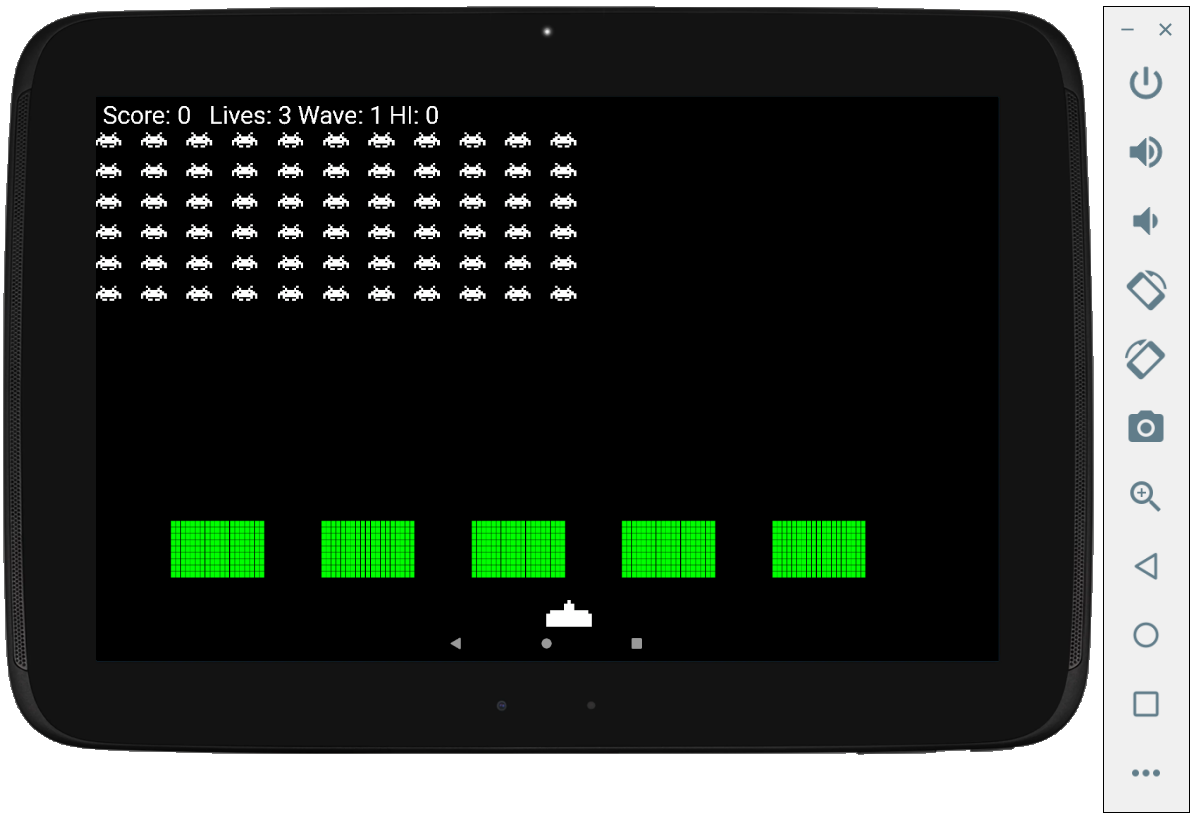
Build and deploy to a device or emulator. On first launch the game renders the full formation but stays frozen — a deliberate pause until the first touch. Tap anywhere above the bottom strip to fire and unfreeze the game simultaneously. Hold the bottom-left or bottom-right to steer.
Clear all 66 invaders to advance to wave 2. Each successive wave is faster, the invaders fire more aggressively, and you earn a bonus life for clearing the screen. Die with no lives remaining and the score resets, but the high score persists across sessions.
Common Issues
Crash on launch — theme error. The activity must extend android.app.Activity, not AppCompatActivity. Change the class declaration and make sure the manifest points to the correct class name.
Black screen, game doesn't appear. Check that onResume() in the activity calls kotlinInvadersView?.resume(). Without it the thread never starts. Also check that prepareLevel() is being called from resume().
Bitmaps not found / resource not found crash. The three PNG files must be in app/src/main/res/drawable and named exactly playership.png, invader1.png, invader2.png — lowercase, matching the R.drawable references in the code.
Sound doesn't play. Confirm all six .ogg files are in app/src/main/assets (not res/raw) and that filenames match the strings in SoundPlayer exactly, including case.
Game crashes after pausing and resuming the app. A Thread in Java/Kotlin can only be started once. If you see IllegalThreadStateException, check that resume() assigns a fresh Thread(this) to gameThread before calling start() — as shown in the code above. A common mistake is declaring gameThread as val, which prevents reassignment.
Where to Take It Next
The codebase as written is intentionally straightforward. A few improvements worth considering:
- Dynamic menace speed. Reduce
menaceIntervalasInvader.numberOfInvadersfalls — from 1000 ms with a full formation down to around 200 ms with only a few survivors. The rising heartbeat is central to the original game's tension. - Per-column firing. Only the bottom-most invader in each column can sensibly fire at the player. Filtering candidates to the lowest visible invader per column would make the AI more realistic and the game fairer.
- Self-drawing objects. Move the draw calls for each class into the class itself —
invader.draw(canvas, paint, uhOrOh)— soKotlinInvadersView.draw()shrinks to a simple loop. This is the first step toward a proper game-object architecture. - UFO bonus. A mystery ship crossing the top of the screen at a random interval, worth a large random point bonus if the player hits it, is a staple of the original and a manageable addition.