
Snake is one of the oldest mobile games in existence. The concept — steer a growing line around a grid, eat food, avoid the walls and yourself — traces back to the arcade cabinet Blockade in 1976. It reached global fame in the late 1990s when Nokia bundled it with a generation of mobile phones, and it's still the perfect first Android game project: the rules are simple, the logic is contained, and building it covers nearly everything you'd encounter in a real game — a game loop, 2D rendering, touch input, audio, and Android lifecycle management.
We'll use Java (not Kotlin), Android's SurfaceView for drawing, the Canvas API for 2D graphics, and SoundPool for sound effects. No third-party libraries, no game engine. Just the Android SDK and a clean Java project.
The implementation locks the game to 10 frames per second rather than running as fast as possible. That's deliberate — Snake is a tile-based game where the snake jumps one grid cell per tick. A fixed tick rate eliminates the need for delta-time physics and gives the game its characteristic feel. It also makes the code considerably easier to follow.
What we'll build:
- A snake that moves one grid cell per tick across a 40-column grid scaled to any screen size
- Food that spawns at random grid positions
- Tap the right half of the screen to turn clockwise, left half to turn counter-clockwise
- Score display, collision detection, and a death-and-restart loop
- Two sound effects loaded from the app's assets folder
The project splits across two Java files: SnakeActivity.java (the Android entry point) and SnakeEngine.java (the game itself). Let's build them from top to bottom.
Setting Up the Project
Creating the Project in Android Studio
Open Android Studio and choose New Project → Empty Views Activity. Set the language to Java and the minimum SDK to API 21 (Android 5.0). API 21 covers the vast majority of devices still in use, and everything we're using is available from that version upward.
Android Studio generates a MainActivity.java. Rename it to SnakeActivity — right-click the file in the Project pane and choose Refactor → Rename. Android Studio will update the manifest reference automatically.
Configuring the Manifest
Open AndroidManifest.xml. Find the <activity> element for SnakeActivity and add two attributes:
<activity
    android:name=".SnakeActivity"
    android:theme="@android:style/Theme.NoTitleBar.Fullscreen"
    android:screenOrientation="landscape"
    android:exported="true">
    <intent-filter>
        <action android:name="android.intent.action.MAIN" />
        <category android:name="android.intent.category.LAUNCHER" />
    </intent-filter>
</activity>
Theme.NoTitleBar.Fullscreen removes the status bar so the game uses the full display. screenOrientation="landscape" locks the screen — we don't want the layout reflowing mid-game if the player shifts their grip.
Note:
Theme.NoTitleBar.Fullscreenrequires that your activity extendsandroid.app.Activity, notAppCompatActivity. If you get a theme-related crash, check your class declaration.
Adding the Sound Files
In the Project pane, right-click the main folder (inside app/src/) and choose New → Folder → Assets Folder. This creates app/src/main/assets.
Drop two .ogg audio files into that folder:
get_mouse_sound.ogg— plays when the snake eats fooddeath_sound.ogg— plays when the snake crashes
Short, punchy sounds work best — a blip for eating, a crunch or buzz for death. Freesound.org has plenty of royalty-free options. The filenames must match the code exactly, including case.
SnakeActivity
SnakeActivity is intentionally thin. Its only jobs are: measure the display, hand those dimensions to SnakeEngine, display the engine as the content view, and delegate lifecycle events.
import android.app.Activity;
import android.graphics.Point;
import android.os.Bundle;
import android.view.Display;

public class SnakeActivity extends Activity {

    SnakeEngine snakeEngine;

    @Override
    protected void onCreate(Bundle savedInstanceState) {
        super.onCreate(savedInstanceState);

        Display display = getWindowManager().getDefaultDisplay();
        Point size = new Point();
        display.getSize(size);

        snakeEngine = new SnakeEngine(this, size);
        setContentView(snakeEngine);
    }

    @Override
    protected void onResume() {
        super.onResume();
        snakeEngine.resume();
    }

    @Override
    protected void onPause() {
        super.onPause();
        snakeEngine.pause();
    }
}
onCreate queries the display dimensions and passes them into the SnakeEngine constructor. Because SnakeEngine extends SurfaceView — which is a View — we can pass it directly to setContentView, making it fill the entire screen.
onResume and onPause simply call through to the engine's matching methods. This keeps the background thread tied correctly to the activity lifecycle: it starts when the app comes to the foreground and stops when it leaves it. If you forget these two overrides, the game thread never starts and you'll get a blank screen.
SnakeEngine
Everything interesting happens in SnakeEngine. Create a new Java class named SnakeEngine and start with the imports and class declaration:
import android.content.Context;
import android.content.res.AssetFileDescriptor;
import android.content.res.AssetManager;
import android.graphics.Canvas;
import android.graphics.Color;
import android.graphics.Paint;
import android.graphics.Point;
import android.media.AudioManager;
import android.media.SoundPool;
import android.view.MotionEvent;
import android.view.SurfaceHolder;
import android.view.SurfaceView;
import java.io.IOException;
import java.util.Random;

class SnakeEngine extends SurfaceView implements Runnable {

}
Extending SurfaceView gives us a drawable surface that can be safely updated from a background thread. Implementing Runnable lets us pass this directly when creating the game-loop thread. Together they're the standard pattern for Android games that need to draw continuously without blocking the UI thread.
Member Variables
Add these fields inside the class body. They're grouped by purpose — thread control, drawing, sound, direction, the grid, the snake, and frame timing:
// Thread and lifecycle
private Thread thread = null;
private volatile boolean isPlaying;

// Drawing
private Canvas canvas;
private SurfaceHolder surfaceHolder;
private Paint paint;

// Sound
private SoundPool soundPool;
private int eat_bob    = -1;
private int snake_crash = -1;

// Direction — the snake can only face one of four ways
public enum Heading { UP, RIGHT, DOWN, LEFT }
private Heading heading = Heading.RIGHT;

// Grid
private static final int NUM_BLOCKS_WIDE = 40;
private int numBlocksHigh;
private int blockSize;
private int screenX;
private int screenY;

// Snake — parallel arrays of grid coordinates; index 0 is always the head
private int   snakeLength;
private int[] snakeXs;
private int[] snakeYs;

// Food and score
private int bobX;
private int bobY;
private int score;

// Frame timing — 10 updates per second
private long nextFrameTime;
private static final long FPS               = 10;
private static final long MILLIS_PER_SECOND = 1000;
A few things worth understanding before we move on:
volatile boolean isPlaying — volatile ensures that when the main thread sets this to false (in pause()), the game-loop thread immediately sees the change. Without it, the JVM is allowed to cache the value in a register and the loop might not stop when expected.
The grid system — the snake and food live in grid coordinates, not pixel coordinates. The grid is always 40 columns wide; the number of rows depends on the screen's aspect ratio. Each grid cell is blockSize pixels square, calculated as screenX / 40. This way the game scales to any screen resolution automatically. We only convert to pixels at draw time.
Parallel arrays for the snake — snakeXs[i] and snakeYs[i] hold the grid position of the i-th segment. Index 0 is the head. We allocate 200 slots — far more than any player will ever reach in one run — which avoids bounds-checking overhead in the movement loop.
The Constructor
public SnakeEngine(Context context, Point size) {
    super(context);

    screenX = size.x;
    screenY = size.y;

    blockSize     = screenX / NUM_BLOCKS_WIDE;
    numBlocksHigh = screenY / blockSize;

    // Load sound effects from the assets folder
    soundPool = new SoundPool(10, AudioManager.STREAM_MUSIC, 0);
    try {
        AssetManager assetManager = context.getAssets();
        AssetFileDescriptor descriptor;

        descriptor  = assetManager.openFd("get_mouse_sound.ogg");
        eat_bob     = soundPool.load(descriptor, 0);

        descriptor  = assetManager.openFd("death_sound.ogg");
        snake_crash = soundPool.load(descriptor, 0);
    } catch (IOException e) {
        // Game still runs without sound if files are missing
    }

    surfaceHolder = getHolder();
    paint         = new Paint();

    snakeXs = new int[200];
    snakeYs = new int[200];

    newGame();
}
The constructor does four things in sequence:
- Grid calculation.
blockSizeis how many pixels wide each grid cell is.numBlocksHighis how many rows fit vertically. These two values let every other piece of code work in grid space and forget about pixels entirely. - Sound loading.
SoundPoolloads short audio clips into memory so they can be triggered with zero latency. We open each.oggfile from the assets folder and store the returned integer handle. The-1default values foreat_bobandsnake_crashmean "no sound loaded", so if the files are missing the game runs silently rather than crashing. - Drawing setup.
getHolder()returns theSurfaceHolderwe'll use to lock and unlock the canvas each frame. A singlePaintobject is reused for all drawing operations — creating one per frame would be wasteful. - Initialisation. The coordinate arrays are allocated here, before
newGame()is called, becausenewGame()immediately writes to index 0. Allocate first, then call.
The Game Loop
@Override
public void run() {
    while (isPlaying) {
        if (updateRequired()) {
            update();
            draw();
        }
    }
}

public void pause() {
    isPlaying = false;
    try {
        thread.join();
    } catch (InterruptedException e) {
    }
}

public void resume() {
    isPlaying = true;
    thread = new Thread(this);
    thread.start();
}
resume() creates a fresh Thread, passing this as the Runnable, and starts it. The thread calls run(), which loops while isPlaying is true. Each iteration asks updateRequired() whether a frame is due; if so, it calls update() then draw().
pause() sets isPlaying to false and calls thread.join(), which blocks the calling thread until the game thread finishes its current iteration and exits run(). This is important: it prevents the activity from being destroyed while the background thread is still mid-draw, which can cause crashes on some devices.
Controlling the Frame Rate
public boolean updateRequired() {
    if (nextFrameTime <= System.currentTimeMillis()) {
        nextFrameTime = System.currentTimeMillis() + MILLIS_PER_SECOND / FPS;
        return true;
    }
    return false;
}
updateRequired() compares the current time against nextFrameTime. When the threshold is crossed, it pushes nextFrameTime forward by 100 ms (1000 / 10) and returns true, triggering an update and draw. Between those moments it returns false and the game-loop thread spins idle.
This gives a consistent 10 ticks per second. The approach is simple and effective for a tile-based game — there's no need for the more complex delta-time calculations that a smooth-scrolling game requires. If you want to speed the game up as the score increases, you can reduce the value of FPS progressively.
Initialising a New Game
public void newGame() {
    snakeLength = 1;
    snakeXs[0]  = NUM_BLOCKS_WIDE / 2;
    snakeYs[0]  = numBlocksHigh   / 2;
    spawnBob();
    score         = 0;
    nextFrameTime = System.currentTimeMillis();
}

private void spawnBob() {
    Random random = new Random();
    bobX = random.nextInt(NUM_BLOCKS_WIDE - 1) + 1;
    bobY = random.nextInt(numBlocksHigh   - 1) + 1;
}
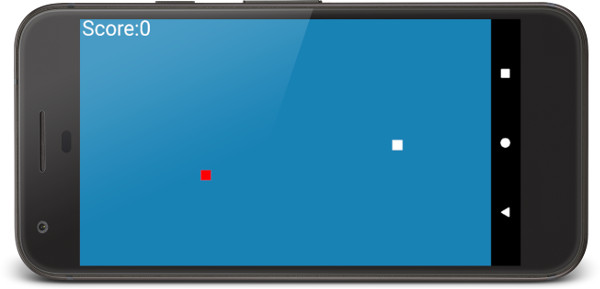
newGame() resets the snake to a single segment in the center of the grid, spawns food, zeros the score, and resets the frame timer. It's called from the constructor on startup and again from update() on death — the same method handles both cases.
spawnBob() picks a random grid cell for the food. The + 1 and - 1 keep it at least one cell away from the edges, so food never appears directly against a wall where the player couldn't collect it without dying.
Game Logic
update() is the sequencer that calls the other game-logic methods in the right order each tick:
public void update() {
    if (snakeXs[0] == bobX && snakeYs[0] == bobY) {
        eatBob();
    }
    moveSnake();
    if (detectDeath()) {
        soundPool.play(snake_crash, 1, 1, 0, 0, 1);
        newGame();
    }
}
It checks for food collection before moving, then moves, then checks for death. The order matters: checking food first means the eating check uses the head's current position before it advances, which feels the most natural to the player.
private void eatBob() {
    snakeLength++;
    spawnBob();
    score++;
    soundPool.play(eat_bob, 1, 1, 0, 0, 1);
}
Eating increases snakeLength by one, moves the food to a new location, increments the score, and plays the eating sound. The length increase requires no extra work — moveSnake() uses snakeLength to determine how many segments to shift, so the new tail cell is automatically included on the next frame.
private void moveSnake() {
    // Shift every body segment one position toward the tail
    for (int i = snakeLength; i > 0; i--) {
        snakeXs[i] = snakeXs[i - 1];
        snakeYs[i] = snakeYs[i - 1];
    }
    // Move the head in the current direction
    switch (heading) {
        case UP:    snakeYs[0]--; break;
        case RIGHT: snakeXs[0]++; break;
        case DOWN:  snakeYs[0]++; break;
        case LEFT:  snakeXs[0]--; break;
    }
}
Movement propagates from the tail toward the head — each segment copies the position of the segment in front of it. Once all segments have shifted, the head advances one cell in the current direction. Iterating backward through the array is the key: if we looped forward, every segment would overwrite the position that the next segment still needs to read.
private boolean detectDeath() {
    // Wall collisions
    if (snakeXs[0] == -1)              return true;
    if (snakeXs[0] >= NUM_BLOCKS_WIDE) return true;
    if (snakeYs[0] == -1)              return true;
    if (snakeYs[0] == numBlocksHigh)   return true;

    // Self-collision — skip the first four segments
    for (int i = snakeLength - 1; i > 0; i--) {
        if (i > 4 && snakeXs[0] == snakeXs[i] && snakeYs[0] == snakeYs[i]) {
            return true;
        }
    }
    return false;
}
Death has two sources: leaving the grid, or the head overlapping a body segment. The wall checks are straightforward — the head's grid coordinate moves one step past the boundary.
The self-collision loop starts at i > 4, skipping the first four body segments. It's geometrically impossible to reach them without first hitting a wall, so we can safely ignore them. This also prevents a false-death in the early frames of a new game when segments haven't fully separated yet.
Drawing
public void draw() {
    if (surfaceHolder.getSurface().isValid()) {
        canvas = surfaceHolder.lockCanvas();

        // Blue background
        canvas.drawColor(Color.argb(255, 26, 128, 182));

        // Score
        paint.setColor(Color.argb(255, 255, 255, 255));
        paint.setTextSize(90);
        canvas.drawText("Score:" + score, 10, 70, paint);

        // Snake — white rectangles
        for (int i = 0; i < snakeLength; i++) {
            canvas.drawRect(
                snakeXs[i] * blockSize,
                snakeYs[i] * blockSize,
                snakeXs[i] * blockSize + blockSize,
                snakeYs[i] * blockSize + blockSize,
                paint);
        }

        // Food (Bob) — red rectangle
        paint.setColor(Color.argb(255, 255, 0, 0));
        canvas.drawRect(
            bobX * blockSize,
            bobY * blockSize,
            bobX * blockSize + blockSize,
            bobY * blockSize + blockSize,
            paint);

        surfaceHolder.unlockCanvasAndPost(canvas);
    }
}
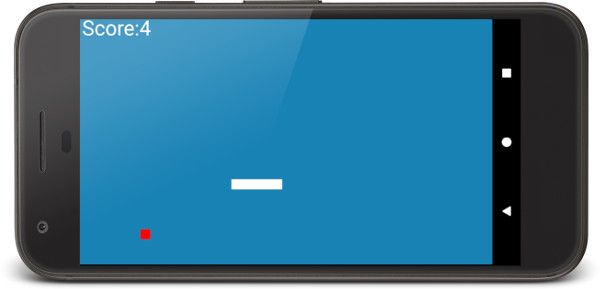
surfaceHolder.lockCanvas() acquires exclusive access to the drawing surface and returns a Canvas we can draw into. We clear the whole surface with a blue fill, draw the score text, then loop through every snake segment drawing a white rectangle. The food draws in red. Finally, unlockCanvasAndPost() releases the surface and pushes the finished frame to the display.
The isValid() guard at the top prevents a crash if draw() fires before the surface is ready — which can happen in the brief window between resume() starting the thread and Android finishing surface creation.
Grid-to-pixel conversion happens inline: snakeXs[i] * blockSize gives the left edge of the cell in pixels, and adding blockSize gives the right edge.
Handling Touch Input
@Override
public boolean onTouchEvent(MotionEvent motionEvent) {
    switch (motionEvent.getAction() & MotionEvent.ACTION_MASK) {
        case MotionEvent.ACTION_UP:
            if (motionEvent.getX() >= screenX / 2) {
                // Right half of screen — rotate clockwise
                switch (heading) {
                    case UP:    heading = Heading.RIGHT; break;
                    case RIGHT: heading = Heading.DOWN;  break;
                    case DOWN:  heading = Heading.LEFT;  break;
                    case LEFT:  heading = Heading.UP;    break;
                }
            } else {
                // Left half of screen — rotate counter-clockwise
                switch (heading) {
                    case UP:    heading = Heading.LEFT;  break;
                    case LEFT:  heading = Heading.DOWN;  break;
                    case DOWN:  heading = Heading.RIGHT; break;
                    case RIGHT: heading = Heading.UP;    break;
                }
            }
    }
    return true;
}
The screen is divided at its horizontal midpoint. A touch release on the right half rotates the snake 90° clockwise; a touch on the left half rotates it 90° counter-clockwise. We act on ACTION_UP (the moment the finger lifts) rather than ACTION_DOWN, which prevents a long press from firing multiple direction changes in rapid succession.
You can only turn — never reverse. Tapping right twice takes you from moving right, to down, to left. This limitation is authentic to the original Nokia game and is what makes Snake interesting: you're always committing to a direction change, planning a few moves ahead.
The ACTION_MASK bitwise AND strips out multi-touch flags that could otherwise prevent the switch from matching on some devices.
The Complete SnakeEngine
Here is the full SnakeEngine.java in one place. If you've been typing along, this is what you should have. If you'd rather copy and paste, this is the complete listing:
import android.content.Context;
import android.content.res.AssetFileDescriptor;
import android.content.res.AssetManager;
import android.graphics.Canvas;
import android.graphics.Color;
import android.graphics.Paint;
import android.graphics.Point;
import android.media.AudioManager;
import android.media.SoundPool;
import android.view.MotionEvent;
import android.view.SurfaceHolder;
import android.view.SurfaceView;
import java.io.IOException;
import java.util.Random;

class SnakeEngine extends SurfaceView implements Runnable {

    private Thread thread = null;
    private volatile boolean isPlaying;

    private Canvas canvas;
    private SurfaceHolder surfaceHolder;
    private Paint paint;

    private SoundPool soundPool;
    private int eat_bob    = -1;
    private int snake_crash = -1;

    public enum Heading { UP, RIGHT, DOWN, LEFT }
    private Heading heading = Heading.RIGHT;

    private static final int NUM_BLOCKS_WIDE = 40;
    private int numBlocksHigh;
    private int blockSize;
    private int screenX;
    private int screenY;

    private int   snakeLength;
    private int[] snakeXs;
    private int[] snakeYs;

    private int bobX;
    private int bobY;
    private int score;

    private long nextFrameTime;
    private static final long FPS               = 10;
    private static final long MILLIS_PER_SECOND = 1000;

    public SnakeEngine(Context context, Point size) {
        super(context);

        screenX = size.x;
        screenY = size.y;

        blockSize     = screenX / NUM_BLOCKS_WIDE;
        numBlocksHigh = screenY / blockSize;

        soundPool = new SoundPool(10, AudioManager.STREAM_MUSIC, 0);
        try {
            AssetManager assetManager = context.getAssets();
            AssetFileDescriptor descriptor;
            descriptor  = assetManager.openFd("get_mouse_sound.ogg");
            eat_bob     = soundPool.load(descriptor, 0);
            descriptor  = assetManager.openFd("death_sound.ogg");
            snake_crash = soundPool.load(descriptor, 0);
        } catch (IOException e) {
        }

        surfaceHolder = getHolder();
        paint         = new Paint();

        snakeXs = new int[200];
        snakeYs = new int[200];

        newGame();
    }

    @Override
    public void run() {
        while (isPlaying) {
            if (updateRequired()) {
                update();
                draw();
            }
        }
    }

    public void pause() {
        isPlaying = false;
        try {
            thread.join();
        } catch (InterruptedException e) {
        }
    }

    public void resume() {
        isPlaying = true;
        thread = new Thread(this);
        thread.start();
    }

    public void newGame() {
        snakeLength   = 1;
        snakeXs[0]   = NUM_BLOCKS_WIDE / 2;
        snakeYs[0]   = numBlocksHigh   / 2;
        spawnBob();
        score         = 0;
        nextFrameTime = System.currentTimeMillis();
    }

    private void spawnBob() {
        Random random = new Random();
        bobX = random.nextInt(NUM_BLOCKS_WIDE - 1) + 1;
        bobY = random.nextInt(numBlocksHigh   - 1) + 1;
    }

    public void update() {
        if (snakeXs[0] == bobX && snakeYs[0] == bobY) {
            eatBob();
        }
        moveSnake();
        if (detectDeath()) {
            soundPool.play(snake_crash, 1, 1, 0, 0, 1);
            newGame();
        }
    }

    private void eatBob() {
        snakeLength++;
        spawnBob();
        score++;
        soundPool.play(eat_bob, 1, 1, 0, 0, 1);
    }

    private void moveSnake() {
        for (int i = snakeLength; i > 0; i--) {
            snakeXs[i] = snakeXs[i - 1];
            snakeYs[i] = snakeYs[i - 1];
        }
        switch (heading) {
            case UP:    snakeYs[0]--; break;
            case RIGHT: snakeXs[0]++; break;
            case DOWN:  snakeYs[0]++; break;
            case LEFT:  snakeXs[0]--; break;
        }
    }

    private boolean detectDeath() {
        if (snakeXs[0] == -1)              return true;
        if (snakeXs[0] >= NUM_BLOCKS_WIDE) return true;
        if (snakeYs[0] == -1)              return true;
        if (snakeYs[0] == numBlocksHigh)   return true;

        for (int i = snakeLength - 1; i > 0; i--) {
            if (i > 4 && snakeXs[0] == snakeXs[i] && snakeYs[0] == snakeYs[i]) {
                return true;
            }
        }
        return false;
    }

    public void draw() {
        if (surfaceHolder.getSurface().isValid()) {
            canvas = surfaceHolder.lockCanvas();

            canvas.drawColor(Color.argb(255, 26, 128, 182));

            paint.setColor(Color.argb(255, 255, 255, 255));
            paint.setTextSize(90);
            canvas.drawText("Score:" + score, 10, 70, paint);

            for (int i = 0; i < snakeLength; i++) {
                canvas.drawRect(
                    snakeXs[i] * blockSize,
                    snakeYs[i] * blockSize,
                    snakeXs[i] * blockSize + blockSize,
                    snakeYs[i] * blockSize + blockSize,
                    paint);
            }

            paint.setColor(Color.argb(255, 255, 0, 0));
            canvas.drawRect(
                bobX * blockSize,
                bobY * blockSize,
                bobX * blockSize + blockSize,
                bobY * blockSize + blockSize,
                paint);

            surfaceHolder.unlockCanvasAndPost(canvas);
        }
    }

    public boolean updateRequired() {
        if (nextFrameTime <= System.currentTimeMillis()) {
            nextFrameTime = System.currentTimeMillis() + MILLIS_PER_SECOND / FPS;
            return true;
        }
        return false;
    }

    @Override
    public boolean onTouchEvent(MotionEvent motionEvent) {
        switch (motionEvent.getAction() & MotionEvent.ACTION_MASK) {
            case MotionEvent.ACTION_UP:
                if (motionEvent.getX() >= screenX / 2) {
                    switch (heading) {
                        case UP:    heading = Heading.RIGHT; break;
                        case RIGHT: heading = Heading.DOWN;  break;
                        case DOWN:  heading = Heading.LEFT;  break;
                        case LEFT:  heading = Heading.UP;    break;
                    }
                } else {
                    switch (heading) {
                        case UP:    heading = Heading.LEFT;  break;
                        case LEFT:  heading = Heading.DOWN;  break;
                        case DOWN:  heading = Heading.RIGHT; break;
                        case RIGHT: heading = Heading.UP;    break;
                    }
                }
        }
        return true;
    }
}
Common Issues
Theme error: android:theme not found or app crashes on launch. Your activity must extend android.app.Activity, not AppCompatActivity. Theme.NoTitleBar.Fullscreen is a framework theme that isn't compatible with AppCompat. Check the first line of your class declaration.
Blank screen, game never appears. You've most likely omitted onResume() in SnakeActivity. Without it, snakeEngine.resume() is never called, the background thread never starts, and nothing draws. Double-check both onResume and onPause are present and correctly delegate to the engine.
Sound effects don't play. Confirm the .ogg files are in app/src/main/assets (not res/raw) and that the filenames match the strings in the constructor exactly, including lowercase. If you're running on an emulator, also check that the emulator's audio is enabled.
NullPointerException in the constructor. newGame() writes to snakeXs[0] and snakeYs[0], so the arrays must be allocated before newGame() is called. If you've rearranged the constructor, make sure new int[200] comes first.
App compiles but the snake doesn't respond to taps. Check that onTouchEvent is overriding correctly — make sure you have @Override and that the method signature matches exactly. Also confirm you're returning true at the end, which tells Android the event was consumed.
Where to Take It Next
This implementation is deliberately minimal — it's a foundation, not a finished product. Some natural next steps:
- Increasing speed over time. Raise the
FPSconstant (or a mutable field) as the score climbs. Even going from 10 to 15 FPS dramatically increases the difficulty. - A high score. Store the best score using
SharedPreferencesand display it alongside the current score. - A start screen. Right now the game launches straight into play. A simple "tap to start" state would feel more polished.
- Distinct head rendering. Draw
snakeXs[0]in a different color to make it easy to see the head in a crowd of segments. - Updating SoundPool for modern API levels. The
SoundPool(int, int, int)constructor is deprecated since API 21. If you're targeting newer devices you can replace it withnew SoundPool.Builder().setMaxStreams(10).build().