
Pong is one of those games people underestimate. It looks like a box and two rectangles, but getting the physics to feel satisfying — the ball speed scaling with screen resolution, the bat fast enough to be responsive but not so fast it teleports, the velocity randomised on each bat hit so you can't just park the bat in the middle — all of that takes real thought. It's a better learning project than it looks.
This single-player version keeps the rules simple: bounce the ball off the bat to score points. The ball speeds up slightly with every successful hit. Miss and you lose a life. Three lives and it's game over. The bat is controlled by holding the left or right half of the screen — lift your finger to stop.
The project uses four files:
- Ball.java — position, velocity, and bounce logic
- Bat.java — player-controlled paddle with left/right/stopped states
- PongView.java —
SurfaceViewrunning the game loop, audio, and rendering - MainActivity.java — Activity that creates
PongViewand manages the lifecycle
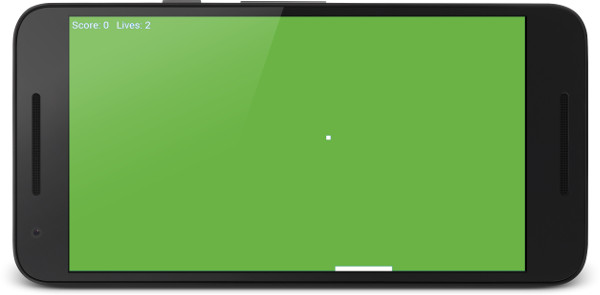
Project Setup
Open Android Studio and create a new Empty Views Activity project. Set the language to Java and minimum SDK to API 21. Name the Activity MainActivity.
Open AndroidManifest.xml, find the <activity> tag, and add:
<activity
    android:name=".MainActivity"
    android:theme="@android:style/Theme.NoTitleBar.Fullscreen"
    android:screenOrientation="landscape"
    android:exported="true">
    ...
</activity>
Sound Assets
Right-click the main folder in the Project pane and choose New → Folder → Assets Folder. Right-click each link to save, then drop the files into app/src/main/assets:
beep1.ogg— bat hitbeep2.ogg— top wall bouncebeep3.ogg— side wall bounceloseLife.ogg— ball missed
Ball.java
The ball is a RectF that moves by velocity scaled to the current FPS. Everything is set relative to screen dimensions in the constructor so the game works identically on phones and tablets:
public class Ball {

    private RectF mRect;
    private float mXVelocity;
    private float mYVelocity;
    private float mBallWidth;
    private float mBallHeight;

    public Ball(int screenX, int screenY) {
        mBallWidth  = screenX / 100;
        mBallHeight = mBallWidth;

        mYVelocity = screenY / 4;   // quarter screen per second
        mXVelocity = mYVelocity;

        mRect = new RectF();
    }

    public RectF getRect() { return mRect; }

    public void update(long fps) {
        mRect.left   += mXVelocity / fps;
        mRect.top    += mYVelocity / fps;
        mRect.right   = mRect.left + mBallWidth;
        mRect.bottom  = mRect.top  - mBallHeight;
    }

    public void reverseYVelocity() { mYVelocity = -mYVelocity; }
    public void reverseXVelocity() { mXVelocity = -mXVelocity; }

    public void setRandomXVelocity() {
        Random generator = new Random();
        if (generator.nextInt(2) == 0) {
            reverseXVelocity();
        }
    }

    public void increaseVelocity() {
        mXVelocity += mXVelocity / 10;
        mYVelocity += mYVelocity / 10;
    }

    public void clearObstacleY(float y) {
        mRect.bottom = y;
        mRect.top    = y - mBallHeight;
    }

    public void clearObstacleX(float x) {
        mRect.left  = x;
        mRect.right = x + mBallWidth;
    }

    public void reset(int x, int y) {
        mRect.left   = x / 2;
        mRect.top    = y - 20;
        mRect.right  = x / 2 + mBallWidth;
        mRect.bottom = y - 20 - mBallHeight;
    }
}
clearObstacleY and clearObstacleX snap the ball back to just outside the surface it collided with before reversing velocity. Without this, if the ball is moving fast and a frame moves it deep inside a wall, reversing velocity alone wouldn't help — it would just oscillate back and forth inside the wall. The clear methods prevent that entirely.
increaseVelocity adds 10% to both axes on every bat hit. The acceleration is compounding, so a long rally gets genuinely frantic near the end.
Bat.java
The bat has three movement states — STOPPED, LEFT, RIGHT — and moves at screen-width pixels per second, meaning it crosses the full screen in exactly one second at full speed:
public class Bat {

    private RectF mRect;
    private float mLength;
    private float mHeight;
    private float mXCoord;
    private float mYCoord;
    private float mBatSpeed;

    public final int STOPPED = 0;
    public final int LEFT    = 1;
    public final int RIGHT   = 2;

    private int mBatMoving = STOPPED;
    private int mScreenX;
    private int mScreenY;

    public Bat(int x, int y) {
        mScreenX = x;
        mScreenY = y;

        mLength = mScreenX / 8;
        mHeight = mScreenY / 25;

        mXCoord = mScreenX / 2;
        mYCoord = mScreenY - 20;

        mRect = new RectF(mXCoord, mYCoord, mXCoord + mLength, mYCoord + mHeight);

        mBatSpeed = mScreenX;   // full screen per second
    }

    public RectF getRect() { return mRect; }

    public void setMovementState(int state) { mBatMoving = state; }

    public void update(long fps) {
        if (mBatMoving == LEFT)  mXCoord -= mBatSpeed / fps;
        if (mBatMoving == RIGHT) mXCoord += mBatSpeed / fps;

        if (mRect.left < 0)               mXCoord = 0;
        if (mRect.right > mScreenX)       mXCoord = mScreenX - (mRect.right - mRect.left);

        mRect.left  = mXCoord;
        mRect.right = mXCoord + mLength;
    }
}
The wall clamp is applied to mRect before it's updated with the new mXCoord, which means on the frame it hits the wall it snaps cleanly without the bat clipping through. Setting bat speed to mScreenX (screen width in pixels) might sound arbitrary, but it means the bat is always fast enough to cover the screen in one second regardless of device resolution — it scales automatically.
MainActivity.java
public class MainActivity extends Activity {

    PongView pongView;

    @Override
    protected void onCreate(Bundle savedInstanceState) {
        super.onCreate(savedInstanceState);

        Display display = getWindowManager().getDefaultDisplay();
        Point size = new Point();
        display.getSize(size);

        pongView = new PongView(this, size.x, size.y);
        setContentView(pongView);
    }

    @Override
    protected void onResume() {
        super.onResume();
        pongView.resume();
    }

    @Override
    protected void onPause() {
        super.onPause();
        pongView.pause();
    }
}
PongView.java
PongView wires everything together: the game loop thread, collision detection, sound, and drawing. Let's look at the key sections.
Constructor and Audio Setup
public PongView(Context context, int x, int y) {
    super(context);

    mScreenX = x;
    mScreenY = y;

    mOurHolder = getHolder();
    mPaint = new Paint();

    mBat  = new Bat(mScreenX, mScreenY);
    mBall = new Ball(mScreenX, mScreenY);

    if (Build.VERSION.SDK_INT >= Build.VERSION_CODES.LOLLIPOP) {
        AudioAttributes audioAttributes = new AudioAttributes.Builder()
                .setUsage(AudioAttributes.USAGE_MEDIA)
                .setContentType(AudioAttributes.CONTENT_TYPE_SONIFICATION)
                .build();

        sp = new SoundPool.Builder()
                .setMaxStreams(5)
                .setAudioAttributes(audioAttributes)
                .build();
    } else {
        sp = new SoundPool(5, AudioManager.STREAM_MUSIC, 0);
    }

    try {
        AssetManager assetManager = context.getAssets();
        AssetFileDescriptor descriptor;

        descriptor = assetManager.openFd("beep1.ogg");
        beep1ID = sp.load(descriptor, 0);
        descriptor = assetManager.openFd("beep2.ogg");
        beep2ID = sp.load(descriptor, 0);
        descriptor = assetManager.openFd("beep3.ogg");
        beep3ID = sp.load(descriptor, 0);
        descriptor = assetManager.openFd("loseLife.ogg");
        loseLifeID = sp.load(descriptor, 0);
    } catch (IOException e) {
        Log.e("error", "failed to load sound files");
    }

    setupAndRestart();
}
The Build.VERSION.SDK_INT check handles both old and new Android versions: API 21+ gets the modern SoundPool.Builder with explicit AudioAttributes; older versions use the deprecated single-argument constructor. In practice everything you'll run on today supports the new path, but the guard keeps the code clean if you ever target API 18+.
Update
public void update() {
    mBat.update(mFPS);
    mBall.update(mFPS);

    // Ball hits bat
    if (RectF.intersects(mBat.getRect(), mBall.getRect())) {
        mBall.setRandomXVelocity();
        mBall.reverseYVelocity();
        mBall.clearObstacleY(mBat.getRect().top - 2);
        mScore++;
        mBall.increaseVelocity();
        sp.play(beep1ID, 1, 1, 0, 0, 1);
    }

    // Ball hits bottom — lose a life
    if (mBall.getRect().bottom > mScreenY) {
        mBall.reverseYVelocity();
        mBall.clearObstacleY(mScreenY - 2);
        mLives--;
        sp.play(loseLifeID, 1, 1, 0, 0, 1);

        if (mLives == 0) {
            mPaused = true;
            setupAndRestart();
        }
    }

    // Top wall
    if (mBall.getRect().top < 0) {
        mBall.reverseYVelocity();
        mBall.clearObstacleY(12);
        sp.play(beep2ID, 1, 1, 0, 0, 1);
    }

    // Left wall
    if (mBall.getRect().left < 0) {
        mBall.reverseXVelocity();
        mBall.clearObstacleX(2);
        sp.play(beep3ID, 1, 1, 0, 0, 1);
    }

    // Right wall
    if (mBall.getRect().right > mScreenX) {
        mBall.reverseXVelocity();
        mBall.clearObstacleX(mScreenX - 22);
        sp.play(beep3ID, 1, 1, 0, 0, 1);
    }
}
The bat collision uses RectF.intersects() — the same static call used throughout these Android projects. After a bat hit the X direction is randomised with setRandomXVelocity(): this 50/50 coin flip means you can't predict exactly where the ball will go, which is the entire reason Pong is interesting to play rather than a solved problem.
Touch and Draw
@Override
public boolean onTouchEvent(MotionEvent motionEvent) {
    switch (motionEvent.getAction() & MotionEvent.ACTION_MASK) {
        case MotionEvent.ACTION_DOWN:
            mPaused = false;
            if (motionEvent.getX() > mScreenX / 2) {
                mBat.setMovementState(mBat.RIGHT);
            } else {
                mBat.setMovementState(mBat.LEFT);
            }
            break;
        case MotionEvent.ACTION_UP:
            mBat.setMovementState(mBat.STOPPED);
            break;
    }
    return true;
}
public void draw() {
if (mOurHolder.getSurface().isValid()) {
mCanvas = mOurHolder.lockCanvas();
mCanvas.drawColor(Color.argb(255, 120, 197, 87));
mPaint.setColor(Color.argb(255, 255, 255, 255));
mCanvas.drawRect(mBat.getRect(), mPaint);
mCanvas.drawRect(mBall.getRect(), mPaint);
mPaint.setTextSize(40);
mCanvas.drawText("Score: " + mScore + " Lives: " + mLives, 10, 50, mPaint);
mOurHolder.unlockCanvasAndPost(mCanvas);
}
}Complete Listing — PongView.java
import android.content.Context;
import android.content.res.AssetFileDescriptor;
import android.content.res.AssetManager;
import android.graphics.Canvas;
import android.graphics.Color;
import android.graphics.Paint;
import android.media.AudioAttributes;
import android.media.AudioManager;
import android.media.SoundPool;
import android.os.Build;
import android.util.Log;
import android.view.MotionEvent;
import android.view.SurfaceHolder;
import android.view.SurfaceView;
import java.io.IOException;
class PongView extends SurfaceView implements Runnable {
Thread mGameThread = null;
SurfaceHolder mOurHolder;
volatile boolean mPlaying;
boolean mPaused = true;
Canvas mCanvas;
Paint mPaint;
long mFPS;
int mScreenX;
int mScreenY;
Bat mBat;
Ball mBall;
SoundPool sp;
int beep1ID = -1;
int beep2ID = -1;
int beep3ID = -1;
int loseLifeID = -1;
int mScore = 0;
int mLives = 3;
public PongView(Context context, int x, int y) {
super(context);
mScreenX = x;
mScreenY = y;
mOurHolder = getHolder();
mPaint = new Paint();
mBat = new Bat(mScreenX, mScreenY);
mBall = new Ball(mScreenX, mScreenY);
if (Build.VERSION.SDK_INT >= Build.VERSION_CODES.LOLLIPOP) {
AudioAttributes audioAttributes = new AudioAttributes.Builder()
.setUsage(AudioAttributes.USAGE_MEDIA)
.setContentType(AudioAttributes.CONTENT_TYPE_SONIFICATION)
.build();
sp = new SoundPool.Builder()
.setMaxStreams(5)
.setAudioAttributes(audioAttributes)
.build();
} else {
sp = new SoundPool(5, AudioManager.STREAM_MUSIC, 0);
}
try {
AssetManager assetManager = context.getAssets();
AssetFileDescriptor descriptor;
descriptor = assetManager.openFd("beep1.ogg");
beep1ID = sp.load(descriptor, 0);
descriptor = assetManager.openFd("beep2.ogg");
beep2ID = sp.load(descriptor, 0);
descriptor = assetManager.openFd("beep3.ogg");
beep3ID = sp.load(descriptor, 0);
descriptor = assetManager.openFd("loseLife.ogg");
loseLifeID = sp.load(descriptor, 0);
} catch (IOException e) {
Log.e("error", "failed to load sound files");
}
setupAndRestart();
}
public void setupAndRestart() {
mBall.reset(mScreenX, mScreenY);
if (mLives == 0) {
mScore = 0;
mLives = 3;
}
}
@Override
public void run() {
while (mPlaying) {
long startFrameTime = System.currentTimeMillis();
if (!mPaused) update();
draw();
long timeThisFrame = System.currentTimeMillis() - startFrameTime;
if (timeThisFrame >= 1) mFPS = 1000 / timeThisFrame;
}
}
public void update() {
mBat.update(mFPS);
mBall.update(mFPS);
if (RectF.intersects(mBat.getRect(), mBall.getRect())) {
mBall.setRandomXVelocity();
mBall.reverseYVelocity();
mBall.clearObstacleY(mBat.getRect().top - 2);
mScore++;
mBall.increaseVelocity();
sp.play(beep1ID, 1, 1, 0, 0, 1);
}
if (mBall.getRect().bottom > mScreenY) {
mBall.reverseYVelocity();
mBall.clearObstacleY(mScreenY - 2);
mLives--;
sp.play(loseLifeID, 1, 1, 0, 0, 1);
if (mLives == 0) { mPaused = true; setupAndRestart(); }
}
if (mBall.getRect().top < 0) {
mBall.reverseYVelocity();
mBall.clearObstacleY(12);
sp.play(beep2ID, 1, 1, 0, 0, 1);
}
if (mBall.getRect().left < 0) {
mBall.reverseXVelocity();
mBall.clearObstacleX(2);
sp.play(beep3ID, 1, 1, 0, 0, 1);
}
if (mBall.getRect().right > mScreenX) {
mBall.reverseXVelocity();
mBall.clearObstacleX(mScreenX - 22);
sp.play(beep3ID, 1, 1, 0, 0, 1);
}
}
public void draw() {
    if (mOurHolder.getSurface().isValid()) {
        mCanvas = mOurHolder.lockCanvas();
        mCanvas.drawColor(Color.argb(255, 120, 197, 87));
        mPaint.setColor(Color.argb(255, 255, 255, 255));
        mCanvas.drawRect(mBat.getRect(),  mPaint);
        mCanvas.drawRect(mBall.getRect(), mPaint);
        mPaint.setTextSize(40);
        mCanvas.drawText("Score: " + mScore + "   Lives: " + mLives, 10, 50, mPaint);
        mOurHolder.unlockCanvasAndPost(mCanvas);
    }
}
public void pause() {
mPlaying = false;
try { mGameThread.join(); }
catch (InterruptedException e) { Log.e("Error:", "joining thread"); }
}
public void resume() {
mPlaying = true;
mGameThread = new Thread(this);
mGameThread.start();
}
@Override
public boolean onTouchEvent(MotionEvent motionEvent) {
switch (motionEvent.getAction() & MotionEvent.ACTION_MASK) {
case MotionEvent.ACTION_DOWN:
mPaused = false;
mBat.setMovementState(motionEvent.getX() > mScreenX / 2 ? mBat.RIGHT : mBat.LEFT);
break;
case MotionEvent.ACTION_UP:
mBat.setMovementState(mBat.STOPPED);
break;
}
return true;
}
}Common Issues
Ball disappears off one edge and never comes back. This usually means the clearObstacleX call for that wall is clamping the ball to a position that is still inside the wall. Check that the left wall clamps to 2 (not 0) and the right wall clamps to mScreenX - 22 to leave room for the ball width.
Ball passes straight through the bat. RectF.intersects is a static method — it must be called as RectF.intersects(a, b), not a.intersects(b). The instance method has different behaviour and won't work correctly here.
No sound. Confirm the four .ogg files are in app/src/main/assets and that filenames match exactly (case-sensitive). The SoundPool load returns -1 on failure; add a log after each load call to verify the IDs are positive.
Game doesn't start on first touch. mPaused starts as true and is set to false in onTouchEvent — if the manifest doesn't set the activity to fullscreen landscape, the touch zone may be offset. Confirm the manifest attributes are in place.
Where to Take It Next
- Two-player mode. Add a second bat at the top of the screen controlled by the upper portion of the screen — left half moves the top bat left, right half moves it right. The ball now bounces between two players instead of off the top wall.
- Difficulty levels. Start the ball slower and ramp the
increaseVelocitymultiplier based on a difficulty enum. Easy mode makes the initial velocity gentle enough that beginners can track the ball; hard mode starts it at a pace that demands real reflexes. - High score persistence. Store the high score in
SharedPreferencesso it survives between sessions. The pattern is identical to the Space Invaders tutorial — onegetSharedPreferencescall on load, oneeditor.putIntcall when the game ends.